
In the complex architecture of modern computing, communication between devices feels instantaneous. When you click a link or send an email, data travels across the globe in milliseconds. However, beneath the user-friendly interface of our operating systems lies a sophisticated stack of protocols working in harmony to ensure data reaches its intended destination. One of the most fundamental, yet often overlooked, components of this system is the Address Resolution Protocol, or ARP.
To understand what ARP means, one must first understand how computers identify each other. In a network, a device has two primary addresses: an IP (Internet Protocol) address, which is a logical address used for routing data across different networks, and a MAC (Media Access Control) address, which is a physical address hardcoded into the network interface hardware. ARP is the bridge that connects these two identifiers. It is the mechanism that allows a network to translate a known IP address into a physical MAC address, ensuring that data packets are delivered to the correct hardware on a local area network (LAN).

Understanding the Role of ARP in the Networking Stack
To grasp the importance of ARP, it is helpful to look at the Open Systems Interconnection (OSI) model, which standardizes the functions of a telecommunication system into seven abstraction layers. ARP operates between Layer 2 (the Data Link Layer) and Layer 3 (the Network Layer).
While Layer 3 handles the logical routing of data using IP addresses, Layer 2 is responsible for the actual physical transmission of data frames between devices on the same physical wire or Wi-Fi segment. Hardware, such as network switches and network interface cards (NICs), does not inherently understand IP addresses; they communicate using MAC addresses. Therefore, when a computer wants to send data to another device on its local network, it knows the destination’s IP address but lacks the “physical” coordinates required to move the bits across the wire. This is where ARP enters the conversation.
The Distinction Between IP and MAC Addresses
To visualize this, imagine sending a letter to an office building. The IP address is akin to the person’s name and department—it tells the postal service which building to go to and who the intended recipient is in a logical sense. The MAC address, however, is like the specific desk number or the physical biometric ID of the recipient. The mailroom (the local network switch) needs to know exactly which desk to deliver the letter to. ARP is the directory that tells the mailroom, “The person named ‘192.168.1.5’ is sitting at desk ’00:0a:95:9d:68:16′.”
Why Dynamic Resolution is Necessary
In the early days of networking, administrators could theoretically maintain static tables mapping every IP to a MAC address. However, as networks grew and devices became mobile—connecting and disconnecting via Wi-Fi—static mapping became impossible. ARP provides a dynamic, automated way for devices to discover each other’s physical identities without human intervention, making modern plug-and-play networking possible.
How the ARP Process Works: A Step-by-Step Breakdown
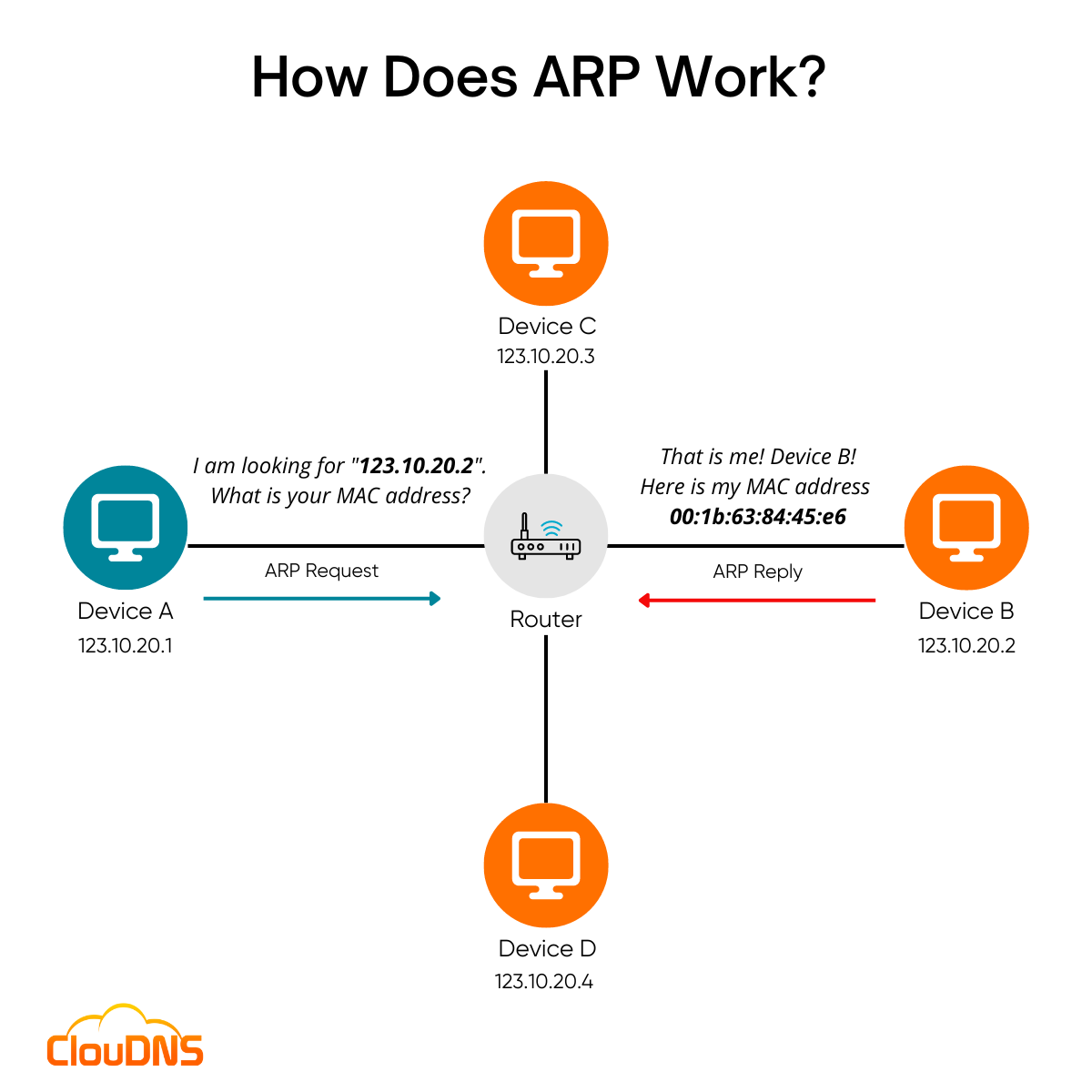
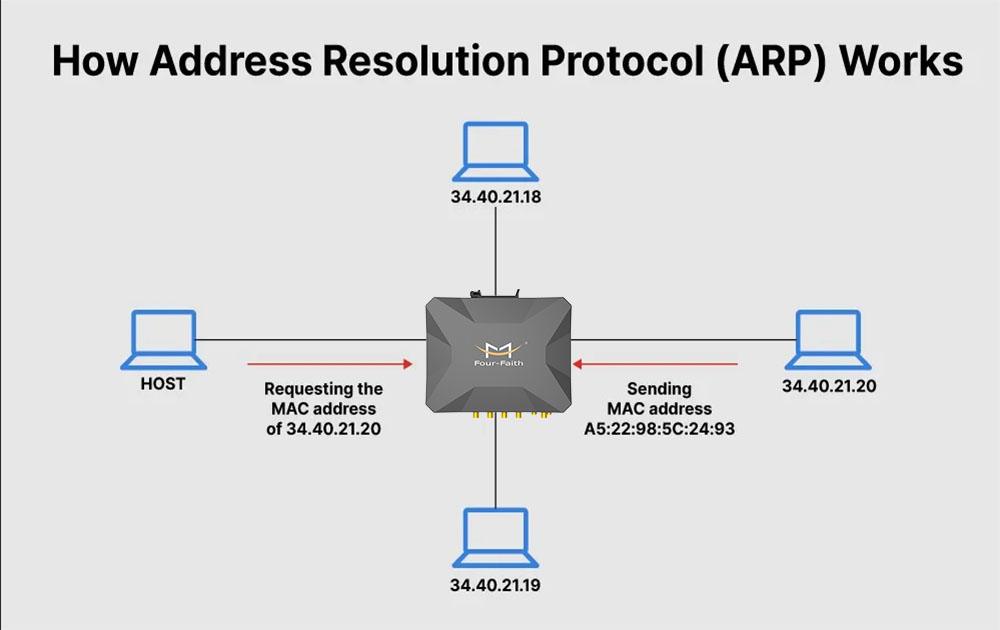
The magic of ARP happens in a matter of microseconds through a simple request-and-reply mechanism. When a device (the “source”) needs to communicate with another device (the “target”) on the same local network, it follows a specific sequence of events to resolve the address.
The ARP Request (The Broadcast)
The process begins when the source device checks its internal “ARP Cache”—a temporary table of recently resolved addresses. If the target IP address is not in the cache, the source creates an ARP Request packet. This packet contains the source’s MAC address, the source’s IP address, and the target’s IP address. Crucially, the target’s MAC address field is left blank.
The source then sends this packet as a “broadcast.” In networking terms, a broadcast is sent to every single device on the local network segment. Every device receives the packet and looks at the target IP address specified within.
The ARP Reply (The Response)
Most devices on the network will see the ARP Request, realize the target IP address does not match their own, and promptly discard the packet. However, the device that actually owns the target IP address will recognize itself. This device then generates an ARP Reply.
Unlike the request, the reply is a “unicast” message, meaning it is sent directly back to the source device’s MAC address. The reply contains the physical MAC address that was requested. Once the source receives this reply, it now has all the information necessary to wrap its data in a hardware-readable frame and transmit it.
The ARP Cache and Efficiency
To prevent the network from being flooded with broadcast requests every time a packet is sent, devices store the results of successful ARP exchanges in an ARP Cache. This table resides in the device’s RAM. The next time the computer needs to send data to that specific IP, it simply looks up the MAC address in its local table.
Entries in the ARP Cache are not permanent. They have a “Time to Live” (TTL), after which they are deleted. This ensures that if a device leaves the network or is assigned a new IP address, the network doesn’t continue trying to send data to an obsolete hardware address.
Different Types of ARP and Their Special Functions
While the standard ARP process handles most day-to-day traffic, several variations of the protocol exist to handle specific networking scenarios and architectural challenges.
Proxy ARP
Proxy ARP occurs when a device, usually a router, answers an ARP request on behalf of another device. This typically happens when the target device is on a different sub-network but the source device believes it is on the local network. The router “proxies” the request, providing its own MAC address to the source. The source sends the data to the router, which then forwards it to the actual destination. This is often used in legacy network designs or complex VPN configurations.
Gratuitous ARP
A Gratuitous ARP is an unsolicited ARP response. A device sends this out without being asked, usually when it first joins a network or changes its IP address. This serves two purposes: it informs other devices to update their ARP caches immediately, and it helps detect IP address conflicts. If another device responds to a Gratuitous ARP, the system knows that two devices are trying to use the same IP address.
Inverse ARP (InARP) and Reverse ARP (RARP)
Reverse ARP was an older protocol used by diskless workstations to find their own IP addresses based on their MAC addresses during the boot process. This has largely been replaced by DHCP (Dynamic Host Configuration Protocol). Inverse ARP, conversely, is used in Frame Relay and ATM networks to find the protocol address associated with a virtual circuit.
ARP Security: Vulnerabilities and Modern Protection
Despite its efficiency, ARP was designed in an era when internal networks were considered inherently “trusted.” Consequently, the protocol lacks built-in authentication. This oversight has led to one of the most common and effective local network attacks: ARP Spoofing, also known as ARP Poisoning.
The Mechanism of ARP Spoofing
In an ARP Spoofing attack, a malicious actor sends falsified ARP messages onto a local network. These messages trick a target device into believing that the attacker’s MAC address is associated with the IP address of a legitimate gateway or another server.
Once the victim’s ARP cache is “poisoned” with the incorrect mapping, the victim’s computer will unknowingly send its data frames directly to the attacker’s hardware. This allows the attacker to perform a Man-in-the-Middle (MitM) attack, where they can intercept, read, or even modify sensitive data (such as login credentials) before passing it along to the actual destination.
Mitigation and Digital Security Strategies
To combat these vulnerabilities, network administrators employ several defensive technologies:
- Dynamic ARP Inspection (DAI): This is a security feature found on professional-grade network switches. DAI intercepts and validates all ARP packets on the network. If an ARP packet has an invalid IP-to-MAC binding that doesn’t match the information in the switch’s DHCP snooping database, the packet is dropped.
- Static ARP Entries: For critical infrastructure, administrators can manually hardcode ARP mappings. Because these entries are static, they cannot be overwritten by malicious unsolicited ARP replies. However, this is difficult to manage at scale.
- VPNs and Encryption: While ARP spoofing happens at the hardware level, encrypting data at the application or transport layer (using HTTPS or VPNs) ensures that even if an attacker intercepts the data frames, they cannot read the contents.
The Future of ARP and the Transition to IPv6
As the world gradually moves from IPv4 to IPv6, the role of ARP is changing. IPv6 was designed to address many of the limitations of its predecessor, including the inefficiencies and security flaws of ARP.
In the IPv6 environment, ARP has been officially replaced by the Neighbor Discovery Protocol (NDP). NDP performs the same essential function—resolving logical addresses to physical hardware addresses—but it does so using ICMPv6 (Internet Control Message Protocol version 6) and multicast instead of broadcast.
The shift to multicast is a significant improvement. While an ARP broadcast interrupts every device on a network segment, an IPv6 multicast is only processed by devices interested in that specific type of traffic. This reduces network “chatter” and improves overall performance. Furthermore, NDP includes features like Secure Neighbor Discovery (SEND), which adds a layer of cryptographic security that the original ARP protocol lacked.
Despite the rise of IPv6, ARP remains a cornerstone of networking. Millions of corporate networks, home routers, and legacy systems still rely on IPv4, and by extension, ARP. Understanding what ARP means is not just an academic exercise in networking history; it is a vital part of troubleshooting connectivity issues, securing local environments, and appreciating the elegant, invisible layers that keep the digital world connected. Whether it is facilitating a simple file transfer or defending against a sophisticated cyber attack, ARP continues to be the silent translator of the local area network.
aViewFromTheCave is a participant in the Amazon Services LLC Associates Program, an affiliate advertising program designed to provide a means for sites to earn advertising fees by advertising and linking to Amazon.com. Amazon, the Amazon logo, AmazonSupply, and the AmazonSupply logo are trademarks of Amazon.com, Inc. or its affiliates. As an Amazon Associate we earn affiliate commissions from qualifying purchases.