
In the fast-paced world of social media, user interface (UI) design plays a critical role in how we perceive and interact with our digital environment. Snapchat, a pioneer of ephemeral messaging and augmented reality filters, has always prided itself on a minimalist—and sometimes cryptic—interface. One of the most common points of confusion for both new and veteran users is the appearance of a small “X” icon next to a contact’s name in the Chat tab.
Understanding what this “X” means is more than just a matter of social etiquette; it is a dive into the technical mechanics of how Snapchat manages data, privacy, and peer-to-peer connections. For tech-savvy users, these symbols are diagnostic tools that reveal the status of a handshake between two accounts on the server side. In this guide, we will break down the technical reasons for the “X” icon, its implications for your privacy, and how it fits into the broader landscape of modern app design.
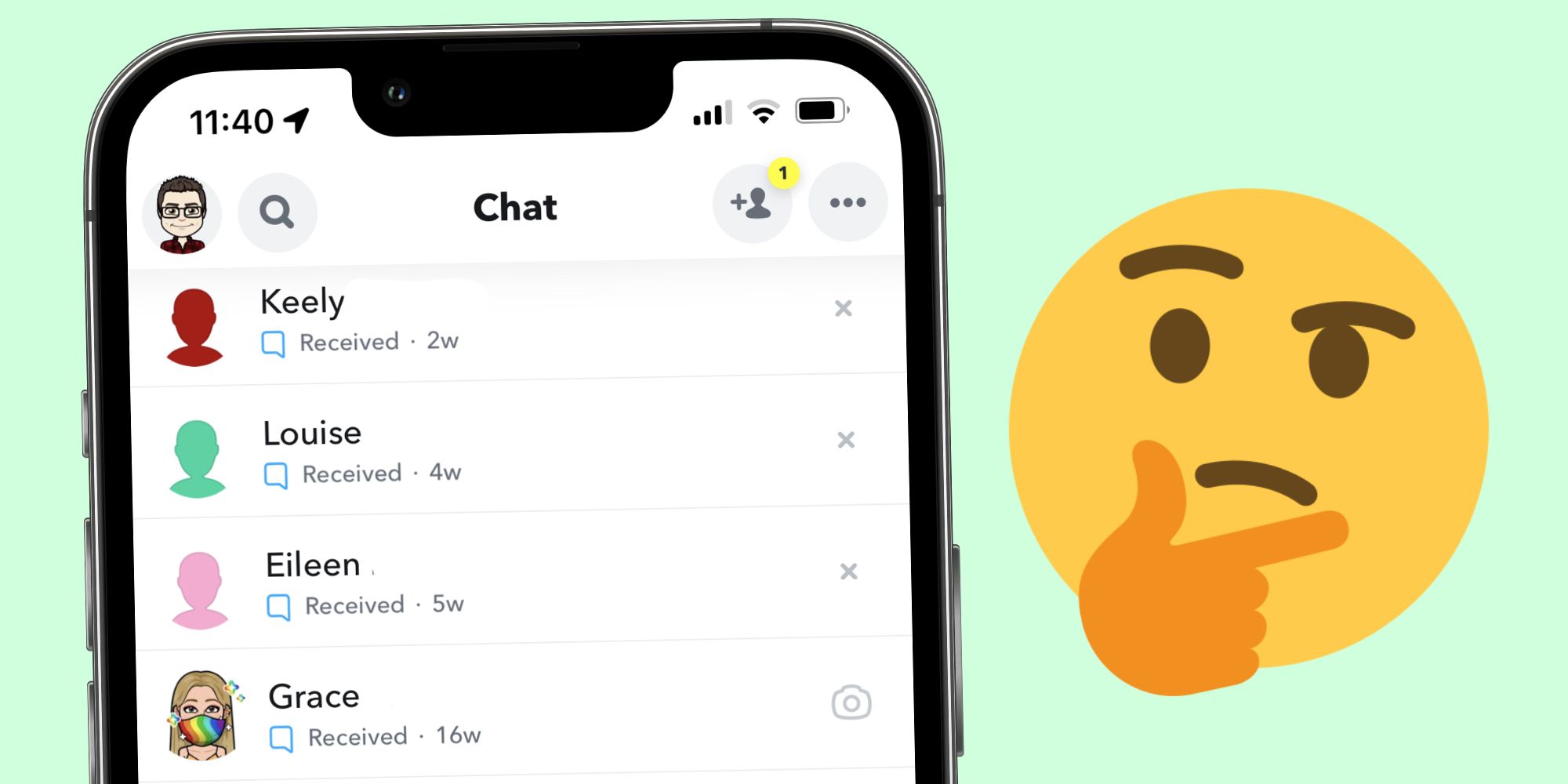
Decoding the Snapchat Interface: The Significance of the “X” Icon
The Snapchat Chat interface is designed to provide immediate feedback on the status of your conversations. Typically, you see a camera icon (to send a Snap) or a blue chat bubble (to send a text). When these standard icons are replaced by a gray “X,” it signifies a specific state in the relationship protocol between your account and the other user’s account.
The Difference Between Friends and Non-Friends
At its core, the “X” icon serves as a status indicator for your digital connection. In the technical architecture of Snapchat, a “friendship” is a mutual data agreement. If User A adds User B, and User B adds User A back, the system clears the path for seamless communication, displaying the Camera icon. However, if that mutual link is broken or never existed, the system displays an “X.”
The “X” essentially means that the person is not currently on your “Friends” list, even though they may appear in your recent chat history. This often happens when someone sends you a message or a friend request, but you have not yet accepted it. The “X” is a placeholder, signaling that the full suite of interaction features—such as viewing their Stories or seeing their Snap Score—is restricted until a mutual connection is established.
Pending Requests and Privacy Settings
From a software perspective, the “X” also acts as a gatekeeper for privacy settings. Snapchat allows users to customize who can contact them: “Everyone” or “Friends Only.” If a user has their settings set to “Everyone,” they may receive a message from a stranger. In this instance, the recipient will see an “X” next to the sender’s name.
This serves as a technical warning. It alerts the user that the incoming data packet is from an unverified source. By clicking the “X,” the user is given the option to either “Block,” “Report,” or “Accept” the contact. This UI choice is a deliberate attempt to give users control over their digital footprint, ensuring that unsolicited interactions are clearly marked and easily manageable.
Why the “X” Appears Instead of the Camera Icon
The transition from a Camera icon to an “X” icon is often the source of social anxiety, but from a technical standpoint, it is simply a change in the user’s permissions within the app’s database. Understanding why this change occurs requires looking at how the app handles unfriending and contact synchronization.
Unfriending vs. Blocking: Key Distinctions
One of the most frequent questions is whether the “X” means you have been blocked. Technically, the answer is usually “no.” In Snapchat’s UI logic, if someone blocks you, their entire profile typically vanishes from your friend list and search results. You won’t see an “X” because you won’t see the contact at all.
The “X” specifically appears when you have been removed as a friend (unfriended) or if you have removed the other person. When User A removes User B, User B may still see User A in their chat list, but the Camera icon will be replaced by an “X.” This indicates that the “Friends” permission level has been downgraded to a “Public” or “Pending” level. It is a subtle way for the software to manage the end of a digital handshake without completely erasing the message history, allowing the user to archive or delete the conversation at their own pace.
Contact Syncing and Suggestion Algorithms
Sometimes, the “X” appears next to names you haven’t even talked to. This is related to how Snapchat syncs with your phone’s contact list. If you have granted the app permission to access your contacts, it will populate your “Quick Add” or “Recents” with people from your real-world address book.
The “X” in this context is a UI shortcut to dismiss the suggestion. Rather than a status of a broken friendship, it is a tool for the user to clean up their interface. From a UX (User Experience) perspective, providing an “X” allows users to declutter their feed without navigating through deep menus, streamlining the mobile experience to focus only on active, mutual connections.

Managing Your Digital Social Circle
Navigating the technical side of Snapchat requires knowing how to manipulate these UI elements to suit your needs. Whether you want to restore a connection or tighten your digital security, the “X” is your primary point of interaction.
How to Remove the “X” and Restore Connection
If you see an “X” next to someone you want to be friends with, the process to “fix” it is straightforward. Tapping the name usually opens a profile preview where an “Add” button is prominent. Once you tap “Add” and the other party accepts (or if they have already added you), the “X” will programmatically switch back to the Camera icon.
This transition triggers a change in the app’s cache. The software moves the user from the “Pending” or “Stranger” category into the “Friend” category, unlocking features like the Snap Map (if shared) and the ability to see their “My Story” content. It is a real-time update that reflects the current state of the API (Application Programming Interface) call between the two users.
Best Practices for Snapchat Security and Privacy
From a digital security standpoint, the “X” is your first line of defense. Tech experts recommend that users pay close attention to the “X” when receiving messages from unknown accounts. If an “X” appears next to a name you don’t recognize, it is a signal to exercise caution.
- Don’t Open Snaps from “X” Contacts Immediately: If you aren’t friends, the content could be spam or phishing attempts.
- Use the “X” to Clear Clutter: Regularly tapping the “X” on old, inactive conversations helps the app run more efficiently by reducing the amount of metadata the UI has to load upon startup.
- Review Privacy Settings: If you find too many “X” icons appearing from strangers, go to Settings > “Who Can… Contact Me” and switch it to “My Friends.” This adds a server-side filter that prevents non-friends from even appearing in your chat list with an “X.”
The Evolution of Snapchat’s UI and UX Design
The use of an “X” rather than a text-based label is a hallmark of modern app development. This shift toward iconography is driven by the need for global scalability and the limitations of mobile screen real estate.
Minimalism in Modern App Interfaces
Snapchat was one of the first major apps to embrace a “no-buttons” philosophy, relying heavily on gestures and icons. The “X” is a perfect example of this minimalism. It communicates a complex state—“This user is in your local database but not in your mutual friend server-side list”—with a single pixel-efficient character.
In the world of software engineering, this is known as “frictionless design.” The goal is to provide the user with the maximum amount of information with the minimum amount of visual noise. While it can lead to initial confusion for new users, it ultimately creates a faster, more intuitive experience for the core demographic that grew up with digital-native symbology.
Why Visual Cues Matter in Communication Apps
Visual cues like the “X,” the “Gold Heart,” or the “Fire Emoji” (Snapstreak) are more than just decorations; they are data visualizations. They represent the health and status of the underlying data streams. In a communication app, these cues help users prioritize their interactions.
The “X” acts as a negative space indicator. It tells you where a connection isn’t, which is just as important as knowing where one is. By standardizing these symbols, Snapchat creates a universal language that transcends spoken tongue, allowing a user in Tokyo and a user in New York to understand their friendship status through the same technical shorthand.

Conclusion: Digital Hygiene and Interface Literacy
In conclusion, the “X” on Snapchat is a vital technical indicator that helps users navigate the complexities of digital relationships and data privacy. It serves as a signifier of unreciprocated friendship, a tool for UI decluttering, and a sentinel for personal security.
Understanding these nuances is a key part of digital literacy in the 21st century. As apps continue to evolve and simplify their interfaces, the burden falls on the user to understand the technical logic behind the icons. By recognizing the “X” for what it is—a status report from the Snapchat database—users can better manage their social circles, protect their privacy, and enjoy a more seamless technological experience. Whether you are clearing out old contacts or cautiously inspecting a message from a stranger, the “X” is a small but powerful tool in your digital arsenal.
aViewFromTheCave is a participant in the Amazon Services LLC Associates Program, an affiliate advertising program designed to provide a means for sites to earn advertising fees by advertising and linking to Amazon.com. Amazon, the Amazon logo, AmazonSupply, and the AmazonSupply logo are trademarks of Amazon.com, Inc. or its affiliates. As an Amazon Associate we earn affiliate commissions from qualifying purchases.