
In the ecosystem of modern social media, visual shorthand is the primary language of user interaction. Snapchat, a pioneer of ephemeral messaging, has mastered the art of “glanceable” information through its sophisticated UI/UX design. For the average user, the sudden appearance of a grey icon where a vibrant red, purple, or blue one used to be can be a source of confusion. From a technical perspective, these color shifts are not merely aesthetic choices; they are status indicators tied to the app’s underlying architecture, privacy protocols, and server-side communication.

Understanding what a grey Snapchat icon means requires a look into how the application handles data transmission and user permissions. This guide explores the technical nuances of Snapchat’s signaling system, the logic of “Pending” statuses, and the software-driven reasons behind these visual cues.
The UI Logic Behind Snapchat’s Color Coding System
Snapchat’s interface is built on the principle of immediate feedback. In software development, this is often referred to as “state management”—the ability of the application to reflect the current status of a piece of data (in this case, a message or a relationship) through the user interface.
How Visual Cues Enhance User Experience (UX)
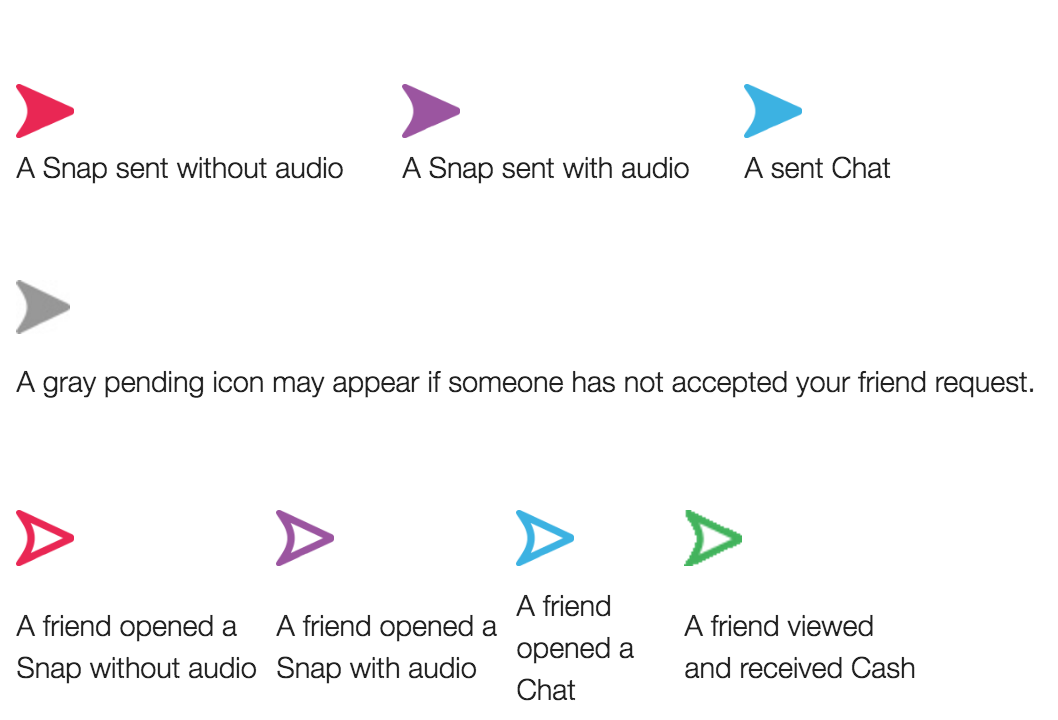
The use of color as a diagnostic tool allows users to process information without reading text. In technical terms, this reduces the cognitive load on the user. Red indicates a Snap without audio, purple indicates a Snap with audio, and blue indicates a text-based Chat. When the system deviates from these primary colors and displays grey, it signals a “null” or “intermediate” state. This occurs when the software cannot categorize the interaction into a standard “sent,” “delivered,” or “read” workflow because a specific technical or permission-based barrier exists.
Decoding the Spectrum: Blue, Red, Purple, and Gold
Before troubleshooting the grey icon, one must understand the active states. A solid icon means the content has been sent but not yet opened; an outlined icon means it has been viewed. These states are updated in real-time via persistent connections (WebSockets) between the client app and Snapchat’s servers. The grey icon represents an interruption in this flow. It signifies that the data packet—the Snap or message—is held in a “Pending” state on the server, unable to reach the recipient’s device.
What a Grey Snapchat Icon Specifically Means
In the majority of scenarios, a grey icon (specifically the grey arrow or grey box) is a manifestation of a “Pending” status. This is a failsafe in the app’s code that prevents data from being pushed to a user who has not authorized the connection.
The Pending Status: Connection and Privacy Settings
The most common reason for a grey icon is that the person you are messaging has not added you back as a friend. Snapchat’s privacy architecture is designed to prevent spam and unsolicited content. If User A sends a Snap to User B, but User B does not have User A in their contact list (and has their privacy settings set to “Friends Only”), the Snapchat server will accept the upload from User A but will refuse to “push” the notification to User B. The icon remains grey to indicate that the handshake between the two accounts is incomplete.
Account Deactivation and Unfriending Scenarios
From a software standpoint, a grey icon can also serve as an indicator of a change in the relational database. If you were previously friends with a user and the icon suddenly turns grey, it suggests a “State Change” in the friendship logic. This happens if:
- The recipient has removed you from their friends list.
- The recipient has blocked your account.
- The recipient has deactivated their account entirely.
In these instances, the app’s API returns an error or a specific “restricted” code when you attempt to send a message, which the UI then renders as a grey “Pending” indicator.
New Friend Requests and Opt-in Protocols
When you first add a user, the grey icon serves as an opt-in marker. Until the recipient clicks “Accept,” the software treats all outgoing media as “unauthorized.” This is a critical security feature that prevents the transmission of potentially malicious links or inappropriate media to users who haven’t consented to the interaction. The grey box is essentially a digital holding cell for data.
Troubleshooting Grey Icons: Technical Fixes and Software Glitches

While a grey icon is often a result of privacy settings, it can occasionally be caused by local client-side issues or server-side latency. If you are certain that you are friends with the recipient, the issue may be technical.
Clearing Cache and Resolving Sync Issues
Snapchat is a resource-intensive application that stores a significant amount of temporary data to speed up the loading of “Stories” and “Memories.” Occasionally, the local cache can become corrupted, leading to a “desync” between your phone and the Snapchat servers. When this happens, the app might display a grey icon even if a message has been delivered.
- Technical Fix: Navigating to Settings > Account Actions > Clear Cache can force the app to re-fetch the latest state data from the server, often resolving “false” grey status icons.
Network Latency and Server-Side Delays
Snapchat operates on a massive distributed network. When you send a Snap, it travels from your device to an edge server, then to a central processing hub, and finally to the recipient. If there is a “timeout” during this process—due to poor Wi-Fi or a temporary outage in a specific server cluster—the message may be flagged as grey. In this context, the grey icon is a visual representation of a “504 Gateway Timeout” or a similar network error.
Verifying App Permissions and Update Conflicts
Modern mobile operating systems (iOS and Android) have strict permission protocols. If a recent OS update has revoked Snapchat’s ability to use background data or refresh in the background, the app may struggle to update the status of sent messages. Ensuring the app is updated to the latest version is vital, as developers frequently release patches for “UI state bugs” where icons do not update their colors correctly despite successful data transmission.
The Impact of Privacy Features on Icon States
Snapchat’s brand is built on privacy, and its technical architecture reflects this through various “incognito” modes that can influence how icons are displayed.
Ghost Mode and Location Data
While “Ghost Mode” primarily affects the Snap Map, it is part of a broader suite of privacy tools that dictate how much information is shared between users. If a user has extremely high privacy thresholds enabled, certain “read receipts” or status updates might be throttled by the system to protect the user’s metadata, occasionally resulting in less descriptive icon states.
Understanding ‘Ignore’ vs. ‘Block’ Mechanics
There is a technical distinction between being ignored and being blocked. If you are blocked, the grey icon is permanent and you may lose the ability to see the user’s score or stories. If a message is merely “Pending” (grey), it means the communication channel is still technically open but awaiting a “Boolean true” value from the recipient’s side of the database. Understanding this distinction helps users diagnose whether the issue is a social one or a technical one.
Future Trends: The Evolution of Notification Interfaces in Social Media
As social media apps move toward more minimalist designs, the way they communicate status is likely to evolve. The “grey icon” is a precursor to more advanced AI-driven notification systems.
AI-Driven Contextual Notifications
In the future, Snapchat’s underlying software may move beyond simple color codes. We may see contextual UI elements that use machine learning to explain why a message is pending. For example, if the app detects a poor network connection, it might display a pulsing grey icon to indicate a retry attempt, whereas a static grey icon might be reserved strictly for privacy-related “Pending” statuses.
Minimalist Design and the Reduction of “Notification Fatigue”
The tech industry is currently seeing a trend toward reducing “notification fatigue.” Designers are looking for ways to provide information without overwhelming the user with vibrant colors. The grey icon is a perfect example of “passive communication”—it provides necessary information (the message hasn’t gone through) without the urgency of a bright red or blue notification. This subtle UI choice helps maintain the “ephemeral and casual” feel that is core to the Snapchat brand identity.
In conclusion, a grey Snapchat icon is a sophisticated piece of UI feedback. Whether it is signaling a privacy barrier, a network timeout, or a cache error, it represents a specific state in the app’s code. By understanding the technical logic behind these indicators, users can better navigate the platform, troubleshoot connectivity issues, and respect the privacy boundaries built into the world’s most popular disappearing-message app.
aViewFromTheCave is a participant in the Amazon Services LLC Associates Program, an affiliate advertising program designed to provide a means for sites to earn advertising fees by advertising and linking to Amazon.com. Amazon, the Amazon logo, AmazonSupply, and the AmazonSupply logo are trademarks of Amazon.com, Inc. or its affiliates. As an Amazon Associate we earn affiliate commissions from qualifying purchases.