
In the digital age, a passport photo is no longer a simple snapshot kept in a physical folder; it is a critical data input for a global network of biometric systems. When you ask, “What can I wear in a passport photo?” you aren’t just asking for fashion advice—you are asking how to optimize your physical appearance for facial recognition algorithms, high-resolution scanners, and automated border control gates (eGates).
The shift from manual inspection to AI-driven verification has transformed the requirements for travel documentation. Today, your clothing and accessories are analyzed as part of a digital template that identifies you across international databases. To ensure your photo passes the rigorous “Accept/Reject” logic of government software, you must understand the technological parameters of biometric imaging.

The Science of Biometrics: Why Your Clothing Choices Matter to the Algorithm
To understand the rules of passport attire, one must first understand how facial recognition software operates. When a government agency scans your passport photo, the software maps “facial landmarks”—the distance between your pupils, the width of your nose, and the contours of your jawline.
Understanding Facial Landmark Detection
Biometric algorithms rely on “keypoint detection.” These are specific coordinates on your face that the software uses to create a digital mathematical model. If your clothing—such as a high-turtleneck sweater or a bulky scarf—obscures the neckline or the lower chin, the software may fail to establish a baseline for your facial structure. This “data noise” results in a high false-rejection rate, forcing a manual review or a total rejection of the application. To assist the algorithm, your attire should leave the transition from the neck to the jawline clearly visible.
The Role of Contrast and Lighting in Digital Mapping
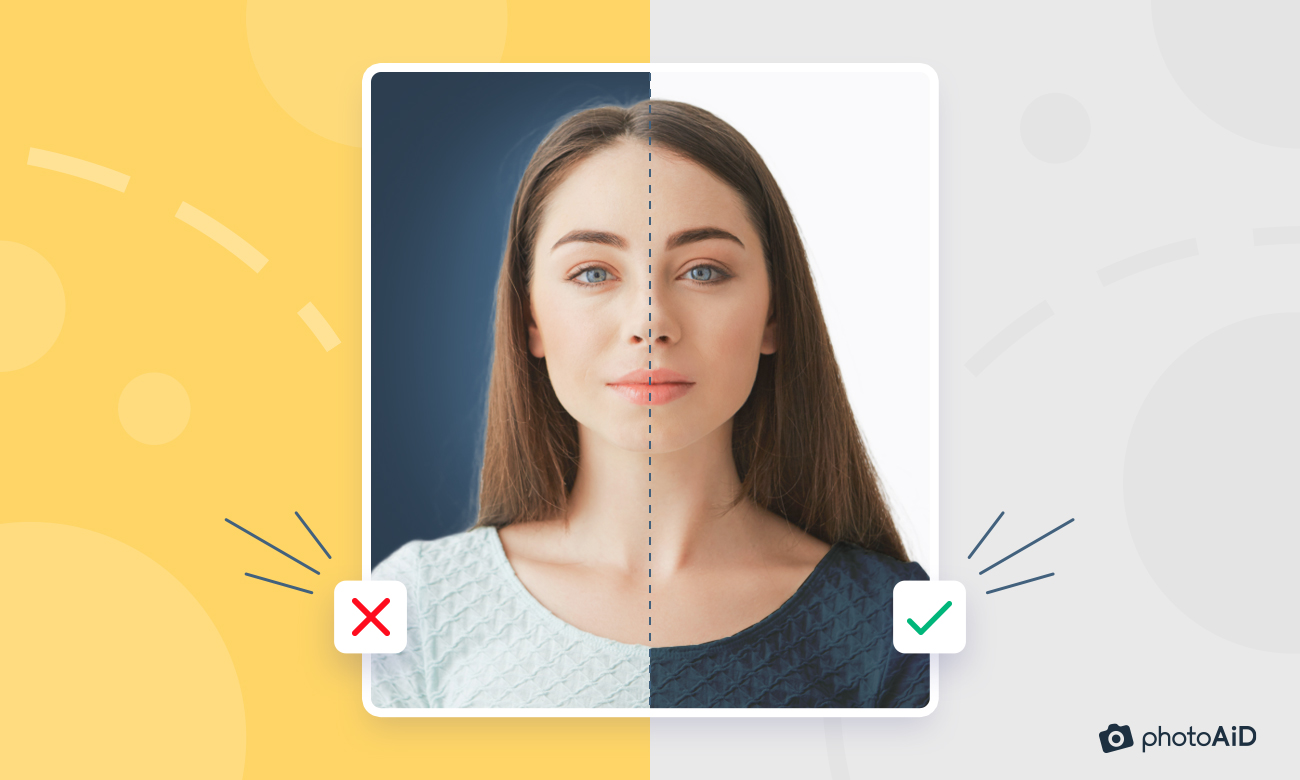
The sensors used in professional passport cameras and automated kiosks are designed to maximize dynamic range. However, they struggle when there is a lack of contrast between the subject and the background. Most passport backgrounds are white or off-white. If you wear a white shirt, you risk a “blown-out” effect where the edges of your shoulders and torso bleed into the background. This makes it difficult for edge-detection software to define your silhouette, which is a key step in standardizing the photo for digital storage.
Dressing for the Sensor: Color Theory and Visual Noise
The technology behind digital imaging interprets colors and patterns differently than the human eye. What looks like a professional outfit in person might cause technical issues when digitized and compressed into the small file sizes required for e-passports.
Avoiding the “Floating Head” Syndrome: Why White is a Technical Risk
As mentioned, the primary technical reason to avoid white or light cream clothing is the background. When the contrast ratio is too low, the image-processing software may struggle to crop the photo correctly. In some cases, this leads to the “floating head” effect, where only the face is visible against the white background. For the best digital results, opt for solid, darker colors like navy blue, black, or charcoal gray. These colors provide a sharp “edge” for the software to detect, ensuring your digital profile is crisp and well-defined.
Texture and Pattern: Minimizing Moiré Patterns in High-Resolution Scans
Technologists often warn against wearing fine, repetitive patterns like small checks, thin stripes, or houndstooth. When these patterns are scanned at high resolutions or displayed on digital screens, they can create a “Moiré pattern”—an interference grid that looks like wavy lines. This visual distortion can interfere with the optical character recognition (OCR) and image-validation tools used by border agents. To ensure your photo remains “clean” across all digital formats, stick to solid colors without complex textures.
Accessories and Hardware Interference
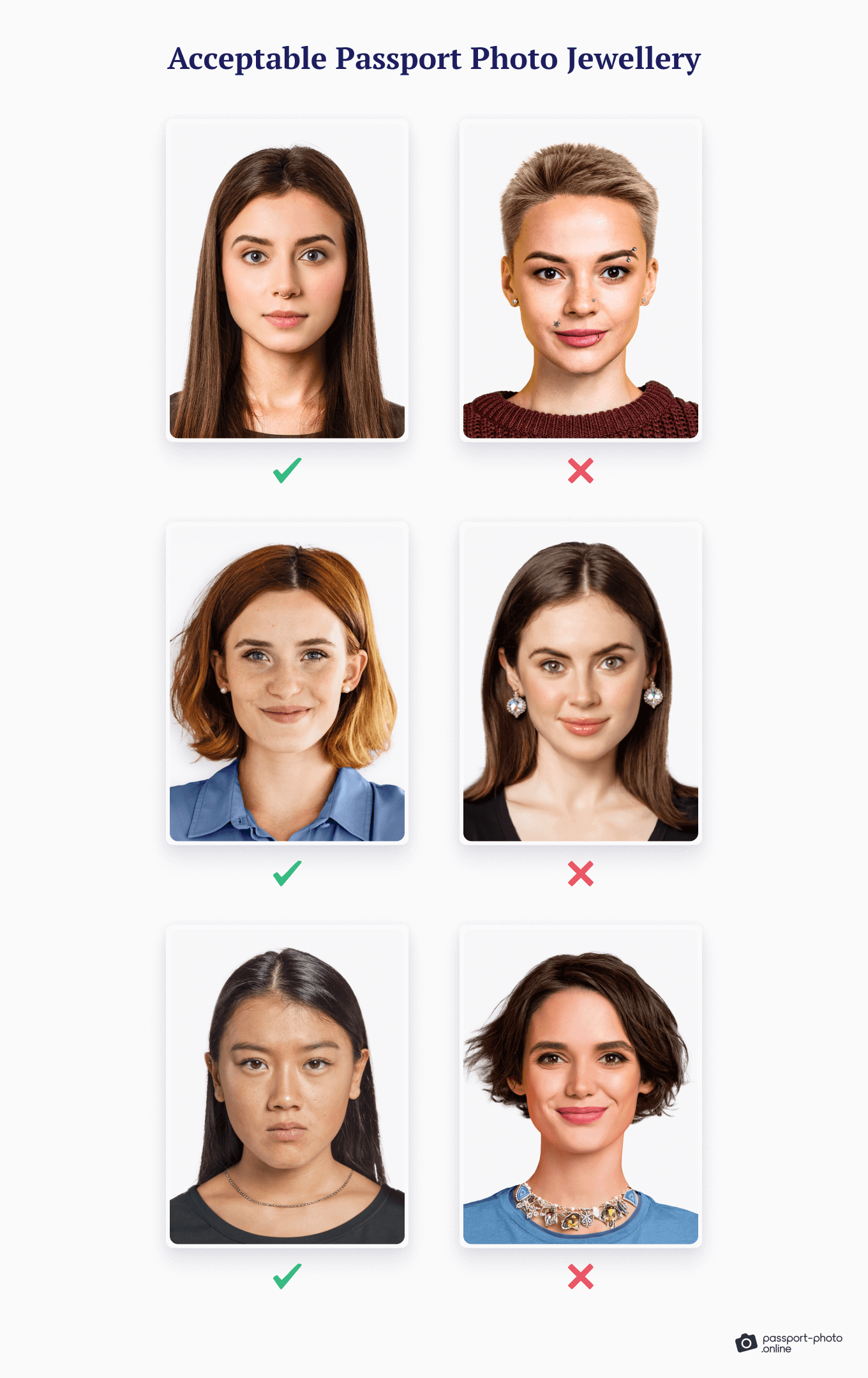
The digital “eyes” of border security are sensitive to reflections and obstructions. Even minor accessories can cause significant errors in biometric data extraction.
The Challenge of Eyeglasses: Refraction and Reflection
While many countries have banned eyeglasses in passport photos entirely, some still allow them if they are non-tinted. However, from a tech perspective, wearing glasses is a risk. Lenses can cause “specular reflection” (glare) from the studio flash, which hides the eyes from the facial recognition software. Furthermore, thick frames can obscure the “orbital region” of the face—one of the most data-rich areas for biometric identification. If the software cannot see the shape of your eyes or the bridge of your nose, the photo is technically useless for automated verification.
Religious and Medical Headgear: Navigating Tech Constraints
While modern technology is designed to be inclusive, headgear still presents a challenge for 3D facial mapping. If you wear headgear for religious or medical reasons, the primary technical requirement is that it must not cast shadows on your face. Shadows create “dark data” zones where the algorithm cannot distinguish features. To comply with both cultural needs and technological requirements, headgear should be adjusted to reveal the full face from the bottom of the chin to the top of the forehead, ensuring no shadows obscure the eyes or cheeks.
AI Tools and Digital Verification: Preparing Your Photo for Global Systems
The rise of “Smart Passports” means your photo is now an encrypted piece of data stored on a tiny RFID chip. Before that data is written to the chip, it undergoes a series of automated checks.
Validating via Automated Compliance Software
Many travelers now use AI-powered apps to take their own passport photos. These apps use machine learning to check for “ICAO (International Civil Aviation Organization) compliance.” The software analyzes the image for head tilt, background lighting, and, crucially, clothing contrast. Using these tech tools before submitting your application can save weeks of processing time. They provide a “pre-flight” check that ensures your attire hasn’t created a technical conflict with the government’s validation scripts.
Post-Processing vs. Pure Data: The Limits of Digital Editing
It is tempting to use software like Photoshop to fix a wardrobe malfunction or adjust the lighting of a photo. However, passport-processing software is increasingly adept at detecting “image manipulation.” If the software detects that pixels have been altered—particularly around the facial features—the photo will be flagged for fraud. The tech industry refers to this as “image integrity.” Therefore, it is always better to wear the correct clothing and have proper lighting during the initial capture rather than trying to use digital tools to fix errors after the fact.
Future-Proofing Your Digital Identity
As we move toward a world of “Contactless Travel,” the quality of your passport photo becomes even more vital. The hardware used at international borders is evolving, and your photo must be compatible with these advancements.
eGates and the Next Generation of Travel Tech
Modern airports are increasingly deploying eGates—automated barriers that use a camera to match your live face against the digital image stored on your passport chip. These gates use near-infrared sensors and 3D mapping. Clothing that reflects light (like sequins or metallic fabrics) can interfere with these sensors. By choosing matte, solid-colored clothing for your photo, you are essentially “future-proofing” your travel experience, ensuring that the hardware at an eGate in London, Tokyo, or New York can read your data without a glitch.
The Integration of AI and Deepfake Prevention
Government agencies are now integrating AI to prevent “presentation attacks” (identity fraud). This tech looks for the natural depth and texture of a human face. Wearing heavy makeup or distracting jewelry can sometimes trigger a “liveness detection” error, as the software may struggle to differentiate between the human skin and the artificial elements. To the tech, “less is more.” A clean, professional look without reflective surfaces allows the AI to focus on the biological data points it needs to verify your identity.
In conclusion, what you wear in a passport photo is the first step in a complex digital handshake between you and global security infrastructure. By understanding the tech—from contrast ratios and Moiré patterns to biometric mapping and RFID integrity—you can ensure that your photo is not only accepted but serves as a reliable digital key for your international travels. Stick to dark, solid colors, avoid obstructions, and respect the requirements of the sensors that will be reading your identity for the next decade.
aViewFromTheCave is a participant in the Amazon Services LLC Associates Program, an affiliate advertising program designed to provide a means for sites to earn advertising fees by advertising and linking to Amazon.com. Amazon, the Amazon logo, AmazonSupply, and the AmazonSupply logo are trademarks of Amazon.com, Inc. or its affiliates. As an Amazon Associate we earn affiliate commissions from qualifying purchases.