
Navigating the rules and regulations for standardized tests can be a complex endeavor, and few areas present more specific technological considerations than the calculators permitted on the ACT. For countless students, the calculator is a crucial tool, a digital co-pilot designed to streamline calculations, graph functions, and accelerate problem-solving under the intense pressure of a timed exam. However, not all advanced mathematical gadgets are created equal in the eyes of the ACT. Understanding the precise technological specifications and restrictions is paramount to avoiding last-minute stress, potential disqualification, and ensuring your chosen device truly empowers your performance rather than hindering it. This comprehensive guide delves into the ACT’s calculator policy, dissecting the types of devices allowed, features to embrace, and technologies to meticulously avoid, all through the lens of maximizing your technological advantage responsibly and effectively.
Understanding the ACT Calculator Policy: The Basics
The ACT’s calculator policy is designed to maintain a level playing field for all test-takers while still allowing students to leverage technology to demonstrate their mathematical aptitude. It’s a careful balance between facilitating efficiency and preventing unfair advantages or breaches of test integrity. The core principle revolves around ensuring that the calculator functions as an aid to computation, not a repository for pre-programmed answers or a communication device.
Why Restrictions Exist: Ensuring Fairness and Preventing Cheating
At its heart, the ACT is an assessment of a student’s knowledge and problem-solving skills, not their ability to program or store vast amounts of information. Without strict regulations, sophisticated calculators could transform from computational tools into miniature data banks or even communication devices, fundamentally undermining the validity of the test. The restrictions aim to ensure that every student’s score reflects their understanding of mathematical concepts and their ability to apply them, rather than the sophistication of their tech. This also prevents scenarios where certain students might have access to expensive, advanced calculators with features that could circumvent the spirit of the test questions.
General Rules: What’s Always Banned and Always Allowed
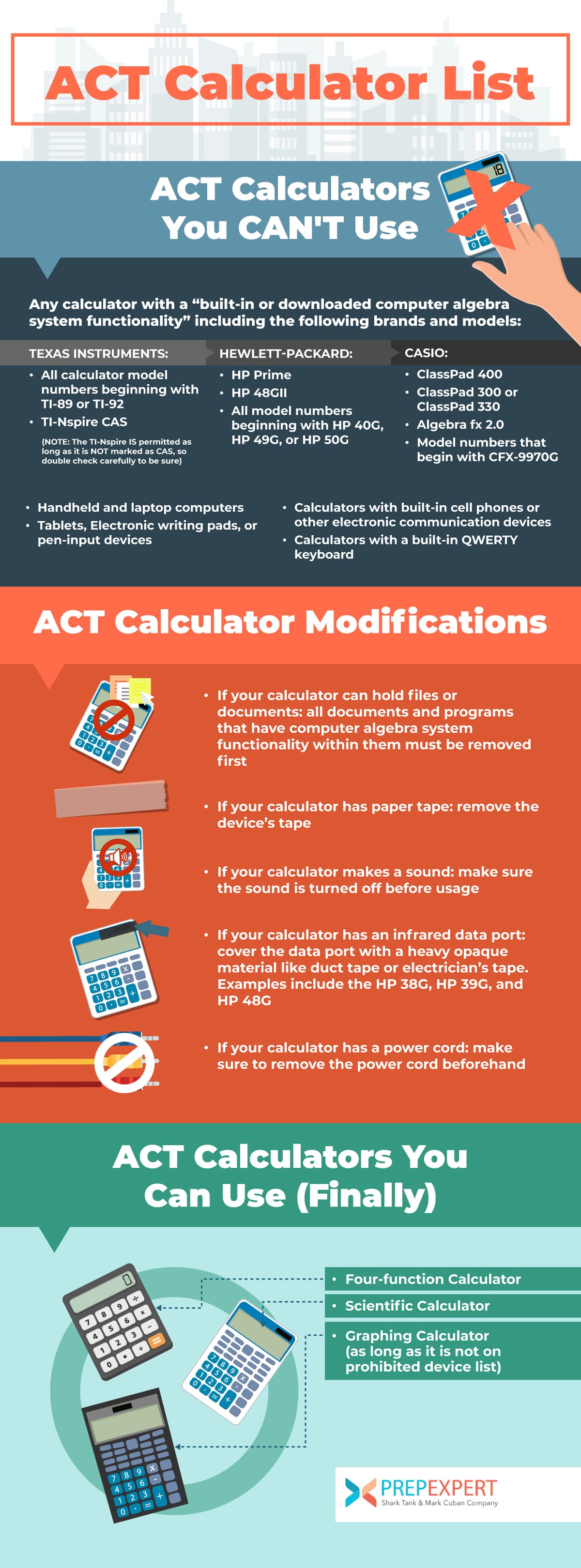
The ACT broadly categorizes calculators into three groups: explicitly allowed, explicitly prohibited, and those that are conditionally allowed after modification. The most crucial takeaway is that any calculator with an internet connection, a camera, a phone, or a QWERTY (typewriter-style) keypad is universally banned. Additionally, devices that operate on electrical outlets, make noise, or use a paper tape are disallowed. Conversely, standard four-function, scientific, and most graphing calculators are generally permitted, provided they don’t possess any of the prohibited features. The emphasis is on standalone computational devices that do not offer communication capabilities or excessive information storage that could be used to cheat.
Approved Calculator Types: Your Go-To Gadgets
While the list of permitted calculators is extensive, it generally boils down to three main types, each offering varying levels of computational power and features suitable for the ACT Math section. Familiarizing yourself with these categories and common models within them is the first step toward making an informed choice.
Graphing Calculators: The Powerhouses (and Their Limitations)
Graphing calculators are often the preferred choice for many ACT test-takers due to their robust capabilities for handling complex equations, plotting functions, and performing advanced statistical calculations. Their visual displays can be invaluable for understanding algebraic relationships and geometry problems.
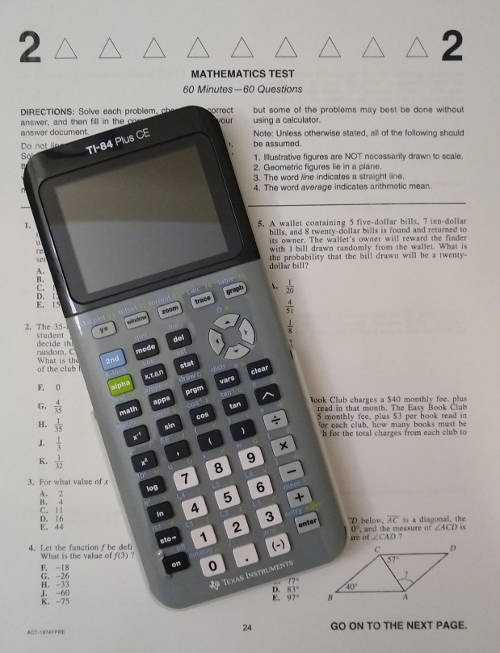
- Texas Instruments (TI) Series: The TI-84 Plus and its variants (e.g., TI-84 Plus CE) are arguably the most popular and widely accepted graphing calculators for standardized tests. They offer a user-friendly interface, powerful graphing capabilities, and are generally allowed without modification. The older TI-83 Plus is also a perfectly suitable and permitted option. These devices excel at graphing linear, quadratic, and other functions, solving systems of equations, and performing matrix operations—all common tasks on the ACT.
- Casio fx-9750GII/fx-9860GII: Casio offers competitive graphing calculators that are fully compliant with ACT regulations. These models provide similar functionality to the TI series, including graphing, statistics, and equation solving, often at a slightly lower price point.
- Other Accepted Models: Many models from HP (e.g., HP Prime Graphing Calculator, HP 50g) and Sharp (e.g., Sharp EL-9600) are also permitted, provided they do not incorporate any of the prohibited features like a CAS (Computer Algebra System) or QWERTY keyboard. It’s crucial to check the specific model against the ACT’s detailed list if you own a less common brand.
Key Limitation: While powerful, it’s vital to ensure your graphing calculator does not have a Computer Algebra System (CAS). Calculators like the TI-89, TI-92, and the HP 48GII have CAS capabilities, which allow them to perform symbolic manipulation and solve equations algebraically, essentially performing steps that the test expects you to do manually. These are explicitly prohibited.
Scientific Calculators: Reliable Workhorses
For students who don’t require graphing capabilities or prefer a simpler interface, scientific calculators are an excellent, compliant, and often more affordable alternative. They are more than capable of handling the vast majority of calculations required on the ACT Math section.
- Casio fx-115ES Plus/fx-991EX ClassWiz: These Casio models are highly recommended and widely used. They offer a natural display that shows fractions and roots as they appear in textbooks, making input and interpretation intuitive. Features include complex numbers, matrices, vectors, solving equations, and a comprehensive set of scientific functions. They are powerful enough to tackle trigonometry, logarithms, and statistical calculations without issue.
- Texas Instruments (TI) 30XA/TI-36X Pro: The TI-36X Pro is a standout scientific calculator, offering multi-line display, equation-solving capabilities, and matrix/vector functions that bridge the gap somewhat between a basic scientific and a graphing calculator, all while remaining ACT-compliant. The TI-30XA is a more basic but still fully functional option.
Scientific calculators are excellent for fraction operations, exponentiation, roots, trigonometric functions, and basic statistical calculations, which form a significant portion of the ACT Math content.
Four-Function Calculators: Basic but Permitted
While not recommended due to their limited functionality, standard four-function calculators (addition, subtraction, multiplication, division) are technically allowed. These calculators lack features like square roots, percentages, or memory functions, which makes them highly inefficient for the ACT. Using one would likely put a student at a significant disadvantage given the time constraints and complexity of many problems. They are primarily listed as allowed for completeness, but nearly all test-takers opt for at least a scientific calculator.
Banned Calculators and Features: What to Avoid
Understanding what is not allowed is just as important as knowing what is. The ACT maintains a strict list of prohibited devices and features, primarily to prevent unfair advantages derived from advanced technology that could store information or communicate.
Prohibited Devices: The “Smart” Calculators and More
The ACT explicitly bans several categories of devices that fundamentally alter the nature of the test-taking environment.
- Calculators with Computer Algebra System (CAS): As mentioned, calculators that can perform symbolic manipulation (like the TI-89, TI-92, TI-Nspire CAS, HP 48GII, HP Prime with CAS enabled, or Casio ClassPad 300/330) are strictly prohibited. These devices can algebraically solve equations, factor polynomials, and perform calculus operations, offering an unfair advantage over students who must perform these steps manually.
- Calculators with QWERTY Keypads: Any calculator featuring a full alphanumeric keyboard (like a computer keyboard) is banned. This includes devices like the TI-Nspire CX II-T CAS, the HP 48G series (and others), and some older Sharp models. The concern here is the potential for storing large amounts of text, formulas, or even entire test questions, or acting as a communication device.
- Handheld/Laptop Computers, Tablets, Cell Phones, Smartwatches, or Any Electronic Communication Devices: This is a clear and absolute ban. The ACT environment is designed to be free from external communication and information retrieval. Attempting to use any such device will result in immediate dismissal and invalidation of scores.
- Calculators with Paper Tape, That Make Noise, or Operate on Electrical Outlets: These are disruptive to the testing environment and therefore banned. Batteries are mandatory.
- Calculators with a Camera, Audio/Video Recording Capability, or Wireless Communication (Bluetooth, Wi-Fi, etc.): Any feature that could capture information, record the testing environment, or facilitate external communication is strictly prohibited.
Specific Feature Red Flags: What to Look Out For
Even if a calculator doesn’t fall into the explicitly banned categories, certain features can lead to its confiscation or require specific modifications before test day.
- Pre-Stored Formulas or Test-Taking Programs: While you cannot deliberately program an ACT-specific program onto your calculator, some graphing calculators allow users to store custom programs. The ACT policy states that any “programs or applications that can provide a test advantage” are prohibited. To avoid suspicion, it is highly recommended to clear all user-created programs from your calculator’s memory before the test.
- PDF/Document Viewers: Some advanced graphing calculators have the capability to display PDF documents or other text files. While not explicitly mentioned for all models, any calculator with this feature could be flagged, as it allows for storing notes or formulas. Best practice is to ensure no such files are loaded.
- Stylus Input (for some models): While not universally banned, some test centers might view calculators requiring a stylus for input with suspicion, particularly if they resemble PDAs or tablets. Sticking to traditional button-input calculators is safer.
The Importance of a “Clean” Calculator: Clearing Memory
Even with an approved model, examiners reserve the right to inspect your calculator. If they find programs, notes, or data that could offer an unfair advantage, they can confiscate your device. To mitigate this risk, it is highly advisable to perform a full memory reset or “clear” on your calculator before test day. This ensures that no hidden programs or data accidentally violate the policy. For most graphing calculators, this is a simple process found in the system settings, usually involving a “reset” or “clear all memory” function.
Optimizing Your Calculator for the ACT: Tech Tips for Success
Having an allowed calculator is only half the battle; knowing how to use it effectively and preparing it for test day are equally crucial. These tech tips will ensure your device is a true asset.
Getting Familiar with Your Device: Practice Makes Perfect
The ACT is a time-sensitive test. Fumbling with your calculator’s functions or struggling to input complex equations will eat valuable seconds. Spend ample time practicing with your chosen calculator before test day.
- Master Essential Operations: Know how to quickly input fractions, mixed numbers, exponents, roots, logarithms, and trigonometric functions.
- Utilize Graphing Features (if applicable): Practice graphing different types of functions, finding intercepts, and locating points of intersection. This can be a huge time-saver for certain algebra and geometry problems.
- Explore Statistical Functions: Understand how to input data, calculate mean, median, mode, and standard deviation, as these concepts can appear on the ACT.
- Solve Equations: Learn how to use your calculator’s equation-solver feature if it has one (and if it’s not a prohibited CAS feature). This can dramatically speed up solving algebraic equations.
Essential Functions for the ACT Math Section
While the ACT tests fundamental mathematical concepts, certain calculator functions are particularly useful:
- Basic Arithmetic: Addition, subtraction, multiplication, division.
- Exponents and Roots: Squares, cubes, square roots, cube roots.
- Fractions and Decimals: Converting between them, performing operations with fractions.
- Trigonometric Functions: Sine, cosine, tangent, and their inverses. Ensure your calculator is in degree mode for ACT problems unless otherwise specified.
- Logarithms: Base-10 and natural logarithms.
- Parentheses: Crucial for ensuring order of operations.
- Memory Functions: Storing intermediate results.
- Equation Solver (non-CAS): For quickly solving single-variable equations.
- Graphing (for graphing calculators): Plotting functions, finding zeros, intersections.
Battery Life and Backup: A Crucial Tech Check
Imagine being halfway through the Math section and your calculator dies. This nightmare scenario is easily preventable.
- Fresh Batteries: Always insert fresh batteries into your calculator the night before the test. Do not rely on old batteries.
- Spare Batteries: Bring a set of spare batteries for your calculator. Keep them in their original packaging or a small baggie. This is a non-negotiable backup plan.
- Battery Cover: Ensure your calculator’s battery cover is securely attached.
Clearing Memory Before Test Day: A Non-Negotiable Step
As previously emphasized, perform a full memory clear or factory reset on your calculator to eliminate any pre-stored programs, notes, or data that could be misinterpreted as an attempt to cheat. This simple step can save you immense trouble and ensure your calculator is fully compliant. Familiarize yourself with how to do this for your specific model well in advance.
The “Why” Behind the Rules: A Look at Test Integrity and Technology
The ACT’s calculator policy is not arbitrary; it represents a careful balancing act in an increasingly tech-driven world. The objective is to harness the power of technology to aid legitimate problem-solving while simultaneously safeguarding the integrity and fairness of a high-stakes examination.
Balancing Tech Advantage with Fair Assessment
In an era where personal devices are ever more capable, the line between an assistive tool and a cheating device can blur. The ACT aims to assess a student’s innate mathematical reasoning and learned skills, not their proficiency in programming complex algorithms or recalling obscure data from a digital archive. By allowing powerful graphing and scientific calculators, the ACT acknowledges the reality of modern mathematics education, where such tools are integral. However, by banning CAS and communication features, it ensures that the core cognitive processes being tested remain intellectual, not technological.

Evolving Policies in a Digital Age
As technology advances, so too must the policies governing its use in critical assessments. The ACT regularly reviews and updates its calculator guidelines to keep pace with new device capabilities and potential vulnerabilities. This ongoing adaptation is essential to maintaining the relevance and credibility of the exam. For test-takers, this means always checking the most current official ACT guidelines directly from their website, as policies can evolve, and new models may be added to or removed from the approved list.
In conclusion, your choice of calculator for the ACT is a significant technological decision that can impact your performance. By understanding the specific rules, choosing a compliant device, mastering its functions, and preparing it meticulously, you can ensure that your calculator is a powerful ally on test day, helping you achieve your best possible score without any unexpected technical hurdles.
aViewFromTheCave is a participant in the Amazon Services LLC Associates Program, an affiliate advertising program designed to provide a means for sites to earn advertising fees by advertising and linking to Amazon.com. Amazon, the Amazon logo, AmazonSupply, and the AmazonSupply logo are trademarks of Amazon.com, Inc. or its affiliates. As an Amazon Associate we earn affiliate commissions from qualifying purchases.