
Navigating the landscape of standardized tests, particularly the ACT, involves understanding not just the academic content but also the intricate rules surrounding approved technological tools. Among these, the calculator stands as a pivotal device, capable of both elevating and hindering a test-taker’s performance depending on its features and adherence to strict guidelines. This article delves deep into the technological specifications and policies governing calculator usage on the ACT, offering a comprehensive guide for students to select, understand, and optimize their device for peak performance within the permitted framework. Our focus will be exclusively on the technology itself—its capabilities, restrictions, and strategic integration—rather than marketing, branding, or financial aspects.
Deciphering the ACT Calculator Policy: The Technical Blueprint
The ACT’s calculator policy is a meticulously crafted set of rules designed to ensure fairness, prevent cheating, and maintain a level playing field for all test-takers. It’s not arbitrary; rather, it’s a technical blueprint that outlines what device functionalities are permissible and which are not. Understanding this policy is the first critical step in preparing for the math section.
The “Why” Behind the Restrictions: Ensuring Fair Technological Use
The fundamental reason for calculator restrictions on the ACT revolves around equity and the integrity of the assessment. The test aims to evaluate a student’s mathematical reasoning and problem-solving skills, not their ability to leverage advanced technological features that might automate complex steps or store prohibited information. Allowing devices with internet access, QWERTY keyboards, or extensive symbolic manipulation capabilities would fundamentally alter the nature of the test, potentially giving an unfair advantage to those with access to such advanced tech. Therefore, the policy serves as a technological gatekeeper, ensuring that the calculator functions as an aid for computation, not a repository of answers or an external communication device. It maintains a focus on the test-taker’s inherent understanding and application of mathematical concepts, augmented by appropriate computational assistance.
Categorizing Permitted and Prohibited Devices: A Feature-Based Approach
The ACT categorizes calculators based on their technical features and functionalities. The overarching principle is that the calculator should not resemble a computer, a smartphone, or a device capable of wireless communication or extensive information storage.
Generally Permitted Devices (with specific feature caveats):
- Four-function calculators: Basic addition, subtraction, multiplication, and division.
- Scientific calculators: These offer more advanced functions like trigonometry, logarithms, and exponents. They are often battery-powered and lack extensive graphing capabilities.
- Graphing calculators: The most commonly used category, these devices can display graphs of equations, perform matrix operations, and often have more powerful processors. However, specific models and features within this category are heavily scrutinized.
Absolutely Prohibited Devices (due to inherent technical capabilities):
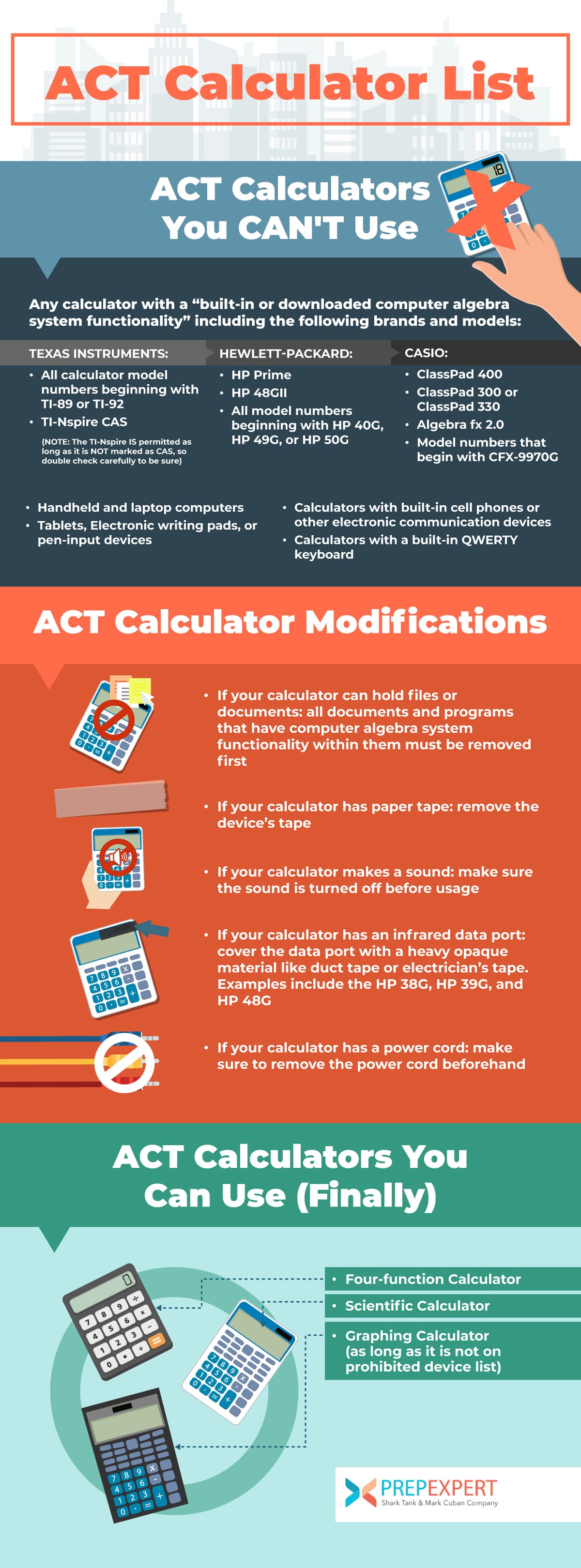
- Calculators with computer algebra system (CAS) functionality that can perform symbolic manipulation (e.g., TI-89, TI-92, Voyage 200, HP 48GII, HP Prime). These devices are capable of solving equations symbolically, which bypasses the need for the student to perform the mathematical steps.
- Calculators with built-in or downloadable computer applications (e.g., programs that store formulas, notes, or pre-solved problems).
- Handheld or laptop computers, including PDAs (Personal Digital Assistants) or devices with tablet functionality.
- Electronic writing pads or pen-input devices.
- Calculators with QWERTY keypads (e.g., TI-92, Voyage 200). These are considered too similar to computer keyboards.
- Calculators with paper tapes.
- Calculators that make noise.
- Calculators with wireless communication capabilities (Bluetooth, Wi-Fi, infrared).
- Calculators that require an electrical outlet.
- Smartwatches or any watch with calculator functionality.
- Smartphones or any other mobile phones.
Specific Examples of Acceptable Technology
While the policy is feature-based, understanding common examples of permitted devices can provide clarity.
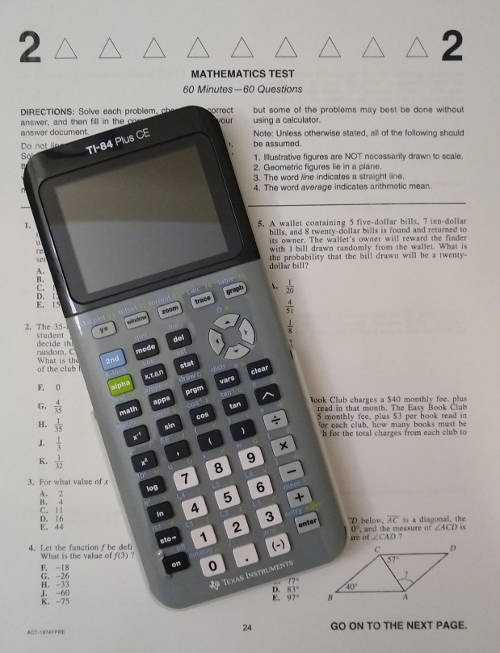
- Texas Instruments (TI): Models like the TI-83, TI-83 Plus, TI-84 Plus, TI-84 Plus CE, and TI-Nspire (non-CAS version) are widely accepted and popular choices. The TI-84 Plus CE, in particular, is a modern favorite due to its color display and enhanced usability, while still adhering to ACT guidelines.
- Casio: The fx-9750GII, fx-9860GII, and certain fx-CG models (e.g., fx-CG50, provided CAS mode is disabled or non-existent) are generally allowed.
- Hewlett Packard (HP): Models like the HP 35s or HP 39gs are typically permitted, though HP models are less common in high school settings compared to TI.
It is crucial for students to verify their specific calculator model against the most current ACT guidelines, usually available on the official ACT website, as policies can be updated.
Essential Technological Features for ACT Success
Once the policy framework is understood, the next step is to identify the technical features that are genuinely beneficial for the ACT math section. The optimal calculator is one that provides necessary functionalities without offering prohibited ones.
Core Mathematical Functionalities: Beyond Basic Arithmetic
Beyond simple operations, an ACT-suitable calculator should proficiently handle a range of mathematical functions crucial for the test. These include:
- Exponents and Roots: Square roots, cube roots, and general nth roots, as well as powers.
- Logarithms: Base 10 and natural logarithms are frequently tested.
- Trigonometric Functions: Sine, cosine, tangent, and their inverses. These are essential for geometry and trigonometry questions.
- Fractions: The ability to input and output fractions correctly, simplifying complex expressions.
- Parentheses: Efficient use of parentheses for correct order of operations.
- Constants: Access to mathematical constants like $pi$ and $e$.
A calculator that offers these functions clearly and with easy access through dedicated buttons or menus will significantly streamline calculations.
Graphing Capabilities: A Strategic Advantage
Graphing calculators are often recommended not just for their advanced computational power but specifically for their graphing functions. On the ACT, being able to:
- Visualize equations: Graphing linear, quadratic, polynomial, exponential, and logarithmic functions can help in understanding their behavior, finding intercepts, and identifying solutions to systems of equations.
- Find intersection points: Graphically determining where two functions intersect can quickly solve systems of equations or inequalities.
- Analyze data: Some graphing calculators can perform basic statistical regressions, which can be helpful for data interpretation problems, although complex statistical analysis is usually not required.
These capabilities transform the calculator from a mere number cruncher into a powerful analytical tool, allowing for visual confirmation of algebraic solutions or a direct graphical approach to certain problem types. The graphical representation of mathematical relationships can often make complex problems more intuitive and solvable under time pressure.
Memory, Programming, and Data Storage: Understanding the Nuances
This is often the most ambiguous area of the ACT calculator policy.
- Memory: Most scientific and graphing calculators have internal memory to store variables, previous calculations, and short-term data. This is generally permitted and useful for multi-step problems.
- Programming: The ability to store user-defined programs is where restrictions become strict. While many graphing calculators have programming capabilities, the ACT prohibits the use of programs that store formulas, notes, or pre-solved problems that could give an unfair advantage. If your calculator has such programs, they must be cleared before the test. Some test administrators might require a factory reset to ensure no prohibited programs remain.
- Data Storage: Storing notes, text, or equations as “data” is also prohibited. The memory should be clear of any content that could be construed as aiding in cheating.
The key distinction lies in the type of information stored and its intent. Basic mathematical constants or user-defined functions that don’t provide explicit answers or step-by-step solutions are generally fine, but anything that automates problem-solving or acts as a cheat sheet is not. When in doubt, it’s safer to clear all user-defined programs and stored data.
Choosing Your ACT-Ready Device: Models and Their Technical Merits
The selection of an ACT-approved calculator involves balancing capabilities, ease of use, and adherence to regulations. This section explores the types of calculators and their technical merits.
The Graphing Calculator Advantage: Power and Versatility
Graphing calculators, such as the TI-84 Plus CE or Casio fx-CG50, are widely considered the most advantageous for the ACT. Their technical merits include:
- Enhanced Processing Power: They can handle complex calculations more quickly than scientific calculators.
- Large, High-Resolution Displays (often color): This allows for clear visualization of graphs, tables, and complex expressions, reducing input errors and improving comprehension.
- Intuitive User Interfaces: While requiring some learning, their menu-driven systems are designed for efficient navigation of advanced functions.
- Matrix Operations: Useful for solving systems of linear equations.
- Statistical Functions: Basic statistical analysis and regression capabilities are often present.
The versatility of these devices allows students to approach problems from multiple angles—algebraically, numerically, or graphically—depending on which method is most efficient for a given question. However, this power comes with the responsibility of ensuring compliance, particularly regarding program memory.
Scientific Calculators: A Reliable and Cost-Effective Option
For students who find graphing calculators too complex, or where budget is a significant concern, a scientific calculator (e.g., Casio fx-115ES Plus, TI-36X Pro) is a perfectly viable and fully permitted option. Their technical merits include:
- Compact Size and Portability: Generally smaller and lighter than graphing calculators.
- Longer Battery Life: Simpler processors and monochromatic displays consume less power.
- Focus on Core Functions: They excel at the essential arithmetic, trigonometric, exponential, and logarithmic functions, often with dedicated buttons for quick access.
- Fraction Handling: Many modern scientific calculators can display and manipulate fractions easily.
- Equation Solvers: Some advanced scientific calculators include basic equation-solving features (numerical solvers, not symbolic).
While they lack graphing capabilities, a student proficient with a scientific calculator can still achieve a high score. The key is familiarity and efficiency with the device they choose.
Features to Scrutinize: Input Methods, Display, and Processing Speed
When choosing among permitted models, consider these technical aspects:
- Input Method (Algebraic vs. RPN): Most modern calculators use algebraic input (like you write it on paper), but some HP models use Reverse Polish Notation (RPN). Ensure you are comfortable and efficient with your chosen method.
- Display: A multi-line display is invaluable for reviewing input and results, especially for complex expressions. Color displays (like on the TI-84 Plus CE) can enhance readability for graphs.
- Processing Speed: While not a major differentiator for most ACT problems, a faster processor can save crucial seconds when dealing with iterative calculations or complex graph plotting.
- Button Layout and Ergonomics: The physical design of the calculator can impact speed and accuracy. Look for a layout that feels intuitive and prevents accidental button presses.
Ultimately, the best calculator is one that a student has mastered, understands its technical limitations and capabilities, and can operate efficiently under pressure.
Pre-Test Technical Checklist: Optimizing Your Device for Peak Performance
Beyond selecting the right device, proper technical preparation of your calculator is paramount for test day. This involves more than just bringing it; it’s about ensuring it’s in optimal working condition and compliant with all regulations.
Battery Management and Power Source Considerations
This is perhaps the most overlooked aspect of calculator readiness.
- Fresh Batteries: Always insert new batteries (alkaline or rechargeable, depending on your model) a few days before the test. Do not rely on old batteries, even if they “seem fine.”
- Backup Batteries: For battery-powered calculators, bring a spare set of new batteries to the test center. While test administrators might not be able to help you change them, having them on hand can be a lifesaver.
- Rechargeable Devices: If your calculator uses a rechargeable battery (e.g., TI-84 Plus CE), ensure it is fully charged the night before the test. Some models might also allow for a small backup coin cell battery for memory retention; ensure this is also fresh if applicable.
- No Power Outlets: Remember, no electrical outlets are permitted for calculators during the test. Your device must operate independently for the entire math section.
Memory Clearance and Factory Reset Procedures
This is where technical compliance meets practical application.
- Clear All Programs: Even if you didn’t create them, old programs from previous users or built-in example programs might be on your calculator. Learn how to delete all user-defined programs.
- Clear Memory: Remove any stored variables, equations, or data. Most calculators have a “clear memory” or “reset” function.
- Factory Reset (If Required or Unsure): If there’s any doubt about prohibited content, perform a full factory reset. This returns the calculator to its original, out-of-the-box state, ensuring compliance. Be aware this will erase everything, so do it after you’ve completed any necessary personal setup.
- Practice with a Cleared Calculator: After clearing, practice using the calculator with its default settings to ensure you are still proficient without any custom programs or stored data.
Test proctors have the right to inspect calculators and may require a memory clear. Being prepared for this will prevent undue stress on test day.
Familiarization: Integrating Your Calculator into Your Test Strategy
A calculator, no matter how advanced, is only as effective as the user’s proficiency with it.
- Extensive Practice: Work through numerous ACT math practice problems using the exact calculator you intend to bring to the test. This builds muscle memory and speed.
- Learn Shortcuts: Understand your calculator’s efficient ways to access functions (e.g., secondary functions, quick menus).
- Understand Its Limitations: Know when it’s faster to do a calculation by hand or mentally versus inputting it into the calculator. Sometimes, over-reliance on a calculator can slow you down.
- Troubleshooting Basic Issues: Familiarize yourself with common error messages and how to resolve them quickly (e.g., domain errors, syntax errors).
The calculator should be an extension of your mathematical thought process, not a barrier. Consistent practice ensures that operating the device becomes second nature, allowing you to focus on the problem itself.
Beyond the Device: The Role of Technology in ACT Preparation and Performance
While the physical calculator is central, technology in a broader sense plays an increasingly significant role in ACT preparation and the future of standardized testing.
Leveraging Digital Tools for Practice and Skill Reinforcement
The modern test-taker has access to a wealth of digital resources:
- Online Practice Platforms: Websites and apps offer thousands of practice questions, often with detailed explanations, allowing students to target specific weak areas. Many simulate the testing environment, including time constraints.
- Virtual Calculators/Emulators: For students who don’t own a physical graphing calculator, emulators (like those for TI-84) can be installed on computers for practice. While not identical to the physical experience, they allow for familiarization with the interface and functions.
- Educational Software: Programs designed to teach specific mathematical concepts can reinforce understanding that the calculator will then help execute.
- Adaptive Learning Platforms: AI-powered platforms can tailor practice questions based on a student’s performance, optimizing study time and focusing on areas where technological tools might be most beneficial.
These digital tools allow for personalized and flexible preparation, supplementing traditional textbooks and classes.
Understanding When Not to Rely on Technology: Human Calculation
Crucially, knowing when not to use the calculator is as important as knowing when to use it. Many ACT math problems are designed to be solved conceptually or through simple mental arithmetic.
- Conceptual Problems: Some questions test understanding of principles rather than complex calculation.
- Estimation: Often, estimating an answer can quickly eliminate choices without touching the calculator.
- Algebraic Simplification: Many problems are faster to simplify algebraically by hand before plugging in numbers.
- Time Management: Spending too much time inputting a simple calculation into a calculator can be detrimental to overall pacing.
The calculator should be a tool for efficiency and accuracy on complex computations, not a crutch for basic math or a substitute for critical thinking. Strategic technological use means discerning when its features genuinely add value.

The Evolving Landscape of Digital Assessments and Calculator Policies
The future of standardized testing, including the ACT, is increasingly digital. This shift inevitably impacts calculator policies and integration:
- Embedded Calculators: Some digital tests now feature an on-screen, embedded calculator. This removes the need to bring a physical device but requires students to adapt to a potentially unfamiliar interface.
- Dynamic Policy Adjustments: As calculator technology advances (e.g., AI integration, more powerful features in compact devices), the ACT and other testing bodies will continuously review and update their policies to maintain fairness and security.
- Increased Focus on Conceptual Understanding: With the ease of calculation provided by technology, future tests might lean even more heavily on conceptual understanding and problem-solving strategies that cannot be easily automated.
Staying informed about these evolving trends, particularly through official ACT communications, will be vital for future test-takers. For now, mastering the use of an approved, well-prepared physical calculator remains a cornerstone of ACT math success. By understanding the technological rules and optimizing your chosen device, you can leverage this powerful tool to demonstrate your full mathematical potential.
aViewFromTheCave is a participant in the Amazon Services LLC Associates Program, an affiliate advertising program designed to provide a means for sites to earn advertising fees by advertising and linking to Amazon.com. Amazon, the Amazon logo, AmazonSupply, and the AmazonSupply logo are trademarks of Amazon.com, Inc. or its affiliates. As an Amazon Associate we earn affiliate commissions from qualifying purchases.