
In the vast and rapidly evolving landscape of technology, few names evoke as much recognition and familiarity as “Windows.” For billions across the globe, “Windows” isn’t just a generic term for transparent panels that let light in; it is synonymous with their primary interface to the digital world. It is the operating system that powers their personal computers, facilitates their work, enables their entertainment, and connects them to the internet. Understanding “what are the Windows” in this context requires delving into its rich history, core functionalities, profound impact, and its ongoing evolution at the forefront of technological innovation.
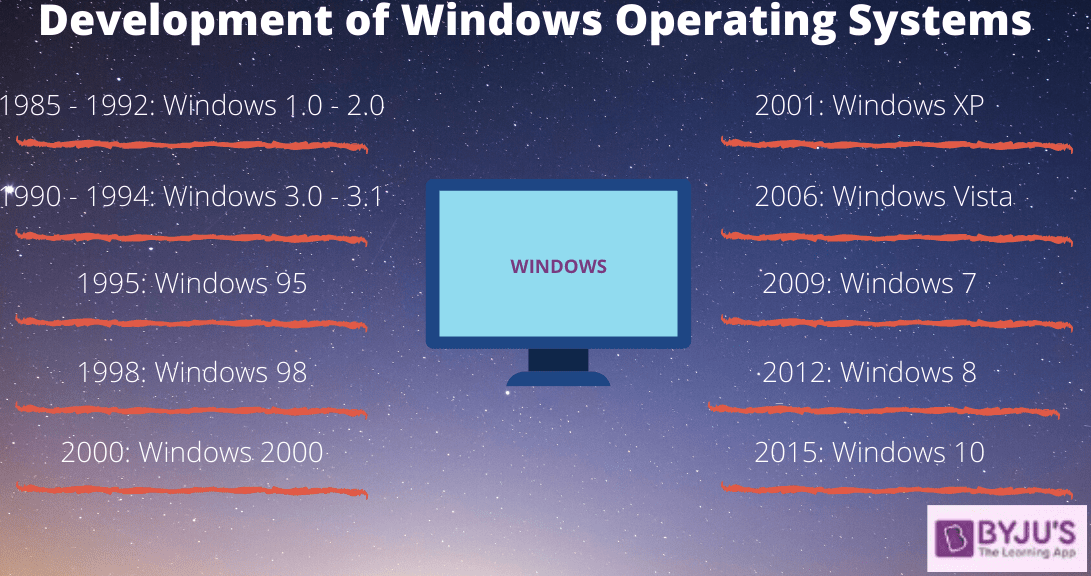
At its heart, Microsoft Windows is a proprietary graphical operating system developed by Microsoft. Since its debut in 1985 as a graphical shell for MS-DOS, Windows has grown from a nascent project into the most widespread desktop operating system globally. Its journey is a testament to persistent innovation, market adaptation, and an unwavering commitment to making computing accessible and powerful for everyone, from casual users to enterprise giants.
The Genesis and Enduring Evolution of Microsoft Windows
The story of Windows is one of constant reinvention, a narrative arc that mirrors the broader history of personal computing itself. From humble beginnings to its current omnipresence, each iteration has built upon its predecessors, introducing new paradigms and solidifying its position.
Early Beginnings: From MS-DOS to Graphical User Interface
The conceptualization of Windows emerged in an era dominated by command-line interfaces, primarily MS-DOS. For many, interacting with a computer meant memorizing complex commands and typing them precisely. Microsoft’s vision, inspired by early graphical user interface (GUI) developments at Xerox PARC and subsequent advancements by Apple, was to make computing more intuitive and visually appealing.
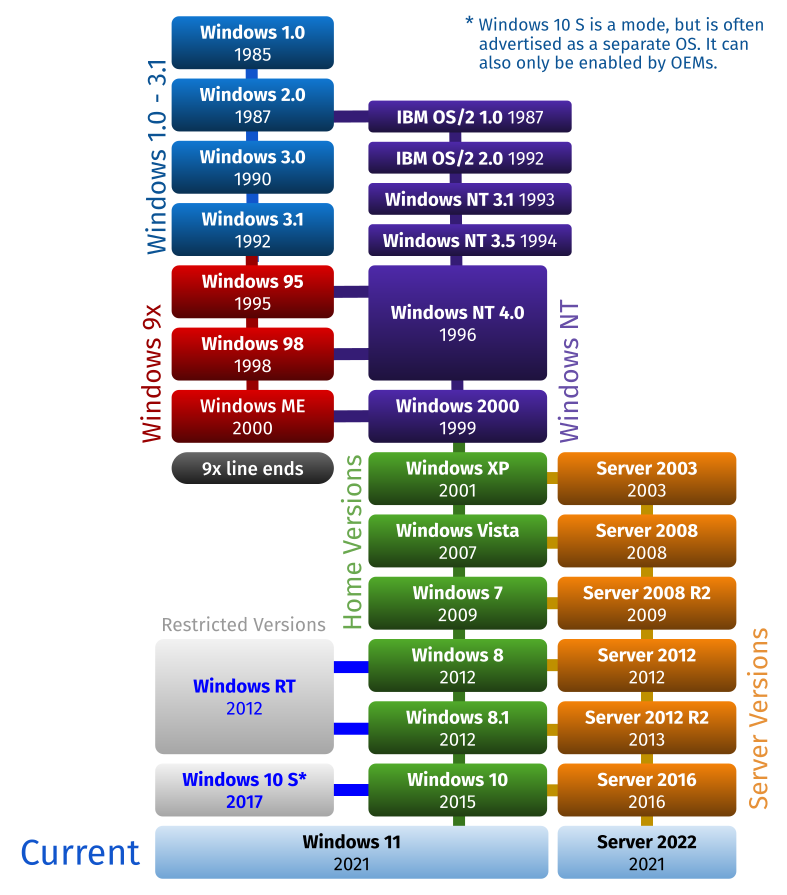
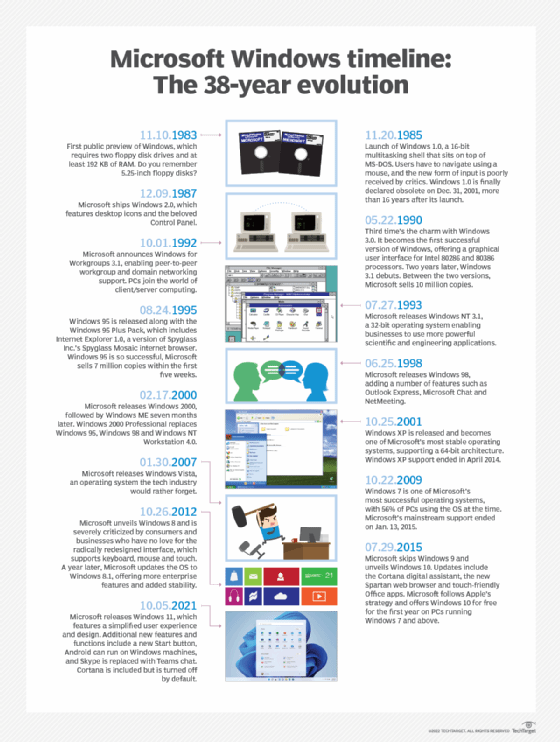
The first version, Windows 1.0, released in November 1985, was not a standalone operating system but rather a graphical environment running on top of MS-DOS. It introduced concepts like drop-down menus, tiled windows, mouse support, and rudimentary applications like Paint and Notepad. While initially met with skepticism and competition, it laid the groundwork for a revolutionary shift. Subsequent versions, particularly Windows 3.0 (1990) and Windows 3.1 (1992), saw significant improvements in performance, memory management, and application support, selling millions of copies and cementing the GUI’s place in the mainstream. This period marked a critical inflection point, moving personal computing from a niche for enthusiasts to a tool for the masses.
The Era of Dominance: Windows 95, 98, XP
The mid-1990s heralded a new chapter with the release of Windows 95. This was a game-changer, integrating the operating system and GUI much more tightly, introducing the iconic Start button and Taskbar, and pioneering Plug and Play functionality. It was a massive commercial success, fueled by an unprecedented marketing campaign, and fundamentally redefined the user experience. It also embraced the burgeoning internet, featuring built-in dial-up networking and Internet Explorer.
This dominance continued with Windows 98, which refined its predecessor, improving hardware support and internet integration. However, it was Windows XP, launched in 2001, that would become one of the most beloved and long-lived versions. XP brought a fresh, modern interface, enhanced stability, and robust security features (for its time). Its extended lifespan and widespread adoption across consumer and enterprise sectors solidified Microsoft’s market leadership for over a decade, becoming a benchmark for reliability and compatibility.
Modern Windows: Vista to Windows 11 and Beyond
The post-XP era saw Microsoft navigating the challenges of evolving user expectations, emerging technologies, and stiff competition. Windows Vista (2007), while introducing significant architectural changes and a sleek Aero interface, struggled with performance issues and compatibility concerns. This paved the way for Windows 7 (2009), which rectified many of Vista’s shortcomings, offering a refined user experience and superior performance, and quickly became another highly popular iteration.
The rise of mobile computing and touch interfaces influenced Windows 8 (2012), which introduced a controversial “Metro” tile-based interface optimized for touchscreens, alongside a traditional desktop. While innovative, its dual interface proved divisive. Microsoft quickly course-corrected with Windows 10 (2015), which ingeniously merged the best of both worlds, bringing back a more traditional Start Menu while retaining universal apps and continuous updates. Windows 10 also championed the “Windows as a Service” model, promising free updates and continuous feature enhancements.
The most recent major release, Windows 11 (2021), represents a significant visual overhaul, with a redesigned Start Menu, rounded corners, and a focus on simplicity and productivity. It also raised minimum hardware requirements, signaling a shift towards more modern and secure computing environments, with an eye towards hybrid work and integrated communication tools like Microsoft Teams.
Core Components and Architecture of Windows
Beneath its familiar graphical interface, Windows is a complex ecosystem of interwoven technologies. Understanding its core components helps illuminate its power and versatility.
The Kernel: The Heart of the OS
At the very core of Windows is its kernel, specifically the Windows NT kernel. This is the low-level part of the operating system that manages the most fundamental operations of the computer. It acts as the bridge between software applications and the hardware, handling tasks such as:
- Process Management: Allocating CPU time to different programs.
- Memory Management: Assigning memory to applications and data.
- Device Management: Communicating with hardware components like printers, keyboards, and hard drives.
- System Calls: Providing a way for applications to request services from the operating system.
The robustness and efficiency of the NT kernel have been a cornerstone of Windows’ stability and performance since its introduction in the early 1990s.
User Interface (UI) and Experience (UX)
The most visible aspect of Windows is its User Interface (UI), encompassing everything from the desktop, Start menu, taskbar, icons, and windows themselves. Over the decades, Windows UI has evolved significantly, but its core principles of direct manipulation (clicking, dragging, dropping) and visual metaphors remain. The User Experience (UX) goes beyond aesthetics, focusing on how intuitive, efficient, and enjoyable it is to interact with the system. Windows aims for a balance between powerful functionality and ease of use, providing accessibility features, customization options, and consistent interaction patterns across applications.
File System and Device Management
Windows primarily uses the NTFS (New Technology File System), which offers robust features like journaling (for data recovery), file permissions (for security), and support for large file sizes and disk volumes. The file explorer, a staple of Windows, allows users to navigate, organize, and manage their digital files and folders with ease.
Device management is another critical component, encompassing the system’s ability to detect, install, and manage hardware. Windows’ “Plug and Play” functionality, first popularized with Windows 95, allows users to connect new hardware devices (like USB drives or webcams) and have them automatically recognized and configured by the operating system, often without needing manual driver installation. This seamless integration is crucial for the vast array of hardware available for Windows PCs.
Networking and Security Features
Modern Windows operating systems are built with networking capabilities deeply integrated. They support various protocols for local network connectivity (Ethernet, Wi-Fi) and internet access. Features like homegroups, workgroups, and domain integration facilitate file sharing, printer access, and collaborative environments.
Security has become an increasingly paramount concern. Windows has continuously evolved its security features, including:
- Windows Defender (now Microsoft Defender Antivirus): Built-in real-time protection against malware, viruses, and spyware.
- Windows Firewall: Controls network traffic, blocking unauthorized access.
- User Account Control (UAC): Prompts for administrative privileges before making system-level changes, preventing malicious software from easily altering critical settings.
- BitLocker: Full disk encryption to protect data in case of device loss or theft.
- Secure Boot: Ensures that only trusted software can launch during startup.
These features, combined with regular security updates, form a multi-layered defense against the ever-present threats in the digital world.
Why Windows Continues to Reign: Strengths and Impact
Despite decades of evolution and formidable competition, Windows remains the dominant force in personal computing, a testament to its intrinsic strengths and profound impact.
Unmatched Software and Hardware Compatibility
One of Windows’ most compelling advantages is its vast ecosystem of software and hardware compatibility. Tens of thousands of applications, from productivity suites like Microsoft Office to specialized engineering software and cutting-edge video games, are developed specifically for Windows. Similarly, the hardware market for Windows PCs is unparalleled, offering an immense choice of laptops, desktops, components, and peripherals from countless manufacturers. This open ecosystem fosters competition, driving down prices and offering users unprecedented flexibility and choice, a stark contrast to more closed systems.
User Familiarity and Ecosystem
The sheer ubiquity of Windows means that generations of users have grown up with its interface and paradigms. This user familiarity reduces the learning curve for new systems and applications, making it the default choice for many educational institutions and workplaces. Furthermore, Microsoft has built a comprehensive ecosystem around Windows, including its Azure cloud services, Xbox gaming platform, Surface devices, and various online services, creating a cohesive experience for users invested in the Microsoft universe.
Role in Business and Enterprise
For businesses of all sizes, Windows is the backbone of their IT infrastructure. Its robust networking capabilities, domain integration, extensive security features, and compatibility with a wide range of business-critical applications make it the preferred choice for enterprise environments. Tools like Active Directory for user management and Group Policy for system configuration are indispensable for IT administrators managing large networks of computers. The familiarity of Windows also simplifies training and support for employees.
Gaming Dominance
Windows has long been the platform of choice for PC gaming. The combination of powerful hardware, extensive driver support, APIs like DirectX, and the vast library of games developed for the platform has made Windows PCs the go-to for enthusiasts seeking the highest fidelity graphics and performance. Microsoft’s own Xbox brand further strengthens this position, with Xbox Game Pass on PC integrating seamlessly with the Windows gaming experience.
Challenges and the Future Landscape
While its dominance is undeniable, Windows faces ongoing challenges and is continuously adapting to a rapidly shifting technological landscape.
Competition from Other Operating Systems
Windows is not without competitors. Apple’s macOS offers a premium, integrated experience, particularly appealing to creative professionals. Linux distributions provide an open-source, highly customizable alternative favored by developers and tech enthusiasts. ChromeOS, Google’s lightweight, cloud-centric operating system, has gained traction in education and budget-friendly segments. These alternatives push Microsoft to innovate, focusing on user experience, performance, and niche market needs.
Security Vulnerabilities and Updates
As the most widely used operating system, Windows is a prime target for cyber threats. While Microsoft invests heavily in security, the sheer volume of attacks necessitates constant vigilance. Regular security updates are crucial but can sometimes be disruptive or introduce temporary compatibility issues. Balancing robust security with a smooth user experience is a continuous challenge.
Cloud Integration and Subscription Models
The future of computing is increasingly intertwined with the cloud. Windows is evolving to integrate more deeply with cloud services, as seen with features like OneDrive and Microsoft 365 integration. Microsoft is also exploring different revenue models, moving beyond one-time purchases to services and subscriptions, which could alter how users access and experience Windows in the long term.
The Metaverse, AI, and Next-Gen Computing
Looking ahead, Windows is poised to play a significant role in emerging technologies. Microsoft is actively investing in the metaverse, envisioning how Windows and its applications will interface with immersive 3D environments. The integration of Artificial Intelligence (AI), from intelligent search (Copilot) to automated tasks and personalized experiences, will become even more central to the Windows experience. As computing paradigms shift towards ambient intelligence and pervasive connectivity, Windows will continue to adapt, potentially extending its reach beyond traditional PCs to new form factors and interfaces, ensuring its relevance in the next generation of digital interaction.
In conclusion, “the Windows” refers to far more than a software product; it represents a foundational pillar of modern computing. From its revolutionary graphical interface to its enduring ecosystem of hardware and software, Windows has shaped how we interact with technology, work, learn, and play. Its journey has been one of constant adaptation, driven by innovation, user demand, and the relentless pace of technological progress. As the digital world continues to evolve, Windows remains a critical, dynamic force, poised to continue its legacy at the forefront of the technological frontier.
aViewFromTheCave is a participant in the Amazon Services LLC Associates Program, an affiliate advertising program designed to provide a means for sites to earn advertising fees by advertising and linking to Amazon.com. Amazon, the Amazon logo, AmazonSupply, and the AmazonSupply logo are trademarks of Amazon.com, Inc. or its affiliates. As an Amazon Associate we earn affiliate commissions from qualifying purchases.