
When building or upgrading a personal computer, most of the attention naturally gravitates toward the “glamour” components: the high-speed Central Processing Unit (CPU) and the powerhouse Graphics Processing Unit (GPU). However, buried beneath the heatsinks and sprawling circuits of the motherboard lies a critical piece of silicon that dictates exactly how these components interact. This is the chipset.
Often referred to as the “nervous system” or the “traffic controller” of a computer, the chipset is the silent architect of your system’s capabilities. It determines which processors you can use, how many high-speed storage drives you can connect, and whether or not you can push your hardware to its limits through overclocking. Understanding chipsets is essential for any tech enthusiast, gamer, or professional looking to build a stable and high-performing machine.

Understanding the Architecture: What Exactly is a Chipset?
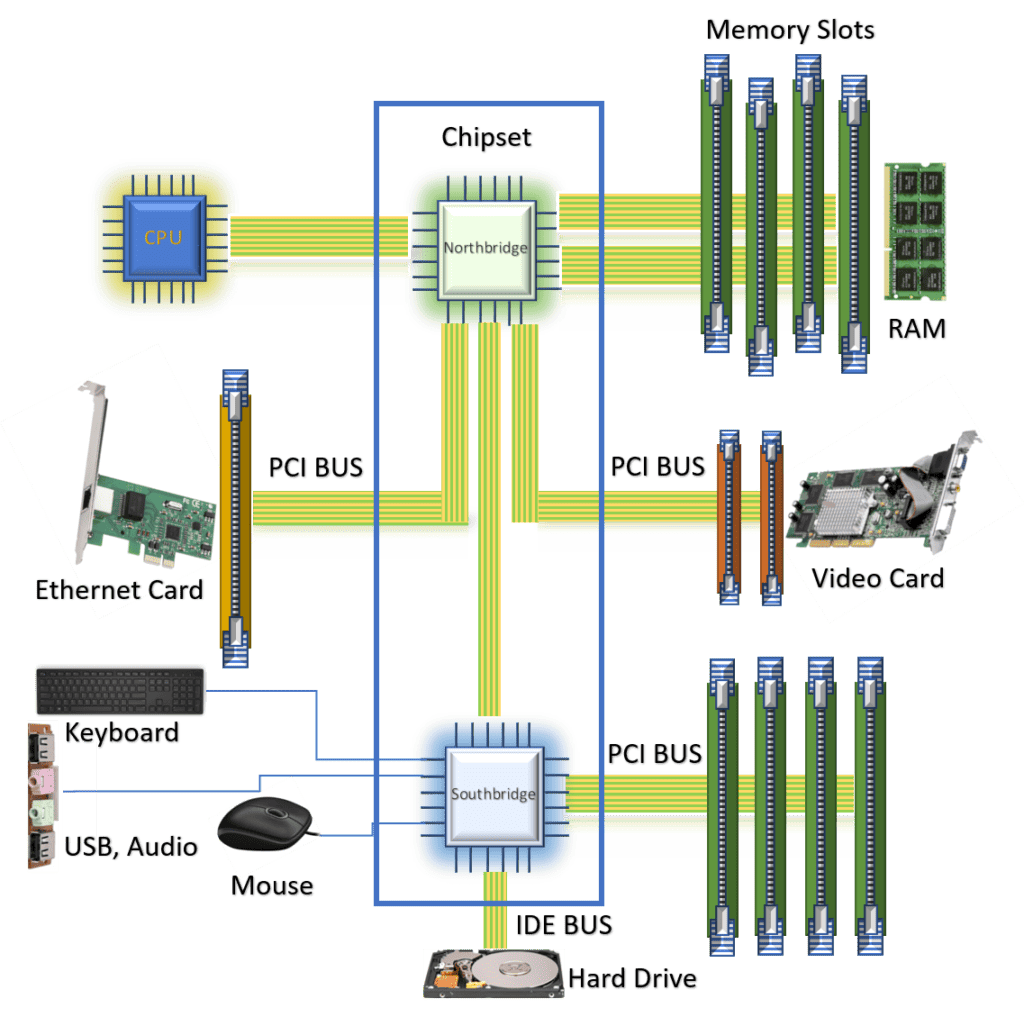
At its most basic level, a chipset is a set of integrated circuits designed to manage the data flow between the CPU, memory, and peripherals. It acts as the communications hub, ensuring that when you click a mouse or save a file to an SSD, the CPU receives that information and processes it correctly.
The Evolution from Northbridge and Southbridge
Historically, motherboard architecture was defined by two distinct chips: the Northbridge and the Southbridge. The Northbridge was responsible for high-speed communication between the CPU, RAM, and the AGP or PCIe graphics slots. Because these components required the lowest latency possible, the Northbridge was physically located closer to the processor.
The Southbridge handled slower tasks, such as USB ports, SATA storage connections, and audio. However, as manufacturing processes shrunk and integration became more efficient, the Northbridge was eventually absorbed into the CPU itself. Modern systems now utilize a single-chip architecture, often called the Platform Controller Hub (PCH) by Intel or simply the Chipset by AMD, which handles the roles formerly assigned to the Southbridge.
The Modern PCH and SoC Design
In the current landscape, the chipset has evolved into a highly specialized I/O (Input/Output) controller. While the CPU now communicates directly with the RAM and the primary graphics card, the chipset manages everything else—from Wi-Fi modules and Ethernet to secondary NVMe slots and RGB lighting controllers. In some mobile devices and ultra-thin laptops, this has evolved further into a System on a Chip (SoC), where the CPU, GPU, and chipset reside on a single piece of silicon to maximize power efficiency.
How Chipsets Define Motherboard Features and Compatibility
The chipset is the primary factor that differentiates a $100 motherboard from a $600 motherboard. While the physical size (ATX, Micro-ATX) matters for your case, the chipset determines the “intelligence” and expansion potential of the board.
CPU Socket and Generation Locking
A chipset is inextricably linked to a specific processor generation and socket type. For instance, Intel’s Z790 chipset is designed for the LGA 1700 socket, supporting 12th, 13th, and 14th Gen processors. You cannot physically or electronically pair an older chipset with a newer CPU unless the manufacturer has specifically designed the socket and firmware to be backward compatible. AMD has been historically more generous in this regard with their AM4 platform, allowing several generations of Ryzen CPUs to run on the same chipsets via BIOS updates.
Expansion Slots and PCIe Lanes
One of the most technical aspects of a chipset is how it manages PCIe lanes. PCIe lanes are like lanes on a highway; the more you have, the more data can travel simultaneously. High-end chipsets provide more “General Purpose” PCIe lanes.
If you plan on running multiple M.2 NVMe SSDs at Gen 5 speeds alongside a high-end GPU, you need a chipset with enough lanes to support that bandwidth without bottlenecking. Lower-end chipsets might limit you to Gen 4 or even Gen 3 speeds, or they might “share” lanes, meaning if you plug in a second SSD, your graphics card might drop from x16 speed to x8 speed.
Connectivity: USB, SATA, and Networking
The chipset also dictates the quantity and quality of your I/O ports. High-end chipsets support the latest USB 4 or USB 3.2 Gen 2×2 standards, offering transfer speeds up to 40Gbps. They also determine the number of SATA ports for traditional hard drives and the integrated networking capabilities, such as support for Wi-Fi 7 or 10Gb Ethernet. If you are a content creator dealing with massive video files, the chipset’s ability to handle high-speed external storage is a deciding factor.
AMD vs. Intel: Navigating the Modern Ecosystems
Both Intel and AMD use a lettering and numbering system to categorize their chipsets into tiers: Entry-level, Mainstream, and Enthusiast. Choosing the right tier is the most important step in the buying process.
Intel Chipset Tiers (Z, H, B Series)
- Z-Series (e.g., Z790): This is the enthusiast tier. It offers the maximum number of PCIe lanes, the most USB ports, and is the only tier that officially supports CPU overclocking. It is designed for gamers and power users who want no compromises.
- B-Series (e.g., B760): This is the “sweet spot” for most users. While it generally doesn’t allow CPU overclocking, it supports memory overclocking and offers enough connectivity for a standard gaming or work setup.
- H-Series (e.g., H610): The budget tier. These boards are stripped down to the essentials, featuring fewer RAM slots and limited high-speed I/O. They are ideal for office PCs or basic home use.
AMD Chipset Tiers (X, B, A Series)
- X-Series (e.g., X670E / X670): Similar to Intel’s Z-series, these provide the most PCIe 5.0 lanes and are built for high-end overclocking and multi-GPU setups (though multi-GPU is increasingly rare). The “E” stands for “Extreme,” indicating guaranteed PCIe 5.0 for both the GPU and the M.2 slots.
- B-Series (e.g., B650): AMD’s B-series is highly popular because, unlike Intel, it often allows for CPU overclocking. It provides a balanced feature set for gamers.
- A-Series (e.g., A620): These are the entry-level boards. They lack overclocking support and have significantly fewer lanes, making them suitable for low-power builds or budget-conscious consumers.
Performance and Overclocking: The Chipset’s Role
While the CPU’s clock speed is the primary driver of performance, the chipset acts as the enabler. Without a supportive chipset, even the fastest processor can be held back by thermal throttling or power delivery limitations.
VRM and Power Delivery Management
Technically, the Voltage Regulator Modules (VRMs) are separate from the chipset, but motherboard manufacturers pair high-end chipsets with high-end VRMs. An enthusiast-grade chipset like the X670E or Z790 is designed to handle the massive power draw of an overclocked i9 or Ryzen 9 processor. A budget chipset, conversely, might have weaker power phases that could overheat if paired with a top-tier CPU, leading to system instability.
Memory Overclocking and Profiles
The chipset also determines how well your system handles RAM. Intel’s XMP (Extreme Memory Profile) and AMD’s EXPO (Extended Profiles for Overclocking) allow users to run RAM at speeds higher than the official industry standards. While most modern mainstream chipsets now allow memory overclocking, the stability of those high speeds is often better on premium chipsets due to superior trace routing and BIOS optimization provided by the manufacturer.
Choosing the Right Chipset for Your Build
Selecting a chipset shouldn’t just be about buying the most expensive option; it’s about matching the hardware to your specific use case.
For Gamers and General Enthusiasts
For the majority of users, a mid-range chipset—the Intel B760 or AMD B650—is the most logical choice. These boards offer a “Goldilocks” zone of features: support for high-speed NVMe storage, plenty of USB ports for peripherals, and solid build quality, all without the price premium of enthusiast features like extreme liquid-nitrogen overclocking support that most will never use.
For Content Creators and Professionals
If your work involves 4K video editing, 3D rendering, or large data transfers, you should opt for the Intel Z790 or AMD X670E. These chipsets provide the “bandwidth headroom” necessary to run multiple high-speed drives and expansion cards (such as capture cards or 10GbE NICs) without the components competing for data lanes.
Future-Proofing and Longevity
When choosing a chipset, consider the platform’s longevity. AMD’s AM5 platform (using 600-series chipsets) is promised to be supported for several years, meaning you can likely upgrade your CPU in 2026 without buying a new motherboard. Intel’s platforms tend to have shorter lifespans, usually supporting only two or three generations of chips.
In conclusion, while the chipset might be a small piece of silicon, its impact on your computing experience is massive. It defines the limits of your hardware, the speed of your storage, and the future upgradeability of your entire system. By understanding the nuances between Intel and AMD’s offerings and the tiers of chipsets available, you can make an informed decision that ensures your PC is not just powerful today, but capable for years to come.
aViewFromTheCave is a participant in the Amazon Services LLC Associates Program, an affiliate advertising program designed to provide a means for sites to earn advertising fees by advertising and linking to Amazon.com. Amazon, the Amazon logo, AmazonSupply, and the AmazonSupply logo are trademarks of Amazon.com, Inc. or its affiliates. As an Amazon Associate we earn affiliate commissions from qualifying purchases.