
In our increasingly digital lives, communication has become instantaneous and often voluminous. From emails that orchestrate global business deals to instant messages that coordinate personal plans, we generate a constant stream of digital conversations. But what happens to these messages once they’ve served their immediate purpose? This is where the concept of “archived messages” comes into play, a fundamental feature within the realm of digital communication and data management. Far from being a mere digital graveyard, archiving messages is a sophisticated process that offers significant benefits for organization, security, and retrieval, playing a crucial role in how we manage our digital information.
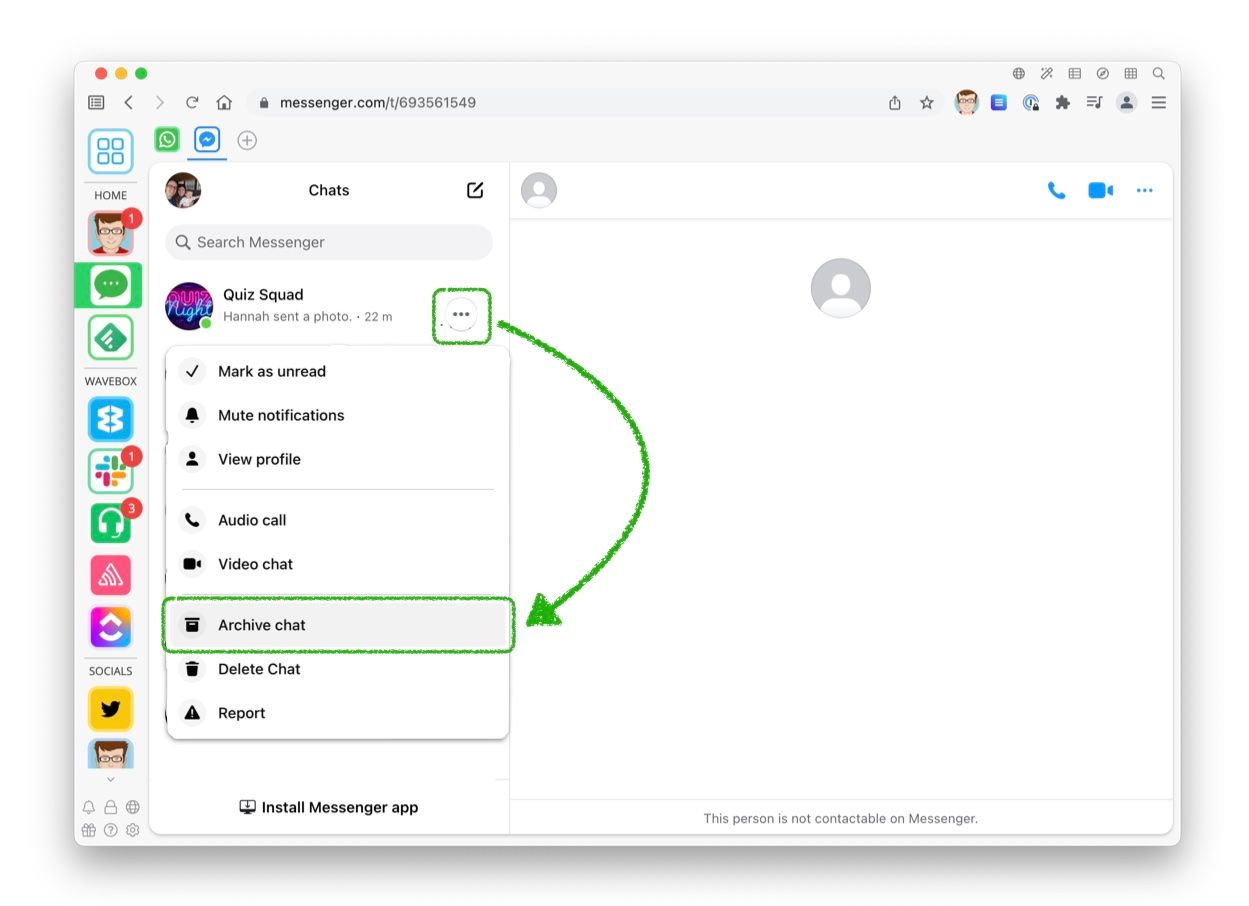
The Core Concept of Archiving
At its heart, archiving a message means moving it from its active, primary inbox or storage location to a separate, more permanent, and often less immediately accessible repository. This action doesn’t delete the message; rather, it effectively “hides” it from the primary view while preserving it for future reference. Think of it like moving files from your desktop to a dedicated filing cabinet. The files are still there, accessible, but they no longer clutter your immediate workspace.
Distinguishing Archiving from Deletion
The most critical distinction to make is between archiving and deleting. Deletion is a permanent act. Once a message is deleted and its associated trash bin or recycle bin is emptied, the data is often irrecoverable, or at least requires specialized and often costly recovery processes. Archiving, on the other hand, is reversible. An archived message can be “unarchived” and returned to its original location at any time. This non-destructive nature is a cornerstone of effective digital information management.
The Purpose Behind Archiving
The primary drivers for archiving messages are multifaceted. Firstly, decluttering active inboxes is a major benefit. A cluttered inbox can be overwhelming, making it difficult to find important, current messages. By archiving older or less immediately relevant conversations, users can maintain a cleaner, more focused primary workspace, improving productivity and reducing mental overhead. Secondly, long-term data retention is another key purpose. Many professions and organizations have legal or regulatory requirements to retain communications for extended periods. Archiving provides a systematic way to ensure this compliance without inundating active systems. Finally, efficient search and retrieval is facilitated by archiving. While active inboxes are optimized for current communication, archived message systems are often built with robust search capabilities, allowing users to quickly locate specific messages from vast historical data stores.
How Archiving Works Across Different Platforms
The implementation of archiving features varies significantly across different communication platforms, reflecting the diverse needs and technical architectures of each. Understanding these variations is key to effectively leveraging archiving for personal and professional use.
Email Archiving
Email remains one of the most prevalent forms of digital communication, and its archiving capabilities are well-established. In most email clients and web interfaces (like Gmail, Outlook, or Apple Mail), archiving an email typically involves a simple button or menu option. This action removes the email from the inbox view and places it into a dedicated “Archive” folder or a similar label.
Internal vs. External Archiving Systems
- Internal Systems: Many email providers offer built-in archiving functionalities. When you archive an email, it’s stored within your account’s storage quota, accessible through the archive folder or search function. This is convenient for individual users but may not meet stringent long-term retention requirements for businesses.
- External Archiving Solutions: For organizations, specialized email archiving solutions exist. These are often cloud-based or on-premises systems that automatically capture and store all incoming and outgoing emails, often in a tamper-evident format. This ensures compliance with regulations like HIPAA, SOX, or GDPR, providing a legally sound record of communications. These systems are designed for large-scale data management, offering features like policy-based retention, e-discovery tools, and granular access controls.
Search and Retrieval in Email Archives
The power of email archiving lies in its search capabilities. Advanced search filters, Boolean operators, and keyword searches allow users to pinpoint specific emails based on sender, recipient, subject, date range, or even content within the email body and attachments. This is invaluable for recalling details of past projects, client interactions, or important decisions.
Instant Messaging and Collaboration Tools
Archiving in instant messaging (IM) and collaboration platforms like Slack, Microsoft Teams, or WhatsApp has evolved to address the ephemeral nature of real-time conversations. Unlike traditional email, IMs can be highly dynamic and conversational, making their archiving crucial for team collaboration and knowledge management.
Message Retention Policies
Many IM platforms allow administrators to set message retention policies. This determines how long messages are stored before being automatically deleted or archived. Some platforms offer a default retention period, while others allow for customizable settings based on organizational needs.
User-Initiated Archiving
Beyond system-wide policies, individual users often have the ability to archive specific conversations or channels. This might involve “muting” a channel to remove it from the primary view or using a specific “archive” function if available. This allows users to manage their own view of active conversations without affecting what others see or what is retained by the platform.
Search and Audit Trails
Similar to email, these platforms provide robust search functionalities within archived messages. This is vital for team leaders to track project discussions, for HR to review employee interactions, or for individuals to recall past decisions. In enterprise settings, these archived messages also form part of audit trails, providing a record of communication for compliance and dispute resolution.
Social Media and Other Digital Platforms
The concept of archiving also extends to social media and other digital platforms where communication and content sharing occur. While the terminology might differ, the underlying principle of preserving content for later access remains.
Saving Posts and Conversations
Platforms like Facebook allow users to “save” posts or specific conversations for later viewing. This isn’t true archiving in the sense of moving to a separate storage, but rather bookmarking for easy retrieval within the platform. Twitter’s “Likes” and “Bookmarks” serve a similar function.
Platform-Specific Archiving Features

Some platforms offer more explicit archiving features. For instance, professional networking sites might allow users to archive connections or past discussions. In the context of digital marketing, social media management tools often include archiving features for past campaigns, posts, and user interactions, which are crucial for performance analysis and historical context.
The Benefits of Effective Message Archiving
Beyond mere storage, properly implemented message archiving offers a wealth of benefits that can profoundly impact productivity, compliance, and data security.
Enhanced Productivity and Focus
A primary advantage of archiving is the significant boost to productivity. By removing inactive or completed conversations from the immediate view of an inbox or chat window, users can significantly reduce distractions. This allows for a more focused approach to current tasks and incoming communications. Imagine trying to find an urgent email in an inbox with thousands of old, irrelevant messages. Archiving streamlines this process, making it easier to identify and act upon what is truly important now. The psychological benefit of a cleaner digital workspace also contributes to reduced stress and improved mental clarity, further enhancing productivity.
Legal and Regulatory Compliance
For many businesses and professions, retaining communications is not just good practice; it’s a legal and regulatory necessity. Industries such as finance, healthcare, and law are subject to strict regulations that mandate the preservation of electronic records, including emails and instant messages, for specific periods.
E-Discovery and Litigation Support
In the event of litigation or regulatory investigations, organizations need to be able to quickly and accurately produce relevant electronic evidence. Robust archiving systems are indispensable for e-discovery processes. They provide a searchable, organized, and often immutable repository of communications, allowing legal teams to identify and retrieve pertinent information efficiently, thus reducing the time and cost associated with discovery.
Audit Trails and Accountability
Archived messages serve as critical audit trails. They provide a verifiable record of who said what, when, and to whom. This is invaluable for accountability, dispute resolution, and ensuring that organizational policies and ethical standards are being upheld. In a remote or hybrid work environment, where direct oversight can be challenging, a well-maintained archive of communications becomes an even more important tool for ensuring transparency and accountability.
Data Security and Disaster Recovery
Archiving plays a vital role in the broader landscape of data security and disaster recovery.
Reducing Data Footprint in Active Systems
By moving older messages to a dedicated archive, organizations can reduce the amount of data stored in their primary operational systems (like mail servers or collaboration platforms). This can improve the performance of these active systems and reduce the costs associated with their maintenance and backup.
Protection Against Data Loss
Dedicated archiving solutions are often designed with enhanced security features, including encryption, access controls, and regular backups. This protects archived messages from accidental deletion, hardware failures, or malicious attacks that could compromise active systems. In the event of a disaster, such as a server crash or a ransomware attack, the archived data serves as a crucial recovery asset, ensuring that vital communications are not lost permanently. Furthermore, some archiving solutions offer immutability, meaning that once data is archived, it cannot be altered or deleted, providing an extra layer of protection against tampering.
Best Practices for Managing Archived Messages
To fully harness the power of message archiving, adopting best practices is essential. This ensures that your archived data is not only preserved but also remains accessible and useful for its intended purposes.
Establishing Clear Archiving Policies
The foundation of effective archiving lies in clear, well-defined policies. These policies should address several key areas:
- What to Archive: Determine which types of messages and communication channels require archiving. This might include all business emails, specific project-related conversations, or messages containing sensitive information.
- How Long to Retain: Establish specific retention periods based on legal, regulatory, and business needs. This could range from a few months to many years, or even indefinitely for certain critical records.
- Who Can Archive/Access: Define user roles and permissions related to archiving and accessing archived messages. This ensures data security and privacy.
- Archiving Triggers: Specify when messages should be archived. This could be a set time after a conversation is inactive, upon project completion, or based on specific keywords or content.
Implementing Robust Search Strategies
An archive is only as good as its searchability. Investing in and training users on effective search strategies is paramount.
- Leverage Advanced Search Functions: Understand and utilize the full capabilities of your archiving platform’s search engine. This includes using Boolean operators (AND, OR, NOT), wildcards, date range filters, and content-specific searches.
- Develop Keyword Lexicons: For organizations, creating and maintaining a lexicon of relevant keywords and phrases can significantly improve search accuracy and efficiency, especially during e-discovery.
- Regularly Test Search Capabilities: Periodically test search queries to ensure they are returning accurate and comprehensive results, and to identify any potential gaps in your archiving strategy or indexing.

Regular Auditing and Review
Archiving systems, like any other digital infrastructure, require regular oversight.
- Policy Adherence Audits: Conduct periodic audits to ensure that archiving policies are being followed consistently across the organization. This helps identify any deviations or non-compliance issues.
- Data Integrity Checks: Regularly verify the integrity of the archived data. This ensures that messages have not been corrupted or lost during the archiving process.
- Review Retention Schedules: Periodically review and update retention schedules to align with evolving legal, regulatory, and business requirements. What was relevant yesterday might not be sufficient for tomorrow.
By embracing these best practices, individuals and organizations can transform message archiving from a passive storage solution into a dynamic tool for efficiency, compliance, and robust data management. Archived messages are not just a digital record; they are a testament to digital communication’s evolution and a crucial component of modern information governance.
aViewFromTheCave is a participant in the Amazon Services LLC Associates Program, an affiliate advertising program designed to provide a means for sites to earn advertising fees by advertising and linking to Amazon.com. Amazon, the Amazon logo, AmazonSupply, and the AmazonSupply logo are trademarks of Amazon.com, Inc. or its affiliates. As an Amazon Associate we earn affiliate commissions from qualifying purchases.