
The question on many minds, from the casual user to the seasoned tech enthusiast, is a simple yet profound one: Is Windows 11 worth installing? As Microsoft’s latest operating system matures, its appeal continues to be debated. But for those who understand the interconnectedness of technology, brand perception, and financial implications, this decision carries more weight than a simple software update. This article will dissect Windows 11’s offerings, considering its technological advancements, its impact on your digital brand, and the tangible financial benefits or drawbacks it presents.

The Technological Evolution: What Windows 11 Brings to the Table
At its core, Windows 11 represents a significant visual and functional overhaul compared to its predecessor, Windows 10. Microsoft has clearly prioritized a more modern, streamlined user experience, and this is immediately apparent.
A Refreshed Interface: The Dawn of a New Aesthetic
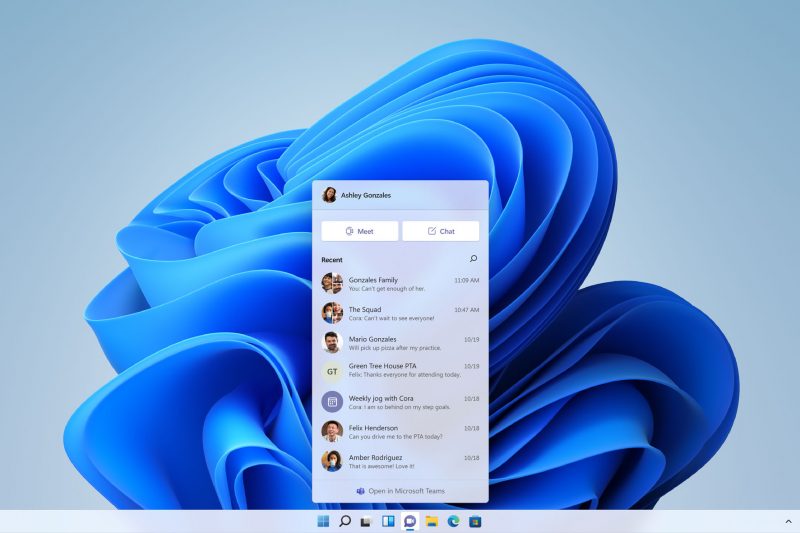
The most striking change is the revamped user interface. Gone is the sharp, angular design of Windows 10, replaced by rounded corners, softer edges, and a visually pleasing centered Start Menu. This is not merely cosmetic; it aims to create a more intuitive and less cluttered environment. For individuals and businesses alike, a clean and modern digital workspace can positively influence productivity and brand perception. Think of it as decluttering your physical desk to improve focus – the digital equivalent is just as important.
The taskbar has also seen a substantial redesign, with icons now centered by default. While this can be toggled back to the left, the shift aligns with a more fluid, almost mobile-like interaction paradigm. The Settings app has been reorganized, making it easier to navigate and find the specific options you need. This improved discoverability can save valuable time, a critical factor when we consider the “Money” aspect later.
Enhanced Productivity and Multitasking: Tools for the Modern Workflow
Windows 11 introduces several features designed to boost productivity, particularly for those who juggle multiple applications and tasks. Snap Layouts and Snap Groups are game-changers. With a simple hover over the maximize button, users are presented with pre-defined layouts for arranging windows on their screen. This significantly reduces the manual effort of resizing and positioning applications, allowing for more efficient multitasking. For professionals who rely on split-screen workflows, this is a welcome improvement.
Virtual Desktops have also been enhanced, offering greater customization options. You can now assign different wallpapers to each virtual desktop, making it easier to distinguish between your work, personal, or project-specific environments. This visual separation can be a powerful tool for maintaining focus and organization, directly impacting your ability to execute tasks efficiently.
Gaming on Windows 11: A Leap Forward for Enthusiasts
For the gaming community, Windows 11 brings notable advancements. Features like Auto HDR, which automatically adds HDR enhancements to many DirectX 11 and DirectX 12 games that don’t natively support it, and DirectStorage, which promises faster game loading times by allowing GPUs to directly load assets from NVMe SSDs, are significant. While not every user is a gamer, these advancements highlight Microsoft’s commitment to leveraging hardware capabilities for a more immersive and performant experience. This commitment to pushing the boundaries of hardware utilization is a positive sign for the platform’s future, even for non-gaming applications.
Under the Hood: Performance and Security Improvements
Beyond the visible changes, Windows 11 boasts under-the-hood improvements. Microsoft claims better performance, reduced background resource consumption, and enhanced security. The emphasis on security is particularly noteworthy. With stricter hardware requirements, including a Trusted Platform Module (TPM) 2.0, Windows 11 is designed to be more resilient against modern threats. For businesses and individuals handling sensitive data, this heightened security posture is a crucial consideration.
Branding in the Digital Age: How Your Operating System Shapes Perception
In today’s hyper-connected world, your digital presence is an extension of your personal or corporate brand. The tools you use, and how you present them, subtly influence how you are perceived by clients, colleagues, and the wider market.
The First Impression: A Modern Interface for a Modern Brand
Your computer’s operating system is often the first point of contact for someone interacting with your digital workspace. A dated or clunky interface can inadvertently signal a lack of attention to detail or a reluctance to embrace modern solutions. Windows 11, with its sleek and contemporary design, offers a visual upgrade that can contribute to a more polished and professional image.
For freelancers, entrepreneurs, and businesses, this matters. When you’re on a video call, or sharing your screen during a presentation, the aesthetic of your desktop reflects on your brand. A visually appealing and well-organized Windows 11 environment can subtly reinforce an image of innovation, efficiency, and forward-thinking. It’s about presenting a digital facade that aligns with your brand’s aspirations.
Productivity as a Brand Attribute: Delivering on Promises
Your ability to deliver results is a core component of your brand. If your operating system hinders your productivity through slow performance, cumbersome multitasking, or difficult navigation, it can indirectly impact your brand’s reputation for reliability and efficiency. Windows 11’s focus on improved multitasking, enhanced search, and a more intuitive interface aims to smooth out these friction points.
By leveraging features like Snap Layouts, you can demonstrate a more organized and efficient workflow. This isn’t just about personal convenience; it’s about showing clients and collaborators that you are a professional who uses modern tools to achieve optimal results. A brand that is perceived as technologically adept and highly productive is more likely to attract and retain business.
Embracing the Future: Signaling Adaptability and Innovation
Adopting a newer operating system can also signal to the market that you are adaptable and embrace innovation. While Windows 10 is still a robust and capable OS, actively upgrading to Windows 11 demonstrates a willingness to explore and implement the latest technological advancements. This can be particularly important in tech-driven industries or for brands that position themselves as leaders in their field. It shows you’re not just keeping up; you’re looking ahead.
However, it’s also important to acknowledge the flip side. For some established brands, especially those with legacy software dependencies or a strong emphasis on extreme stability, a sudden leap to a newer OS might raise concerns about compatibility and potential disruptions. This is where a strategic approach to branding comes into play, balancing innovation with the need for uninterrupted operations.
The Financial Calculus: Is Windows 11 a Smart Investment?
The decision to upgrade to Windows 11 isn’t purely about aesthetics or performance; it has tangible financial implications for both individuals and businesses.
The Cost of Upgrade: Beyond the Price Tag
For most users with compatible hardware, the upgrade from Windows 10 to Windows 11 is free. This is a significant financial advantage, making the decision to explore the new OS less of a direct monetary expenditure and more of an investment in potential future gains. However, the true cost of upgrading can involve factors beyond the software price:
- Hardware Compatibility: The most significant financial hurdle for some is hardware compatibility. Windows 11 has stricter hardware requirements, notably requiring a TPM 2.0 module and a relatively modern CPU. For users with older machines, this might necessitate a hardware upgrade or even a new computer, which represents a substantial upfront investment. Calculating whether the benefits of Windows 11 outweigh the cost of new hardware is crucial.
- Time Investment: Even with a free software upgrade, there’s an investment of time. This includes downloading and installing the OS, reconfiguring settings, and potentially reinstalling applications. For individuals, this might mean a few hours of lost personal time. For businesses, this can translate into downtime for employees, impacting billable hours or project timelines.
- Software Compatibility: While most modern applications are compatible with Windows 11, there’s always a risk with older or niche software. Businesses relying on specific legacy applications might face the added cost of updating or replacing that software to ensure compatibility, adding to the overall expense of the upgrade.
Productivity Gains and Cost Savings: The ROI of Efficiency
The primary financial justification for installing Windows 11 lies in its potential to enhance productivity and, consequently, lead to cost savings.
- Time is Money: As discussed, features like Snap Layouts and improved multitasking can lead to more efficient workflows. If you can complete tasks 10% faster, or manage your time more effectively, this translates directly into economic value, whether it’s more billable hours for a freelancer or more projects completed for a business.
- Reduced IT Support Overhead: For businesses, a more intuitive and stable operating system can potentially lead to fewer user-related issues and a reduced burden on IT support staff. Fewer troubleshooting calls and less time spent resolving basic software problems can result in significant cost savings for the IT department.
- Enhanced Security as Risk Mitigation: The enhanced security features in Windows 11, such as the reliance on TPM 2.0, can act as a form of risk mitigation. Data breaches and cyberattacks can be astronomically expensive, involving not just financial losses but also reputational damage. By investing in a more secure operating system, businesses can potentially avoid much larger future costs associated with security incidents.
The Opportunity Cost: What Are You Missing By Not Upgrading?
Beyond the direct costs and benefits, there’s also the concept of opportunity cost. By sticking with an older operating system, you might be missing out on:
- Access to the Latest Software and Features: As software developers continue to innovate, they will increasingly focus on optimizing for the latest operating systems. By delaying your upgrade, you might find yourself unable to access the newest features or integrations that could further enhance your productivity or competitive edge.
- Staying Competitive: In a fast-paced market, being technologically current is often a requirement for staying competitive. If your competitors are leveraging the latest tools and efficiencies offered by Windows 11, and you are not, you might be at a disadvantage.
- Support and Updates: Eventually, older operating systems will reach their end-of-life for support. While Windows 10 is still well-supported, the ongoing development and security updates are gradually shifting towards Windows 11. Relying on an unsupported OS becomes a significant security risk and can lead to compatibility issues down the line.

The Verdict: Is Windows 11 Worth It For You?
The question of whether Windows 11 is worth installing is not a simple yes or no. It’s a nuanced decision that depends heavily on your individual or organizational context.
For the tech-savvy individual who embraces innovation, values a modern aesthetic, and seeks enhanced productivity tools, Windows 11 is likely a worthwhile upgrade, especially if their hardware meets the requirements. The free upgrade path further sweetens the deal.
For businesses and professionals focused on brand perception and operational efficiency, Windows 11 offers compelling advantages. The cleaner interface can enhance professional image, and the productivity features can lead to tangible cost savings and improved output. However, a thorough assessment of software compatibility and potential hardware upgrade costs is essential before a widespread rollout.
From a financial perspective, the “free” upgrade masks potential hardware costs. The return on investment comes from the increased productivity, reduced support overhead, and enhanced security. For those whose hardware is compatible and who can leverage the new features, Windows 11 can be a sound financial decision. However, if the upgrade necessitates significant hardware investment that outweighs the projected productivity gains, it might be prudent to wait or re-evaluate.
Ultimately, Windows 11 represents Microsoft’s vision for the future of personal computing. It’s a more polished, potentially more productive, and certainly more secure operating system. By carefully considering its technological merits, its impact on your digital brand, and its financial implications, you can make an informed decision about whether this latest iteration of Windows is the right step for you.
aViewFromTheCave is a participant in the Amazon Services LLC Associates Program, an affiliate advertising program designed to provide a means for sites to earn advertising fees by advertising and linking to Amazon.com. Amazon, the Amazon logo, AmazonSupply, and the AmazonSupply logo are trademarks of Amazon.com, Inc. or its affiliates. As an Amazon Associate we earn affiliate commissions from qualifying purchases.