
The landscape of professional sports broadcasting has undergone a seismic shift over the last decade, moving away from the traditional constraints of linear cable television toward an integrated, app-driven digital ecosystem. For Major League Soccer (MLS) fans, this transition reached its zenith with the league’s historic partnership with Apple. This evolution represents more than just a change in channel; it is a fundamental transformation in how digital content is delivered, processed, and consumed across a multitude of hardware platforms. Understanding how to watch MLS games today requires a grasp of modern streaming protocols, device compatibility, and the specialized software that powers the “MLS Season Pass.”
The Digital Architecture of the MLS Season Pass
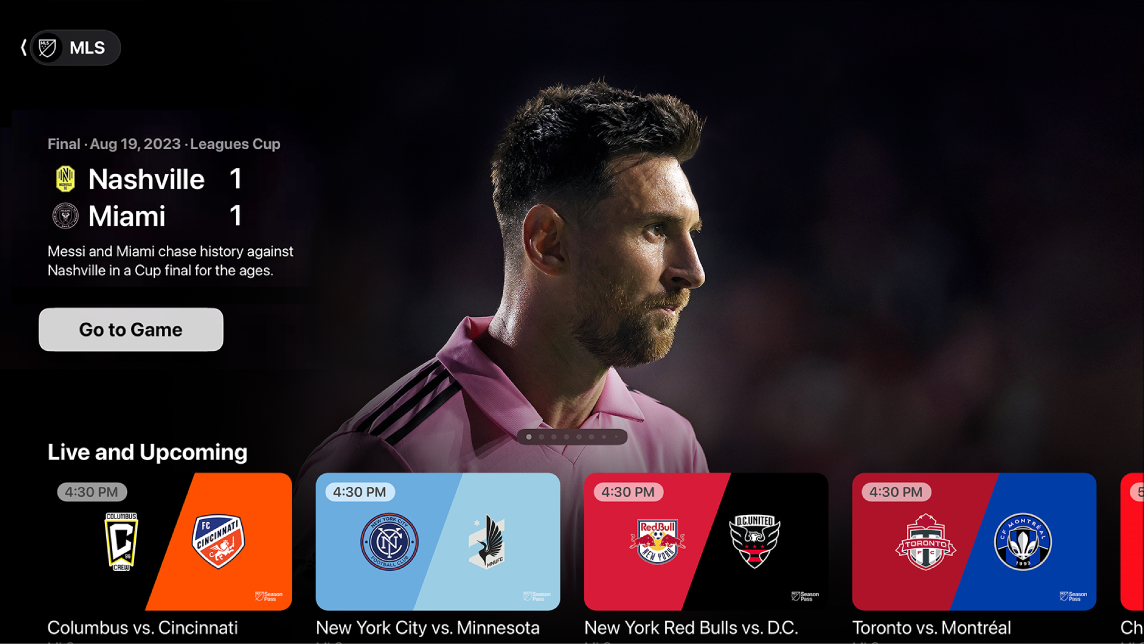
At the center of the MLS viewing experience is the Apple TV app, which serves as the primary gateway for every live match, highlights, and original programming. This is not merely a video player but a sophisticated software environment designed to handle high-concurrency live streaming.
The Apple TV App Ecosystem
The Apple TV app is the central hub for the MLS Season Pass. Unlike traditional apps that might require separate logins for different regions, this platform uses a unified global architecture. Because Apple controls the hardware, software, and services stack, the app is optimized for low-latency delivery. To access it, users must navigate the interface to the “Sports” tab or search specifically for MLS. The software is designed with a “universal search” feature, meaning that if you have an Apple ID, your viewing history and “Up Next” queue sync across every device in your digital ecosystem, from iPhones to Smart TVs.
High-Definition Delivery and Bitrate Management
Watching sports in high definition requires significant bandwidth and sophisticated encoding. MLS games are broadcast in 1080p at 60 frames per second (fps). While some might look for 4K, the 60fps standard is technically superior for fast-moving sports, as it reduces motion blur—a common artifact in lower frame-rate digital streams. The technology behind the scenes uses Adaptive Bitrate Streaming (ABS). This software mechanism detects your internet speed in real-time and adjusts the quality of the video stream dynamically. If your bandwidth drops, the app lowers the resolution to prevent buffering, ensuring the “live” aspect of the game is never interrupted by a spinning loading icon.
Multi-Language Audio Tracks and Data Overlays
One of the most advanced technical features of the MLS Season Pass is the ability to toggle audio tracks without restarting the stream. Users can choose between English and Spanish commentary, and in some cases, French. Furthermore, there is a software integration that allows fans to overlay local radio broadcasts over the live video. This requires precise synchronization technology to ensure the audio from a local radio station matches the visual frames of the digital broadcast, accounting for the inherent delay in satellite and fiber-optic transmissions.
Optimizing Hardware for the Ultimate Viewing Experience
While the software provides the content, the hardware you choose dictates the visual fidelity and responsiveness of the stream. To watch MLS games effectively, you must ensure your hardware stack can handle high-throughput data.
Set-Top Boxes and Streaming Sticks
For the most stable experience, dedicated streaming hardware is often superior to built-in Smart TV apps.
-
Apple TV 4K: This is the flagship device for MLS. It utilizes the A15 Bionic chip, which allows for incredibly fast UI navigation and the unique “Multiview” feature.
-
Roku and Amazon Fire TV: These devices support the Apple TV app and provide a cost-effective way to access the league. When using these, it is vital to ensure you are using the latest generation of the “Stick” or “Cube” to avoid lag within the app menus.
-
Chromecast with Google TV: This allows for seamless “casting” from a smartphone or tablet to a television, utilizing the Google Cast protocol to hand off the stream URL directly to the TV, freeing up the mobile device for other tasks.
The Role of HDMI 2.1 and Display Technology
To get the most out of a 60fps MLS stream, the connection between your streaming device and your TV matters. Using an HDMI 2.1 cable ensures that there is enough bandwidth to handle the high frame rate alongside HDR (High Dynamic Range) metadata. If your display supports “Game Mode” or “Auto Low Latency Mode” (ALLM), enabling these features can sometimes reduce the processing lag of the television, making the motion of the soccer ball appear smoother and more lifelike.
Internet Infrastructure: Wired vs. Wireless
While modern Wi-Fi 6 and 6E standards are capable of handling high-definition sports, a hardwired Ethernet connection remains the gold standard for live streaming. A wired connection eliminates “jitter”—the variance in time between data packets arriving—which is the primary cause of sudden drops in stream quality. For those relying on Wi-Fi, placing the router in a line-of-sight position to the streaming device or utilizing a Mesh Wi-Fi system can help maintain the 15-25 Mbps download speed required for a flawless MLS experience.
Navigating Cross-Platform Compatibility
The beauty of the current MLS tech stack is its platform-agnostic nature. You are no longer tethered to a living room television; the software is designed to move with the user.

Mobile App Integration
On iOS and Android, the Apple TV app (and the MLS Season Pass within it) offers features tailored for smaller screens. This includes “Picture-in-Picture” (PiP) mode, which allows you to keep the game in a small window while answering emails or browsing the web. On the technical side, these apps are optimized for cellular data, using H.265 (HEVC) compression to deliver high-quality video while consuming less data than older formats.
Desktop and Browser-Based Viewing
For those watching on a PC or Mac, the experience is handled through a web browser via tv.apple.com. This requires a browser that supports FairPlay or Widevine DRM (Digital Rights Management). For the best results, using Safari on Mac or Edge on Windows is recommended, as these browsers have deeper integration with the operating system’s hardware acceleration, leading to better battery life on laptops and smoother video playback.
Consoles and Smart TVs
Modern gaming consoles like the PlayStation 5 and Xbox Series X/S are powerful media hubs. They host native versions of the Apple TV app that take advantage of the consoles’ massive processing power to deliver ultra-fast load times. Similarly, most Smart TVs manufactured after 2018 (including those from Samsung, LG, Vizio, and Sony) feature the app natively, removing the need for external hardware altogether.
Security, Privacy, and Digital Hygiene
In the digital age, how you access your stream is just as important as the stream itself. Watching MLS games through official apps is the only way to ensure your hardware remains secure.
Avoiding Unlicensed Streams
While it may be tempting to seek out third-party “free” streams, these sites are often vectors for malware, phishing, and intrusive tracking scripts. From a technical standpoint, these streams are usually “scraped” from official sources and rebroadcast with significant lag—sometimes up to two minutes behind the live action. Official apps use encrypted tunnels to deliver content, protecting your IP address and personal data.
Managing Subscriptions and Digital Security
When setting up your MLS Season Pass, it is crucial to use a strong, unique password and enable Multi-Factor Authentication (MFA) on your Apple ID or streaming account. Since these accounts are often linked to credit cards and other personal services, they are high-value targets for hackers. Utilizing a password manager to generate and store these credentials is a fundamental step in modern digital hygiene.
VPNs and Geographic Considerations
One of the most significant technical advantages of the MLS-Apple partnership is the elimination of “blackouts.” In the old cable model, local games were often blocked in the home market. With the current global streaming model, these geographic restrictions are largely a thing of the past. However, some fans still use VPNs (Virtual Private Networks) to encrypt their traffic or to maintain access to their home country’s version of the app while traveling abroad. If using a VPN, it is important to select a provider that offers high-speed servers optimized for streaming to avoid the bottleneck effect.
The Future of Sports Tech: Beyond the Standard Stream
The current method of watching MLS is just the beginning of a larger technological shift toward immersive broadcasting.
AI and Real-Time Analytics
We are seeing the integration of real-time data overlays powered by AI. Sophisticated tracking cameras in stadiums feed data into software engines that can calculate player speed, shot probability, and passing accuracy in real-time. In the future, the apps used to watch MLS games will likely allow users to toggle these “data skins” on and off, creating a customizable, interactive broadcast.
Multiview and Interactive Features
Currently available on the Apple TV 4K hardware, “Multiview” allows fans to watch up to four matches simultaneously on one screen. This is a significant technical feat, as it requires the device to decode four separate high-definition video streams at once. As processing power in mobile devices and smart TVs increases, we can expect this feature to migrate to more platforms, providing a “Command Center” experience for the dedicated soccer fan.

Virtual and Augmented Reality
With the advent of spatial computing devices like the Apple Vision Pro, the “screen” becomes infinite. Future updates to the MLS viewing experience will likely include immersive 180-degree or 360-degree cameras placed at pitch level, allowing fans to feel as though they are sitting in the front row, all powered by the same app infrastructure used today.
By mastering the apps, hardware, and connectivity requirements of the modern era, fans can ensure they never miss a moment of the action. The technology behind watching MLS games has transformed the sport from a passive viewing experience into a high-tech, customizable, and globally accessible digital service.
aViewFromTheCave is a participant in the Amazon Services LLC Associates Program, an affiliate advertising program designed to provide a means for sites to earn advertising fees by advertising and linking to Amazon.com. Amazon, the Amazon logo, AmazonSupply, and the AmazonSupply logo are trademarks of Amazon.com, Inc. or its affiliates. As an Amazon Associate we earn affiliate commissions from qualifying purchases.