
Understanding where and how to access your bank account number is a fundamental aspect of personal finance, crucial for a variety of essential transactions. Whether you’re setting up direct deposit, initiating a wire transfer, paying bills, or simply reconciling your records, knowing how to quickly and securely locate your Chase account number is invaluable. This guide will walk you through the most reliable methods to find this critical piece of information, ensuring you can manage your finances efficiently and safely. We’ll explore digital platforms, physical documents, and direct assistance options, all while emphasizing the importance of security in handling your sensitive financial data.
Navigating Chase Online Banking and the Mobile App
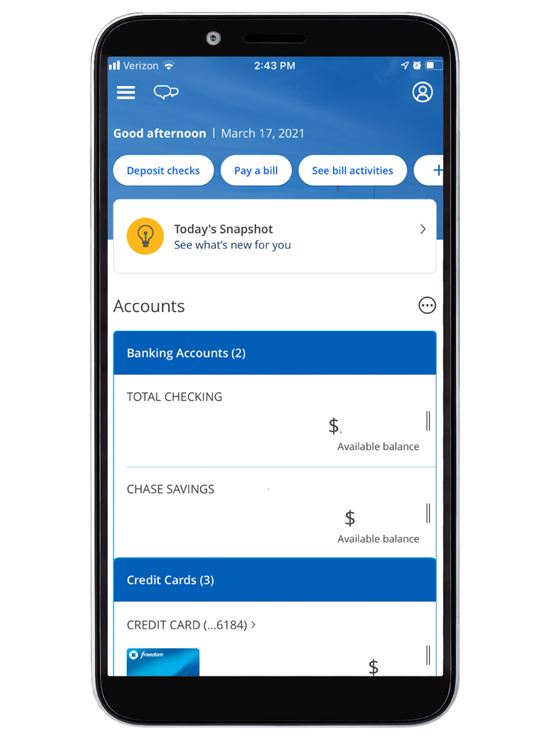
In today’s digital age, your Chase account number is often just a few clicks or taps away. Chase’s robust online banking platform and feature-rich mobile app are designed to give you convenient access to your account details, including your full account number. This method is typically the quickest and most secure for most customers, provided you have your login credentials handy.
Locating Your Account Number Online
Accessing your account number through Chase’s online banking portal requires a secure connection and your personalized login information. This method is highly recommended for its convenience and the robust security measures employed by Chase.
- Log In Securely: Begin by navigating to the official Chase website (chase.com) and logging into your account using your User ID and Password. Always ensure you are on the legitimate Chase domain to avoid phishing scams.
- Select the Desired Account: Once logged in, you’ll see a dashboard listing all your Chase accounts (checking, savings, credit cards, etc.). Click on the specific checking or savings account for which you need the account number.
- Access Account Details or Statements: Look for an option such as “Account Details,” “See Details,” or “Statements.” These links are usually found near the account summary or within a menu associated with that specific account. For most checking and savings accounts, Chase will display the last four digits of your account number on the main summary page, but to see the full number, you’ll need to delve deeper.
- View Full Account Number: Often, within the “Account Details” section, you’ll find a link or button that says “Show full account number” or something similar. For security, you might be prompted to re-enter your password or complete a multi-factor authentication step (e.g., a code sent to your phone) to reveal the full number. In some cases, especially for older interfaces or specific account types, your full account number may be readily visible on a digital statement, which you can typically access by clicking on “Statements & Documents.” Remember that the account number is distinct from the routing number; the routing number identifies the financial institution, while the account number identifies your specific account within that institution.
Accessing Details Through the Chase Mobile App
The Chase Mobile App offers a streamlined experience for accessing your financial information on the go. While some older versions or interfaces might limit the full display of your account number for security reasons, newer versions increasingly provide this functionality securely.
- Open and Log In: Launch the Chase Mobile App on your smartphone or tablet and log in using your User ID and Password, or via biometric authentication (fingerprint, face ID) if enabled.
- Select Account: From the app’s home screen, tap on the checking or savings account whose number you need.
- Find Account Details: Look for an option like “Show Details,” “Account Details,” or a similar link usually found beneath the account summary.
- Reveal Full Number (if applicable): Similar to online banking, you might see the last few digits initially. There might be a “Show full account number” option that requires further verification (e.g., PIN, biometric scan, or a security code) to reveal the complete number. If not directly visible, accessing your e-statements through the app is another reliable way. The app usually has a section for “Statements & Documents” where you can download or view past statements, which will clearly display your account number.
It’s crucial to exercise caution when viewing sensitive information on public Wi-Fi networks and always log out of your account when you’re finished.
Traditional Methods: Physical Documents
While digital access is highly convenient, traditional physical documents remain a reliable source for locating your Chase account number. These methods are particularly useful if you prefer paper records or if you encounter issues accessing your online accounts. Keeping these documents organized and secure is a key part of responsible financial management.
Checking Your Bank Statements
Bank statements are comprehensive records of your account activity and prominently display essential account information, including your full account number.
- Paper Statements: If you receive paper statements from Chase by mail, locate a recent statement. Your full account number is typically printed near the top of the statement, usually in a header section alongside your name, address, and the statement period. It’s often found close to the routing number.
- E-Statements: Even if you’ve opted for paperless statements, you can access your digital statements through your Chase online banking account or mobile app. Navigate to the “Statements & Documents” section, select the desired account and statement period, and then view or download the PDF. The account number will be in the same prominent location as it would be on a physical paper statement. E-statements offer an excellent balance of convenience and security, as they are stored digitally within Chase’s secure environment.
Referencing Your Chase Checkbook
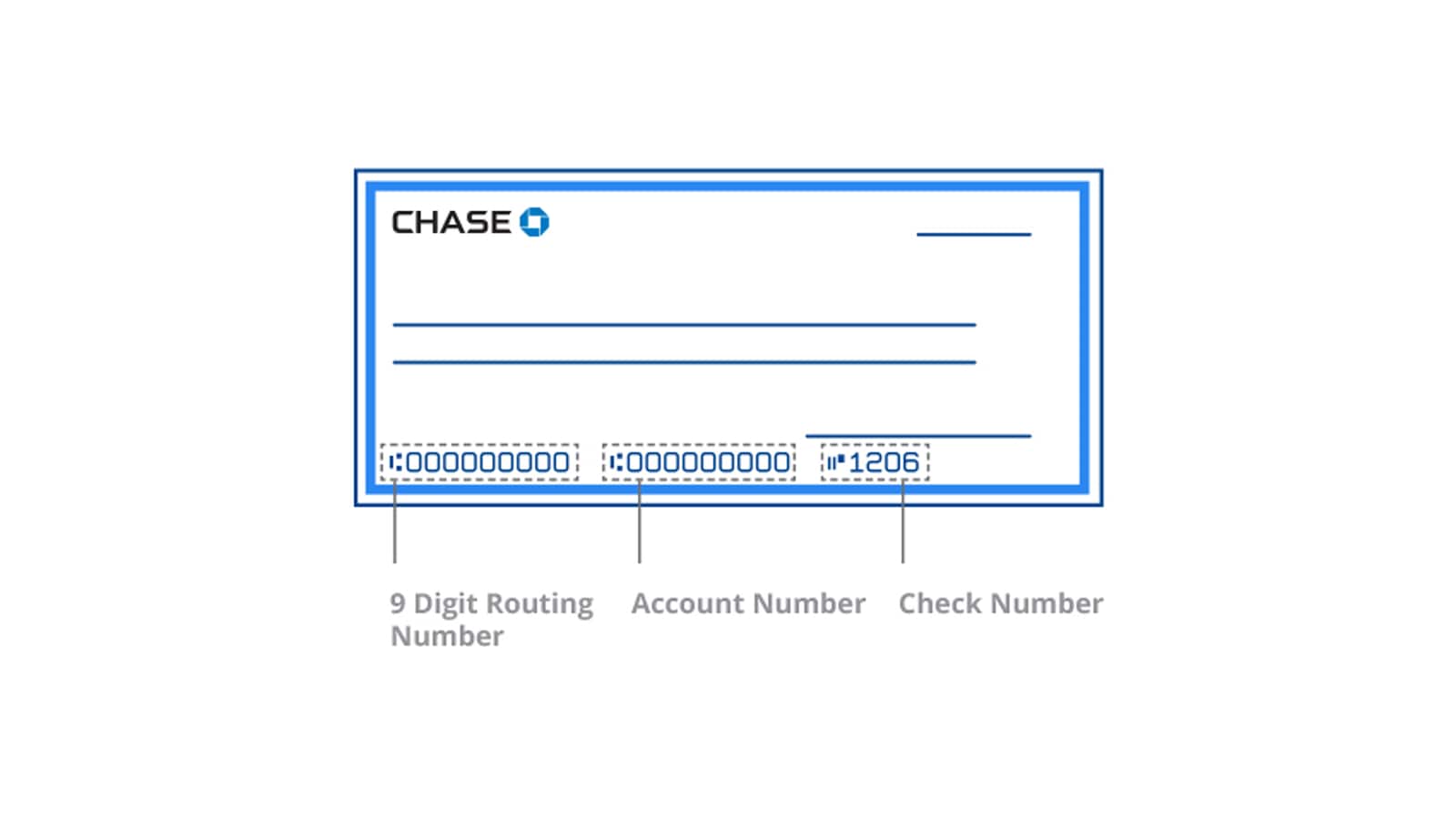
For checking accounts, your checkbook is an immediate and widely recognized source for your account number. It’s important to understand the layout of the numbers at the bottom of a check.
- Locate a Check: Grab a blank check from your Chase checkbook.
- Identify the Numbers: At the bottom of the check, you will see a series of three sets of numbers printed using magnetic ink character recognition (MICR) font.
- The first set of numbers (usually nine digits) on the far left is your bank’s routing number. This identifies Chase as the financial institution.
- The second set of numbers, located in the middle, is your full checking account number. This is the unique identifier for your specific account.
- The third set of numbers on the far right is the check number itself.
Ensure you distinguish between your routing number and your account number, as they serve different purposes. Never share your full check details indiscriminately, as checks contain a wealth of information that could be misused if they fall into the wrong hands.
Utilizing Deposit Slips
Similar to checks, deposit slips provided by Chase also contain your account number, making them a handy reference if you have them readily available.
- Find a Deposit Slip: Look for a blank deposit slip associated with your Chase account. These are often found at the back of your checkbook or can be obtained at a Chase branch.
- Identify the Account Number: The full account number for your checking or savings account will be pre-printed on the deposit slip, typically in the same MICR format at the bottom, just like on a check. Again, it will be the middle set of numbers, following the routing number.
Deposit slips are designed to ensure funds are credited to the correct account, making them a reliable source for your account number.
Direct Assistance: Contacting Chase Customer Service
While digital and physical methods are usually sufficient, there might be instances where you need direct assistance to retrieve your Chase account number. Perhaps you’re locked out of your online account, don’t have access to physical documents, or prefer speaking with a representative. Chase offers multiple channels for customer support to help you access your information securely.
Preparing for Your Call
When contacting Chase customer service, having certain information ready will help expedite the verification process and ensure a smoother experience. This is crucial for security and to protect your privacy.
- Gather Personal Information: Be prepared to provide identifying details such as your full name, address, phone number associated with your account, and potentially the last four digits of your Social Security Number (SSN).
- Security Questions: Chase representatives will ask you security questions to verify your identity. These might include questions about recent transactions, past addresses, or other personal details only you would know. Do not be alarmed by these questions; they are a vital part of Chase’s protocol to prevent unauthorized access to your account.
- Call the Official Number: Always use the official customer service number listed on Chase’s website (chase.com) or on the back of your Chase debit card. Avoid calling numbers found through unofficial search results, which could be phishing attempts. For general inquiries, Chase’s primary customer service number is usually 1-800-935-9935, but it’s best to check the website for the most current and specific number for your account type.
Visiting a Chase Branch
For those who prefer face-to-face interaction or require in-person verification, visiting a local Chase branch is an excellent option. This method ensures maximum security and allows for personalized assistance with any additional banking needs.
- Bring Valid Identification: When visiting a branch, you will be required to present a valid, government-issued photo ID (e.g., driver’s license, passport, state ID). This is a mandatory step for identity verification to ensure your account information is only shared with you.
- Speak with a Teller or Banker: A teller or personal banker at the branch will be able to securely look up your account details, including your full account number, after verifying your identity. They can also assist with updating contact information, addressing security concerns, or providing guidance on other banking services.
- Benefits of In-Person Help: Visiting a branch can be particularly beneficial if you have complex questions, need to update personal information, or prefer to handle sensitive financial matters without relying on digital platforms or phone conversations.
Security Best Practices When Handling Account Information
Your Chase account number is a critical piece of your financial identity. Protecting it from unauthorized access is paramount to preventing fraud and maintaining the security of your funds. Adhering to robust security practices is not just recommended; it’s essential for peace of mind in managing your financial life.
Protecting Your Account Number
Safeguarding your account number involves several proactive measures, particularly in an increasingly digital world.
- Beware of Phishing and Scams: Never share your full account number, login credentials, or other sensitive information in response to unsolicited emails, text messages, or phone calls. Chase will never ask for your full account number or password via unsecured email or text message. Always verify the source of communication. If in doubt, contact Chase directly using an official number.
- Secure Online Access: Always ensure you are using a secure, private internet connection when accessing your online banking or mobile app. Avoid public Wi-Fi networks for financial transactions. Regularly update your browser and operating system to benefit from the latest security patches.
- Strong, Unique Passwords: Use complex, unique passwords for your Chase online banking account that combine letters, numbers, and symbols. Enable multi-factor authentication (MFA) whenever possible, as it adds an extra layer of security by requiring a second form of verification (e.g., a code sent to your phone) in addition to your password.
- Shred Physical Documents: When disposing of old bank statements, checks, or deposit slips, always shred them thoroughly to prevent identity theft. Do not simply throw them in the trash.
- Monitor Account Activity: Regularly review your bank statements and transaction history for any unauthorized or suspicious activity. Promptly report any discrepancies to Chase.
When to Share Your Account Number (and When Not To)
Knowing when it’s appropriate to share your account number is as important as knowing how to protect it. Not every request for your account number is legitimate.
- Legitimate Uses: You will typically need to provide your account number for legitimate purposes such as:
- Setting up direct deposit for your salary or government benefits.
- Initiating automatic bill payments to trusted service providers (e.g., utilities, mortgage).
- Sending or receiving wire transfers (often requiring both account and routing numbers).
- Setting up transfers between your own accounts at different institutions.
- Providing it to a verified financial advisor or accountant for tax or investment purposes.
In these instances, you are generally providing the information directly to a known, trusted entity, often through a secure portal or form.
- Red Flags for Fraudulent Requests: Be highly suspicious if:
- Someone asks for your account number over the phone or via email, claiming to be from your bank or a government agency, and pressures you for the information.
- A supposed “employer” or “client” asks for your account number before you’ve even started working or for an unexpected payment.
- You are asked to “verify” your account number by clicking a link in an email.
- Someone you don’t know well requests it for an unusual reason.
Always err on the side of caution. If you are unsure about a request, contact the organization directly using a verifiable official phone number or website, not one provided by the person making the request.
Locating your Chase account number is a straightforward process, thanks to the multiple secure avenues Chase provides. Whether you prefer the immediacy of online banking and the mobile app, the tangible proof of physical documents like statements and checks, or the reassurance of direct assistance from customer service or a branch, you have reliable options. By understanding these methods and, more importantly, by implementing strong security practices, you empower yourself to manage your finances with confidence and protect your valuable financial information from potential threats.
aViewFromTheCave is a participant in the Amazon Services LLC Associates Program, an affiliate advertising program designed to provide a means for sites to earn advertising fees by advertising and linking to Amazon.com. Amazon, the Amazon logo, AmazonSupply, and the AmazonSupply logo are trademarks of Amazon.com, Inc. or its affiliates. As an Amazon Associate we earn affiliate commissions from qualifying purchases.