
In the rapidly evolving landscape of fintech, few applications have managed to bridge the gap between complex financial infrastructure and user-centric design as effectively as Venmo. Since its inception, Venmo has transformed from a simple SMS-based payment system into a robust social payment ecosystem. As a subsidiary of PayPal, it leverages high-level encryption and a streamlined user interface (UI) to facilitate billions of dollars in annual transactions. For the modern user, understanding how to “Venmo” someone is more than just knowing where to click; it involves mastering the digital tools, security protocols, and social integrations that define the platform’s technical architecture.

This guide provides an in-depth technical walkthrough of the Venmo application, focusing on the software mechanics, security configurations, and advanced features that make it a cornerstone of contemporary digital interaction.
1. Initial Configuration: Building Your Digital Payment Foundation
Before a single dollar can be sent, the technical framework of the account must be established. Venmo operates as a digital wallet that sits between your traditional banking institution and the recipient’s software. Setting this up correctly is essential for minimizing transaction latency and maximizing security.
Downloading and System Compatibility
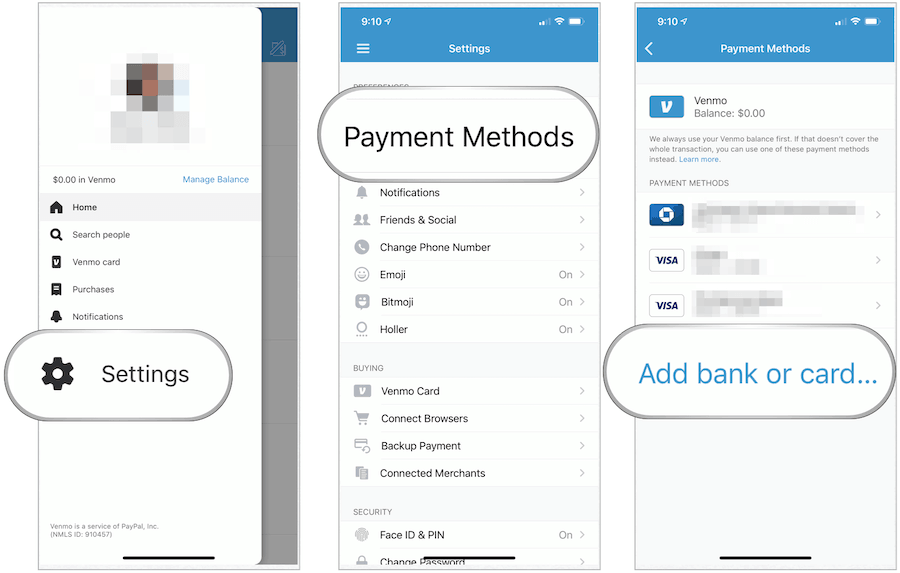
Venmo is optimized for the latest versions of iOS and Android. To begin, users must download the official application from the Apple App Store or Google Play Store. Technically, Venmo requires a mobile device with a functional cellular number and a data connection. It is important to note that Venmo does not currently offer a full-featured desktop experience for sending payments; the architecture is “mobile-first,” prioritizing the portability and biometric security features inherent in smartphones.
Linking Financial Protocols: Bank Accounts vs. Cards
The app functions by pulling funds from a linked source. There is a technical distinction between linking a bank account via the ACH (Automated Clearing House) network and linking a debit or credit card. Linking a bank account often requires verification through third-party APIs like Plaid, which securely syncs your banking credentials with Venmo’s interface. While debit cards allow for near-instantaneous “Instant Transfers” out of the app, credit cards typically incur a 3% processing fee—a technical overhead passed down from credit card networks.
Security Configuration: MFA and Biometrics
From a technical standpoint, the most critical step in setup is enabling Multi-Factor Authentication (MFA). Venmo utilizes SMS-based codes or device-specific tokens to verify identity. Furthermore, users should navigate to the “Settings” menu to activate biometric locks, such as FaceID or TouchID. This adds a layer of hardware-level encryption, ensuring that even if a device is stolen, the software remains inaccessible to unauthorized users.
2. Navigating the Interface: Executing Precise Transactions
The core utility of Venmo lies in its “Pay or Request” engine. This interface is designed to reduce the friction of manual data entry, utilizing sophisticated search algorithms to help users find their intended recipients.
The Search Algorithm and User Discovery
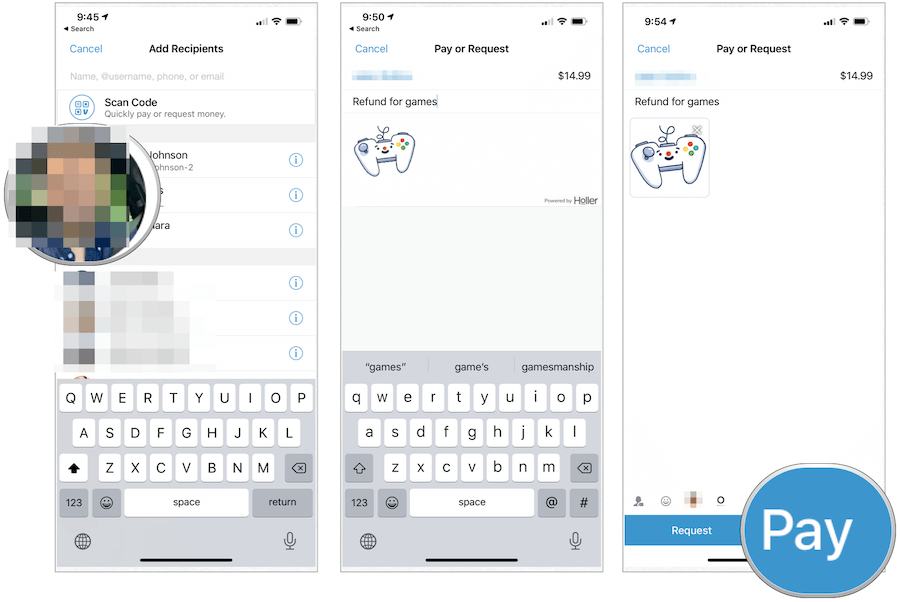
When you tap the “Pay/Request” button, the app accesses your synchronized contacts and uses a predictive search algorithm. You can find recipients via their name, @username, or phone number. To ensure technical accuracy and prevent “fat-finger” errors (sending money to the wrong person), Venmo displays the user’s profile picture and their network status. For absolute precision, the software includes a built-in QR code scanner, which eliminates the need for manual searching by directly identifying the unique digital signature associated with another user’s profile.
Transaction Logic: The “Pay” vs. “Request” Workflow
Once a recipient is selected, the user enters the transaction amount. The software logic requires a note or an emoji in the “What’s it for?” field before the “Pay” button becomes active. This is not just a social feature; it serves as a metadata tag for transaction history, helping the software categorize expenditures. When you hit “Pay,” the app initiates an API call to your funding source, verifies the availability of funds, and updates the ledgers on Venmo’s servers in real-time.
Managing the Social Feed and Privacy Settings
One of Venmo’s unique technical features is its social feed. However, from a digital security and privacy perspective, users must understand the three visibility tiers: Public, Friends, and Private. These settings are controlled via the app’s privacy engine. “Private” transactions are visible only to the sender and recipient, whereas “Public” transactions are broadcast to the global Venmo feed. Adjusting these settings is a critical part of managing your digital footprint and ensuring that your financial habits are not exposed to data-scraping algorithms.
3. Advanced Technical Features and Business Integration
Venmo has evolved beyond simple peer-to-peer (P2P) transfers. It now incorporates sophisticated tools for businesses and technical integrations for diverse financial assets.
Venmo for Business Profiles
For entrepreneurs and freelancers, Venmo offers “Business Profiles.” This feature creates a distinct technical partition within the app, allowing users to separate personal and professional transactions. Business profiles come with advanced reporting tools, allowing users to export transaction histories for tax purposes. These profiles also utilize a different fee structure, as the software provides built-in “Purchase Protection” for buyers—a technical guarantee that mirrors the dispute resolution protocols found in larger e-commerce platforms.
QR Code Technology and Contactless Sharing
Venmo’s integration of QR (Quick Response) technology is a masterclass in reducing user friction. Each user is assigned a unique, encrypted QR code. In a physical environment, one user can display their code while the other scans it using the app’s integrated camera module. This process automatically populates the recipient’s information, ensuring a 100% accuracy rate and facilitating contactless payments that are significantly faster than traditional card-swiping methods.
Cryptocurrency Integration
In a major technical expansion, Venmo now allows users to buy, sell, and hold cryptocurrencies like Bitcoin and Ethereum directly within the app. The interface simplifies the complexities of blockchain technology, providing a streamlined dashboard where users can track price movements and execute trades. While the underlying assets live on a secure blockchain, the user experience is integrated into the standard Venmo UI, making digital assets accessible to non-technical users.
4. Security Protocols and Digital Safety
In any financial software, security is the paramount concern. Venmo employs several layers of technical protection to safeguard user data and funds.
Data Encryption and Server-Side Security
Venmo utilizes bank-grade encryption to protect user information. When you send a payment, the data is encrypted as it travels from your device to Venmo’s servers. The platform also employs “unauthorized activity” monitoring, using machine learning algorithms to detect patterns that deviate from a user’s typical behavior. If a transaction appears fraudulent (e.g., a high-value transfer from a new location), the software may trigger an automatic hold until the user provides further verification.
Identifying and Mitigating Digital Scams
As a technical user, it is vital to understand the limitations of the software. Venmo is designed for use between people who know and trust each other. A common scam involves “accidental” payments, where a fraudster sends money using a stolen credit card and then requests a “refund” to their personal account. By the time the original credit card company cancels the transaction, the user has already sent their own money to the scammer. Understanding these technical loopholes and only interacting with verified contacts is essential for digital safety.
Managing Account Permissions
Modern mobile operating systems allow users to control what data an app can access. To optimize Venmo’s performance, users should periodically review the app’s permissions in their phone’s settings. This includes access to contacts (for finding friends), camera (for QR codes), and location services (for fraud prevention). Limiting these permissions to “Only while using the app” is a technical best practice that enhances overall device security.
5. Troubleshooting and Performance Optimization
Even the most polished software can encounter errors. Understanding how to navigate technical glitches ensures that your funds are never in limbo.
Handling Pending Payments and Synchronization Issues
Occasionally, a payment may appear as “Pending.” This usually occurs if the recipient has not yet verified their email address or phone number, or if there is a lag in the banking network. Technically, the money is moved into a “holding” state. Users can often cancel a pending payment if the recipient has not yet claimed it by navigating to the “Incomplete” tab in their activity feed.
Managing App Updates and Software Compatibility
To maintain the highest level of security and access to new features, keeping the Venmo app updated is non-negotiable. Developers frequently release “patches” that fix security vulnerabilities and optimize API calls for faster transaction speeds. If the app becomes sluggish or crashes, clearing the app’s cache (on Android) or performing a “force restart” (on iOS) can resolve local software conflicts.
Optimizing Transfer Speeds
When moving money from your Venmo balance to your bank, you have two technical options: the Standard Transfer (via ACH) and the Instant Transfer. Standard transfers are free but can take 1-3 business days as they move through traditional clearinghouse cycles. Instant Transfers utilize the Real-Time Payment (RTP) networks or debit card rails to move funds in minutes for a small percentage fee. Choosing the right method depends on your immediate liquidity needs and your willingness to pay for speed.
In conclusion, Venmo is more than a simple utility; it is a sophisticated piece of financial technology that requires a nuanced understanding of its features, security, and interface. By mastering the technical aspects of account setup, transaction execution, and security management, users can navigate the world of digital payments with confidence, efficiency, and safety.
aViewFromTheCave is a participant in the Amazon Services LLC Associates Program, an affiliate advertising program designed to provide a means for sites to earn advertising fees by advertising and linking to Amazon.com. Amazon, the Amazon logo, AmazonSupply, and the AmazonSupply logo are trademarks of Amazon.com, Inc. or its affiliates. As an Amazon Associate we earn affiliate commissions from qualifying purchases.