
In the ever-expanding digital landscape, our smartphones and tablets have become gateways to an immense universe of applications, entertainment, and knowledge. At the heart of this ecosystem for Android users lies Google Play, a vibrant marketplace teeming with apps, games, movies, books, and much more. Central to navigating and acquiring content within this platform is your Google Play Balance – a versatile digital currency that simplifies purchases and unlocks a wealth of possibilities. Far from being just a monetary figure, understanding and effectively utilizing your Google Play Balance is a fundamental skill for any savvy Android user, transforming abstract credit into tangible digital experiences.

This comprehensive guide will delve deep into the intricacies of Google Play Balance, demystifying its nature, illustrating its vast utility, and providing actionable steps to maximize its potential. From checking your balance to making a seamless purchase and even troubleshooting common hurdles, we’ll equip you with the knowledge to harness this powerful feature and fully immerse yourself in the digital offerings of Google Play.
Understanding Your Google Play Balance: The Digital Currency Explained
Before diving into how to spend your balance, it’s crucial to grasp what Google Play Balance actually is and how it functions within Google’s extensive digital framework. Think of it as a pre-paid debit card specifically for the Google Play Store, holding value that can only be redeemed for goods and services offered through that platform.
What is Google Play Balance?
Google Play Balance represents a digital credit associated with your Google Account, specifically designated for purchases within the Google Play Store. It is denominated in your local currency and acts as a primary or secondary payment method, offering a secure and convenient way to acquire digital content without needing to repeatedly enter credit card details or bank information. This balance is distinct from other Google payment methods like Google Pay, though they are integrated within the broader Google payment infrastructure. It’s a closed-loop system, meaning you can only spend it on Google Play, and typically, it cannot be transferred out or converted to cash.
How to Check Your Current Balance
Keeping tabs on your available balance is the first step to smart spending. Google has made this process incredibly straightforward, accessible directly from the Google Play Store app or a web browser.
- Via the Google Play Store App:
- Open the Google Play Store app on your Android device.
- Tap your profile icon (usually in the top-right corner).
- From the menu, select “Payments & subscriptions.”
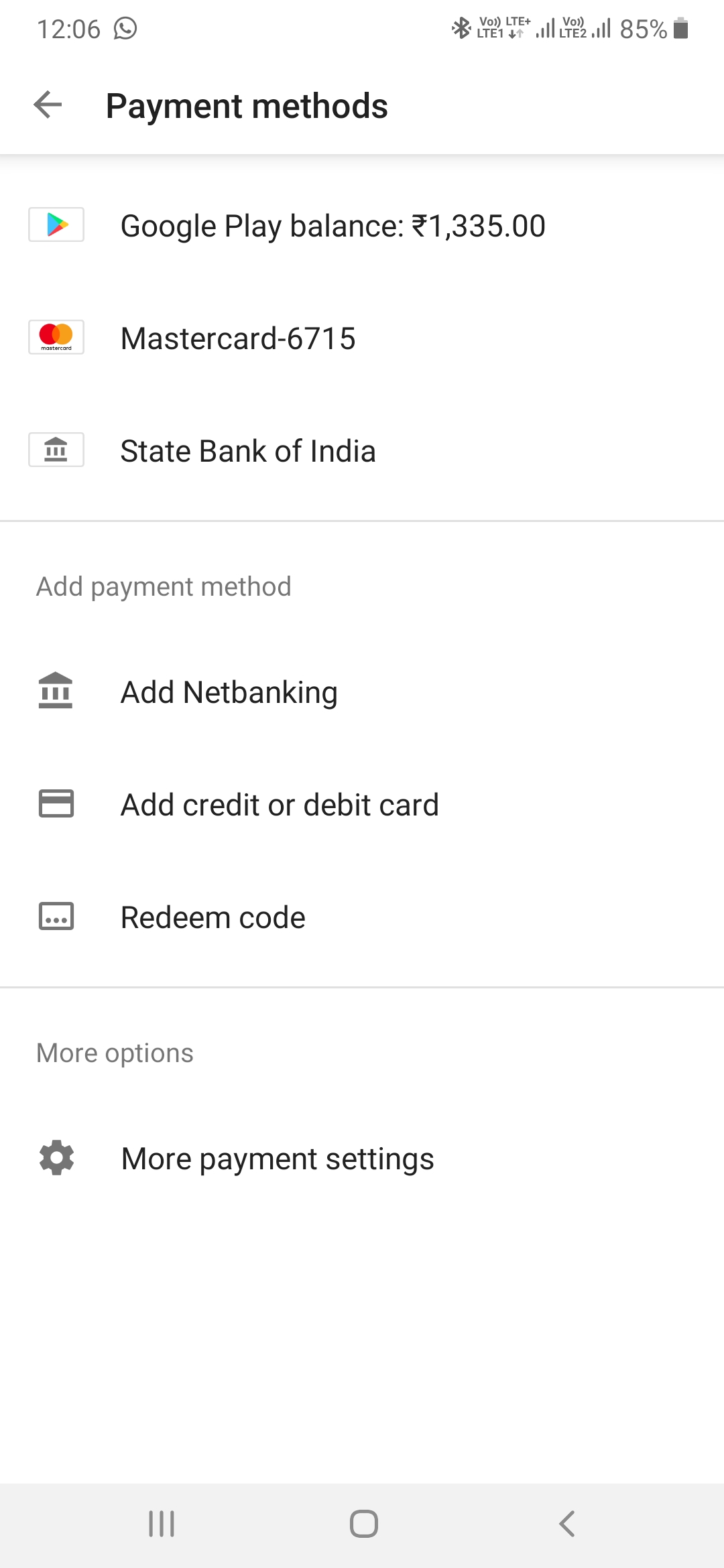
- Tap “Payment methods.”
- Your Google Play Balance will be clearly displayed under “Google Play balance.”
- Via a Web Browser:
- Go to play.google.com/store in your web browser.
- Log in with the Google Account associated with your Play Balance.
- Click on your profile picture in the top-right corner.
- Select “Payment methods.”
- Your Google Play Balance will be listed alongside other payment options.
Regularly checking your balance ensures you’re always aware of your purchasing power and can plan your digital acquisitions accordingly.
Sources of Google Play Balance
Your Google Play Balance doesn’t just appear out of thin air; it’s accumulated through several common methods, each offering convenience and often serving different purposes.
- Google Play Gift Cards: This is perhaps the most common way to add funds. Gift cards can be purchased from various retail stores, online merchants, or even digitally. Redeeming them is simple: open the Play Store app, tap your profile icon, go to “Payments & subscriptions,” then “Redeem gift code.”
- Promotional Codes and Rewards: Google often runs promotions or partners with other companies to offer free Google Play credit. These are usually distributed as redeemable codes. Additionally, Google Opinion Rewards, a popular app, allows users to earn Play credit by answering short surveys.
- Refunds: If you purchase an app, game, or other digital content and request a refund within Google’s policy guidelines, the refunded amount is typically credited back to your Google Play Balance.
- Family Link Parental Controls: In some family settings, parents can add funds to a child’s Google Play Balance to allow them to make purchases within approved limits.
Understanding these sources helps you not only add funds but also appreciate how your balance might fluctuate over time.
A Universe of Possibilities: What You Can Buy
The beauty of Google Play Balance lies in its versatility. It’s not just for a niche type of content; it’s a universal currency within the Play Store, opening doors to almost every digital offering available. This breadth of use makes it an incredibly valuable asset for anyone invested in the Android ecosystem.
Apps, Games, and In-App Purchases
This is arguably the most fundamental use of your Google Play Balance. Whether you’re looking for productivity tools, creative suites, educational apps, or the latest mobile gaming sensation, your balance can cover the cost.
- Paid Apps and Games: Directly purchase premium applications and games that offer enhanced features or an ad-free experience.
- In-App Purchases (IAPs): Many free-to-play games and freemium apps offer additional content, virtual currency, premium features, or ad removal through in-app purchases. Your Google Play Balance is the perfect way to unlock these without linking a credit card. This is particularly popular for mobile gamers wanting to buy character skins, power-ups, or additional levels.
Movies, TV Shows, and Digital Content
Beyond software, Google Play is a robust entertainment hub. Your balance can transform your device into a portable cinema or a personalized streaming service.
- Rent or Buy Movies: Access a vast library of films, from recent blockbusters to timeless classics. You can rent for a limited viewing period or purchase to own indefinitely.
- Buy TV Show Seasons or Episodes: Catch up on your favorite series or discover new ones by purchasing individual episodes or entire seasons.
- Google TV Integration: Purchased content is often integrated with Google TV, allowing you to watch across various devices, providing a seamless entertainment experience.
Books and Audiobooks
For the avid reader or listener, Google Play offers a digital library that rivals any physical bookstore. Your balance provides immediate access to a world of literature.
- Ebooks: Browse and purchase millions of ebooks across every genre imaginable. Read them on your Android device, e-reader, or through the Google Play Books app on other platforms.
- Audiobooks: Perfect for commutes, workouts, or multi-tasking, audiobooks allow you to consume literature on the go. Your balance can be used to purchase individual titles, offering a convenient way to expand your spoken-word library.
Subscriptions (Premium Services & Apps)
The digital world is increasingly subscription-based, and Google Play Balance isn’t left out. It can be used to manage recurring payments for various premium services, provided it’s set as your primary payment method or has sufficient funds.
- App Subscriptions: Many apps offer premium tiers with monthly or annual subscriptions for enhanced features, cloud storage, or ad-free experiences.
- Google Services: In some regions, Google Play Balance can be used for subscriptions to Google services like Google One (for cloud storage) or YouTube Premium. Always check specific regional availability and terms.
- Gaming Subscriptions: Use your balance to pay for premium passes or subscriptions within certain games, like battle passes or monthly content unlocks.
The flexibility to use a single balance across such a diverse range of digital goods and services underscores its utility and convenience.
Making a Purchase: Step-by-Step Guide
The process of using your Google Play Balance is designed to be intuitive and straightforward. Once you have funds available, making a purchase is typically a seamless experience.
Selecting Content and Initiating Purchase
The journey begins with finding what you want. Whether it’s an app, a movie, a book, or an in-app item, the selection process is consistent.
- Browse the Google Play Store: Navigate through the app or website to find the item you wish to purchase. You can use search, explore categories, or check recommendations.
- View Product Details: Tap on the item to view its product page. This page will display details, reviews, screenshots, and, crucially, the price.
- Initiate Purchase: Tap the “Buy,” “Install” (for paid apps), “Rent,” or “Subscribe” button, depending on the type of content. For in-app purchases, you’ll usually initiate them from within the specific app or game.
Confirming Google Play Balance as Payment
This is the pivotal step where you ensure your Play Balance is utilized.
- Payment Method Pop-up: After initiating the purchase, a payment method confirmation window will appear. By default, if you have a Google Play Balance, it will often be pre-selected as the primary payment method.
- Verify or Select: Double-check that “Google Play Balance” is selected. If you have other payment methods linked (like a credit card or PayPal), you might see a dropdown menu. Tap on this menu and explicitly select “Google Play Balance.”
- Confirm Purchase: Once Google Play Balance is selected and displayed with the sufficient amount, tap the “Buy” or “Subscribe” button to finalize the transaction. You might be prompted to enter your Google Account password or verify with a fingerprint/face unlock for security.
- Confirmation: Upon successful purchase, you’ll receive an email confirmation, and the content will begin downloading or become accessible instantly.
Troubleshooting Common Purchase Issues
While generally smooth, issues can occasionally arise. Here’s how to address some common problems:
- Insufficient Balance: The most frequent issue. If your balance doesn’t cover the full cost, the purchase will fail. You’ll need to add more funds to your Google Play Balance or select an alternative payment method.
- Payment Method Not Showing: Ensure you are logged into the correct Google Account associated with your Play Balance. Sometimes, a temporary app glitch might occur; try restarting the app or your device.
- Regional Restrictions: Some content might not be available in your region, or gift cards might be region-locked. Verify the terms of any promotional credit or gift card.
- Pending Authorization: Occasionally, a purchase might be pending. Check your order history in the Play Store (Profile icon > Payments & subscriptions > Budget & order history) for status updates.
- Account Issues: Ensure your Google Account is in good standing and not facing any temporary holds or restrictions. Contact Google Play support if you suspect account-related problems.
Patience and a quick check of your account details often resolve most issues.
Maximizing Your Google Play Balance: Smart Strategies
Beyond simply spending your balance, there are ways to manage and utilize it strategically to get the most value out of your digital funds. Effective management ensures you’re always prepared for that must-have app or a spontaneous movie night.
Managing Multiple Payment Methods
While Google Play Balance is convenient, you might also have credit cards, debit cards, or PayPal linked to your Google Account. Understanding how they interact is key.
- Primary Payment Method: You can set Google Play Balance as your primary payment method. This ensures it’s always used first for purchases, which is ideal if you prefer to exhaust your credit before touching other funds.
- Fallback Options: If your Play Balance is insufficient for a purchase, Google Play will typically prompt you to choose another payment method or add more funds. Having a secondary method linked can provide a seamless backup.
- Prioritize Spending: If you have multiple payment methods, consciously choose Google Play Balance when it makes sense. For instance, if you have a promotional balance with an expiration date, prioritize using it first.
Gifting and Sharing (Limitations)
It’s important to understand the limitations of Google Play Balance regarding gifting and sharing, as it’s not designed for direct person-to-person transfers.
- No Direct Transfer: You cannot directly transfer your Google Play Balance to another user’s account. It’s tied to your specific Google Account.
- Gifting Content: While you can’t transfer the balance, you can purchase specific digital content (apps, games, movies, books) as gifts for others, provided the option is available for that item and in your region. This is a great way to “share” your balance indirectly.
- Family Library: If you use Google Play Family Library, content purchased with your Google Play Balance can often be shared with other family members, allowing them to access apps, games, movies, and books without additional purchases.
Keeping an Eye on Promotions and Sales
Google Play frequently hosts sales, discounts, and promotions on apps, games, movies, and books. Utilizing your balance during these periods can significantly stretch your purchasing power.
- Check Daily Deals: The Play Store often features daily or weekly deals.
- Wishlist Notifications: Add desired apps or content to your wishlist. Google Play will often notify you if items on your list go on sale.
- Holiday Sales: Major holidays (Black Friday, Cyber Monday, Christmas, New Year’s) are prime times for significant discounts.
- Google Opinion Rewards: Continue earning small amounts of balance by answering surveys, building up credit for future purchases.
Strategic timing can lead to substantial savings and allow your balance to acquire more content.
Beyond the Basics: Advanced Tips & Considerations
To truly master your Google Play Balance, it helps to understand some of the finer points and potential pitfalls, ensuring a smooth and secure experience.
Understanding Regional Restrictions
Google Play operates on a regional basis, and this can impact your balance.
- Currency and Region Lock: Google Play Balance is tied to the currency and region of your Google Account. A balance acquired in the US (USD) cannot be used in the UK (GBP) unless you change your Google Play country, which has its own restrictions and cool-down periods.
- Content Availability: Not all apps, movies, or books are available in all regions due to licensing agreements. Your balance will only work for content available in your registered country.
- Gift Card Origin: Ensure any Google Play Gift Cards you redeem match the region of your Google Account. Redeeming a foreign gift card can sometimes cause issues or require a region change.
Balance Expiration (Rare but Possible)
While Google Play Balance generally does not expire, there are specific circumstances where it might.
- Promotional Credits: Balance acquired through specific promotions (e.g., from a device purchase or a limited-time offer) might have an expiration date. Always read the terms and conditions of such promotions carefully.
- Gift Card Terms: While the funds themselves usually don’t expire once redeemed, certain gift cards might have terms if they are not redeemed within a specific timeframe (though this is less common for standard Google Play gift cards).
- Check the Fine Print: If you’re concerned about a specific credit, check its source or contact Google Play support for clarification.
Security Best Practices
Protecting your Google Play Balance is as important as protecting any other financial asset.
- Strong Google Account Password: Ensure your Google Account has a strong, unique password.
- Two-Factor Authentication (2FA): Enable 2FA for your Google Account. This adds an extra layer of security, making it much harder for unauthorized users to access your account, even if they have your password.
- Beware of Phishing: Be wary of emails or messages asking for your Google Account details or gift card codes. Google will never ask for this information outside of its secure platforms.
- Monitor Activity: Regularly check your “Budget & order history” in the Play Store for any suspicious purchases.
- Device Security: Keep your Android device secure with a screen lock and up-to-date software.
By adhering to these security measures, you can enjoy your Google Play Balance with peace of mind.

Conclusion
Your Google Play Balance is more than just digital money; it’s a key that unlocks a vast and diverse world of digital content. From the latest productivity apps and immersive games to captivating movies, insightful books, and essential subscriptions, its utility is expansive. By understanding its nature, knowing how to manage and spend it, and adopting smart strategies, you can transform a simple balance into a powerful tool for enhancing your digital life. Embrace the convenience, explore the possibilities, and make the most of your Google Play Balance to navigate and enrich your personal digital universe.
aViewFromTheCave is a participant in the Amazon Services LLC Associates Program, an affiliate advertising program designed to provide a means for sites to earn advertising fees by advertising and linking to Amazon.com. Amazon, the Amazon logo, AmazonSupply, and the AmazonSupply logo are trademarks of Amazon.com, Inc. or its affiliates. As an Amazon Associate we earn affiliate commissions from qualifying purchases.