
In an increasingly cashless society, digital payment platforms have become indispensable tools for managing personal finances. Among these, Cash App stands out for its user-friendly interface and comprehensive features, enabling swift peer-to-peer transactions and accessible banking services. However, the use of such sophisticated financial technology by minors introduces unique considerations, primarily concerning age restrictions, parental oversight, and feature limitations. This guide delves into the technological framework and practical steps for individuals under 18 to safely and effectively leverage Cash App, positioning it not just as a payment tool, but as an early gateway to digital financial literacy within a controlled environment.
The Evolution of Digital Payments for Minors: A Tech Perspective
The landscape of personal finance has been dramatically reshaped by technological advancements, moving from physical currency to digital transactions facilitated by mobile applications. For minors, understanding and interacting with these digital ecosystems is becoming increasingly vital. Cash App, with its intuitive design, represents a significant step in this evolution, offering a controlled environment for young users to gain practical experience with digital money management.
Understanding Cash App’s Digital Ecosystem
At its core, Cash App is a mobile-first financial platform designed to simplify money transfers. Its architecture relies on secure, encrypted peer-to-peer (P2P) payment protocols, allowing users to send and receive money instantaneously through unique digital identifiers like a $Cashtag, phone number, or email address. Beyond basic transfers, the app integrates a suite of features including a linked debit card (the Cash Card), direct deposit capabilities, and even options for investing in stocks and Bitcoin. For minors, access to this ecosystem is carefully controlled, reflecting the complexities of financial regulations and the need for parental guidance. The app’s technological design ensures that all user data and transaction details are protected through robust encryption and security protocols, mirroring industry standards for financial technology (FinTech) platforms. This digital infrastructure is what enables the seamless, yet secure, flow of funds and information within the app, making it an advanced piece of software in the personal finance space.
The Rationale Behind Age Restrictions and Parental Oversight (Tech Implications: Security, Data Privacy, User Access)
The primary reason for age restrictions on financial apps like Cash App is a confluence of legal, regulatory, and practical considerations. Legally, minors typically cannot enter into contracts, which includes agreements for financial services. From a technological standpoint, this means that the app’s backend systems are designed to verify age during the onboarding process, often requiring government-issued IDs for adults. For users under 18, Cash App implements a “sponsored account” model. This technological solution allows a parent or legal guardian, who is an adult Cash App user, to link their account to a minor’s. This sponsorship model isn’t merely a formality; it’s a technical integration that grants the sponsor oversight capabilities. They can monitor transaction history, set spending limits, and approve or deny certain features, effectively acting as a digital gatekeeper. This parental control feature is a critical component of the app’s design for minors, ensuring compliance with child protection laws and empowering guardians with the tools to manage their child’s digital financial interactions responsibly. Data privacy is also paramount; the sponsored account structure ensures that while the minor gains functional access, the ultimate legal and financial responsibility, along with data management oversight, remains with the adult sponsor. This dual-account architecture, managed through backend logic and user interface controls, is a sophisticated solution to a complex regulatory challenge.
Setting Up a Sponsored Cash App Account: A Step-by-Step Technical Walkthrough
Enabling a minor to use Cash App involves a specific technical process that requires the active participation of a parent or legal guardian. This setup ensures that the account complies with age restrictions and provides the necessary parental oversight. The process is designed to be intuitive for adult users familiar with mobile app navigation, yet robust enough to establish the required legal and technical linkages.
Requirements for Parental Sponsorship (Tech: Account Linking, Verification Processes)
Before a minor can begin using Cash App, an existing adult Cash App user (the parent or legal guardian) must sponsor their account. The technical requirements for this sponsorship are straightforward:
- Active Adult Account: The sponsor must have their own verified Cash App account, which typically means they have linked a bank account or debit card and completed identity verification (KYC – Know Your Customer) protocols, including providing their SSN and date of birth. This verification process is handled by Cash App’s backend systems, using secure APIs to connect with identity verification services.
- Consent and Legal Agreement: The sponsorship process requires the adult to digitally consent to the minor’s usage of the app, acknowledging their responsibility for the minor’s financial activities on the platform. This digital agreement is logged and stored within Cash App’s secure database, forming the legal basis for the sponsored account.
- App Compatibility: Both the parent and minor should have the latest version of the Cash App installed on compatible mobile devices (iOS or Android). This ensures access to all features, security updates, and a consistent user experience. The app versions communicate specific protocols to enable the sponsorship feature.
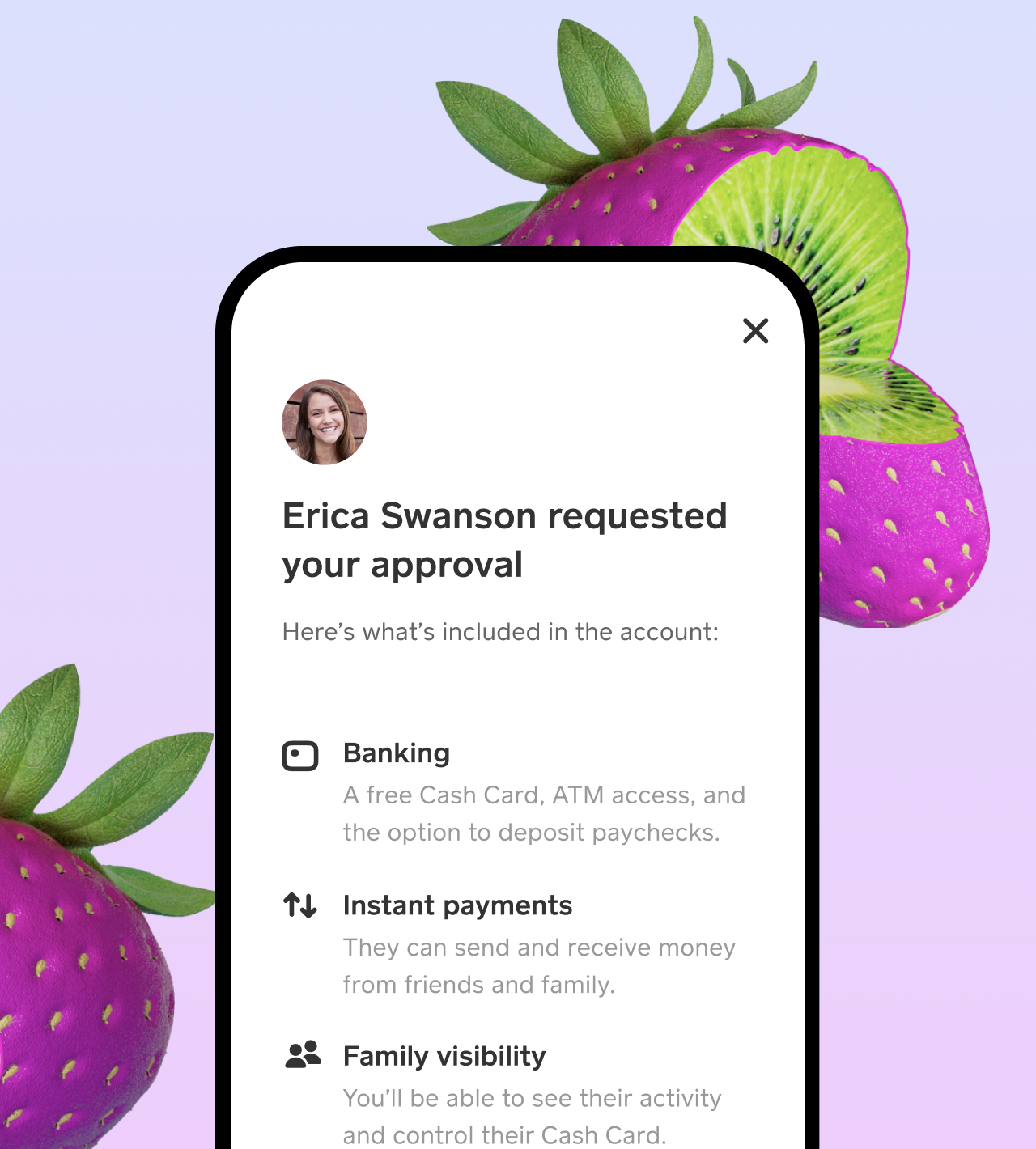
The account linking process itself is a sophisticated technical operation. When a parent initiates sponsorship, Cash App’s system creates a secure digital link between the adult’s primary account and the minor’s nascent account. This link is more than just an association; it’s a hierarchical relationship where the adult’s account acts as the primary controller, with specific permissions and monitoring capabilities assigned.
Onboarding Process for Minors (Tech: App Installation, Profile Creation, Linking)
Once the adult sponsor is ready, the minor can proceed with setting up their side of the account. This involves:
- App Installation: The minor downloads the Cash App from their device’s app store.
- Initial Setup: They open the app and begin the registration process by entering their phone number or email address.
- Age Input: Crucially, when prompted for their date of birth, the minor enters their actual age. Cash App’s system will then detect that the user is under 18.
- Sponsorship Prompt: The app will then guide the minor to initiate the sponsorship request by sending an invitation to their parent/guardian. This involves either entering the parent’s phone number or $Cashtag.
- Parental Approval: The parent receives a notification within their Cash App, prompting them to review and approve the sponsorship request. Upon approval, the minor’s account becomes active, albeit with specific limitations. From a technological perspective, this communication flow is managed through secure push notifications and internal API calls, ensuring that the request and approval are authenticated and linked to the correct accounts. The minor’s profile is then updated in the system to reflect its sponsored status, automatically applying the relevant feature restrictions.
Activating and Managing the Cash Card (Tech: Physical Card Integration with Digital Wallet)
One of the most valuable features for a minor is the Cash Card, a customizable debit card linked to their Cash App balance.
- Ordering the Card: After the account is sponsored, the minor can request a Cash Card directly through the app. This involves selecting a design and confirming their shipping address. The order is processed through Cash App’s card issuance partners, where the minor’s details (under parental sponsorship) are securely transmitted.
- Card Activation: Once the physical card arrives, the minor activates it within the Cash App by scanning the QR code on the card packaging or manually entering the card details. This activation process uses secure cryptographic keys embedded in the card and app to establish a validated connection between the physical card and the digital wallet balance.
- Managing the Card: The Cash Card operates on established debit card networks (like Visa), allowing it to be used anywhere these networks are accepted, both online and in physical stores. The app provides real-time transaction notifications and allows minors (and their parents) to manage card settings, such as temporarily pausing the card, reporting it lost or stolen, and viewing transaction history. These functionalities are driven by the app’s sophisticated backend, which communicates with the card network’s APIs, providing instant updates and control over the card’s status and usage. This integration of physical payment infrastructure with a digital interface is a prime example of FinTech in action.
Navigating Features and Functionality: What Under-18 Users Can (and Can’t) Do
While a sponsored Cash App account opens up many possibilities for minors, it’s crucial to understand the technological limitations and available features specifically tailored for this demographic. These restrictions are designed to ensure responsible usage and compliance with financial regulations.
Core Transaction Capabilities: Sending and Receiving Money (Tech: Peer-to-Peer Protocols, Instant Transfers)
For under-18 users with a sponsored account, the core functionality of sending and receiving money is fully enabled. This leverages Cash App’s robust peer-to-peer (P2P) payment protocols, which facilitate instant transfers between users.
- Sending Money: Minors can send funds from their Cash App balance to other Cash App users by entering their $Cashtag, phone number, or email. The transaction is processed in real-time, debiting the sender’s balance and crediting the recipient’s. The underlying technology involves secure data packets exchanged between users via Cash App’s servers, ensuring the integrity and authenticity of each transaction.
- Receiving Money: Similarly, minors can receive money from parents, friends, or family. Funds instantly appear in their Cash App balance. This instantaneous transfer is a hallmark of modern digital payment systems, relying on high-speed data processing and secure network connections.
- Source of Funds: Funds for sending can come from the minor’s Cash App balance, which can be loaded by the parent from their linked bank account or by receiving money from other users. The system ensures that all funds are tracked and reconciled within the account’s digital ledger.
Cash Card Usage: Digital Wallet Meets Physical Spending (Tech: EMV Technology, NFC Payments)
The Cash Card for under-18 users functions much like a standard debit card, allowing them to spend their Cash App balance in the physical world.
- In-Store Purchases: The card uses EMV chip technology for secure point-of-sale transactions, and for contactless payments, it leverages Near Field Communication (NFC) technology. This means the minor can simply tap their card at compatible terminals. Each transaction is digitally authorized and recorded, appearing instantly in the app’s activity feed.
- Online Purchases: The Cash Card can also be used for online shopping, requiring the input of card number, expiry date, and CVV. Secure Socket Layer (SSL) encryption protects these details during transmission to online merchants.
- ATM Withdrawals: With a sponsored account, minors can typically use their Cash Card to withdraw cash from ATMs. This feature, however, may have daily limits set by Cash App or the sponsoring parent, and ATM fees may apply. The withdrawal process interacts with the ATM network via standard payment card protocols, deducting funds directly from the Cash App balance.
Feature Limitations and Why They Exist (Tech: API Restrictions, Compliance Protocols, Risk Management)
Crucially, sponsored Cash App accounts for minors come with specific technical limitations rooted in regulatory compliance and risk management:
- No Investing (Stocks/Bitcoin): Minors cannot directly buy or sell stocks or Bitcoin through Cash App. These features involve complex financial instruments and legal contracts that minors are not permitted to enter into. The app’s APIs for these services are simply disabled for sponsored accounts.
- No Direct Deposit: While the Cash Card has an associated routing and account number, minors typically cannot use this for direct deposit of paychecks or other regular income streams. This restriction often stems from federal regulations concerning payroll and taxation for minors, and the additional verification required for such services. The direct deposit infrastructure within Cash App’s system is not activated for sponsored accounts.
- Cash App Borrow: The “Borrow” feature, which allows users to take out short-term loans, is explicitly unavailable for minors. This is a high-risk financial product and legally unsuitable for individuals under 18. The backend logic of the app simply does not present this option to sponsored users.
- Cash Limits: While basic sending and receiving are enabled, there might be lower daily or weekly transaction limits compared to adult accounts. These limits are implemented by Cash App’s risk management algorithms to mitigate potential fraud or misuse and are configurable by the sponsoring parent in some instances.
These technological limitations are not arbitrary; they are meticulously implemented through the app’s backend code and API design, ensuring that minors can safely explore digital finance without exposure to high-risk activities or legal complications.
Enhancing Digital Safety and Financial Literacy Through Cash App Technology
Beyond its immediate utility as a payment tool, a sponsored Cash App account can serve as a valuable educational platform, teaching minors about digital financial responsibility while providing adults with sophisticated control and monitoring capabilities.
Parental Controls and Monitoring Tools (Tech: Dashboard, Activity Logs, Notification Systems)
Cash App’s design for sponsored accounts includes robust technological features that empower parents to oversee and guide their minor’s financial activities effectively.
- Centralized Dashboard: Parents gain access to a dedicated section within their own Cash App interface that provides a real-time overview of their minor’s account. This dashboard pulls data from the minor’s account through secure internal APIs, displaying current balance, recent transactions, and spending summaries.
- Detailed Activity Logs: Every transaction—sending, receiving, and Cash Card purchases—is meticulously logged and accessible to the parent. This audit trail is a critical feature, enabling parents to review spending habits and identify any unusual activity. The logging system is designed for high data integrity and provides timestamps and merchant details for each entry.
- Customizable Notifications: Parents can configure their notification settings to receive real-time alerts for every transaction made by their minor. This proactive monitoring mechanism, driven by push notification technology, ensures parents are immediately aware of financial activities, allowing for timely intervention or discussion.
- Spending Limits: Although not always fully customizable, the system often allows parents to view default limits and potentially request adjustments through support channels. These limits are enforced by the app’s transaction processing logic, preventing spending beyond predefined thresholds.
These tools transform Cash App from a simple transaction platform into a comprehensive digital oversight system, giving parents the technological leverage needed to guide their child’s financial journey securely.
Best Practices for Secure App Usage (Tech: Strong Passwords, 2FA, Phishing Awareness)
Teaching minors responsible digital citizenship extends to how they interact with financial apps. The technological security features embedded within Cash App, combined with user vigilance, form the first line of defense against cyber threats.
- Strong Passwords/PINs: Emphasize the importance of creating unique, complex PINs for Cash App and strong passwords for their device. The app’s security protocols encrypt these credentials, but user-side strength is paramount.
- Two-Factor Authentication (2FA): While Cash App primarily uses a PIN for transactions, ensuring the minor’s associated email or phone number has 2FA enabled adds another layer of security, protecting against unauthorized access if login credentials are compromised.
- Phishing and Scams Awareness: Educate minors about the prevalence of phishing emails, scam messages, and suspicious links. Teach them never to share their PIN, login details, or personal information with anyone claiming to be from Cash App support outside of the official app or website. Cash App’s internal systems work to flag suspicious activity, but user awareness is the most effective preventative measure.
- Public Wi-Fi Caution: Advise against accessing financial apps over unsecured public Wi-Fi networks, which can be vulnerable to eavesdropping. Using cellular data or secure private networks is always preferable.
Leveraging Cash App for Early Financial Tech Education
A sponsored Cash App account provides a practical, hands-on learning environment for minors to grasp fundamental financial concepts within a tech context:
- Budgeting and Tracking: By reviewing transaction history and monitoring balances through the app’s interface, minors can visually understand income and expenses, forming the basis for budgeting skills.
- Saving Goals: Parents can encourage saving by having the minor set aside portions of received money within their Cash App balance for specific goals. While Cash App doesn’t have dedicated sub-accounts, simple balance management can illustrate the concept.
- Understanding Digital Transactions: The real-time nature of Cash App transactions helps demystify how digital money moves, providing a tangible experience with digital currency that physical cash cannot. This foundational understanding is crucial for navigating future financial technologies.
- Security Awareness: Experiencing the need for PINs, understanding transaction details, and being aware of potential scams directly contributes to a minor’s digital security literacy, preparing them for more complex online interactions in adulthood.
Troubleshooting and Optimizing Your Cash App Experience
Even with robust technology, users may encounter issues or seek ways to enhance their app experience. Understanding common technical solutions and optimization strategies can ensure a smooth and efficient use of Cash App for under-18 users and their sponsors.
Common Issues and Technical Solutions (Tech: App Updates, Connectivity, Transaction Failures)
Several technical issues can arise when using Cash App; knowing how to troubleshoot them is key to a seamless experience.
- App Not Responding/Crashing: This often indicates a software glitch.
- Solution: First, try force-closing and reopening the app. If the problem persists, check for app updates in the device’s app store. Developers frequently release patches to fix bugs and improve performance. As a last resort, reinstalling the app (after ensuring you have your login details) can resolve deeper corruption issues, as it refreshes all local app data.
- Transaction Failures: Funds not sending, or receiving money not appearing.
- Solution: Verify internet connectivity (Wi-Fi or cellular data). A stable connection is crucial for digital transactions. Check if the recipient’s $Cashtag, phone number, or email is correct. Sometimes, a temporary service outage from Cash App’s side might be the cause; checking Cash App’s official social media or support channels can provide status updates. For failed Cash Card transactions, ensure sufficient balance and that the card is not paused in the app.
- Login Issues: Unable to access the account.
- Solution: Double-check the entered phone number or email. If you’ve forgotten your PIN, use the “Forgot PIN” option to reset it via a verification code sent to your registered contact method. Ensure your device’s time and date settings are accurate, as discrepancies can sometimes interfere with authentication protocols.
- Notifications Not Appearing: Missing alerts for transactions or account activity.
- Solution: Check the notification settings within the Cash App itself (Settings > Notifications) and also your device’s system settings for Cash App. Ensure notifications are enabled. Sometimes, clearing the app’s cache (in device settings) can resolve notification delivery issues.

Maximizing App Performance and Features (Tech: Notification Settings, Linked Accounts Management)
Optimizing how you use Cash App can significantly improve the user experience for both minors and their sponsors.
- Regular App Updates: Always keep the Cash App updated to the latest version. Updates often include critical security patches, bug fixes, and performance enhancements, ensuring the app runs smoothly and securely, and has access to all current features.
- Customize Notification Settings: Tailor notifications to your preferences. Parents can ensure they receive alerts for every minor transaction, while minors might prefer fewer notifications for minor account activities. This helps manage digital noise while retaining critical alerts.
- Manage Linked Accounts: Periodically review and ensure that only necessary and trusted bank accounts or debit cards are linked to the sponsor’s primary account, from which the minor’s account is funded. This enhances security and simplifies fund management.
- Utilize Support Resources: Cash App provides extensive in-app support, FAQs, and a dedicated help center on their website. For technical issues that cannot be resolved through basic troubleshooting, these resources are invaluable. Contacting support directly through the app ensures secure communication and efficient resolution.
- Device Security: Ensure the mobile device used for Cash App has strong security measures enabled, such as screen locks (PIN, fingerprint, face ID) and up-to-date operating system software. This forms a foundational layer of security for the app itself.
By understanding the technological underpinnings of Cash App and applying these best practices, minors, under the guidance of their sponsors, can navigate the digital financial world with confidence and competence. This not only facilitates convenient transactions but also lays a crucial groundwork for future financial literacy in an increasingly technology-driven economy.
aViewFromTheCave is a participant in the Amazon Services LLC Associates Program, an affiliate advertising program designed to provide a means for sites to earn advertising fees by advertising and linking to Amazon.com. Amazon, the Amazon logo, AmazonSupply, and the AmazonSupply logo are trademarks of Amazon.com, Inc. or its affiliates. As an Amazon Associate we earn affiliate commissions from qualifying purchases.