
In an increasingly digitized world, the traditional leather wallet filled with physical cards and crumpled bills is steadily giving way to its sleek, digital counterpart. A digital wallet, often residing within your smartphone or smartwatch, has evolved from a mere convenience into an essential tool for navigating modern financial transactions. This guide will demystify the digital wallet, providing a comprehensive walkthrough on its usage, from initial setup to advanced security practices, all firmly rooted in the principles of software functionality, app utility, and digital security.
Understanding the Digital Wallet Ecosystem
The journey into digital payments begins with a clear understanding of what a digital wallet is, the myriad benefits it offers, and the common platforms available. At its core, a digital wallet is a software application designed to securely store payment information and conduct transactions electronically.

What Exactly is a Digital Wallet?
A digital wallet, sometimes referred to as an e-wallet or mobile wallet, is a virtual repository for your payment credentials, such as credit and debit card numbers, bank account details, and even loyalty program information. Instead of carrying multiple physical cards, you store their encrypted versions on your device. When you’re ready to make a purchase, the digital wallet facilitates the transaction by securely transmitting this information to the merchant’s payment terminal or online checkout system.
There are several forms a digital wallet can take:
- Mobile Wallets: The most common type, integrated into smartphones (e.g., Apple Pay, Google Pay, Samsung Pay) and smartwatches.
- Desktop Wallets: Browser-based extensions or software applications used primarily for online shopping (e.g., PayPal, LastPass with payment features).
- Cryptocurrency Wallets: Specialized digital wallets designed to store and manage digital assets like Bitcoin or Ethereum. These range from “hot wallets” (online, software-based) to “cold wallets” (offline, hardware devices) and are a distinct, though related, segment of the digital wallet landscape. For the purpose of this guide, we will primarily focus on fiat-currency payment-oriented digital wallets.
Key Benefits of Going Digital
Embracing a digital wallet offers a compelling array of advantages that streamline your financial interactions and enhance your overall payment experience:
- Unparalleled Convenience: Your smartphone is likely always with you. With a digital wallet, your payment methods are just a tap or a glance away, eliminating the need to fumble for cards or cash. This is especially true for contactless payments where a quick tap is all it takes.
- Enhanced Security: Ironically, storing your card details digitally can be safer than carrying physical cards. Digital wallets use advanced encryption, tokenization, and biometric authentication (fingerprint, facial recognition) to protect your data. When you make a payment, your actual card number is rarely transmitted; instead, a unique, one-time-use token is generated, making it significantly harder for fraudsters to intercept and misuse your details.
- Speed and Efficiency: Transactions are remarkably fast. Contactless payments often complete in seconds, while online purchases can be finalized with just a few clicks or biometric confirmations, bypassing tedious form-filling.
- Improved Organization: Many digital wallets offer features to track your spending, categorize transactions, and integrate loyalty cards, helping you manage your finances more effectively and consolidate multiple cards into a single digital interface.
- Reduced Physical Clutter: Say goodbye to a bulky wallet. Your phone can hold countless payment methods, reducing the number of cards you need to carry daily.
Common Digital Wallet Platforms
The market is dominated by a few major players, alongside numerous specialized alternatives:
- Apple Pay: Integrated into Apple devices (iPhone, Apple Watch, iPad, Mac), offering seamless contactless payments and online checkout for Apple users.
- Google Pay: Available on Android devices and accessible via web browsers, providing similar contactless and online payment functionalities across a wider range of hardware.
- Samsung Pay: Exclusive to Samsung Galaxy devices, it uniquely offers both NFC (Near Field Communication) and MST (Magnetic Secure Transmission) capabilities, allowing it to work with older card readers that only accept magnetic stripe swipes.
- PayPal: While not a traditional NFC-based mobile wallet, PayPal is a venerable online payment system that has integrated mobile payment features, including QR code payments and peer-to-peer (P2P) transfers, making it a digital wallet in its broader sense.
- Venmo/Cash App: Primarily P2P payment apps, they also offer debit cards linked to your balance, enabling them to function as a digital wallet for everyday spending.
- Bank-Specific Apps: Many banks now incorporate digital wallet functionalities directly into their mobile banking apps, allowing customers to pay with their linked accounts.
Setting Up Your Digital Wallet for Seamless Transactions
Getting started with a digital wallet is a straightforward process, but it requires careful attention to detail, especially regarding security.
Choosing the Right Wallet for Your Needs
The choice of digital wallet largely depends on your device ecosystem and specific requirements.
- Device Compatibility: If you own an iPhone, Apple Pay is the natural choice. Android users typically gravitate towards Google Pay or Samsung Pay (for Samsung devices).
- Feature Set: Consider if you need advanced features like transit card integration, loyalty program storage, or international payment capabilities.
- Security Preferences: While all major wallets offer robust security, some users might prefer the specific biometric authentication methods (e.g., Apple’s Face ID vs. Google’s fingerprint recognition).
Adding Payment Methods
Once you’ve selected your platform, the next step is to populate it with your financial instruments. This typically involves:
- Opening the Wallet App: Locate the pre-installed digital wallet app on your device (e.g., Wallet app on iOS, Google Wallet on Android).
- Initiating Card Addition: Look for an “Add Card” or “+” icon.
- Scanning or Manual Entry: You’ll usually have the option to scan your physical credit or debit card using your device’s camera. The app will automatically read the card number and expiry date. Alternatively, you can manually input these details.
- Verification: For security reasons, your bank or card issuer will need to verify the card. This often involves receiving a verification code via SMS, email, or a call to your bank. This step ensures that you are the legitimate cardholder.
- Adding Additional Cards: Repeat the process for any other credit cards, debit cards, or even loyalty cards you wish to store. You can often set a default card for quicker transactions.
Essential Security Protocols During Setup
Security is paramount when dealing with financial data. During setup, ensure you take these critical steps:
- Enable Device Passcode/Biometrics: Your digital wallet is only as secure as your device. Always set up a strong passcode, PIN, fingerprint recognition, or facial recognition on your smartphone or smartwatch. This ensures that even if your device is lost or stolen, unauthorized users cannot access your wallet.
- Strong Wallet-Specific Passwords/PINs: Some wallets might offer an additional layer of security with their own PIN or password, separate from your device’s lock. Utilize this if available.
- Review Terms and Conditions: Understand the privacy policies and security measures employed by the digital wallet provider.
- Keep Software Updated: Regularly update your operating system and wallet app. Updates often include critical security patches that protect against new vulnerabilities.
Mastering Everyday Digital Wallet Usage
With your digital wallet configured, it’s time to put it to use in various scenarios, from in-store purchases to online transactions and even peer-to-peer money transfers.
Making In-Store Payments
This is where digital wallets truly shine for their speed and convenience. Most in-store digital payments leverage Near Field Communication (NFC) technology:
- Look for the Symbol: Identify terminals displaying the contactless payment symbol (four curved lines resembling a Wi-Fi symbol turned on its side) or the logo of your digital wallet (e.g., Apple Pay logo).
- Activate Your Wallet:
- Apple Pay: Double-click the side button on your iPhone (or watch), then authenticate with Face ID, Touch ID, or passcode.
- Google Pay: Unlock your Android phone and hold it near the terminal. For smaller transactions, you might not even need to unlock it.
- Samsung Pay: Swipe up from the bottom of your screen to launch the app, then authenticate with your PIN, fingerprint, or iris scan.
- Tap to Pay: Hold your device close to the contactless reader on the payment terminal.
- Confirmation: A checkmark, audible chime, or on-screen message on your device and the terminal will confirm a successful transaction.
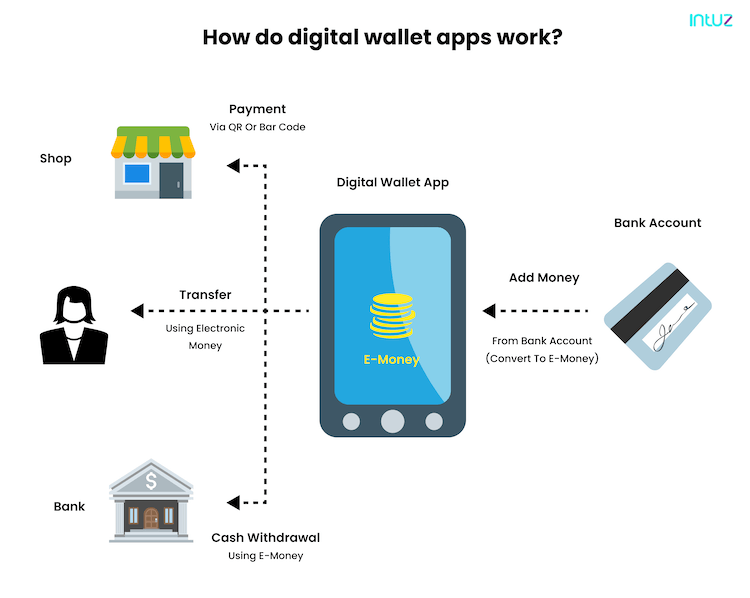
Some merchants also use QR codes for payment, especially in certain regions or for specific apps. You simply open your wallet app, select the QR code payment option, and scan the merchant’s code.
Facilitating Online Transactions
Digital wallets simplify online shopping by securely storing your payment and shipping details:
- Look for Wallet Logos: At online checkout, look for buttons like “Pay with Apple Pay,” “Google Pay,” or “PayPal.”
- Select Your Wallet: Click on the relevant digital wallet option.
- Authenticate: Your device will prompt you to authenticate the purchase using biometrics (fingerprint, Face ID) or your device passcode. This securely transmits your payment details to the merchant without you having to manually enter card numbers.
- Confirm: Review your order and confirm the payment.
This method not only speeds up checkout but also adds a layer of security, as your actual card number is not shared directly with the merchant.
Peer-to-Peer (P2P) Transfers
Many digital wallets and dedicated apps facilitate sending and receiving money between individuals:
- Open P2P App: Launch apps like Venmo, PayPal, Cash App, or sometimes features built into Google Pay or Apple Pay.
- Select Recipient: Choose the person from your contacts or enter their username/email/phone number.
- Enter Amount & Note: Specify the amount you want to send and add a descriptive note (e.g., “Dinner,” “Rent share”).
- Confirm: Review and authorize the transfer. Funds are typically transferred instantly or within a few business days, depending on the service and whether you’re moving money from your wallet balance to a bank account.
Leveraging Loyalty Programs and Tickets
Modern digital wallets can consolidate more than just payment cards:
- Loyalty Cards: Many wallets allow you to add digital versions of your store loyalty cards. When paying, you can easily access and present these cards to earn points or apply discounts.
- Event Tickets and Boarding Passes: Concert tickets, movie tickets, and airline boarding passes can be stored in your digital wallet, providing quick access and simplifying check-ins.
Advanced Features and Digital Security Best Practices
Beyond basic transactions, digital wallets offer advanced functionalities and demand proactive security measures to keep your finances safe.
Exploring Beyond Basic Payments
The utility of digital wallets continues to expand:
- Transit Cards: In many cities, public transportation passes can be loaded directly into your digital wallet, allowing you to tap your phone or watch at turnstiles.
- Digital Keys: Some car manufacturers and smart home systems are integrating with digital wallets to allow your phone to act as a digital car key or house key.
- Identity Documents (Emerging): There’s a growing trend to store digital driver’s licenses or state IDs within digital wallets, potentially simplifying age verification or identity checks in the future.
- Health Passes: During specific times, digital wallets have been used to store vaccination records or health passes for convenient access.
Protecting Your Digital Wallet
While digital wallets are inherently designed with security in mind, user vigilance is crucial:
- Two-Factor Authentication (2FA): Always enable 2FA on your device and for any associated online accounts (e.g., Google account, Apple ID). This adds an extra layer of security, requiring a second verification step beyond just a password.
- Strong Device Security: Never disable your device’s passcode or biometrics. These are the primary gatekeepers for your wallet.
- Beware of Phishing and Scams: Be skeptical of unsolicited emails, texts, or calls asking for your wallet credentials, passcodes, or personal information. Digital wallet providers or banks will never ask for this information directly.
- Regular Software Updates: Keep your phone’s operating system and all apps, especially your wallet app, updated to the latest versions. These updates often include critical security patches.
- Remote Wipe Capabilities: Familiarize yourself with how to remotely wipe or lock your device if it’s lost or stolen. Most operating systems offer “Find My Device” features that allow you to locate, lock, or erase your phone’s data remotely.
- Monitor Transactions: Regularly check your bank statements and transaction history within your digital wallet app to spot any unauthorized activity promptly.
- Public Wi-Fi Caution: Avoid making financial transactions or accessing sensitive information over unsecured public Wi-Fi networks.
Troubleshooting Common Issues
Even with robust technology, issues can arise:
- Failed Transactions: Check if your chosen payment card has sufficient funds, if it’s expired, or if there’s a daily transaction limit. Ensure the payment terminal is working correctly and supports contactless payments.
- Device Not Responding: Restart your device. Ensure NFC is enabled in your phone’s settings if you’re experiencing issues with contactless payments.
- Lost or Stolen Device: Immediately use your device’s “Find My” feature (e.g., Apple’s Find My iPhone, Google’s Find My Device) to locate, lock, or remotely wipe your device. Contact your bank to temporarily suspend or remove the cards linked to your digital wallet as a precautionary measure.
- App Glitches: If the wallet app itself is misbehaving, try force-closing and reopening it, clearing its cache (on Android), or reinstalling it.
The Future of Digital Wallets
The evolution of digital wallets is far from over. As technology advances, we can expect even more sophisticated features and broader integration into our daily lives.
Emerging Technologies and Trends
- Enhanced Biometric Authentication: Beyond fingerprints and facial recognition, future wallets might integrate more advanced biometrics like vein scanning or behavioral biometrics (analyzing unique typing patterns or gait) for even greater security.
- Integration with Smart Devices: Expect seamless payments and identity verification across a wider ecosystem of smart devices, from smart rings and glasses to connected cars and home appliances.
- Web3 and Decentralized Finance (DeFi) Wallets: As blockchain technology matures, dedicated Web3 wallets for cryptocurrencies, NFTs, and decentralized applications are becoming more mainstream, offering users greater control over their digital assets and identity in a decentralized internet.
- Digital Currencies (CBDCs): Central Bank Digital Currencies (CBDCs) being explored by governments worldwide could fundamentally change how digital wallets function, potentially allowing direct interaction with central bank-issued digital cash.
The Path Towards a Cashless Society
The continuous refinement of digital wallets pushes society further towards a cashless future. This shift brings undeniable convenience and efficiency but also necessitates ongoing discussions about privacy, data security, and financial inclusion for all segments of the population. As digital wallets become more ubiquitous, their underlying technology and the security protocols governing them will remain critical areas of focus for both developers and users.
In conclusion, mastering the use of a digital wallet is no longer optional but a fundamental skill in the modern digital age. By understanding its mechanics, meticulously setting it up, practicing secure usage, and staying informed about its evolving capabilities, you can unlock a world of convenient, secure, and efficient financial transactions, all from the palm of your hand.
aViewFromTheCave is a participant in the Amazon Services LLC Associates Program, an affiliate advertising program designed to provide a means for sites to earn advertising fees by advertising and linking to Amazon.com. Amazon, the Amazon logo, AmazonSupply, and the AmazonSupply logo are trademarks of Amazon.com, Inc. or its affiliates. As an Amazon Associate we earn affiliate commissions from qualifying purchases.