
Overdraft protection, while seemingly a safety net, can often become a costly convenience that hinders sound personal financial management. For many account holders, intentionally opting out of this service with institutions like Chase is a strategic move towards tighter budgeting, reduced fees, and enhanced financial discipline. Understanding the mechanics of overdraft protection, the process of disabling it, and the necessary financial adjustments post-disabling is crucial for effective money management.
Understanding Overdraft Protection and Its Financial Implications
Before making a decision to turn off overdraft protection, it’s essential to grasp what it entails and its potential impact on your personal finances. This clarity empowers you to make an informed choice that aligns with your financial goals.

What is Overdraft Protection?
Overdraft protection is a service offered by banks, including Chase, designed to prevent your debit card transactions, ATM withdrawals, and sometimes checks or automated payments from being declined if you don’t have enough money in your checking account. Instead of declining the transaction, the bank covers the difference, effectively lending you the funds to complete the payment.
There are generally two main types of overdraft protection:
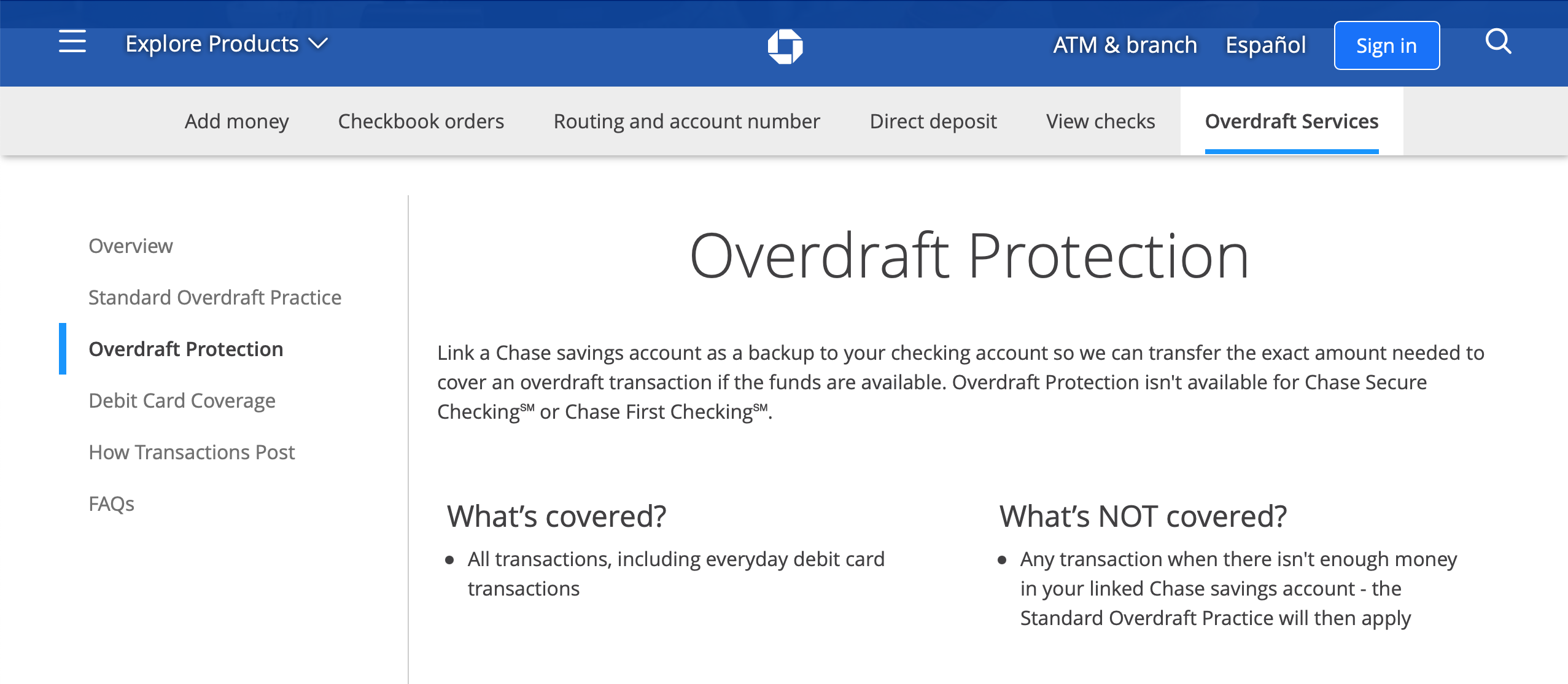
- Overdraft Protection Plans: This involves linking your checking account to another Chase account (like a savings account or a credit card) or a line of credit. When you overdraw, funds are automatically transferred from the linked account to cover the deficit. While this might involve transfer fees, they are typically lower than standard overdraft fees and you’re drawing from your own funds or a pre-approved credit line.
- Standard Overdraft Service: This is often an “opt-in” service where Chase covers the overdraft using its own funds, allowing the transaction to go through. However, for this service, the bank typically charges a significant overdraft fee for each transaction that overdraws your account. This fee can apply even to very small overdrafts, and multiple fees can accumulate rapidly if you make several small transactions while overdrawn.
The crucial distinction lies in the cost. Overdraft protection linked to your own accounts or a line of credit usually incurs lower or no fees, while the standard overdraft service, where the bank covers the deficit, is a major source of revenue for financial institutions through substantial fees. These fees can quickly erode your balance and budget, trapping individuals in a cycle of charges if not managed diligently.
The Hidden Costs and Why Opting Out Might Be Smart
While the immediate benefit of overdraft protection is avoiding a declined transaction and potential embarrassment, the long-term financial implications can be substantial. The standard overdraft fee at major banks often ranges from $30 to $35 per transaction. If you inadvertently make several small purchases while your balance is low, you could face hundreds of dollars in fees in a single day. This turns what might have been a minor shortfall into a significant financial burden.
Opting out of standard overdraft protection is a strategic move for several reasons:
- Eliminating Costly Fees: The most immediate benefit is preventing the accumulation of high overdraft fees. If a transaction would overdraw your account, it will simply be declined, and you won’t be charged a fee for the attempt.
- Encouraging Financial Discipline: Knowing that transactions will be declined if funds are insufficient forces a greater awareness of your account balance. This encourages more diligent budgeting, careful tracking of expenditures, and a proactive approach to managing your money. It shifts the responsibility from the bank’s “safety net” to your personal financial accountability.
- Promoting Budget Adherence: Without the buffer of overdraft protection, you are more likely to stick to your budget and ensure you have sufficient funds before making purchases. This can be a powerful tool for preventing impulse spending and maintaining a healthy financial equilibrium.
- Building an Emergency Fund: The money saved from avoiding overdraft fees can be redirected towards building an emergency fund. This fund serves as a true financial safety net, allowing you to cover unexpected expenses without incurring bank fees or relying on high-interest credit.
- Reducing Financial Stress: While initially, the thought of a declined transaction might seem stressful, the long-term reduction in financial anxiety from avoiding unexpected fees and having better control over your money often outweighs this initial concern.
For individuals striving for financial independence and robust personal finance practices, disabling overdraft protection can be a pivotal step towards greater control and savings.
Step-by-Step Guide to Disabling Overdraft Protection with Chase
Chase offers multiple convenient ways to manage your account settings, including turning off overdraft protection. Whether you prefer digital channels or direct interaction, the process is straightforward.
Online Banking Method
Using Chase’s online banking platform is often the quickest and most accessible way to adjust your overdraft settings.
- Log In to Your Chase Account: Go to Chase.com and enter your username and password to log in.
- Navigate to Account Services: Once logged in, locate the “Account Services” or “Customer Service” section. This is typically found in the main navigation menu or under your account details.
- Find Overdraft Settings: Within the services section, look for options related to “Overdraft Protection,” “Overdraft Services,” or “Account Settings.” The exact phrasing may vary slightly.
- Review and Modify: You will likely see your current overdraft protection status. If you are opted into standard overdraft service, you should have an option to “Change” or “Manage” these settings.
- Opt Out/Confirm Changes: Follow the prompts to opt out of the standard overdraft service. You may need to confirm your decision. Chase will typically send you a confirmation email or message.
It’s crucial to ensure you understand which type of overdraft protection you are disabling. If you have a linked savings account or credit card for overdraft transfers, this process typically refers to the standard overdraft service that charges fees.
Using the Chase Mobile App
For those who manage their finances primarily on the go, the Chase Mobile App offers a convenient alternative.
- Open the Chase Mobile App: Launch the app on your smartphone or tablet and log in using your credentials.
- Select Your Account: Tap on the checking account for which you want to manage overdraft protection.
- Access Account Details/Settings: Look for an option like “Manage Account,” “Account Services,” or “Settings” within the selected account’s details. This might be represented by an icon (e.g., a gear or three dots).
- Locate Overdraft Options: Similar to online banking, search for “Overdraft Protection,” “Overdraft Services,” or similar terminology.
- Disable Service: Follow the on-screen instructions to opt out of the standard overdraft service. Confirm your changes. A digital confirmation should appear in the app and possibly via email.
Calling Customer Service
If you prefer speaking with a representative or encounter difficulties with the digital channels, Chase’s customer service is an effective option.
- Gather Your Information: Have your account number, personal identification information (e.g., Social Security Number, date of birth), and possibly your online banking login details ready.
- Dial Chase Customer Service: Call the main customer service number, which can usually be found on the back of your debit card, on your bank statements, or on the Chase website. The general number is often 1-800-935-9935.
- Navigate the Automated System: Follow the prompts to speak with a representative about your checking account and overdraft services. You might select options like “Account Services” or “Manage My Account.”
- Request to Opt Out: Clearly state to the representative that you wish to opt out of standard overdraft service for your checking account. They may explain the implications, but you can confirm your decision.
- Confirm Changes: Ask the representative to confirm that the change has been made and inquire about any waiting periods for the change to take effect. Request an email or mail confirmation for your records.
Visiting a Chase Branch
For those who prefer face-to-face interaction or need personalized assistance, visiting a local Chase branch is a viable option.
- Locate a Branch: Use the Chase website or mobile app to find the nearest branch location.
- Bring Identification: Take a valid government-issued photo ID (e.g., driver’s license, passport) and your Chase debit card or account details.
- Speak with a Banker: Inform the branch representative that you want to opt out of standard overdraft protection for your checking account.
- Complete Necessary Forms: You may need to sign a form acknowledging the change. The banker will guide you through the process.
- Get Confirmation: Ensure you receive confirmation that the service has been disabled. This might be a printout or a note on your account.
Regardless of the method chosen, it’s always prudent to keep a record of your request, such as a confirmation email, screenshot, or the name of the representative you spoke with and the date/time of the call.
Navigating Your Finances After Disabling Overdraft Protection
Turning off overdraft protection is a significant step towards better financial management, but it also necessitates a shift in how you monitor and manage your spending. Understanding the direct consequences and implementing proactive strategies are key to success.
Potential Consequences: Declined Transactions and NSF Fees
Without standard overdraft protection, any transaction that would cause your account balance to fall below zero will typically be declined. This applies to debit card purchases, ATM withdrawals, and sometimes even bill payments or checks. While the immediate inconvenience might be a moment of embarrassment at the point of sale, the financial benefit is significant: you avoid the costly overdraft fee.
However, it’s important to differentiate between a declined transaction and a Non-Sufficient Funds (NSF) fee.
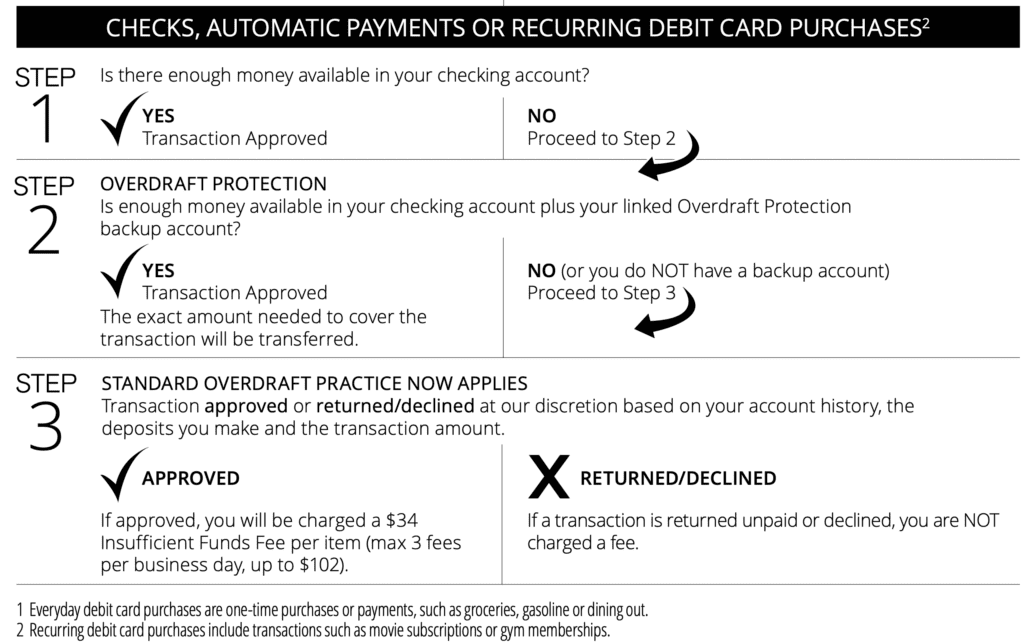
- Declined Transaction: For most debit card transactions and ATM withdrawals, if you don’t have enough funds and no overdraft protection, the transaction will simply be declined without a fee from Chase.
- Non-Sufficient Funds (NSF) Fees: For certain types of transactions, like checks or automated clearing house (ACH) payments (e.g., automatic bill payments), if you don’t have enough funds and no overdraft protection, the payment might be returned unpaid. When this happens, Chase may still charge an NSF fee (sometimes called a “returned item fee”). Additionally, the merchant or biller you were trying to pay might also charge you a separate returned payment fee. This is a critical distinction, as avoiding overdraft protection doesn’t always completely eliminate all associated fees, particularly for pre-authorized debits.
Therefore, while disabling overdraft protection greatly reduces your exposure to expensive fees, it underscores the paramount importance of maintaining an adequate balance for all scheduled payments.
Proactive Strategies for Avoiding Overdrafts
To successfully navigate banking without overdraft protection, robust proactive strategies are essential.
- Diligent Balance Monitoring: Regularly check your account balance through online banking or the mobile app. Don’t just check once a week; make it a daily habit, especially if you have multiple transactions.
- Accurate Transaction Tracking: Keep a running tally of your spending. Whether using a digital budgeting app, a spreadsheet, or even a simple pen and paper, knowing exactly where your money is going and what payments are pending is critical.
- Low Balance Alerts: Set up low balance alerts with Chase. You can typically customize these alerts to notify you via text or email when your account balance drops below a certain threshold (e.g., $100 or $50). This provides an early warning system, allowing you to transfer funds before an overdraft occurs.
- Buffer Funds: Aim to keep a small buffer (e.g., $100-$200) in your checking account above what you anticipate spending or needing for upcoming bills. This provides a small cushion against unexpected transactions or slight miscalculations.
- Understanding Pending Transactions: Be aware that some transactions, especially debit card purchases, might show as “pending” for a day or two before they fully clear your account. Always factor these into your available balance to avoid spending money that’s already allocated.
By integrating these habits into your financial routine, you can effectively manage your account without relying on overdraft protection, leading to better financial health and fewer surprise fees.
Beyond Overdraft: Building Robust Financial Habits
Disabling overdraft protection is not just about avoiding fees; it’s an opportunity to cultivate stronger financial habits that serve you well in the long run. It encourages a shift from reactive problem-solving to proactive money management.
The Power of Budgeting and Emergency Funds
At the core of successful financial management without overdraft protection lies a solid budget and a healthy emergency fund.
- Comprehensive Budgeting: Create a detailed budget that tracks all your income and expenses. Utilize tools like the 50/30/20 rule (50% needs, 30% wants, 20% savings/debt repayment) or a zero-based budget to ensure every dollar has a purpose. A clear budget helps you anticipate cash flow, identify potential shortfalls before they happen, and allocate funds appropriately. Regularly review and adjust your budget to reflect changes in income or spending patterns.
- Establishing an Emergency Fund: An emergency fund is your primary defense against unexpected financial shocks that might otherwise lead to overdrafts. Aim to save at least three to six months’ worth of essential living expenses in a separate, easily accessible savings account. This fund provides a critical buffer for job loss, medical emergencies, car repairs, or other unforeseen costs, preventing you from dipping below zero in your checking account or resorting to high-interest debt. Prioritize building this fund even before investing significantly elsewhere.
Leveraging Technology for Financial Alerts
Modern banking tools offer invaluable assistance in maintaining financial vigilance. Chase’s digital platforms provide customizable alerts that can act as an early warning system.
- Low Balance Alerts: As mentioned, setting up alerts to notify you when your checking account balance drops below a specified amount is crucial. This proactive notification gives you time to transfer funds from savings or another account before an overdraft occurs.
- Large Transaction Alerts: You can also set alerts for transactions exceeding a certain amount. This helps you monitor unusual activity and keeps you informed of significant outgoing funds.
- Deposit Alerts: Knowing immediately when your paycheck or other deposits hit your account can help you manage your spending expectations and confirm available funds.
- Upcoming Bill Reminders: While not directly an overdraft prevention tool, setting reminders for recurring bills within your budgeting app or bank’s features can prevent you from forgetting a payment and inadvertently overdrawing your account.
By effectively utilizing these technological safeguards, you can enhance your awareness of your account status and prevent common pitfalls.
Alternative Safety Nets
While removing standard overdraft protection, it’s wise to consider other prudent safety nets:
- Linked Savings Account: Maintain a savings account with sufficient funds linked to your checking account for overdraft protection transfers. This is a distinct service from standard overdraft. If you overdraw, funds are automatically transferred from your savings account to cover the deficit, often for a lower fee (or no fee for transfers from your own accounts) than a standard overdraft fee. This is a much healthier form of protection as you’re using your own money.
- Small, Revolving Credit Line (if applicable): Some individuals may opt for a small personal line of credit that can act as a backup. However, this should be used with extreme caution, as it is a form of debt.
- Credit Card for Emergencies: A credit card can serve as a true emergency fund for unexpected expenses, provided it’s used responsibly and paid off in full each month to avoid interest charges. This separates your daily spending from emergency funds, offering a controlled financial safety net.
Ultimately, turning off overdraft protection at Chase is more than a simple account change; it’s a commitment to greater financial responsibility and a step towards mastering your personal finances. By combining diligent monitoring, robust budgeting, and strategic planning, you can navigate your banking successfully and efficiently, avoiding unnecessary fees and building a stronger financial future.
aViewFromTheCave is a participant in the Amazon Services LLC Associates Program, an affiliate advertising program designed to provide a means for sites to earn advertising fees by advertising and linking to Amazon.com. Amazon, the Amazon logo, AmazonSupply, and the AmazonSupply logo are trademarks of Amazon.com, Inc. or its affiliates. As an Amazon Associate we earn affiliate commissions from qualifying purchases.