
In the rapidly evolving landscape of personal finance, digital payment applications have become indispensable tools for managing day-to-day transactions. Among these, Cash App stands out as a popular platform for sending, receiving, and investing money. However, for many users, the ultimate goal often involves bridging the gap between their digital wallet balance and their traditional bank account. Understanding how to seamlessly transfer funds from Cash App to a bank is not just a matter of technical know-how; it’s a critical component of effective personal finance management, ensuring liquidity, accessibility, and integration with broader financial strategies. This comprehensive guide delves into the mechanics, implications, and best practices for moving your money from Cash App directly into your bank account.
Understanding the Importance of Seamless Fund Transfers
The advent of digital payment platforms like Cash App has revolutionized how individuals interact with their money, offering unparalleled convenience for P2P (person-to-person) payments, bill splitting, and even cryptocurrency transactions. Yet, for all their utility, these apps are often just one piece of a larger financial puzzle. The ability to easily move funds between these digital ecosystems and a traditional bank account is paramount for maintaining financial agility and control.
The Role of Digital Wallets in Modern Finance
Digital wallets have carved out a significant niche in modern finance, primarily due to their speed and ease of use. They facilitate instant transactions, often bypassing the traditional banking hours and processing delays that once characterized money transfers. For many, Cash App serves as a primary hub for receiving payments – whether it’s reimbursement from a friend, payment for a side hustle, or a gift. While convenient for digital spending, a significant portion of personal finance still relies on funds being available in a traditional bank account for larger expenditures, bill payments, or savings.
Why Move Funds from Cash App to Your Bank?
There are numerous compelling reasons why users frequently need to transfer money from their Cash App balance to a linked bank account. Firstly, traditional bank accounts often serve as the central repository for one’s financial life, where salaries are deposited, major bills are paid, and long-term savings reside. Consolidating funds from various digital sources into this central account provides a clearer overview of one’s financial position and simplifies budgeting. Secondly, while Cash App offers a Cash Card for spending directly from your balance, a bank account provides broader access to financial services, including ATM withdrawals without specific card limitations, loan applications, and higher-tier investment options. Lastly, for many, the psychological comfort and perceived security of having funds in a regulated, insured bank account outweigh the convenience of keeping large sums in a digital wallet. This transfer process is thus not merely a transaction; it’s a strategic financial move.
The Step-by-Step Process of Withdrawing Funds
Transferring money from your Cash App account to your bank is designed to be straightforward, though understanding the nuances of each option is key to making informed financial decisions. The process primarily involves a few taps within the application, offering both standard and instant transfer methods.
Initiating a Standard Transfer
The standard transfer option is the most common and cost-effective way to move money from Cash App to your bank. Here’s how to do it:
- Open Cash App: Launch the Cash App on your mobile device.
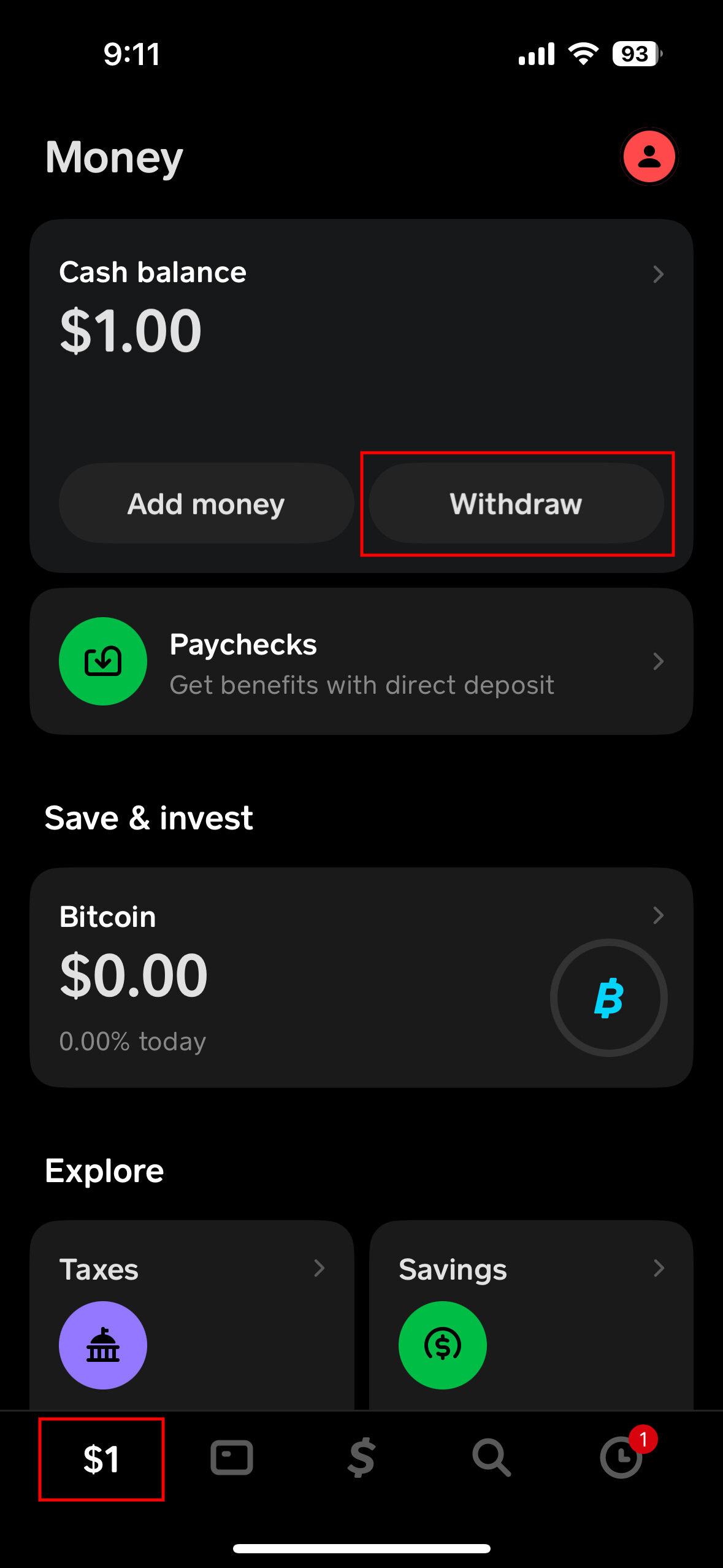
- Navigate to the Banking Tab: Tap the banking icon (which looks like a house or a dollar sign depending on your app version) from the bottom left corner of the screen.
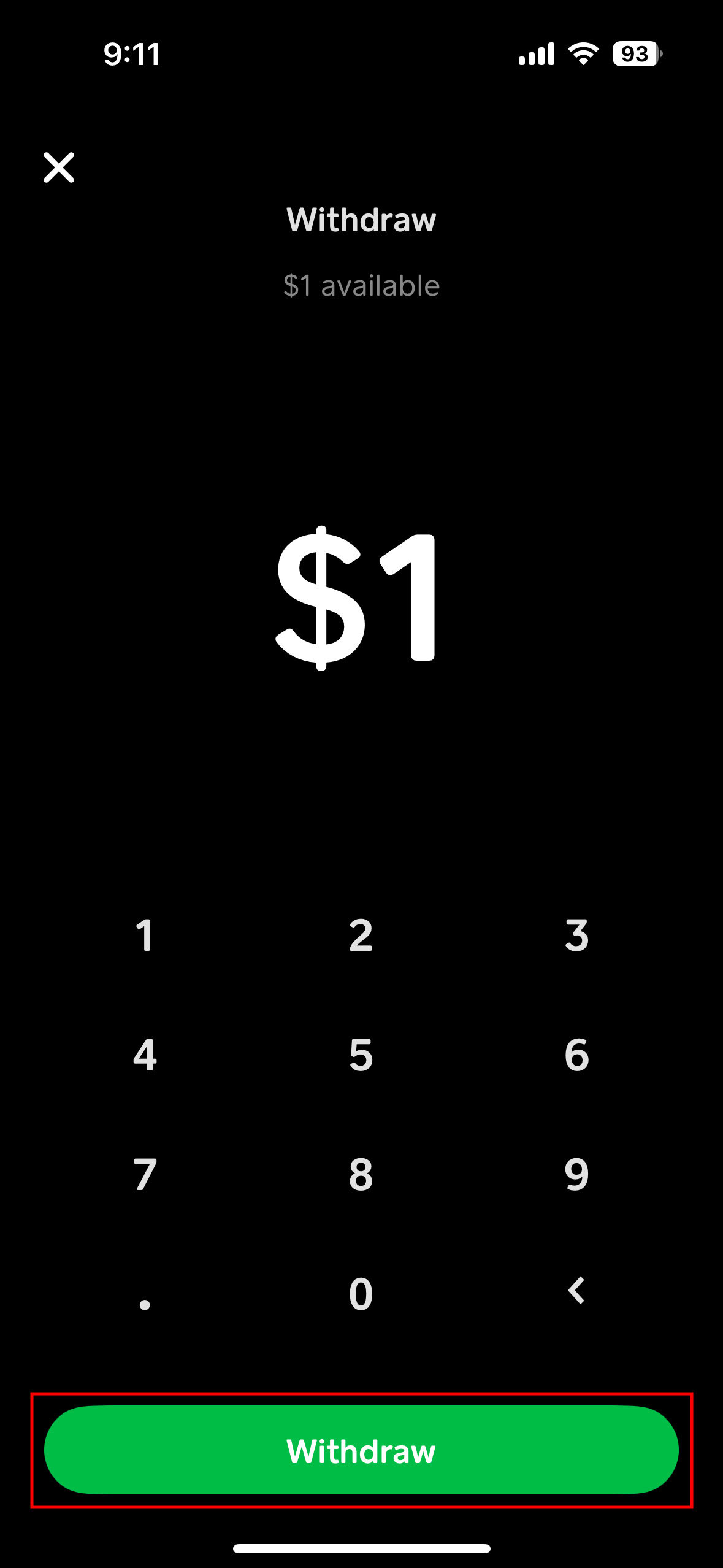
- Select “Cash Out”: Your current Cash App balance will be displayed. Tap the “Cash Out” button.
- Enter the Amount: Input the specific amount of money you wish to transfer to your bank account. You can choose to transfer your full balance or a partial amount.
- Choose “Standard” Transfer: Cash App will present two options: “Standard” or “Instant.” Select “Standard.”
- Confirm Transfer: Review the details, including the amount and the linked bank account. Tap “Confirm” to initiate the transfer.
Standard transfers are typically free of charge but come with a longer processing time, usually taking 1-3 business days to reflect in your bank account. This duration excludes weekends and public holidays, which can extend the waiting period.
Expediting Your Funds with Instant Transfer
For those situations demanding immediate access to funds, Cash App offers an “Instant” transfer option. This service expedites the transfer, making your money available in your linked bank account within minutes, often almost instantly.
- Follow Steps 1-4 above: Navigate to the “Cash Out” section and enter the desired amount.
- Choose “Instant” Transfer: When presented with transfer options, select “Instant.”
- Review Fee and Confirm: Cash App charges a small fee for instant transfers, typically 0.5% to 1.75% of the transferred amount. Before confirming, the app will clearly display this fee. Review the amount and fee, then tap “Confirm.”
While highly convenient for urgent financial needs, it’s crucial for users to factor in the associated fee when deciding between standard and instant transfers, particularly for larger sums where the fee can become significant.
Verifying Your Bank Account for Transfers
Before any transfer can take place, your bank account must be securely linked and verified with your Cash App profile. If you haven’t done this already, Cash App will prompt you during your first transfer attempt or through the linked accounts section in your profile settings.
- Go to Profile Icon: Tap your profile icon (usually top right corner).
- Select “Linked Banks”: Under the “Personal” section, tap on “Linked Banks.”
- Link Bank: If no bank is linked, tap “Link Bank” and follow the prompts to connect your bank account using your bank’s login credentials (via Plaid, a secure third-party service) or by manually entering your debit card information.
- Verification: Cash App may require a small deposit/withdrawal verification process to ensure the account belongs to you. Always ensure the bank account details are accurate to prevent failed transfers and potential delays in accessing your funds.
Navigating Fees, Limits, and Timelines
Understanding the financial parameters surrounding Cash App transfers is vital for effective money management. These include the costs associated with transfers, the maximum amounts you can move, and the expected timeframe for funds to clear.
Deconstructing Transfer Fees
As previously mentioned, Cash App distinguishes between standard and instant transfers primarily through their fee structures:
- Standard Transfers: These are typically free. This makes them the most cost-effective option for users who do not require immediate access to their funds.
- Instant Transfers: These incur a fee, usually ranging from 0.5% to 1.75% of the transfer amount. The exact percentage can vary and is always displayed clearly before you confirm the transaction. For example, transferring $100 instantly might cost you between $0.50 and $1.75. While seemingly small for lower amounts, this fee can add up for frequent or large instant transfers, impacting the net amount received in your bank account.
Savvy financial planning involves minimizing unnecessary fees. If you can anticipate your need for funds, opting for a standard transfer is often the financially prudent choice.
Understanding Daily and Weekly Limits
To safeguard against fraud and manage risk, Cash App imposes certain limits on the amounts that can be transferred. These limits can vary based on whether your account is verified and your transaction history.
- Unverified Accounts: Typically have lower limits for both sending and receiving money, as well as for cashing out to a bank.
- Verified Accounts: Users who have verified their identity (by providing their full name, date of birth, and the last four digits of their SSN) generally enjoy significantly higher limits. For example, verified users might be able to cash out up to $25,000 per week, though daily limits may also apply.
It’s important to check your specific limits within the Cash App settings if you plan to transfer large sums. If you encounter a limit, consider verifying your account or spreading out your transfers over several days or weeks.
Expected Transfer Timelines
The timeline for funds to appear in your bank account is a critical consideration for financial planning:
- Standard Transfers: As a rule of thumb, expect funds to arrive within 1-3 business days. This means if you initiate a standard transfer on a Friday, the funds might not be available until Tuesday or Wednesday of the following week, accounting for weekend processing. Bank holidays can also extend this period.
- Instant Transfers: Funds transferred using the instant option are generally available in your linked bank account within minutes, sometimes even seconds. This immediacy is the primary benefit justifying the fee. However, very occasionally, bank processing delays or network issues can cause a slight hold-up, though this is rare.
Always allow ample time for standard transfers, especially when dealing with critical payments or financial obligations.
Ensuring Security and Troubleshooting Common Issues
While Cash App aims for a smooth user experience, understanding security best practices and knowing how to troubleshoot common issues can save you time, stress, and potential financial loss.
Best Practices for Secure Transfers
Security in digital finance is a shared responsibility. While Cash App employs robust encryption and fraud detection systems, users play a crucial role in protecting their funds:
- Strong, Unique Passwords/PINs: Use a strong, unique PIN for your Cash App and avoid sharing it. Enable two-factor authentication (2FA) for an added layer of security.
- Monitor Account Activity: Regularly review your Cash App transaction history and bank statements for any unauthorized activity.
- Secure Wi-Fi: Avoid conducting financial transactions over unsecured public Wi-Fi networks, which can be vulnerable to eavesdropping.
- Verify Recipient Details: While not directly applicable to bank transfers, always double-check recipient details for any P2P payments to prevent erroneous transfers. For bank transfers, ensure your linked bank account details are correct.
- Phishing Awareness: Be wary of suspicious emails, texts, or calls purporting to be from Cash App. Cash App will never ask for your PIN, sign-in code, or full debit card number via unsecure channels.
Addressing Failed Transfers and Delays
Occasionally, a transfer might fail or experience unexpected delays. Here are common reasons and initial troubleshooting steps:
- Incorrect Bank Information: The most frequent cause of failure. Double-check that your linked bank account number and routing number are correct.
- Bank Restrictions: Your bank might have internal limits or restrictions on incoming transfers from certain platforms. Contact your bank directly to inquire.
- Insufficient Funds: Ensure you have enough balance in your Cash App account to cover the transfer amount and any associated instant transfer fees.
- Cash App Account Issues: Your Cash App account might be flagged for unusual activity or be unverified, leading to transfer restrictions.
- Technical Glitches: Although rare, temporary system outages or technical issues on either Cash App’s or your bank’s side can cause delays.
If a transfer fails, Cash App usually provides a notification or an error message. The funds are typically returned to your Cash App balance. If you experience significant delays beyond the stated timelines, especially for instant transfers, document the transaction details and proceed to contact support.
Contacting Cash App Support
For persistent issues, failed transfers where funds are not returned, or security concerns, reaching out to Cash App support is the next step:
- In-App Support: The most efficient way to contact support is directly through the Cash App. Go to your profile icon, scroll down, and select “Support” or “Cash App Support.” This allows the support team to quickly access your account details.
- Website Support: You can also visit Cash App’s official website and navigate to their support section.
- Phone Support (Limited): Cash App primarily relies on in-app and web support. Be extremely cautious of unofficial phone numbers, as scams are prevalent. Always verify the official support number through the app or website.
When contacting support, be prepared to provide transaction IDs, dates, amounts, and a clear description of the problem.
Integrating Cash App Transfers into Your Personal Finance Strategy
Mastering the art of transferring funds from Cash App to your bank goes beyond mere execution; it’s about strategically integrating this capability into a broader framework of personal finance management to enhance control and optimize financial health.
Budgeting and Tracking Cash App Transactions
For comprehensive financial oversight, it’s crucial to incorporate Cash App transactions into your overall budgeting and tracking system. Treat your Cash App balance as another component of your liquid assets. When you transfer funds to your bank, categorize it appropriately within your budget software or spreadsheet—perhaps as an “income transfer” or “fund consolidation.” This ensures that you have a holistic view of where your money is, where it’s coming from, and where it’s going, preventing any “black holes” in your financial reporting. Regularly reviewing your Cash App statements alongside your bank statements helps identify spending patterns and prevents financial surprises.
Leveraging Instant Transfers for Financial Agility
While instant transfers incur a fee, they offer unparalleled financial agility in specific scenarios. Consider these strategic uses:
- Emergency Fund Replenishment: If you’ve used your bank’s emergency fund for an immediate expense but have received unexpected income on Cash App, an instant transfer can quickly replenish your primary emergency savings without waiting.
- Avoiding Overdrafts: If you realize your bank account is running low just before a significant bill is due, an instant transfer from a Cash App balance can prevent costly overdraft fees, making the instant transfer fee a worthwhile trade-off.
- Time-Sensitive Investments: For opportunities that require immediate funding from your bank, an instant transfer can bridge the gap.
- Urgent Bill Payments: If you need to pay a bill that only accepts bank transfers and the deadline is imminent, instant transfer ensures the funds are available.
Used judiciously, instant transfers can be a powerful tool for maintaining liquidity and responding swiftly to financial imperatives.
Beyond Transfers: Other Cash App Financial Features
While transferring money to your bank is a fundamental use case, it’s worth remembering that Cash App offers a suite of other financial tools that can complement your personal finance strategy:
- Investing in Stocks and Bitcoin: Cash App provides a user-friendly platform for micro-investing, allowing users to buy fractional shares of stocks and Bitcoin directly from their balance.
- Cash Card: The free customizable debit card allows you to spend your Cash App balance anywhere Visa is accepted, effectively extending the utility of your digital wallet.
- Direct Deposit: You can set up direct deposit with Cash App to receive paychecks, tax refunds, and other benefits directly into your account, offering another pathway for managing incoming funds.
- Boosts: These are instant discounts and rewards available when using your Cash Card at specific merchants, providing an opportunity for savings on everyday spending.
By understanding how to effectively transfer funds from Cash App to your bank, and by integrating this knowledge with awareness of its other features, users can harness Cash App as a powerful component of a comprehensive and agile personal finance strategy. In an increasingly digital world, the ability to seamlessly move money between various financial instruments is not just a convenience; it’s a cornerstone of financial empowerment.
aViewFromTheCave is a participant in the Amazon Services LLC Associates Program, an affiliate advertising program designed to provide a means for sites to earn advertising fees by advertising and linking to Amazon.com. Amazon, the Amazon logo, AmazonSupply, and the AmazonSupply logo are trademarks of Amazon.com, Inc. or its affiliates. As an Amazon Associate we earn affiliate commissions from qualifying purchases.