
In an increasingly digital world, managing personal finances has evolved dramatically. Gone are the days when bank transactions were solely confined to physical branches or cumbersome online portals. Today, mobile payment applications like Cash App have revolutionized how individuals send, receive, and manage their money, offering unparalleled convenience and speed. For many, integrating these digital wallets seamlessly with traditional banking is crucial for efficient financial management. This comprehensive guide will walk you through the process of transferring money from your bank account to Cash App, offering insights, best practices, and troubleshooting tips to ensure a smooth and secure experience.

Understanding Cash App and Its Role in Personal Finance
Cash App, developed by Square (now Block Inc.), has quickly become a dominant force in the peer-to-peer payment space. More than just a simple money transfer service, it’s an all-encompassing financial tool designed to simplify everyday transactions. For anyone looking to modernize their personal finance approach, understanding Cash App’s capabilities is the first step towards leveraging its full potential.
What is Cash App?
At its core, Cash App is a mobile payment service that allows users to send and receive money from friends and family with ease. However, its functionalities extend far beyond simple peer-to-peer transfers. Users can link bank accounts and debit cards, receive direct deposits, invest in stocks and Bitcoin, and even acquire a customizable debit card known as the Cash Card, which can be used for purchases anywhere Visa is accepted. This multi-faceted approach positions Cash App as a comprehensive digital wallet that caters to various personal finance needs, from splitting bills to managing small investments. Its intuitive interface and widespread adoption have made it a go-to platform for quick and efficient money movement.
Why Use Cash App for Money Transfers?
The appeal of Cash App for money transfers lies primarily in its speed, convenience, and user-friendly design. Traditional bank transfers, while reliable, can often take 1-3 business days to process. Cash App, on the other hand, facilitates near-instant transfers between users, and the process of adding funds from a linked bank account is remarkably swift. This immediacy is invaluable in situations requiring urgent payments or when managing day-to-day expenses. Furthermore, the ability to store funds within the app, use a dedicated debit card, and even dabble in investments, transforms it from a mere transfer service into a versatile financial hub that simplifies budgeting and expenditure tracking. For individuals accustomed to digital convenience, Cash App represents a significant upgrade in how they interact with their money.
Security Considerations for Digital Wallets
While the convenience of digital wallets is undeniable, it’s crucial to approach them with an understanding of security implications. Cash App employs several security measures, including data encryption, fraud detection technology, and multi-factor authentication (MFA) options, to protect user information and transactions. However, the onus also falls on the user to practice good digital hygiene. This includes using strong, unique passwords, enabling two-factor authentication, regularly monitoring transaction history, and being wary of phishing attempts or unsolicited requests for money. When linking a bank account, Cash App utilizes secure, encrypted connections to protect sensitive financial details, ensuring that your banking information is not directly exposed but rather tokenized for transaction processing. Maintaining vigilance is key to a secure and positive experience with any financial application.
Preparing for Your First Transfer: Linking Your Bank Account
Before you can add funds from your bank account to Cash App, the most critical step is to securely link your bank account to your Cash App profile. This process establishes the financial pathway for your money to flow between your traditional banking institution and your digital wallet. Careful preparation ensures a smooth and error-free connection.
Essential Prerequisites: Cash App Account and Bank Details
To initiate the linking process, you’ll need two primary prerequisites. First, a fully set up and verified Cash App account. This typically involves downloading the app, creating an account with your phone number or email, and verifying your identity (which may include providing personal information like your full name, date of birth, and the last four digits of your Social Security Number for higher limits and full functionality). Second, you’ll need the login credentials for your online banking portal. Cash App uses a secure third-party service (like Plaid) to connect to your bank, which requires you to log in with your bank’s username and password to verify ownership. Ensure you have these details readily available and accurate before you begin.
Step-by-Step Guide: Connecting Your Bank to Cash App
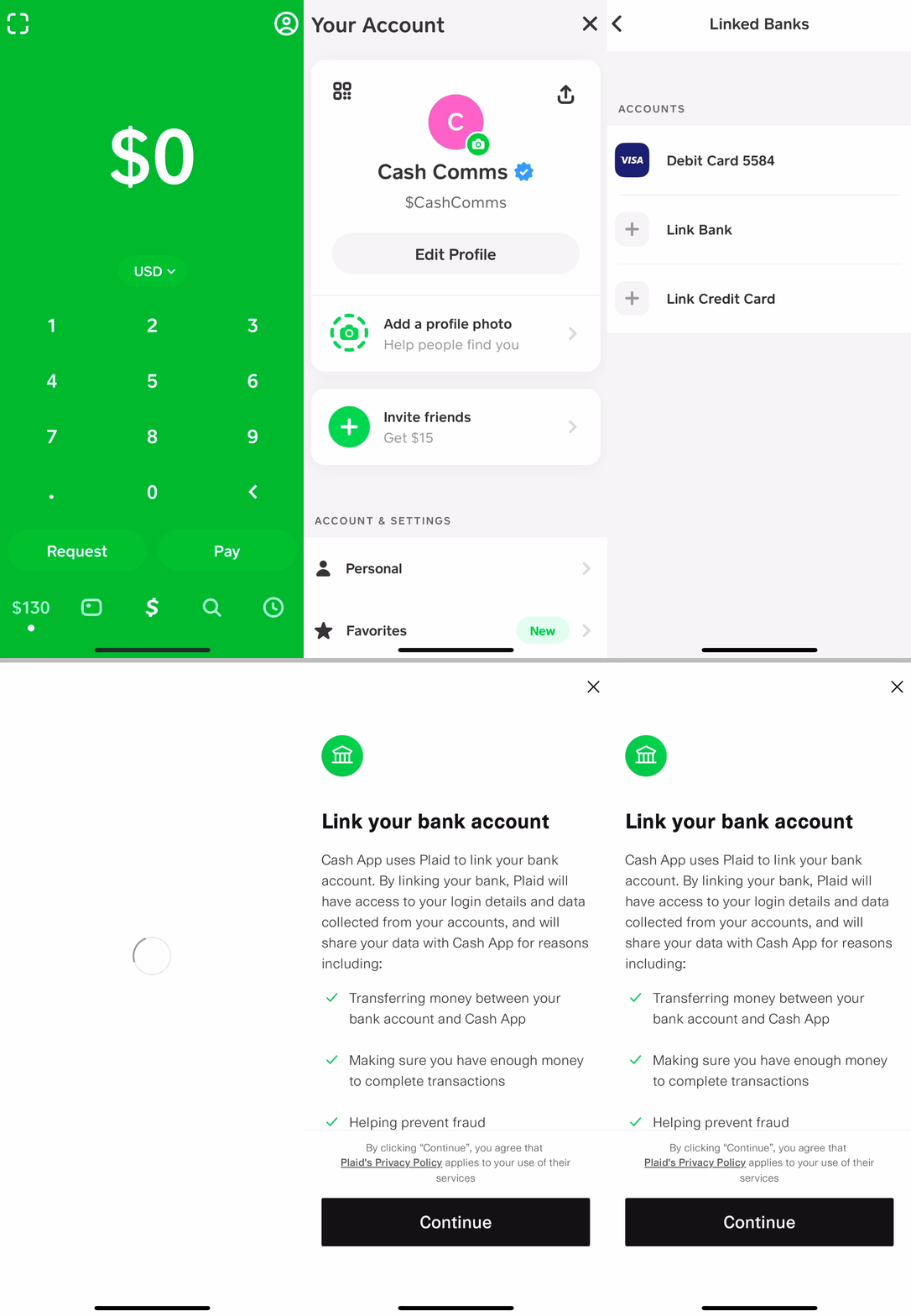
The process of linking your bank account is designed to be straightforward:
- Open Cash App: Launch the Cash App on your smartphone.
- Navigate to the Banking Tab: Tap the banking icon (which looks like a house or a bank) on the home screen.
- Link Bank: Under the “Cash Out” or “Linked Banks” section, look for an option that says “Link Bank” or “Add Bank.”
- Follow On-Screen Prompts: Cash App will then guide you through a series of screens, often powered by a secure service like Plaid. You will be asked to select your bank from a list.
- Log In to Your Bank: Enter your online banking username and password. This is a crucial step where your bank verifies your identity and authorizes the connection. This information is typically not stored by Cash App directly but used by the secure third-party service to establish the link.
- Select Account: If you have multiple accounts with the same bank (e.g., checking, savings), you may be prompted to select which account you wish to link.
- Confirmation: Once successfully linked, Cash App will display a confirmation message, and your bank account will now appear as a linked payment method in your app.
Troubleshooting Common Linking Issues
Occasionally, users may encounter issues when attempting to link their bank accounts. Here are some common problems and their solutions:
- Incorrect Login Details: Double-check your bank’s online login credentials. These are often case-sensitive. If you’ve recently changed your password, ensure you’re using the most current one.
- Unsupported Bank: While Cash App supports most major banks, some smaller or regional credit unions might not be directly supported through the automated linking process. In such cases, you might be able to link your bank via its debit card or by contacting Cash App support for alternative solutions.
- Security Blocks: Your bank might have security protocols that temporarily block third-party connections. If you receive an error, try logging into your bank’s website directly to see if there are any security alerts or pending actions required. You might also need to contact your bank’s customer service to authorize the connection.
- Technical Glitches: Sometimes, the issue might be temporary. Try restarting the Cash App or your phone, or wait a few minutes before attempting the linking process again. Ensure your internet connection is stable.
- Identity Verification Issues: If your Cash App account isn’t fully verified, it might restrict certain financial activities, including linking a bank account. Complete any pending identity verification steps within the app.
Executing the Transfer: Adding Funds to Your Cash App Balance
With your bank account successfully linked, the next step is to initiate the actual transfer of money. This process is designed for clarity and efficiency, allowing you to quickly top up your Cash App balance from your connected financial institution.
Navigating the Cash App Interface
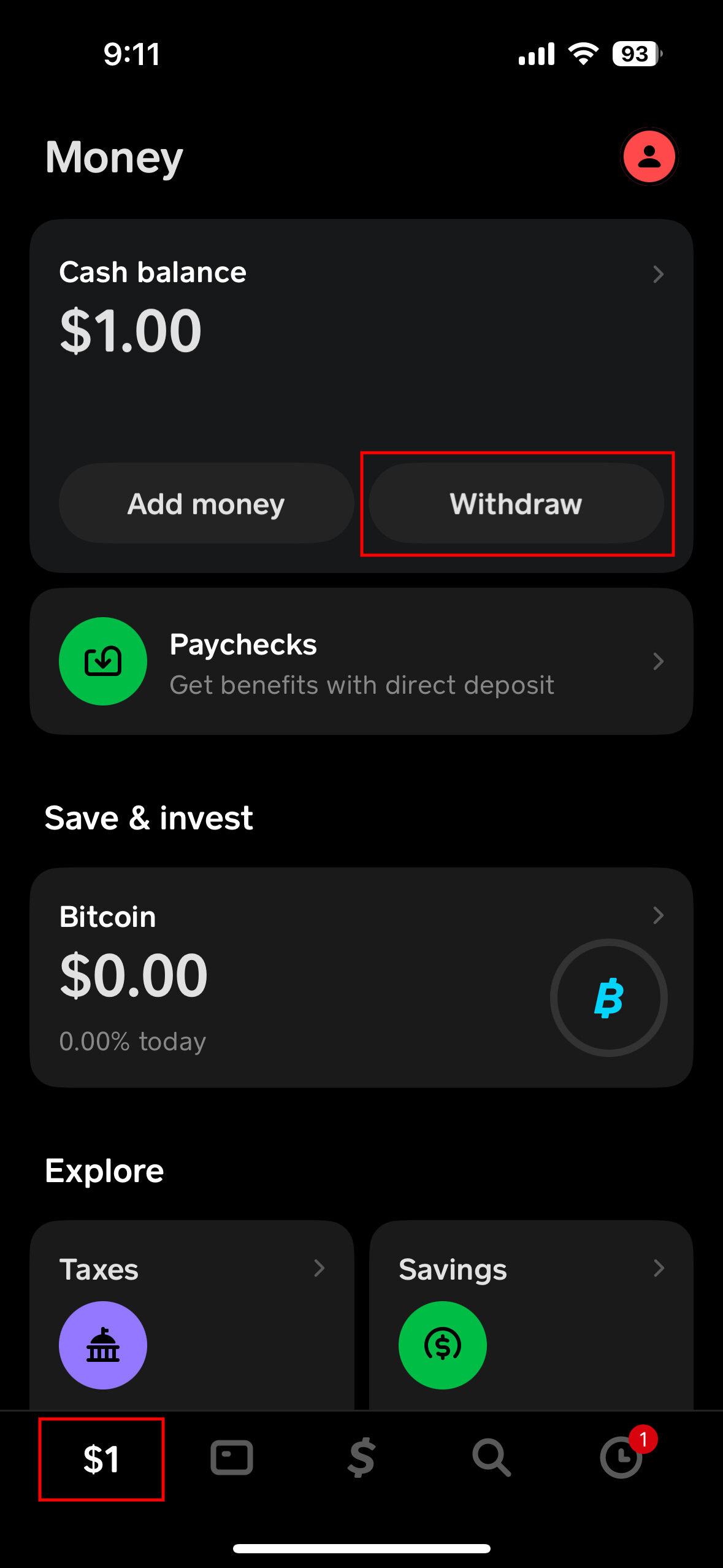
Cash App’s interface is generally intuitive, but knowing where to find the “Add Cash” option is key. Upon opening the app, you’ll land on the main screen, often displaying your current Cash App balance. At the bottom of this screen, there is a navigation bar. Look for the banking icon (often represented by a house or dollar sign with waves) – tapping this will take you to your banking section, where you can manage your balance and linked accounts. Alternatively, some users may find a prominent “Add Cash” button directly on the main screen if their balance is low or they frequently add funds.
Detailed Steps: Initiating a Bank Transfer to Cash App
Once you’ve located the “Add Cash” feature, the transfer process is straightforward:
- Tap “Add Cash”: From the banking tab or the main screen, select the “Add Cash” button.
- Enter Amount: A numerical keypad will appear, prompting you to enter the amount of money you wish to transfer from your bank account to your Cash App balance. Ensure this amount is within your linked bank account’s available funds and Cash App’s daily limits.
- Confirm Source: Cash App will typically default to your linked bank account as the source of funds. Verify that this is the correct account from which you intend to draw the money. If you have multiple funding sources (e.g., another bank account or a debit card), you might have an option to switch the source at this stage.
- Confirm Transaction: Review the amount and the source, then tap the “Add” or “Confirm” button. You might be asked to enter your PIN or use Touch ID/Face ID for security verification.
- Processing and Completion: Cash App will then process the transaction. Funds from your linked bank account are typically added to your Cash App balance almost instantly, though in rare cases, it might take a few minutes. You will receive an in-app notification and an email confirming the successful transfer. The added amount will immediately reflect in your Cash App balance.
Understanding Transfer Limits and Fees
Like most financial services, Cash App imposes certain limits on transactions and may charge fees for specific services.
- Transfer Limits: For unverified accounts, there are often lower limits on how much money you can send, receive, and add from a bank account. Verification (providing full legal name, date of birth, and the last four digits of your SSN) significantly increases these limits, allowing for much larger transfers. For instance, verified users typically can send up to $7,500 per week and receive an unlimited amount. Adding cash from a bank account also falls under these limits. It’s crucial to verify your account early on if you plan on frequent or large transactions.
- Fees: Standard transfers from a linked bank account to your Cash App balance are generally free. However, if you opt for instant deposit when moving money from Cash App to your bank account, Cash App charges a small fee (typically 0.5% – 1.75%, with a minimum fee). When adding money to Cash App from a credit card, Cash App also charges a 3% fee. To avoid fees when adding funds, always use a linked bank account or debit card. Understanding these fee structures is vital for cost-effective financial management within the app.
Beyond Basic Transfers: Optimizing Your Cash App Experience
Transferring money from your bank account to Cash App is just the beginning. The platform offers a suite of functionalities that, when understood and utilized effectively, can significantly enhance your personal finance management.
Instant vs. Standard Deposits: What’s the Difference?
When you add money from your bank to Cash App, it’s typically an instant process. However, when you move money from your Cash App balance to your bank account, you have a choice between “Standard” and “Instant” deposits.
- Standard Deposits: These are free and typically take 1-3 business days to arrive in your linked bank account. They function much like a traditional ACH transfer. This option is ideal if you’re not in a hurry to access the funds in your bank account.
- Instant Deposits: For a small fee (usually 0.5% to 1.75% of the transaction amount, with a minimum charge), Cash App will transfer the funds to your linked debit card almost immediately. This is perfect for situations where you need quick access to your Cash App balance in your traditional bank account, such as paying a bill or making a large purchase that requires your bank’s direct funds. Understanding this distinction allows you to manage your liquidity effectively, balancing speed with cost.
Using Your Cash App Balance: Sending Money, Spending with Cash Card, Investing
Once funds are in your Cash App balance, their utility expands considerably:
- Sending Money: The primary function – easily send money to friends, family, or businesses using their $Cashtag, phone number, or email. This is free for standard transfers.
- Spending with Cash Card: Request a free, customizable physical Cash Card (a Visa debit card) or use the virtual card within the app. This card is directly linked to your Cash App balance and can be used anywhere Visa is accepted, allowing you to spend your digital funds in physical stores and online. This essentially transforms your Cash App balance into a functional checking account, enabling everyday purchases.
- Investing: Cash App allows users to buy and sell fractional shares of stocks and Bitcoin directly within the app, starting with as little as $1. This makes investing more accessible, allowing users to leverage their Cash App balance for wealth-building in addition to transactional purposes. It’s a powerful feature for those looking to dip their toes into the investment world without needing a separate brokerage account.
- Direct Deposit: You can even set up direct deposit to receive paychecks, tax refunds, or government benefits directly into your Cash App account, effectively using it as a primary bank account.
Best Practices for Secure Cash App Usage
To ensure your financial safety and optimize your experience, adhere to these best practices:
- Enable Security Locks: Use a PIN, Touch ID, or Face ID to protect your Cash App account from unauthorized access.
- Activate Two-Factor Authentication (2FA): This adds an extra layer of security, requiring a code sent to your phone or email in addition to your password for logins.
- Be Wary of Scams: Cash App is a frequent target for scammers. Never send money to people you don’t know, especially in response to unsolicited offers or requests for “test” transactions. Cash App will never ask you for your PIN or sign-in code outside of the app.
- Monitor Activity: Regularly review your transaction history for any suspicious activity. Report unauthorized transactions immediately.
- Keep App Updated: Ensure your Cash App is always updated to the latest version to benefit from the newest security patches and features.
- Protect Personal Information: Be cautious about sharing your $Cashtag or other personal information publicly. While $Cashtags are designed for transfers, sharing too much other personal data can make you vulnerable.
Common Questions and Advanced Tips
Navigating any financial tool often brings up specific questions and opportunities for advanced usage. Addressing these can help users maximize their Cash App experience and troubleshoot potential hurdles.
What if My Transfer Fails?
A failed transfer can be frustrating, but there are usually clear reasons and solutions:
- Insufficient Funds: The most common reason. Double-check your bank account balance to ensure you have enough money to cover the transfer amount.
- Bank Restrictions: Your bank might have daily transaction limits or security flags that temporarily block transfers to third-party apps. Contact your bank to inquire about any such restrictions.
- Incorrect Information: Though less common for linked accounts, ensure all details (like the amount) were entered correctly.
- Cash App Limits: You might have hit your daily or weekly Cash App “Add Cash” limit, especially if your account is not fully verified.
- Technical Glitch: Sometimes, an internet connectivity issue or a temporary server problem can cause a transfer to fail. Try again after a short while, ensuring a stable connection.
- Expired Bank Link: Occasionally, the secure link between Cash App and your bank might expire or require re-verification. You might need to re-link your bank account.
If issues persist, checking Cash App’s in-app support or contacting their customer service can provide tailored assistance.
Can I Transfer from Multiple Bank Accounts?
Yes, Cash App allows you to link multiple bank accounts and debit cards to your profile. This flexibility is highly beneficial for managing funds from different financial institutions. When you go to “Add Cash” or “Cash Out,” you’ll typically have an option to select which linked bank account or debit card you wish to use for that specific transaction. This feature is particularly useful for individuals who manage personal and business finances through separate bank accounts, or for those who simply prefer to segregate funds for different purposes. Ensure each linked account is verified and current to avoid transaction hiccups.
Leveraging Cash App for Small Business or Freelance Payments
While often perceived as a personal peer-to-peer payment app, Cash App can be a valuable tool for small businesses and freelancers, especially for micro-transactions or quick payments.
- Receiving Payments: Businesses can use a dedicated $Cashtag to receive payments from clients easily. This is particularly appealing for service-based businesses, independent contractors, or anyone needing to collect payments quickly without the overhead of traditional merchant services.
- Separate Accounts: While Cash App doesn’t offer a full-fledged business account with advanced features, freelancers can leverage its ability to link multiple bank accounts to keep business funds separate from personal ones. One bank account could be dedicated solely to business transactions via Cash App.
- Instant Access to Funds: For small businesses that need immediate access to funds to cover operational costs or pay suppliers, the instant deposit feature (for a fee) can be a lifeline, bridging the gap between receiving payment and having it cleared in a traditional bank account.
- Cash Card for Business Expenses: The Cash Card can be used for everyday business expenses, helping track spending linked to the Cash App balance.
However, it’s important for businesses to remember that Cash App’s reporting and accounting features are not as robust as dedicated business banking solutions. For larger businesses or those needing comprehensive financial tracking, it might serve as a supplementary tool rather than a primary one.
In conclusion, transferring money from your bank account to Cash App is a straightforward process that unlocks a world of digital financial convenience. By understanding the platform’s features, adhering to security best practices, and leveraging its various functionalities, users can effectively integrate Cash App into their personal finance strategies, making money management more efficient, flexible, and accessible in the modern digital economy.
aViewFromTheCave is a participant in the Amazon Services LLC Associates Program, an affiliate advertising program designed to provide a means for sites to earn advertising fees by advertising and linking to Amazon.com. Amazon, the Amazon logo, AmazonSupply, and the AmazonSupply logo are trademarks of Amazon.com, Inc. or its affiliates. As an Amazon Associate we earn affiliate commissions from qualifying purchases.