
In the contemporary digital landscape, the act of purchasing has evolved from a simple transaction into a data-driven strategy. As e-commerce ecosystems become more complex, price volatility has become the norm rather than the exception. For the tech-savvy consumer, staying ahead of these fluctuations requires more than just luck; it requires a deep understanding of the tools and algorithms integrated into the Google ecosystem. Google has transitioned from a mere search engine into a sophisticated commerce facilitator, offering a suite of built-in features, browser extensions, and automation scripts designed to monitor the digital marketplace in real-time.
Mastering price tracking on Google allows users to leverage big data to their advantage, ensuring they never overpay for hardware, software, or gadgets. This guide explores the technical methodologies for tracking prices using Google’s native tools, the Chrome ecosystem, and advanced automation techniques.
Leveraging Google Shopping and Native Search Features
Google’s primary weapon in the fight against price inflation is its integrated Google Shopping platform. Over the last several years, Google has refined its “Shopping Graph,” an AI-enhanced model that tracks billions of product listings, merchants, and reviews across the web. This infrastructure provides the foundation for native price tracking.
Activating the “Track Price” Toggle
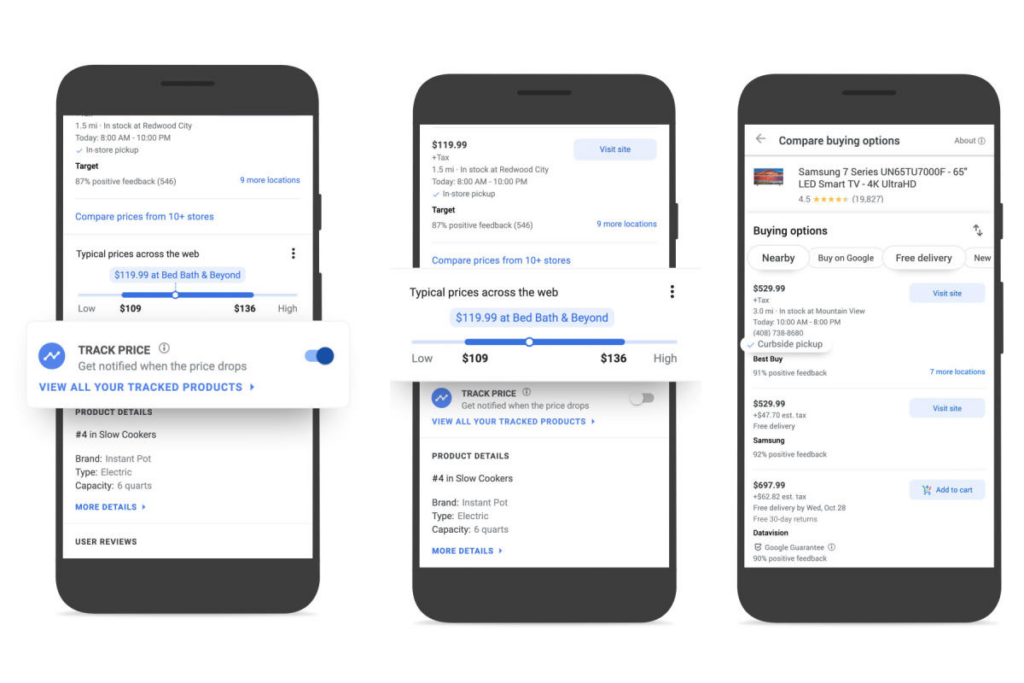
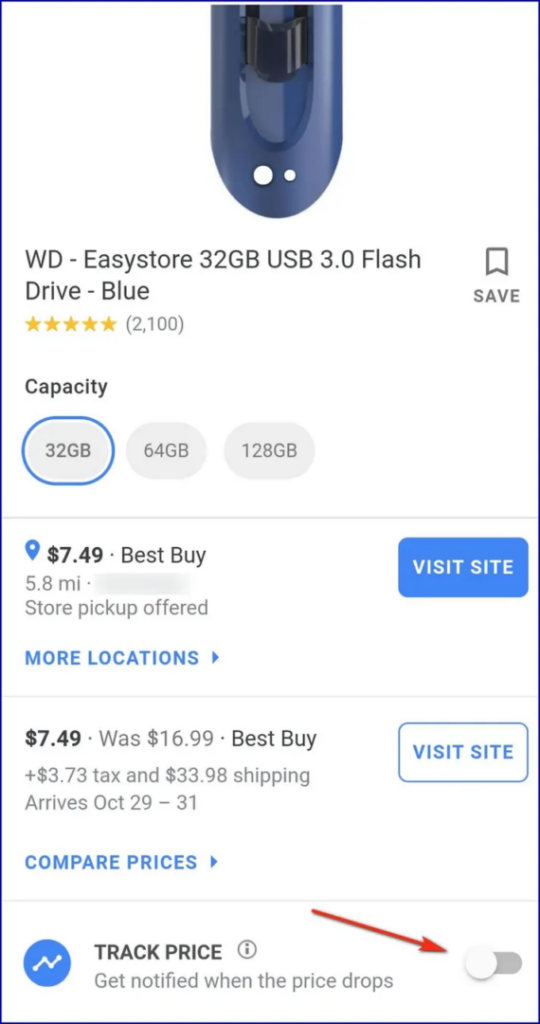
The most straightforward method for monitoring price drops is through the native “Track Price” feature found within Google Search and the Google Shopping tab. When searching for a specific product—such as a high-end graphics card or a mobile device—Google often presents a product knowledge panel.
Within this panel, users can find a toggle switch labeled “Track Price.” By enabling this, users opt into receiving push notifications via the Google app on mobile or email alerts sent to their Gmail account. Behind the scenes, Google’s crawlers monitor the specific URL and merchant feed associated with that product, triggering an alert the moment the indexed price falls below a certain threshold.
Utilizing the Price Insights Dashboard
For a more analytical approach, Google offers a “Price Insights” dashboard. This tool is accessible by clicking on a product in the Shopping tab. It provides a technical breakdown of the product’s current price relative to its historical data.
The dashboard displays a linear graph showing whether the current price is “low,” “typical,” or “high” compared to the last 90 days. This data is invaluable for tech enthusiasts who want to avoid “fake” sales where retailers inflate prices shortly before offering a discount. By analyzing the historical trend lines provided by Google’s data aggregation, users can make informed decisions based on real market behavior rather than marketing slogans.
Enhancing the Experience with Google Chrome Extensions
While native features are convenient, they are often limited to products that Google’s crawlers have indexed specifically for the Shopping tab. For power users who require more granular control and broader site compatibility, the Google Chrome Web Store offers a variety of specialized price-tracking extensions. These tools interact directly with the browser’s Document Object Model (DOM) to extract price data from almost any e-commerce site.
The Technical Edge of Browser-Based Tracking
Extensions like CamelCamelCamel (specifically for Amazon) or Keepa offer deep-dive analytics that go beyond simple alerts. These tools inject a script directly into the product page, displaying a historical price chart right below the product title.
From a technical perspective, these extensions work by periodically pinging a centralized database that stores historical price snapshots of millions of SKUs. When a user visits a page, the extension matches the product ID (such as an ASIN on Amazon) with its database and renders the data visually. This allows users to see exactly when a gadget reached its “all-time low,” helping to identify cyclical patterns in tech hardware releases.
Multi-Platform Monitors
Other extensions, such as Honey or Pennywise, take a broader approach. They don’t just track one site; they scan the entire Google Search index for the same product across different retailers. When you are viewing a product on a specific site, these extensions use background scripts to search for the same product string across other indexed pages, alerting you if a competitor has a lower price. This real-time price comparison is a testament to the power of browser-level automation and data scraping.
Custom Automation: Tracking via Google Sheets and Apps Script
For users who want to move beyond consumer-grade tools, Google Sheets offers a powerful platform for building a custom price-tracking engine. By using specific functions and Google Apps Script, you can create a personalized dashboard that monitors dozens of websites simultaneously without ever opening a browser tab.
The Power of IMPORTXML
The IMPORTXML function in Google Sheets is a potent tool for data scraping. It allows users to pull specific data points from a website’s HTML structure using XPath queries. To track a price, a user identifies the XPath of the price element on a product page and inputs it into a spreadsheet.
For example, a formula like =IMPORTXML("URL", "//span[@id='priceblock_ourprice']") instructs Google’s servers to visit the specified URL, find the span element with the corresponding ID, and import the value into the cell. This creates a live-updating spreadsheet that reflects current market prices.
Automating Notifications with Google Apps Script
While IMPORTXML updates the data, it doesn’t notify the user. This is where Google Apps Script comes in. By writing a simple JavaScript-based script within the Google Sheets environment, users can automate the notification process.
The script can be programmed to run on a “trigger” (e.g., every six hours). It checks the current price in the cell against a “target price” set by the user. If the current price is lower than the target, the script uses the MailApp service to send an automated email to the user. This DIY approach offers the highest level of privacy and customization, allowing tech-savvy shoppers to bypass third-party tracking services and build their own proprietary monitoring system.
Mobile Integration and Google Lens
In the age of omnichannel retail, price tracking is not confined to the desktop. Google has integrated sophisticated visual recognition technology into its mobile app through Google Lens, creating a bridge between physical and digital shopping.
Visual Search for Price Comparison
When a user encounters a gadget or tech accessory in a physical store, they can use Google Lens to “scan” the product. Google’s computer vision algorithms identify the object and immediately pull up its digital footprint across the web. From this interface, users can see if the in-store price matches the online market value.
Once the product is identified via Lens, the user can instantly tap the “Track Price” button that appears in the search results. This seamlessly integrates the physical discovery of a product into the user’s digital tracking ecosystem, ensuring that the same alerts and historical data insights are applied regardless of where the product was first seen.
The Role of Google Discover and AI
Google is increasingly using its “Discover” feed to push price drop alerts based on a user’s search history and interests. Utilizing machine learning, Google identifies products the user has recently researched and monitors them in the background. If a significant price drop occurs on a reputable site, an alert may appear in the Discover feed. This proactive approach uses predictive AI to anticipate consumer needs, transforming price tracking from a manual task into an automated, background service.
Security and Privacy in Digital Price Tracking
As with any technology that involves data collection and monitoring, price tracking on Google requires an awareness of digital security and privacy. When using Google’s native tools, users are trading their search and shopping data for convenience. Google uses this information to build a profile of consumer preferences, which in turn fuels its advertising engine.
Evaluating Extension Permissions
When installing third-party Chrome extensions for price tracking, it is vital to examine the permissions requested. Many of these tools require the ability to “read and change all your data on the websites you visit.” While necessary for the extension to find prices, this permission can be a security risk if the extension is not from a reputable developer.
Technical users should opt for extensions that have been “Featured” in the Chrome Web Store or those that offer transparent privacy policies regarding data anonymization. Furthermore, using a dedicated “shopping browser profile” can help silo this tracking activity away from sensitive accounts like online banking or work emails.
The Future of Tracking: AI and SGE
The introduction of Google’s Search Generative Experience (SGE) is set to revolutionize price tracking further. As generative AI becomes more integrated into search, we can expect “conversational tracking.” Instead of setting manual toggles, users may soon be able to instruct the AI: “Track the price of the latest 14-inch MacBook Pro and notify me when it hits $1,700 at a retailer with a 4-star rating.”
This move toward natural language processing and agentic workflows will make the technical hurdles of price tracking nearly invisible, allowing the AI to handle the scraping, comparison, and notification logic autonomously.
By leveraging the full spectrum of Google’s technological offerings—from native Shopping insights and Chrome extensions to custom Google Sheets automation—consumers can gain a significant advantage in the digital marketplace. In a world of dynamic pricing and algorithmic sales, these tools are the essential kit for the modern, tech-informed shopper.
aViewFromTheCave is a participant in the Amazon Services LLC Associates Program, an affiliate advertising program designed to provide a means for sites to earn advertising fees by advertising and linking to Amazon.com. Amazon, the Amazon logo, AmazonSupply, and the AmazonSupply logo are trademarks of Amazon.com, Inc. or its affiliates. As an Amazon Associate we earn affiliate commissions from qualifying purchases.