
In an increasingly digital financial landscape, peer-to-peer payment applications like Cash App have become indispensable tools for managing personal finances. These platforms facilitate seamless transactions, from sending money to friends and family to making online purchases. However, for many users, the critical question isn’t just how to put money into Cash App, but rather how to efficiently and securely take money off it and convert it into accessible funds. Understanding the various withdrawal methods, associated costs, and potential limitations is paramount for effective financial management.

This guide delves deep into the mechanisms of withdrawing funds from your Cash App balance, offering insightful strategies and practical advice to ensure you can access your money whenever and wherever you need it. We will explore direct transfer options, the utility of the Cash Card, and best practices for navigating the financial landscape with this popular tool.
Understanding Your Cash App Balance and Available Funds
Before initiating any withdrawal, a clear understanding of your Cash App balance and the specifics of your account is essential. This foundational knowledge ensures smooth transactions and helps prevent common issues.
Verifying Your Account Balance
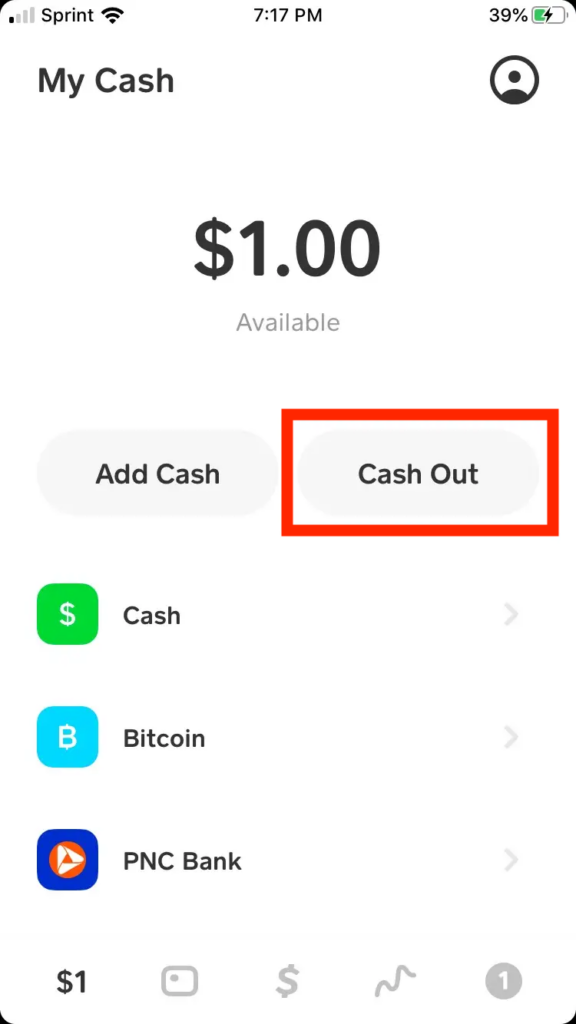
The first step in taking money off Cash App is to know exactly how much you have available. Cash App’s user-friendly interface makes this process straightforward. Upon opening the application, your current balance is prominently displayed on the main screen (the “My Cash” tab, represented by the banking symbol). This balance reflects all funds currently held within your Cash App account, whether received from others, deposited directly, or transferred from a linked bank account. Regularly checking this balance helps in budgeting and planning your withdrawals.
Differentiating Between Cash App Balance and Linked Accounts
It’s crucial to distinguish between your Cash App balance and the funds held in your linked bank accounts or debit cards. Money on Cash App resides within the app’s ecosystem. When you send money, make a purchase with your Cash Card, or initiate a withdrawal, these funds are drawn directly from your Cash App balance. Funds in your linked bank account, on the other hand, are separate. While Cash App allows you to easily add funds from a linked account to your Cash App balance, withdrawing money means moving it from your Cash App balance to a linked external account or accessing it via the Cash Card. Understanding this distinction is fundamental for managing your digital cash flow effectively.
Ensuring Your Account is Fully Verified
Cash App, like all regulated financial tools, operates with certain verification requirements designed to enhance security and comply with financial regulations. An unverified account will have significantly lower limits on sending, receiving, and, crucially, withdrawing money. To access higher withdrawal limits and unlock all features, you will need to fully verify your account. This typically involves providing your full legal name, date of birth, and the last four digits of your Social Security Number. In some cases, Cash App might request additional information, such as a full Social Security Number or proof of identity. Completing this verification process is a critical step for serious users who anticipate frequent or larger withdrawals, ensuring unimpeded access to their funds.
Direct Methods for Withdrawing Cash App Funds
Cash App offers several convenient methods to convert your digital balance into tangible or accessible funds. Each method comes with its own speed, fee structure, and usage scenario.
Instant Deposit to a Linked Bank Account
For users requiring immediate access to their funds, Cash App provides an “Instant Deposit” option. This feature allows you to transfer your Cash App balance directly to a linked debit card or bank account, with the funds typically appearing in your external account within minutes. While incredibly convenient for urgent financial needs, this speed comes at a small cost. Cash App charges a nominal fee, typically 0.5% to 1.75% of the transaction amount, for instant deposits. It’s vital to review the exact fee displayed in the app before confirming the transfer. This method is ideal when time is of the essence, and the minor fee is an acceptable trade-off for instant liquidity.
To perform an instant deposit:
- Tap the “Banking” tab on your Cash App home screen.
- Tap “Cash Out.”
- Enter the amount you wish to transfer.
- Select “Instant” deposit option.
- Confirm your transfer.
Standard Deposit to a Linked Bank Account
For those who are not in a hurry, the “Standard Deposit” option presents a cost-effective alternative. This method transfers your Cash App balance to a linked bank account (not directly to a debit card, but to the underlying bank account associated with your debit card or checking account number). Standard deposits typically take 1 to 3 business days to process and clear, similar to traditional bank transfers. The significant advantage of this method is that Cash App does not charge any fees for standard deposits. This makes it the preferred option for routine transfers where immediate access isn’t critical, allowing you to retain the full value of your funds.
To perform a standard deposit:
- Tap the “Banking” tab on your Cash App home screen.
- Tap “Cash Out.”
- Enter the amount you wish to transfer.
- Select “Standard” deposit option.
- Confirm your transfer.
Using the Cash Card for ATM Withdrawals
The Cash Card, a customizable, free-to-order debit card linked directly to your Cash App balance, offers another powerful way to access your funds. Functioning like any standard Visa debit card, the Cash Card allows you to make purchases online or in-store and, more importantly for withdrawals, to withdraw cash from ATMs.
To use your Cash Card for ATM withdrawals:
- Ensure you have an activated Cash Card. If not, you can order one through the app.
- Locate an ATM that accepts Visa cards.
- Insert your Cash Card and enter your PIN. (You can set or reset your PIN within the Cash App.)
- Select “Withdrawal” and enter the desired amount.
It’s important to be aware of ATM fees. While Cash App offers one free ATM withdrawal per month if you receive at least $300 in direct deposits, most ATMs will charge a fee for withdrawals. These fees are imposed by the ATM owner, not Cash App, and are typically displayed before you confirm the transaction. It’s wise to plan larger withdrawals or utilize your free withdrawal strategically to minimize costs. Daily ATM withdrawal limits also apply, which vary based on your verification status.
Strategic Considerations for Managing Withdrawals
Effective management of your Cash App funds goes beyond simply knowing how to withdraw. Strategic planning around limits, fees, and security can significantly enhance your financial experience.
Understanding Withdrawal Limits
Cash App implements daily, weekly, and monthly limits on withdrawals, which are primarily determined by your account’s verification status. Unverified accounts have lower limits, restricting the amount of money you can cash out over specific periods. For instance, an unverified account might only be able to withdraw a few hundred dollars per week. Fully verified accounts, however, enjoy significantly higher limits, often allowing thousands of dollars to be withdrawn daily or weekly. It’s crucial to be aware of these limits, especially if you plan to transfer large sums, to avoid unexpected delays or rejections. Regularly checking your account’s verification status and understanding the associated limits will prevent financial inconvenience.
Navigating Associated Fees
Fees are an unavoidable aspect of many financial transactions, and Cash App withdrawals are no exception. The primary fees you’ll encounter are for instant deposits to a linked bank account (typically 0.5% to 1.75%) and ATM withdrawal fees imposed by third-party ATM operators. While standard deposits are free, their slower processing time might not always be suitable. Strategic management of fees involves:
- Prioritizing Standard Deposits: Whenever possible, opt for the free standard deposit if you can wait 1-3 business days for the funds.
- Utilizing Free ATM Withdrawals: If you receive direct deposits through Cash App, take advantage of the one free ATM withdrawal per month. Otherwise, be mindful of ATM operator fees.
- Batching Withdrawals: For instant transfers, if you have multiple small amounts to withdraw, consolidating them into a single larger transfer might result in a lower percentage-based fee compared to multiple smaller transfers, though the absolute fee might be higher. More importantly, it reduces the number of transactions you incur fees on.
Understanding and planning around these fees can save you money over time, ensuring more of your hard-earned cash remains in your pocket.
Security Best Practices for Fund Transfers
The security of your financial transactions should always be a top priority. Cash App employs various security measures, but user vigilance is equally important. When withdrawing funds:
- Use Strong, Unique Passwords: Protect your Cash App account with a robust password and enable two-factor authentication (2FA).
- Be Wary of Phishing Scams: Never share your Cash App login credentials, PIN, or sensitive financial information in response to unsolicited emails, texts, or calls. Cash App will never ask for your PIN or full sign-in code outside of the app.
- Verify Recipient Details: Although this article focuses on taking money off, when sending money to link accounts, always double-check the linked bank account details to ensure funds are going to the correct destination.
- Monitor Account Activity: Regularly review your Cash App transaction history for any unauthorized activity. Report suspicious transactions immediately.
- Secure Your Mobile Device: Keep your smartphone operating system and Cash App updated, and use a screen lock to prevent unauthorized access.
Adhering to these security practices minimizes the risk of fraud and ensures your funds remain safe during transfers.
Troubleshooting Common Withdrawal Issues
Despite Cash App’s efficiency, users may occasionally encounter issues when trying to withdraw funds. Common problems include failed transfers, unexpected delays, or account flags.
- Failed Transfers: This can occur due to incorrect linked bank details, insufficient funds, exceeding withdrawal limits, or temporary system glitches. Double-check all entered information and ensure your balance is adequate.
- Unexpected Delays: While instant deposits are usually immediate, bank processing times can vary for standard deposits. Weekends, holidays, or bank-specific policies can extend the 1-3 business day timeframe. If a standard deposit takes longer than expected, first check with your bank before contacting Cash App support.
- Account Flags: Cash App’s security system may flag unusual activity, potentially delaying or blocking withdrawals. This could be due to large, infrequent transactions, attempts to withdraw to a newly linked account, or suspicious login attempts. If your account is flagged, Cash App typically sends a notification or requires additional verification.
For any persistent issues, Cash App’s support team is accessible via the app. Providing clear details of your problem, including transaction IDs and timestamps, will help expedite resolution.
Optimizing Your Cash App Experience for Financial Management
Beyond mere transactions, Cash App can serve as a valuable component of a broader personal finance strategy. Understanding its full capabilities helps in making informed financial decisions.
Integrating Cash App into Your Personal Finance Strategy
Cash App’s ease of use makes it a powerful tool for daily financial management.
- Budgeting: Use the app’s transaction history to track expenses, especially for peer-to-peer payments or purchases made with the Cash Card. This data can feed into your overall budget.
- Emergency Funds (Small Scale): While not a substitute for a traditional savings account, keeping a small, accessible amount in your Cash App balance can act as a quick emergency fund for immediate needs, knowing you can withdraw it instantly if necessary.
- Separating Funds: Some users opt to keep a dedicated portion of their “fun money” or specific allowances in Cash App, making it easy to manage spending without dipping into primary bank accounts.
- Direct Deposit: Setting up direct deposit of your paycheck into Cash App not only unlocks the free ATM withdrawal feature but also consolidates a portion of your income within the app, simplifying management for daily spending and immediate transfers.
By thoughtfully integrating Cash App, you can streamline certain aspects of your financial life, making it easier to track, spend, and save.
Leveraging Cash App for Peer-to-Peer Transactions and Bill Payments
While our focus is on withdrawals, it’s worth noting that Cash App’s primary strength lies in its ability to facilitate peer-to-peer (P2P) transactions. This makes splitting bills, sending money to friends, or receiving payments incredibly easy. Many small businesses and freelancers also use Cash App for receiving payments, often cashing out these funds for business operations or personal use. Furthermore, with the Cash Card, you can pay bills directly wherever Visa debit cards are accepted, providing another avenue to utilize your Cash App balance without necessarily having to withdraw funds to your bank first. This broad utility underscores Cash App’s role as a versatile financial instrument.
Conclusion
Navigating the various methods for taking money off Cash App is a fundamental skill for anyone leveraging this popular financial application. From instant and standard bank transfers to ATM withdrawals via the Cash Card, Cash App provides flexible options to ensure users can access their digital funds in a manner that best suits their needs.
By understanding your account balance, recognizing the nuances of each withdrawal method, being mindful of associated fees and limits, and diligently practicing security best practices, you can effectively manage your money within the Cash App ecosystem. Integrating these insights into your personal finance strategy will not only provide convenience but also empower you to make more informed and financially savvy decisions, ensuring that your digital cash is always within your reach.
aViewFromTheCave is a participant in the Amazon Services LLC Associates Program, an affiliate advertising program designed to provide a means for sites to earn advertising fees by advertising and linking to Amazon.com. Amazon, the Amazon logo, AmazonSupply, and the AmazonSupply logo are trademarks of Amazon.com, Inc. or its affiliates. As an Amazon Associate we earn affiliate commissions from qualifying purchases.