
In the vast and ever-expanding digital landscape, subscription services have become an integral part of our daily lives, offering unparalleled convenience and access to a plethora of content and benefits. Among these, Amazon Prime stands out as a colossal ecosystem, weaving together e-commerce, digital entertainment, cloud storage, and exclusive deals. However, with the sheer volume of digital subscriptions and the occasional lapse in memory, many users often find themselves asking a fundamental question: “How do I check if I have Amazon Prime?”
This seemingly simple query taps into a broader need for clarity and control over one’s digital services. Understanding your Prime status isn’t just about verifying an active subscription; it’s about navigating a complex digital platform, managing your expenditures, and ensuring you’re leveraging the full suite of technological benefits you’re entitled to. This article will serve as your definitive guide, detailing the precise technical steps to ascertain your Amazon Prime membership status, troubleshoot common issues, and effectively manage this powerful digital service.
Understanding Amazon Prime: A Digital Service Overview
Before diving into the mechanics of checking your status, it’s crucial to appreciate what Amazon Prime represents within the tech sphere. It’s not merely a delivery service; it’s a comprehensive digital platform designed to integrate seamlessly into a user’s online activities, offering a multifaceted approach to digital consumption and interaction.
The Ecosystem of Prime: More Than Just Shipping
At its core, Amazon Prime is a subscription service that bundles an impressive array of digital and physical benefits. While expedited shipping is often the most visible perk, it merely scratches the surface. Prime membership encompasses:
- Prime Video: A vast library of movies and TV shows, including Amazon Originals, accessible via streaming on various devices. This positions Prime as a direct competitor in the digital entertainment streaming market, akin to Netflix or Hulu.
- Prime Music: Ad-free access to millions of songs and thousands of stations and playlists, integrating music streaming into the Prime offering.
- Prime Reading: Access to a rotating selection of ebooks, magazines, and comics, available on Kindle devices and apps, extending its reach into digital publishing.
- Amazon Photos: Unlimited full-resolution photo storage, a significant cloud service benefit that rivals standalone photo storage platforms.
- Prime Gaming (formerly Twitch Prime): Free games, in-game content, and a free channel subscription on Twitch, appealing directly to the online gaming community.
- Whole Foods Market Discounts: Exclusive savings and offers at Whole Foods, blending the digital subscription with real-world retail benefits.
- Early Access to Deals: A technological advantage, granting members a head start on Amazon’s Lightning Deals, optimizing their shopping experience.
This integration of services across e-commerce, entertainment, storage, and gaming exemplifies a highly sophisticated digital ecosystem, making Prime a cornerstone of many users’ online lives.
Why Your Prime Status Matters (Beyond the Obvious)
Knowing your Prime status is more than just confirming you have it; it’s about making informed decisions about your digital consumption and financial commitments. For instance, an active Prime membership unlocks specific features within Amazon’s mobile apps and website that are unavailable to non-members, such as faster filter options for Prime-eligible items or direct links to Prime Video content. From a technical standpoint, this status dictates the user interface and functional permissions you receive within the Amazon environment. It can impact streaming quality, storage limits, and even the speed at which digital content loads. Moreover, understanding your status helps you avoid duplicate subscriptions or unintended renewals, keeping your digital spending in check.
Navigating the Amazon Platform: Your Digital Hub for Prime Status
The process of checking your Prime status is inherently a technical tutorial, requiring navigation through specific menus and settings within Amazon’s digital interfaces – either their website or mobile application. Both platforms are designed to be user-friendly, but knowing exactly where to look is key.
Checking Via the Amazon Website: A Step-by-Step Guide
The Amazon website remains the most comprehensive portal for managing your account and subscriptions. Accessing your Prime status here is straightforward if you follow the correct path.
Logging In Securely
The first and most critical step is to securely log in to your Amazon account.
- Open your web browser and navigate to Amazon.com.
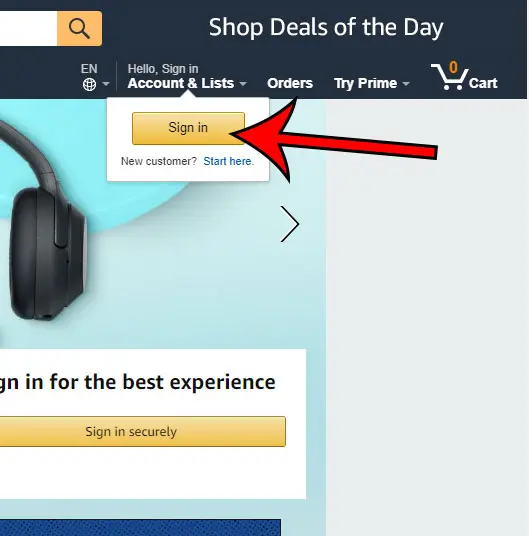
- Locate the “Accounts & Lists” menu in the top right corner of the homepage.
- Click on “Sign in.”
- Enter your registered email address or mobile number and your password. Ensure you are using a secure internet connection and be wary of phishing attempts. If you have two-factor authentication enabled, you’ll need to complete that step as well.
Accessing “Accounts & Lists”
Once logged in, the “Accounts & Lists” dropdown menu transforms into your personalized gateway to managing all aspects of your Amazon experience.
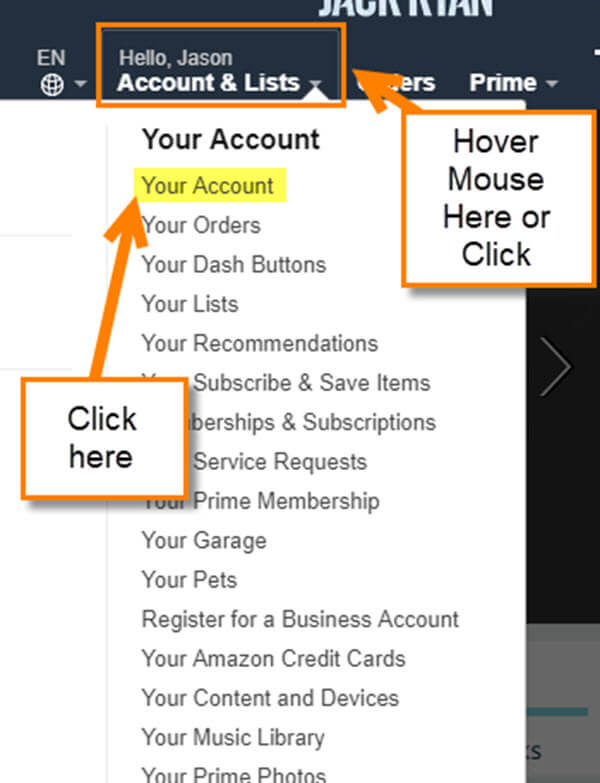
- Hover over or click on “Accounts & Lists” again. A dropdown menu will appear with various options related to your account.
Locating “Prime Membership”
Within the “Accounts & Lists” menu, there’s a specific section dedicated to your Prime membership.
- Look for the section titled “Your Account” and within that, click on “Prime Membership.”
- This action will redirect you to the “Manage Prime Membership” page. Here, you will find a clear indication of your current Prime status. This page typically displays:
- Whether your membership is “Active.”
- Your next billing date (if active).
- The cost of your membership.
- Options to manage or cancel your membership.
Using the Amazon App: Mobile Verification Made Easy
For those who primarily interact with Amazon via their smartphones or tablets, the Amazon shopping app offers an equally efficient way to check your Prime status.
Opening the App and Navigating to “Your Account”
- Open the Amazon Shopping app on your mobile device.
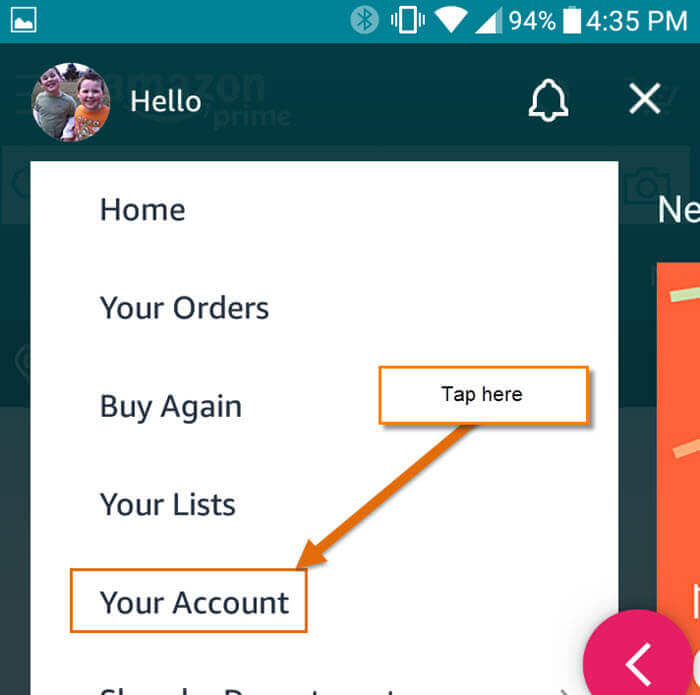
- Tap the menu icon (usually three horizontal lines or a “burger” icon) located at the bottom right or top left of the screen.
- Scroll down and tap on “Account.” This will take you to a screen listing various account settings.
Finding the Prime Section
Within the “Account” section, the Prime membership details are readily accessible.
- Under the “Account Settings” section, tap on “Manage Prime Membership.”
- Similar to the website, this page will clearly state your current Prime status, including whether it’s active, the renewal date, and billing information. This streamlined mobile interface ensures that managing your digital subscriptions is always within reach.
Deciphering Your Prime Membership Status
Once you’ve navigated to the “Manage Prime Membership” page, understanding what you see is crucial. The page provides more than just a yes/no answer; it offers insights into the nature of your membership.
Active Membership: Understanding Your Benefits and Billing Cycle
An “Active” status indicates that your Prime benefits are fully operational. This section will typically show:
- Your next billing date: This is critical for understanding when your membership will renew and when your associated payment method will be charged.
- The membership plan: Whether it’s a monthly or annual subscription.
- Payment method: The card or account linked to your Prime subscription.
Knowing these details allows you to plan financially and confirms you have access to all the digital services and expedited shipping.
Expired or Cancelled: What to Look For
If your Prime membership has expired or been cancelled, the “Manage Prime Membership” page will clearly state this. You might see:
- A message indicating your membership has “Ended.”
- A prompt to “Join Prime” or “Restart your membership.”
- Information about when your benefits ceased.
This clarity is vital for users who might have intended to cancel or are unsure why their benefits have stopped. It serves as a digital notification system, informing you of changes to your service access.
Trial Memberships: Identifying Your Current Phase
Amazon frequently offers trial periods for Prime. If you are currently in a trial, the page will specify this, often displaying:
- “Prime Free Trial” status.
- The exact date your free trial ends and when the paid membership will begin (if not cancelled).
- Options to cancel the trial before it converts to a paid membership.
This level of detail is a crucial technological feature, empowering users to make timely decisions about continuing or discontinuing the service without incurring unwanted charges.
Troubleshooting and Common Queries Regarding Prime Status
Despite the straightforward process, users might encounter issues or have specific questions when checking their Prime status. These often relate to account access, billing discrepancies, or multiple accounts.
When You Can’t Log In: Account Security and Recovery
The most common hurdle is being unable to log in. This often stems from forgotten passwords or security measures.
- Password Reset: Utilize the “Forgot your password?” link on the sign-in page. This will guide you through a secure process, typically involving email or phone verification, to regain access.
- Two-Factor Authentication (2FA): If you’ve enabled 2FA and are having trouble, ensure your authentication method (e.g., authenticator app, phone number) is accessible. Amazon’s customer support can assist with account recovery if you lose access to your 2FA device.
- Account Lockout: Repeated failed login attempts can temporarily lock your account for security reasons. Wait a short period and try again, or contact Amazon Customer Service.
Multiple Amazon Accounts: Untangling the Confusion
It’s not uncommon for individuals to inadvertently create multiple Amazon accounts, leading to confusion about which account holds the Prime membership.
- Check Different Email Addresses: If you have multiple email addresses, try logging in with each one. Your Prime membership is tied to a specific Amazon account.
- Review Payment Methods: If you suspect an active Prime membership, check your bank or credit card statements for “Amazon Prime” charges. The statement might indicate the email address associated with the charge, or you can cross-reference the date with your own records.
Unexpected Prime Charges: Investigating Your Billing History
Discovering an unexpected Prime charge on your statement is a common concern. The “Manage Prime Membership” page, combined with your order history, can help clarify this.
- Check Prime Status First: Verify if the account you’re logged into shows an active Prime membership.
- Review “Digital Orders”: Sometimes, “Prime” charges can be for digital content (movies, music) purchased through Prime Video/Music, not the membership itself. Check your “Digital Orders” within “Accounts & Lists.”
- Contact Customer Service: If you’ve confirmed no active Prime membership on any of your accounts and still see a charge, contact Amazon Customer Service directly. They can trace the charge using the transaction details from your bank statement.
Maximizing Your Prime Experience: Beyond Just Checking
Once you’ve confirmed your Prime status, the next step in fully leveraging this digital service is to actively explore and manage its extensive offerings. The “Manage Prime Membership” page isn’t just for verification; it’s a control panel for your entire Prime ecosystem.
Exploring Prime Benefits: A Deeper Dive into the Digital Offerings
An active Prime membership is a gateway to a world of digital advantages. Don’t just verify your status; use it to explore.
- Dedicated Benefits Pages: Amazon provides specific pages for Prime Video, Prime Music, Prime Reading, and Amazon Photos, accessible directly from the main Amazon site or app. These pages showcase the latest content and features available to you.
- Utilize Prime Day: Understand that your Prime status grants you exclusive access to Prime Day, Amazon’s annual shopping event, which requires an active membership to participate in its tech deals.
- Family Sharing: Explore the “Amazon Household” feature, allowing you to share select Prime benefits (like shipping and Prime Video) with other adults in your household, maximizing the technological utility for your family.
Managing Your Membership: Renewal, Cancellation, and Updates
The “Manage Prime Membership” page is also where you maintain control over your subscription.
- Cancelling Your Membership: If you decide to discontinue the service, the option to “End Membership” or “Manage Membership” will be prominently displayed. Amazon typically offers a partial refund if you cancel mid-term and haven’t used many benefits.
- Updating Payment Information: Ensure your payment method is current to avoid service interruptions. The page allows you to update your credit card details or switch to a different payment method seamlessly.
- Switching Plans: You might have the option to switch between monthly and annual plans, allowing for flexibility based on your usage patterns and financial preferences.
Leveraging Prime Customer Service: Tech Support for Your Account
If you encounter any issues that the self-service options cannot resolve, Amazon’s customer service is equipped to handle complex account-related queries.
- Contacting Support: From the “Manage Prime Membership” page, or any Amazon help page, you can typically find options to contact customer service via chat, phone, or email.
- Specific Prime Issues: Clearly state that your query relates to your Prime membership. Support staff are trained to address billing, access, and benefit-related questions pertaining to the service.
In conclusion, knowing how to check your Amazon Prime status is a fundamental skill for any user navigating Amazon’s vast digital ecosystem. By understanding the technical pathways on both the website and mobile app, deciphering the membership details, and knowing how to troubleshoot common issues, you empower yourself to effectively manage this powerful, multifaceted digital service. This proactive approach ensures you’re always aware of your benefits, your financial commitments, and ultimately, get the most out of your Amazon Prime experience.
aViewFromTheCave is a participant in the Amazon Services LLC Associates Program, an affiliate advertising program designed to provide a means for sites to earn advertising fees by advertising and linking to Amazon.com. Amazon, the Amazon logo, AmazonSupply, and the AmazonSupply logo are trademarks of Amazon.com, Inc. or its affiliates. As an Amazon Associate we earn affiliate commissions from qualifying purchases.