
In the ever-evolving landscape of digital entertainment, streaming services have become indispensable. Paramount Plus stands out as a prominent player, offering a vast library of iconic shows, blockbuster movies, and exclusive originals from the ViacomCBS family. For those looking to dive into this content trove, understanding the technical process of subscription is the first crucial step. This guide will meticulously walk you through every technical facet of acquiring and managing your Paramount Plus subscription, ensuring a seamless entry into its digital ecosystem.
Understanding Paramount Plus: Your Gateway to Streaming Entertainment
Paramount Plus is more than just a collection of shows; it’s a sophisticated streaming platform designed to deliver high-quality digital content directly to your preferred devices. Operating as a direct-to-consumer digital service, it leverages robust cloud infrastructure to host and distribute a diverse array of media, from live sports and news to on-demand movies and series.
What is Paramount Plus? A Technical Overview
At its core, Paramount Plus is an over-the-top (OTT) streaming service, meaning it delivers video content directly to viewers over the internet, bypassing traditional broadcast, cable, or satellite television providers. This digital distribution model requires an internet connection and a compatible device to access its content. The platform employs advanced content delivery networks (CDNs) to minimize latency and buffering, ensuring a smooth playback experience for users across various geographical locations. Its architecture supports adaptive bitrate streaming, which dynamically adjusts video quality based on the user’s internet speed, optimizing for both performance and data consumption.
Key Features and Content Library: The Technical Experience
The allure of Paramount Plus lies not just in its content but also in the technical features that enhance its accessibility and user experience. Subscribers gain access to thousands of hours of on-demand content, including classics from CBS, Comedy Central, MTV, Nickelodeon, and Smithsonian Channel, alongside new Paramount+ Originals. Technically, this content is encoded in various formats to support a wide range of devices and resolutions, often including high-definition (HD) and increasingly 4K Ultra HD for select titles.
Beyond the VOD (Video On Demand) library, Paramount Plus also offers live streaming capabilities, including local CBS channels (in most markets), CBSN (24/7 news), CBS Sports HQ (24/7 sports news), and ET Live. This live streaming functionality is powered by real-time encoding and streaming protocols, providing a near-broadcast quality experience over IP networks. The platform’s user interface (UI) and user experience (UX) are designed for intuitive navigation, featuring personalized recommendations driven by machine learning algorithms that analyze viewing habits to suggest relevant content, optimizing user engagement within the vast library.
Navigating Subscription Plans and Their Technical Implications
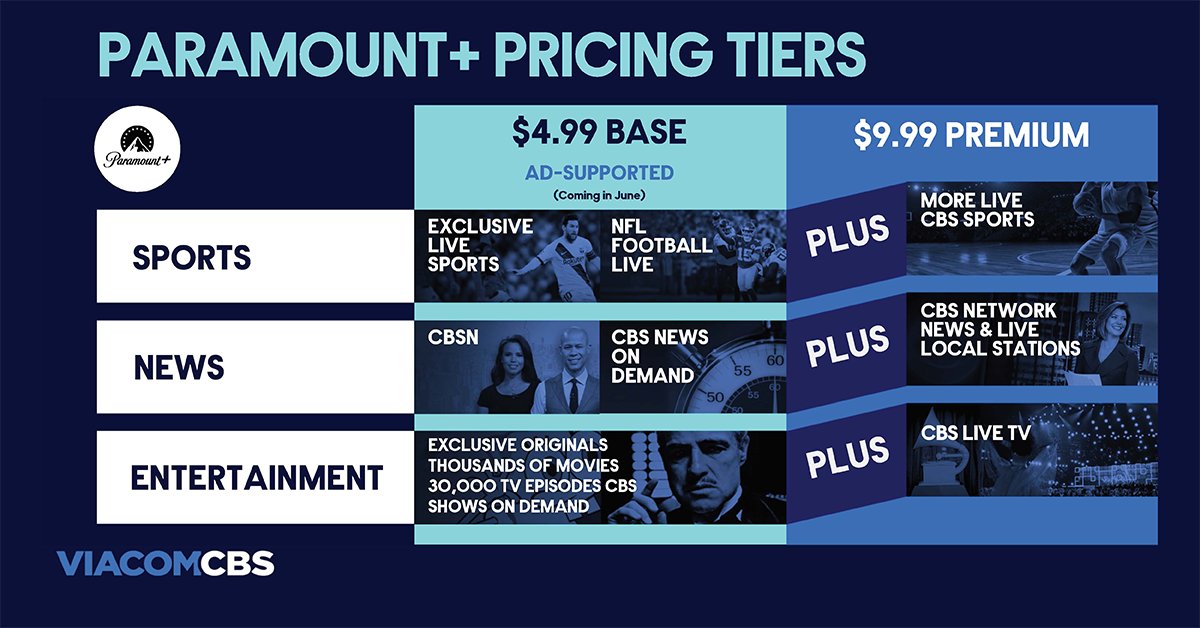
Paramount Plus offers different subscription tiers, each designed with varying technical features and access levels. Understanding these distinctions is crucial for selecting the plan that best fits your technical requirements and viewing preferences.
Essential vs. Premium: Feature Breakdown
Currently, Paramount Plus typically offers two primary subscription plans:
- Paramount+ Essential: This is the more budget-friendly option, which includes access to the full on-demand library (with limited commercial interruptions) and live news and sports from CBSN, CBS Sports HQ, and ET Live. Technically, the “limited commercial interruptions” mean that the streaming client is programmed to inject advertisements at predetermined points during on-demand content playback. This requires server-side ad insertion (SSAI) or client-side ad insertion (CSAI) technologies to seamlessly integrate commercials into the video stream. This plan typically does not include access to your local CBS live channel.
- Paramount+ Premium: This tier provides an almost ad-free experience for the on-demand library (live TV streams will still contain commercials, similar to traditional broadcasts). The “ad-free” technical implementation often involves sophisticated content management systems that deliver a different manifest or stream URL to Premium subscribers, bypassing ad servers for on-demand content. Crucially, the Premium plan usually includes access to your local CBS station live, powered by geofencing technology and IP-based location services to ensure you receive the correct regional feed. A significant technical advantage of the Premium plan is the ability to download content for offline viewing on mobile devices. This feature utilizes digital rights management (DRM) technologies to secure downloaded content, limiting its playback to authorized devices and within a set timeframe, providing flexibility for viewing without an active internet connection.
Pricing Models and Billing Cycles: The Digital Transaction
While the exact pricing may vary by region and promotional offers, Paramount Plus generally operates on a monthly or annual billing cycle. Subscribing involves a digital transaction where your chosen payment method (credit/debit card, PayPal, or digital wallet services like Apple Pay or Google Pay) is securely linked to your Paramount Plus account. The platform utilizes encrypted payment gateways and adheres to industry-standard security protocols (like SSL/TLS) to protect your financial information during the transaction process. Automated recurring billing is a standard feature, meaning your subscription will automatically renew at the end of each billing period unless you manually cancel it through your account settings.
Step-by-Step Technical Guide to Your Paramount Plus Subscription
Subscribing to Paramount Plus is a straightforward process, designed to be user-friendly. However, a technical understanding of each step can enhance security and troubleshooting.
Creating Your Paramount Plus Account: The Digital Identity
The journey begins with establishing your digital identity on the Paramount Plus platform.
- Access the Portal: Navigate to the official Paramount Plus website (paramountplus.com) via a web browser on your computer or open the Paramount Plus app on a compatible device (e.g., smart TV, mobile phone, tablet).
- Initiate Signup: Look for a “Sign Up” or “Try It Free” button. Clicking this will initiate the account creation workflow.
- Provide Credentials: You will be prompted to enter basic personal information:
- Email Address: This serves as your primary identifier and login ID. Ensure it’s an active email you can access for verification and communication.
- Password: Create a strong, unique password. The system often enforces minimum length, character types (uppercase, lowercase, numbers, symbols) for robust security. This is crucial for protecting your account from unauthorized access.
- Name and Birthdate: These details help personalize your account and ensure age-appropriate content settings.
- Agree to Terms: Review and accept the Terms of Use and Privacy Policy. This is a digital contract outlining your rights and obligations as a user and how your data is handled.

Upon successful completion, the system creates a unique user profile in its database, linked to your provided email and encrypted password.
Selecting Your Preferred Subscription Plan: Interacting with the UI
After account creation, you’ll be directed to choose your subscription plan.
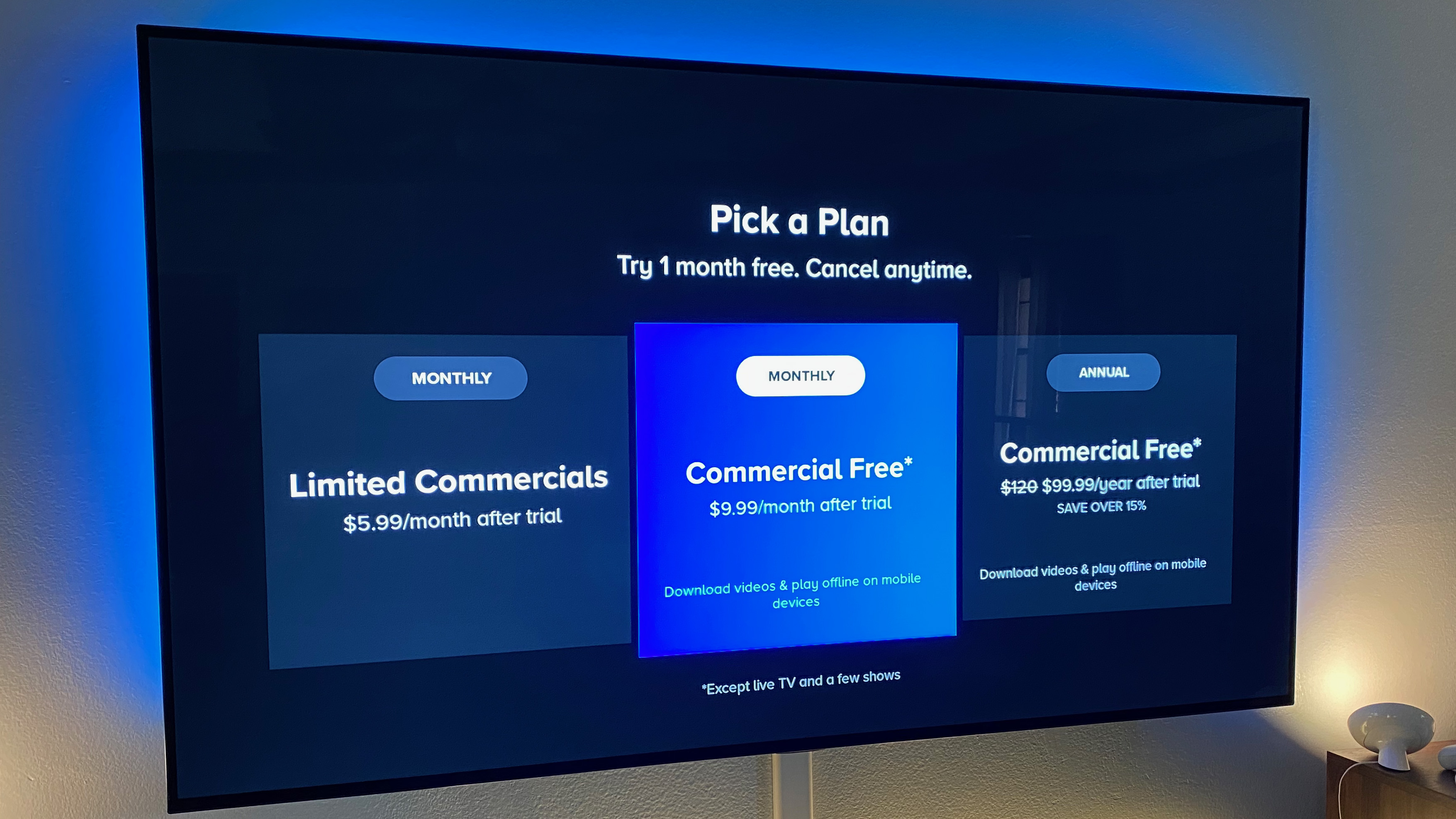
- Plan Presentation: The interface will display the available plans (Essential, Premium, and any promotional bundles), clearly outlining their features and pricing.
- Feature Comparison: Technically, the UI acts as a dynamic information display, helping you compare the functionalities (e.g., ad-supported vs. ad-free, offline downloads, live CBS local) of each tier.
- Selection: Click on the “Select Plan” or similar button corresponding to your chosen tier. This action sends a signal to the server, registering your preference for a specific service level.
- Billing Cycle Choice: You may also have the option to choose between monthly or annual billing. Selecting the annual option typically involves a single, larger transaction but often provides a cost saving over 12 monthly payments, which is then managed by the platform’s billing system.
Completing the Payment Process Securely: Digital Financial Transaction
This is where your financial information is securely integrated with your subscription.
- Payment Method Input: The system will prompt you to enter your payment details. Common options include:
- Credit/Debit Card: Enter card number, expiration date, and CVV. These details are transmitted via encrypted channels (HTTPS/SSL) to a payment gateway.
- PayPal: You will be redirected to PayPal’s secure portal to authorize the payment.
- Other Digital Wallets: Options like Apple Pay or Google Pay leverage their own secure tokenization systems for payment.
- Billing Address: Provide your billing address, which is used for payment verification (Address Verification System – AVS) to prevent fraud.
- Confirmation: Review all details. Once confirmed, a “Start Subscription” or “Subscribe Now” button will initiate the final transaction. The payment gateway processes the payment request, communicates with your bank, and sends a confirmation back to Paramount Plus.
- Subscription Activation: Upon successful payment, your account status is updated in real-time, activating your chosen subscription plan and granting immediate access to content. A confirmation email is usually sent as a digital receipt.
Activating Your Subscription Across Devices: Cross-Platform Access
Once subscribed, the beauty of a streaming service is its cross-device accessibility.
- Login: Download the Paramount Plus app on any compatible device (smart TV, streaming stick, game console, smartphone, tablet) and log in using the email and password you created.
- Device Linking: Some devices, particularly smart TVs and streaming sticks, may offer a “TV Activation Code” method. You visit a specific URL on a web browser (e.g., paramountplus.com/activate), enter a short code displayed on your TV screen, and log in there. This securely links your device to your existing account without requiring full credential input on the TV interface.
- Simultaneous Streams: Be aware of the technical limit on simultaneous streams. Paramount Plus typically allows a certain number of concurrent streams (e.g., 3 streams), meaning multiple devices can play content from the same account at the same time. This is a server-side control implemented to manage bandwidth and prevent account sharing beyond reasonable limits.
Device Compatibility and Enhancing Your Streaming Experience
Optimizing your Paramount Plus experience involves understanding the technical specifications of your devices and network.
Supported Devices: A Technical Rundown
Paramount Plus is designed to be highly compatible across a broad ecosystem of devices, leveraging various operating systems and hardware platforms:
- Smart TVs: Compatible with major smart TV brands running popular operating systems (e.g., Android TV, webOS for LG, Tizen for Samsung) and often through built-in apps or app stores.
- Streaming Media Players: Devices like Roku, Amazon Fire TV, Apple TV (4th gen and newer), and Google Chromecast (including Google TV) are fully supported. These devices essentially act as dedicated mini-computers designed for streaming, running specialized OS versions.
- Mobile Devices: Available on iOS (iPhones, iPads) and Android smartphones and tablets via their respective app stores. The mobile apps are optimized for touch interfaces and varying screen sizes.
- Web Browsers: Accessible directly through most modern web browsers (Chrome, Firefox, Edge, Safari) on desktop and laptop computers. Ensure your browser is up-to-date for optimal performance and security.
- Gaming Consoles: Supported on PlayStation and Xbox consoles. These consoles, with their powerful processors and network capabilities, provide a robust platform for streaming high-quality video.
Ensuring your device’s operating system and the Paramount Plus app are regularly updated is crucial for performance, security, and accessing the latest features. Updates often contain bug fixes, performance enhancements, and security patches that improve the overall streaming experience.
Optimizing Playback and Troubleshooting Common Issues
A smooth streaming experience relies heavily on your network and device performance.
- Internet Connection Speed: Paramount Plus recommends a minimum download speed of 3-5 Mbps for standard definition (SD), 5-10 Mbps for high definition (HD), and 25+ Mbps for 4K Ultra HD content. Bandwidth throttling by your ISP or a congested home network can lead to buffering.
- Wi-Fi vs. Ethernet: For critical streaming, especially on TVs or streaming boxes, a wired Ethernet connection is technically superior to Wi-Fi. It offers a more stable and faster connection, reducing interference and latency.
- App and Device Updates: Always ensure your Paramount Plus app and device’s operating system are on their latest versions. Outdated software can lead to compatibility issues, bugs, and security vulnerabilities.
- Clearing Cache and Data: If an app is behaving erratically, clearing its cache and data (via device settings) can resolve issues by removing corrupted temporary files. This is a common troubleshooting step for many digital applications.
- Restarting Devices: The age-old IT advice holds true: a simple restart of your streaming device, router, and modem can often resolve transient network or software glitches.
- Streaming Quality Settings: Within the Paramount Plus app, you may find settings to adjust streaming quality. Lowering the quality can reduce bandwidth consumption and prevent buffering if your internet connection is unstable.
Managing Your Subscription and Profile Settings
Post-subscription, managing your account is entirely digital and self-service.
- Accessing Account Settings: Log in to your Paramount Plus account via a web browser (recommended for full functionality) or the app. Navigate to the “Account” or “Profile” section.
- Subscription Details: Here, you can view your current plan, next billing date, and payment history.
- Payment Method Update: Update your credit card or other payment methods securely. This ensures uninterrupted service if your card expires or changes.
- Cancellation: To cancel your subscription, locate the “Cancel Subscription” option. Follow the on-screen prompts. Note that cancellation usually takes effect at the end of your current billing period, allowing you to enjoy the remaining service.
- Profile Management: Paramount Plus allows creation of multiple user profiles, each with its own watch history and recommendations. This is particularly useful for households with diverse viewing preferences.
- Parental Controls: Implement parental controls by setting content restrictions based on ratings (e.g., G, PG, PG-13, R) for specific profiles. This feature uses a PIN to prevent unauthorized access to restricted content, ensuring a safe viewing environment for younger audiences.
By understanding these technical nuances, subscribers can not only initiate their Paramount Plus journey smoothly but also maintain an optimized, secure, and personalized streaming experience. The digital world of entertainment is at your fingertips, and with this guide, you are technically equipped to navigate it.
aViewFromTheCave is a participant in the Amazon Services LLC Associates Program, an affiliate advertising program designed to provide a means for sites to earn advertising fees by advertising and linking to Amazon.com. Amazon, the Amazon logo, AmazonSupply, and the AmazonSupply logo are trademarks of Amazon.com, Inc. or its affiliates. As an Amazon Associate we earn affiliate commissions from qualifying purchases.