
In an era defined by digital convenience, managing your finances has never been more accessible. Mobile banking apps have transformed the way we interact with our money, offering unparalleled control from the palm of our hand. However, with this convenience comes the responsibility of managing transactions effectively, sometimes necessitating the need to stop or cancel a payment. Whether it’s an accidental duplicate, a change of plans, or an unforeseen circumstance, knowing how to quickly intervene can save you time, stress, and potentially, money. This guide will walk you through the process of stopping a payment using the Wells Fargo app, empowering you with the knowledge to maintain meticulous control over your personal finances.
Understanding Payment Cancellations in the Digital Age
The ability to manage payments digitally is a cornerstone of modern personal finance. While the ease of sending money is remarkable, the mechanisms for stopping a payment require a clear understanding of financial processes and the timelines involved. Not all payments are created equal in terms of reversibility, making timely action and accurate identification crucial.
The Importance of Timely Action
When it comes to stopping a payment, speed is of the essence. Digital transactions often process rapidly, and once a payment moves past a certain stage, it becomes significantly harder, if not impossible, to halt directly. This cut-off point varies depending on the type of payment and the financial institution, but generally, the sooner you attempt to cancel, the higher your chances of success. Procrastination can lead to funds being irrevocably sent, necessitating more complex dispute resolution processes that are often time-consuming and don’t guarantee a favorable outcome. Therefore, developing a habit of immediately addressing any payment errors or changes of mind is a vital financial discipline.
Types of Payments and Their Reversibility
Understanding the different types of payments is fundamental to knowing if and how they can be stopped. Each payment method has its own rules and processing timelines within the Wells Fargo ecosystem:
- Scheduled Payments/Transfers: These are payments you’ve set up to occur in the future, either to another Wells Fargo account, an external account, or a biller. These are typically the easiest to cancel, provided you do so before the scheduled processing date and time.
- Bill Pay: Payments made through Wells Fargo’s Bill Pay service usually have a processing window. If the payment has not yet been processed and sent, it may be possible to cancel or modify it. Once it’s been sent, particularly electronically, stopping it becomes difficult.
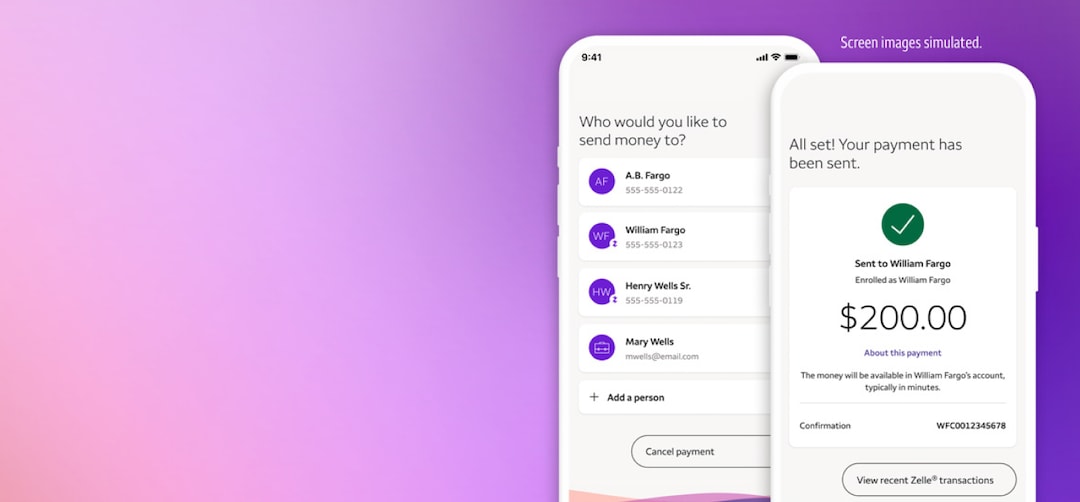
- Zelle® Payments: Zelle is designed for fast money transfers, often making payments irreversible once sent, especially if the recipient is already enrolled. However, if the recipient is not yet enrolled, the payment might be pending and potentially cancellable.
- Wires and External Transfers: These often have specific cut-off times. Once a wire transfer is initiated and reaches a certain stage, it’s very challenging to recall. External transfers to other banks also operate on specific timelines.
- Debit Card Purchases: Once a debit card transaction is authorized and processed, it functions similarly to cash. Stopping the payment directly is usually not an option; instead, you would need to contact the merchant for a refund or dispute the charge with Wells Fargo if it’s unauthorized or fraudulent.
Navigating the Wells Fargo App for Payment Management
The Wells Fargo mobile app is designed to put powerful financial tools at your fingertips, including robust payment management features. Knowing where to look and what steps to take is key to successfully stopping a payment.
Initial Steps: Logging In and Locating Transactions
- Launch the Wells Fargo App: Open the app on your smartphone or tablet.
- Log In Securely: Use your username and password, or biometric authentication (fingerprint/Face ID), to access your account. Ensure you are on a secure, private network.
- Navigate to Payments/Transfers: Once logged in, look for a “Transfers,” “Pay & Transfer,” or “Bill Pay” section. This is typically found in the main menu or dashboard. The exact wording might vary slightly with app updates, but the icon usually denotes transactions or payments.
- View Activity/History: Within the payments section, you’ll need to find an option to view scheduled, pending, or recent activity. This is where you’ll locate the specific payment you wish to stop.
Identifying Cancellable Payments
Not all transactions displayed will be cancellable. The app typically indicates the status of each payment, which is crucial for determining if you can intervene. Look for statuses like:
- “Scheduled” or “Pending”: These are the most likely candidates for cancellation.
- “Processing”: Depending on the stage of processing, some payments might still be stoppable, but the window is narrower.
- “Completed” or “Sent”: Once a payment reaches this status, direct cancellation through the app is usually no longer an option. You would need to pursue alternative methods.
Step-by-Step Guide to Cancelling a Scheduled Payment
For scheduled payments that haven’t yet processed:
- Locate the Payment: In the “Pay & Transfer” or “Bill Pay” section, find your list of upcoming or scheduled payments.
- Select the Payment: Tap on the specific payment you intend to cancel. This will bring up the details of that transaction.
- Look for Cancellation Option: On the payment detail screen, look for an option such as “Cancel Payment,” “Delete Payment,” or “Edit/Cancel.”
- Confirm Cancellation: The app will typically ask you to confirm your decision. Review the details one last time and confirm.
- Receive Confirmation: You should receive an immediate confirmation within the app that the payment has been canceled. It’s also wise to check your account activity shortly after to ensure the scheduled payment no longer appears.
Cancelling Zelle Payments via Wells Fargo
Zelle payments are designed for speed, making them largely irreversible once sent to an enrolled recipient. However, there’s a specific scenario where you might be able to cancel:
- Recipient Not Enrolled: If you send money via Zelle to someone who is not yet enrolled with Zelle, the payment will remain in a pending state until they enroll.
- Find the Pending Payment: Navigate to the Zelle section within your Wells Fargo app. Look for an option to view “Activity” or “Pending Payments.”
- Select and Cancel: If the payment is listed as pending, select it and you should see an option to “Cancel Payment.”
- Act Quickly: If the recipient enrolls before you cancel, the money will be sent, and you won’t be able to stop it.
For Zelle payments already sent to enrolled users, you would need to contact the recipient directly and ask them to send the money back. Wells Fargo cannot reverse an authorized Zelle payment that has been successfully received by an enrolled user.
When Direct Cancellation Isn’t Possible: Alternative Solutions
There will be instances where the payment has already gone through or the app doesn’t offer a direct cancellation option. In these cases, alternative strategies are necessary.
Contacting Wells Fargo Customer Support
When the app doesn’t provide a solution, reaching out to customer support is the next logical step. Be prepared with all the relevant details:
- Call Immediately: The sooner you call, the better.
- Account Information: Have your account number, login details, and personal identification ready.
- Payment Details: Date, amount, recipient, payment method, and any confirmation numbers.
- Reason for Cancellation: Clearly explain why you need to stop the payment.
Customer service representatives might have access to tools that aren’t available through the app, potentially allowing them to intervene for payments that are still in early stages of processing, or guiding you through dispute procedures for completed transactions.
Dispute Resolution Processes
If a payment has already cleared and you believe it was unauthorized, fraudulent, or made in error (and the merchant won’t cooperate), you may need to initiate a dispute. Wells Fargo has specific processes for different types of disputes:
- Unauthorized Transactions: If you did not authorize the payment, it may be classified as fraud. Report this immediately.
- Billing Errors/Merchant Disputes: If you paid a merchant but didn’t receive goods/services, or there was a billing error, you’ll typically need to attempt to resolve it with the merchant first. If unsuccessful, Wells Fargo can help mediate or dispute the charge on your behalf, especially for debit card transactions.
- ACH Disputes: For unauthorized electronic funds transfers (ACH debits), you have certain rights under federal law to dispute these within specific timeframes.
Always document all communication and maintain records related to the payment and your attempts to resolve it.
Reaching Out to the Recipient
For payments that cannot be stopped or disputed, particularly those sent to individuals (like via Zelle to an enrolled user), the most straightforward solution is often to contact the recipient directly.
- Polite Request: Explain the situation clearly and professionally.
- Provide Details: Share the payment amount and date.
- Request Return: Politely ask them to send the funds back.
This approach relies on the recipient’s willingness to cooperate. If they refuse, and the payment was authorized by you, your options may become very limited, highlighting the importance of verifying recipient details before sending money.
Best Practices for Preventing Unwanted Payments
While knowing how to stop a payment is crucial, adopting preventative measures is an even better strategy for sound financial management.
Setting Up Payment Alerts and Notifications
Most banking apps, including Wells Fargo’s, offer customizable alerts.
- Transaction Alerts: Set up notifications for all outgoing transactions above a certain amount, or for all payments initiated.
- Scheduled Payment Reminders: Get reminders before a scheduled payment is due to process, giving you a final chance to review or cancel.
- Balance Alerts: Monitor your account balance to prevent overdrafts or identify unusual activity.
These alerts act as an early warning system, allowing you to catch errors or unwanted payments before they become difficult to reverse.
Regular Review of Scheduled Payments
Make it a habit to periodically review all your scheduled payments and recurring transfers within the Wells Fargo app.
- Monthly Check-up: Dedicate a few minutes each month to look over your upcoming bill payments and transfers.
- Cancel Unneeded Subscriptions: Identify and cancel any subscriptions or recurring payments for services you no longer use.
- Update Biller Information: Ensure all payee details are current to prevent payments from being misdirected.
This proactive approach helps you maintain control, avoid forgotten subscriptions, and keep your financial outflows aligned with your current needs.
Understanding Payment Deadlines and Cut-off Times
Every payment type and financial institution has specific cut-off times. Payments initiated after these times are typically processed on the next business day.
- Know Your Bank’s Timelines: Familiarize yourself with Wells Fargo’s cut-off times for different transaction types (e.g., Bill Pay, Zelle, external transfers). This information is usually available on their website or by asking customer service.
- Plan Ahead: If you need a payment to arrive by a certain date, always initiate it well in advance, considering weekends and holidays.
- Utilize Scheduling Features: Schedule recurring payments a few days before their due date to build in a buffer for any potential issues.
Understanding these timelines is essential for effective financial planning and preventing situations where you need to scramble to stop a payment because it’s already in progress.
The Broader Implications for Personal Financial Management
The ability to stop a payment through the Wells Fargo app is more than just a technical feature; it’s a testament to the empowerment digital banking offers in personal financial management. It underscores the importance of being an active participant in managing your money, rather than a passive observer.
Empowering Financial Control
Digital tools like the Wells Fargo app provide an unprecedented level of control over your finances. Being able to initiate, modify, and, critically, stop payments quickly instills confidence and reduces anxiety. It means you’re not just reacting to your finances but actively directing them, fostering a stronger sense of financial autonomy.
Building Financial Literacy
Navigating these processes also contributes to greater financial literacy. Understanding payment types, processing timelines, and dispute resolutions arms you with valuable knowledge that extends beyond the Wells Fargo app itself. This insight helps you make more informed decisions about all your financial transactions, regardless of the platform.
The Role of Digital Banking in Modern Finance
The capability to manage payments dynamically through a mobile app is a core component of modern financial health. It streamlines everyday banking tasks, minimizes errors through user-friendly interfaces, and offers the agility needed to respond to life’s unpredictable moments. As digital banking continues to evolve, our proficiency in leveraging these tools will become increasingly vital for achieving and maintaining financial well-being. By mastering features like payment cancellation, you’re not just performing a task; you’re actively safeguarding your financial future.
aViewFromTheCave is a participant in the Amazon Services LLC Associates Program, an affiliate advertising program designed to provide a means for sites to earn advertising fees by advertising and linking to Amazon.com. Amazon, the Amazon logo, AmazonSupply, and the AmazonSupply logo are trademarks of Amazon.com, Inc. or its affiliates. As an Amazon Associate we earn affiliate commissions from qualifying purchases.