
In an increasingly data-driven world, the ability to visualize complex relationships is paramount. Functions are the bedrock of mathematical modeling, providing a concise way to describe how one quantity depends on another. While the theoretical understanding of functions remains timeless, the methodology for sketching their graphs has undergone a profound transformation, driven largely by technological advancements. Gone are the days when a ruler, pencil, and graph paper were the sole tools for this endeavor; today, an array of digital instruments empowers us to create precise, interactive, and insightful visualizations with unprecedented speed and accuracy.
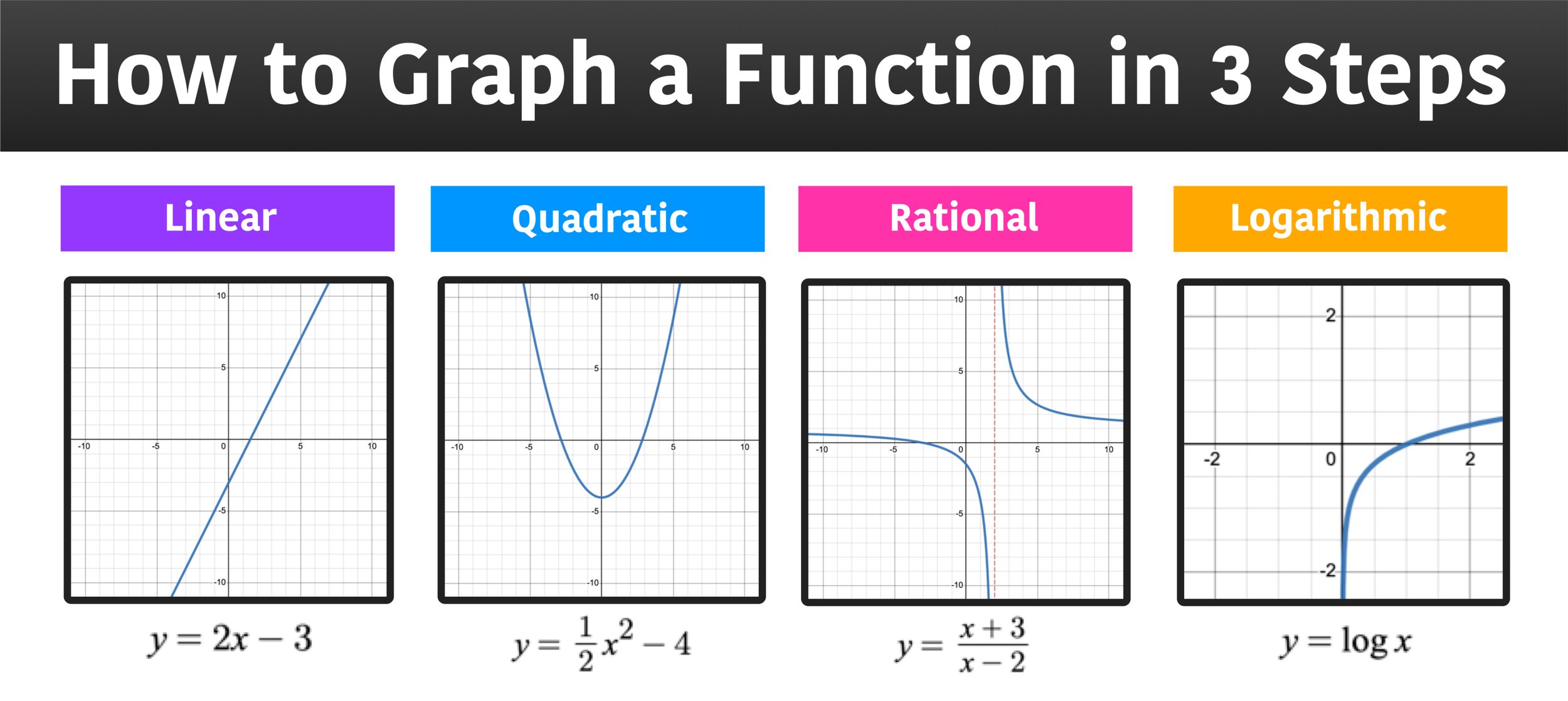
This article delves into the contemporary art of sketching graphs of functions, emphasizing the indispensable role of technology. It’s not merely about replacing manual plotting with digital clicks, but about leveraging sophisticated software and platforms to gain deeper insights, explore dynamic behaviors, and communicate complex ideas with clarity. We will bridge the gap between foundational mathematical principles and the powerful digital tools that define modern graphing, illustrating how a synergistic approach yields superior results for professionals across various tech domains.
The Foundational Understanding: Beyond the Digital Canvas
Even with the most advanced graphing software at our fingertips, a solid grasp of fundamental mathematical concepts remains critical. Technology enhances our ability to visualize, but it doesn’t replace the need to understand what we are visualizing. A deep conceptual understanding allows us to interpret digital outputs critically, identify potential errors, and guide the software to produce the most informative graph.
Key Characteristics of a Function
Before engaging any digital tool, it’s beneficial to conduct a preliminary analysis of the function. This mental or computational check provides a roadmap for the graph’s expected behavior, helping to set appropriate axes and scales in your chosen software.
-
Domain and Range: Understanding where the function is defined (domain) and the set of all possible output values (range) is crucial. Digital tools often struggle with displaying discontinuities or undefined regions unless explicitly instructed, so knowing these boundaries beforehand allows you to effectively configure the graphing window and identify asymptotes or holes. For instance, plotting
y = 1/xrequires an awareness thatx=0is not in the domain. -
Intercepts: The points where the graph crosses the x-axis (x-intercepts, or roots) and the y-axis (y-intercept) provide critical reference points. While software can plot these, knowing how to calculate them manually (setting y=0 for x-intercepts, x=0 for y-intercept) offers a quick verification point. Many advanced calculators and symbolic computation tools (like Wolfram Alpha) can instantly provide these values.
-
Symmetry: Identifying whether a function is even ($f(-x) = f(x)$, symmetric about the y-axis) or odd ($f(-x) = -f(x)$, symmetric about the origin) can simplify the sketching process. Modern graphing software can instantly reveal these symmetries, but recognizing them mathematically can help you predict the graph’s overall shape.
-
Asymptotes: These are lines that the graph approaches but never quite touches. Vertical asymptotes occur where the function’s value approaches infinity, often at points not in the domain. Horizontal and slant asymptotes describe the function’s behavior as
xapproaches positive or negative infinity. Software excel at visualizing these asymptotic behaviors, but understanding their mathematical origin (e.g., rational functions) ensures you interpret them correctly.
Calculus Concepts for Deeper Insight
For functions involving more complex curves and behaviors, calculus provides an indispensable layer of analytical depth. Digital tools, particularly symbolic calculators and programming libraries, have democratized access to these concepts, allowing users to rapidly compute and visualize derivatives, integrals, and limits.
-
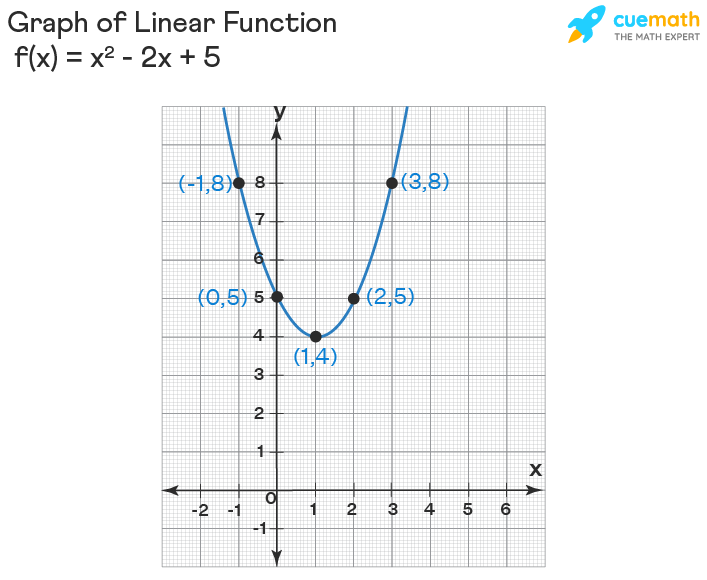
Derivatives (Slopes and Extrema): The first derivative, $f'(x)$, tells us about the function’s slope and whether it is increasing or decreasing. Setting $f'(x) = 0$ helps locate critical points, which correspond to local maxima or minima. Graphing software can not only plot the original function but also its derivative, allowing for a side-by-side visual analysis of where the original function peaks or troughs.
-
Second Derivatives (Concavity and Inflection Points): The second derivative, $f”(x)$, reveals the concavity of the graph (whether it opens upwards or downwards) and helps pinpoint inflection points where the concavity changes. Again, digital platforms can compute and graph $f”(x)$, offering a clear visualization of these nuanced behaviors that are challenging to infer manually.
-
Limits: Understanding limits is crucial for analyzing function behavior at specific points of discontinuity or as
xapproaches infinity. Software can numerically or symbolically evaluate limits, providing precise insights into how the graph approaches asymptotes or holes, which is vital for accurately depicting complex functions.
Leveraging Digital Tools for Efficient Graphing
The real power in modern graph sketching lies in the sophisticated digital tools available. These platforms move beyond static representations, offering interactive, customizable, and often programmatic control over visualizations.
Interactive Graphing Calculators and Web Platforms
These tools are excellent for quick exploration, interactive learning, and generating clear graphs without requiring coding knowledge.
-
Desmos: Renowned for its intuitive interface and real-time graphing capabilities, Desmos allows users to input functions, adjust parameters with sliders, and instantly see the corresponding changes on the graph. Its user-friendliness makes it ideal for educational purposes, quick checks, and dynamic exploration of function transformations. You can easily overlay multiple functions, create animated graphs, and share your creations.
-
GeoGebra: A more robust platform, GeoGebra integrates algebra, geometry, spreadsheets, graphing, statistics, and calculus into a single, user-friendly package. It’s particularly powerful for visualizing geometric transformations of functions and exploring the interplay between different mathematical concepts. It offers more control over labeling, styling, and annotations than simpler tools.
-
Wolfram Alpha: While not strictly a graphing calculator, Wolfram Alpha is a computational knowledge engine that can process natural language queries. You can type in a function, and it will not only sketch its graph but also provide detailed analyses, including domain, range, derivatives, integrals, roots, and more. It’s invaluable for gaining comprehensive insights into a function’s properties.
Programming Libraries for Advanced Visualization
For professionals in data science, engineering, and research, programming libraries offer unparalleled flexibility, customization, and the ability to integrate graphing directly into analytical workflows.
-
Python (Matplotlib, Seaborn, Plotly): Python has emerged as a dominant language for data science and scientific computing, largely due to its powerful visualization libraries.
-
Matplotlib: The foundational library, offering extensive control over every aspect of a plot. It’s excellent for creating static, publication-quality graphs and can handle complex mathematical functions and data visualizations.
-
Seaborn: Built on Matplotlib, Seaborn provides a high-level interface for drawing attractive and informative statistical graphics. While more focused on data visualization, it can be adapted to plot functions with statistical properties.
-
Plotly: Enables the creation of interactive, web-based visualizations. Plotly graphs can be zoomed, panned, and hovered over for detailed information, making them ideal for dynamic exploration and dashboards.
-
-
R (ggplot2): For statisticians and data analysts, R’s
ggplot2library, based on the grammar of graphics, offers an elegant and powerful way to create highly customized and aesthetically pleasing plots. It’s particularly suited for visualizing functions alongside statistical data. -
JavaScript (D3.js, Chart.js): For web-based interactive graphing, JavaScript libraries are essential.
-
D3.js (Data-Driven Documents): Provides a flexible framework for creating highly custom and interactive data visualizations directly in web browsers. It requires a steeper learning curve but offers ultimate control.
-
Chart.js: A simpler library for creating common chart types, including line plots for functions, with good interactivity for web applications.
-
-
MATLAB and Mathematica: These specialized environments are powerhouses for numerical computation, symbolic mathematics, and advanced visualization. MATLAB is widely used in engineering and scientific research for numerical analysis, signal processing, and control systems, offering robust plotting capabilities. Mathematica excels in symbolic computation and has an extensive library for visualizing complex mathematical functions and concepts.
The Workflow: From Concept to Digital Visualization
The most effective approach to sketching a graph of a function in the modern era involves a hybrid workflow, blending analytical understanding with the efficiency of digital tools.
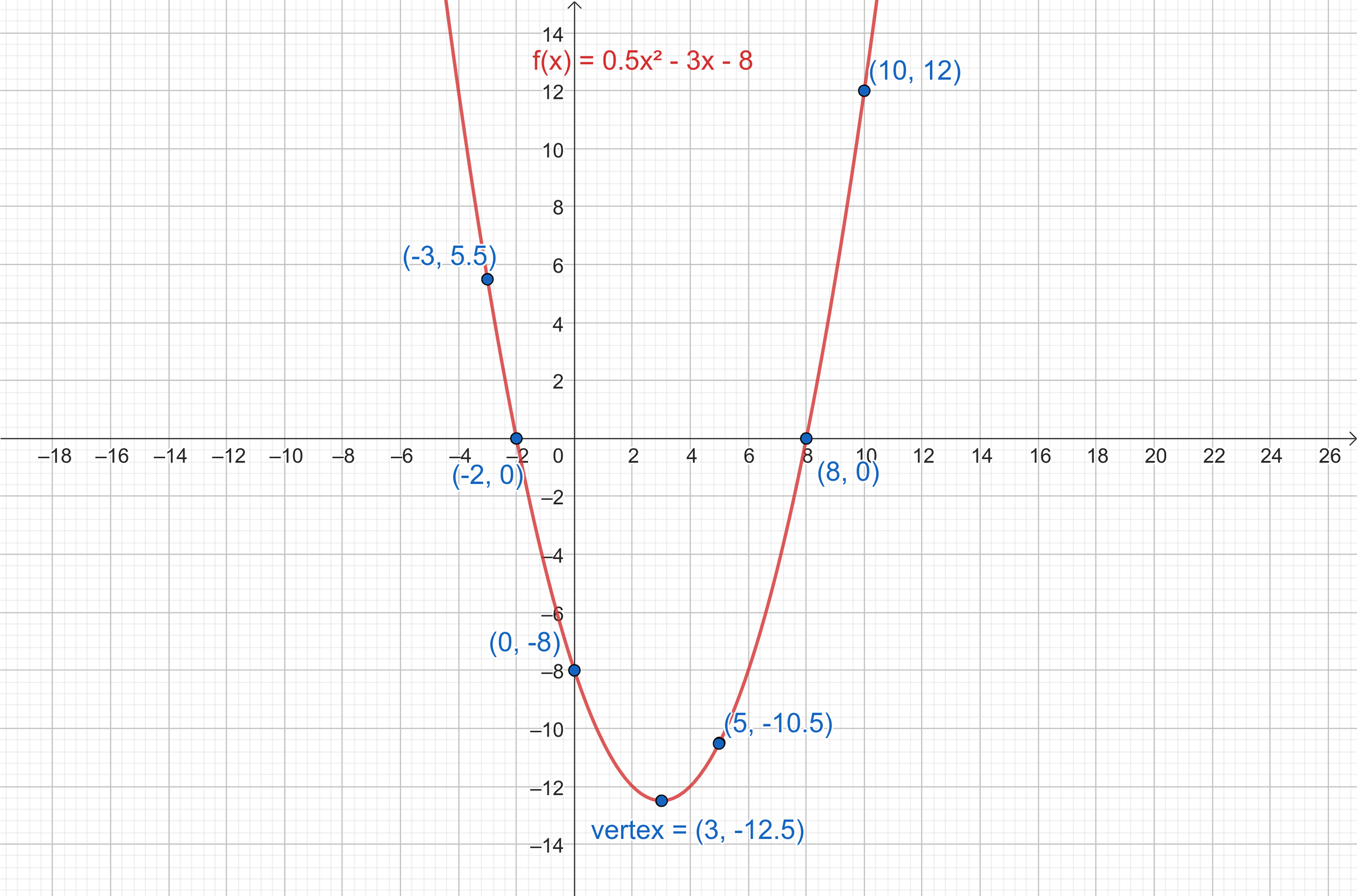
Step-by-Step Approach with Digital Assistance
-
Analyze the Function (Manual/Symbolic Check): Begin by understanding the function’s nature. Is it polynomial, rational, trigonometric, exponential, or logarithmic? Use symbolic calculators like Wolfram Alpha to quickly find the domain, intercepts, critical points, and asymptotic behaviors. This initial analysis helps you anticipate the graph’s overall shape and key features.
-
Choose Your Tool: Select the most appropriate digital tool based on the function’s complexity and your objective. For quick explorations, Desmos or GeoGebra are excellent. For advanced analysis, customization, or integration into a larger project, Python libraries (Matplotlib, Plotly) or specialized software like MATLAB might be better suited.
-
Input and Explore: Enter the function into your chosen tool. Start with a default viewing window and observe the initial sketch. Most tools allow you to adjust the x and y ranges. Experiment with different parameter values using sliders or by re-defining the function to understand how changes impact the graph’s shape, position, and orientation. This dynamic exploration is where digital tools truly shine.
-
Refine and Annotate: Enhance the graph’s clarity and informativeness. Add titles, axis labels, legends for multiple functions, and specific annotations for critical points (intercepts, extrema, inflection points). Adjust line colors, styles, and thicknesses to improve readability. Ensure the scales on both axes are appropriate and clearly marked.
-
Interpret and Verify: Compare the digitally generated graph with your initial analytical predictions. Does it match the expected domain, range, intercepts, and asymptotic behaviors? Are the extrema and inflection points where they should be? This verification step is crucial for catching input errors or misinterpretations, solidifying your understanding of the function.
Best Practices for Effective Digital Graphing
-
Clarity and Readability: Avoid clutter. A graph should communicate information clearly and efficiently. Choose appropriate line styles, colors, and markers.
-
Appropriate Scales: Set the x and y axis limits thoughtfully. An overly broad range might obscure important features, while too narrow a range might miss critical behaviors.
-
Accessibility: Consider colorblindness when choosing palettes. Ensure text is legible and appropriately sized.
-
Dynamic Exploration: Leverage the interactive features of tools like Desmos or Plotly. Using sliders for parameters can provide profound insights into how a function transforms.
-
Contextualization: Always include a title, axis labels with units (if applicable), and any necessary legends. A graph without context is often meaningless.
Applications and Impact in the Tech World
The ability to sketch and interpret graphs of functions is not merely an academic exercise; it’s a foundational skill with profound implications across numerous tech disciplines.
Data Science and Analytics
In data science, functions are everywhere—from describing data distributions to modeling relationships between variables. Graphing functions is vital for:
-
Exploratory Data Analysis (EDA): Visualizing distributions (e.g., probability density functions), scatter plots to identify relationships, and time series plots to observe trends.
-
Model Evaluation: Plotting loss functions to understand model convergence, visualizing receiver operating characteristic (ROC) curves, or plotting residuals to assess model fit.
-
Algorithm Visualization: Understanding how algorithms (e.g., optimization algorithms) navigate a solution space by plotting objective functions.
Software Development and UI/UX
Developers often use functional representations for various aspects of software design:
-
Animation Curves: In UI/UX design, cubic Bézier curves (functions) are used to define animation timing functions, dictating how elements move and transition on a screen. Sketching these curves helps designers understand the animation’s feel (e.g., ease-in, ease-out).
-
Performance Monitoring: Plotting system metrics (CPU usage, memory consumption) as functions of time helps identify bottlenecks and debug performance issues.
-
Game Development: Functions define projectile trajectories, character movement paths, and environmental effects.
AI and Machine Learning
The field of AI and ML is heavily reliant on mathematical functions:
-
Activation Functions: Visualizing sigmoid, ReLU, or tanh activation functions helps understand their non-linear behavior in neural networks.
-
Loss Functions: Graphing loss functions (e.g., mean squared error) helps visualize the optimization landscape and understand how a model learns.
-
Decision Boundaries: In classification tasks, plotting decision boundaries (often non-linear functions) provides a clear visual representation of how a model separates different classes of data.
-
Neural Network Architectures: While not strictly functions, understanding the flow of data through layers involves functional transformations.
Engineering and Simulation
Engineers use functions to model physical systems and analyze their behavior:
-
Signal Processing: Representing signals as functions (e.g., sine waves, step functions) and analyzing them in time and frequency domains.
-
Control Systems: Plotting transfer functions, step responses, and frequency responses to design and analyze feedback control systems.
-
Material Science: Graphing stress-strain curves to understand material properties and predict failure points.
Conclusion
The evolution of technology has profoundly reshaped how we approach the sketching of functions. What was once a labor-intensive manual task is now an incredibly powerful, dynamic, and insightful digital process. Modern tools, from interactive web platforms to sophisticated programming libraries, not only expedite the creation of graphs but also foster a deeper, more intuitive understanding of complex mathematical relationships.
The ability to sketch a graph of a function is no longer just about plotting points; it’s about leveraging computational power to explore, analyze, and communicate intricate patterns across a myriad of technological domains. As we continue to navigate a world increasingly defined by data and algorithms, the synergy between foundational mathematical literacy and technological prowess will remain an indispensable skill, enabling us to unlock new insights and drive innovation. Embrace the tools, master the concepts, and continue to explore the boundless potential of visualization.
aViewFromTheCave is a participant in the Amazon Services LLC Associates Program, an affiliate advertising program designed to provide a means for sites to earn advertising fees by advertising and linking to Amazon.com. Amazon, the Amazon logo, AmazonSupply, and the AmazonSupply logo are trademarks of Amazon.com, Inc. or its affiliates. As an Amazon Associate we earn affiliate commissions from qualifying purchases.