
In an increasingly digitized world, access to essential services and entertainment often hinges on navigating complex online platforms. For students, the digital landscape presents a unique set of challenges and opportunities, particularly when it comes to managing finances and academic resources. Amazon Prime Student stands out as a pivotal digital offering, specifically tailored to bridge this gap by providing a suite of benefits at a reduced cost. This guide is designed for the tech-savvy student, breaking down the often intricate process of enrollment into Amazon Prime Student, emphasizing the digital tools, security protocols, and interface navigation crucial for a smooth onboarding experience. Far from a mere marketing brochure, this article delves into the technological backbone of the service, from digital identity verification to the seamless integration of its diverse offerings within the broader Amazon ecosystem. Understanding the “how-to” from a technological perspective empowers students not just to sign up, but to effectively leverage and manage this powerful digital subscription.

I. Unlocking Digital Benefits: Understanding Prime Student’s Core Offering
Amazon Prime Student is not merely a discount program; it’s an integrated digital ecosystem designed to support student life through advanced technological services. At its heart, Prime Student offers a comprehensive suite of digital advantages, from expedited delivery of physical goods to expansive digital content libraries, all managed through Amazon’s sophisticated online infrastructure. For the technologically inclined student, understanding this foundational structure is key to appreciating the value beyond just cost savings.
More Than Just Shipping: The Digital Ecosystem of Prime Student
While the allure of free, fast shipping is often the primary draw, Prime Student subscribers gain access to a much broader digital services portfolio. Technologically, this means seamless integration across various Amazon platforms:
- Prime Video: A vast library of on-demand movies and TV shows, accessible via streaming apps on virtually any internet-connected device, from smart TVs to mobile phones and tablets. The underlying technology involves adaptive bitrate streaming, ensuring optimal video quality regardless of network conditions.
- Prime Music: Ad-free access to millions of songs and podcasts, downloadable for offline listening, managed through the Amazon Music app. This utilizes cloud-based storage and streaming protocols, offering personalized recommendations driven by AI algorithms.
- Prime Reading & Amazon First Reads: A rotating selection of free eBooks and digital magazines, integrated with Kindle devices and the Kindle app across various platforms. This showcases Amazon’s robust digital publishing and distribution technology.
- Prime Gaming (formerly Twitch Prime): Free games, in-game content, and a monthly Twitch channel subscription. This leverages Amazon’s acquisition of Twitch, offering cross-platform digital rewards for gamers.
- Amazon Photos: Unlimited full-resolution photo storage in the cloud, along with 5 GB for video. This is a critical cloud storage solution, offering secure, accessible backup for personal digital memories.
Each of these components represents a distinct technological service, seamlessly bundled under the Prime umbrella, providing a centralized digital hub for entertainment, information, and utility. The efficiency of accessing all these services through a single Amazon account login highlights the advanced user account management systems in place.
Eligibility and Verification: Navigating Digital Gateways
The gateway to these digital benefits is a robust eligibility and verification process, designed to confirm an applicant’s student status with technological precision. Unlike manual verification systems, Amazon Prime Student relies heavily on digital proofs and automated checks, which makes the sign-up process swift for most, but requires attention to digital detail.
- Active Student Status: Applicants must be enrolled in at least one course at a two- or four-year college or university in the United States or Puerto Rico. This fundamental requirement underpins the verification system.
- Valid Email Address: The most common and technologically efficient method of verification is using an institutional email address (e.g., ending in .edu). Amazon’s system can often automatically verify these domains, confirming active student status without further intervention. This relies on pre-configured domain recognition and secure email verification protocols.
- Alternative Digital Proof: For students without an .edu email, Amazon provides a secure digital upload portal for alternative documentation. This might include:
- A student ID card displaying an expiration date (or the current academic year).
- A transcript or enrollment letter (dated within the last 90 days).
- A tuition bill (dated within the last 90 days).
These documents are typically uploaded as digital images (JPG, PNG) or PDFs, which are then subject to manual review by Amazon’s verification team. The security of this upload portal, utilizing encryption and secure data handling practices, is paramount to protect sensitive personal information. Understanding these digital requirements upfront minimizes friction during the application phase, ensuring a smoother journey through the digital gateway.
II. The Digital Onboarding Journey: A Step-by-Step Tech Walkthrough
The sign-up process for Amazon Prime Student is a prime example of streamlined digital onboarding, designed for user convenience while maintaining strict verification protocols. From initiating the application to final confirmation, each step involves specific technological interactions and data handling procedures.
Initiating Your Digital Enrollment: Starting the Sign-Up Process
The journey begins at a dedicated digital touchpoint: the Amazon Prime Student landing page. This specialized interface is optimized for new enrollments, distinct from the general Prime membership page.
- Accessing the Portal: Students typically navigate to
amazon.com/primestudentor search for “Prime Student” within the Amazon website or mobile application. The website itself is built on a responsive design framework, ensuring optimal display and functionality across desktops, tablets, and smartphones, adapting to various screen sizes and input methods. - Account Login or Creation: Prospective members are prompted to either sign in to an existing Amazon account or create a new one. This involves standard digital account creation practices: email address, password, and basic personal information. Amazon’s robust account management system underpins this, ensuring unique user identification and secure access credentials. The system typically employs password complexity requirements and multi-factor authentication options to enhance digital security from the outset.
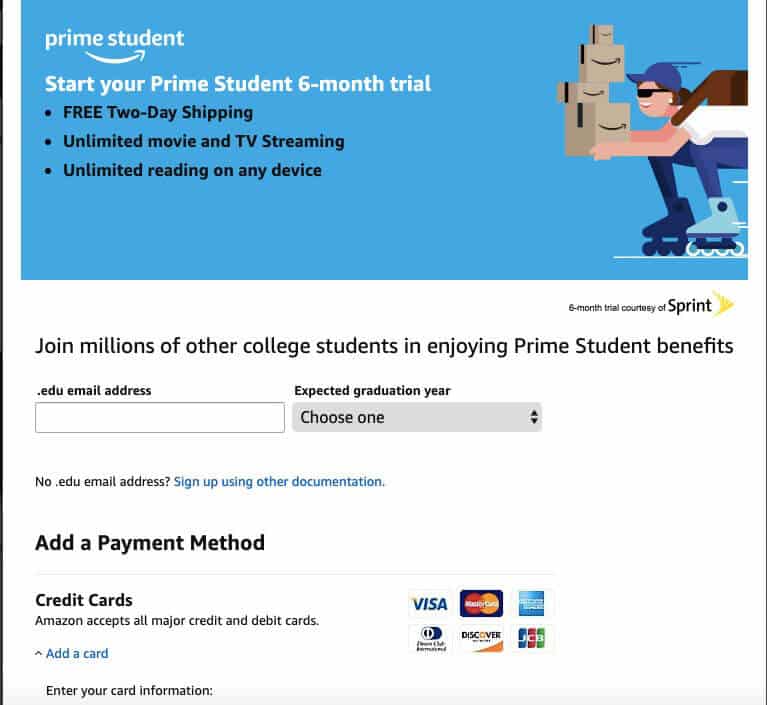
- Initiating the Student Program: Once logged in, users click a clear “Start your 6-month trial” or similar button, which triggers the specific Prime Student enrollment workflow. This action initializes a session within Amazon’s backend systems, earmarking the user for student verification and the associated trial period. The user interface guides the applicant sequentially, minimizing confusion and ensuring all necessary data fields are presented logically.
Data Entry and Secure Submission: Providing Your Digital Footprint
The next phase involves the secure submission of personal and academic information, a critical step where data integrity and privacy are paramount.
- Personal Information: Applicants are asked to provide their name, date of birth, and typically a phone number. This data is collected through secure web forms, protected by SSL/TLS encryption, ensuring that information transmitted between the user’s browser and Amazon’s servers remains confidential and tamper-proof.
- Academic Information: The core of the application requires details about the educational institution. This includes the college/university name and expected graduation date. These fields often integrate autocomplete functions or dropdown menus, drawing from Amazon’s internal database of accredited institutions, which enhances data accuracy and reduces input errors.
- Payment Information: Even for the initial trial period, a valid payment method (credit card, debit card, or Amazon gift card balance) is required. Amazon’s payment processing system employs industry-standard encryption and tokenization for card details, meaning the full card number is never stored on Amazon’s servers in plain text. This digital security measure is crucial to protect financial data against breaches. The system automatically processes the conversion to a paid membership after the trial, leveraging this stored payment method.
The Verification Protocol: Confirming Your Student Status Digitally
This is arguably the most technologically sophisticated part of the sign-up process, where Amazon’s systems confirm student eligibility.
- Email Verification: If an applicant provides an .edu email address, Amazon’s system dispatches an automated verification email. This email contains a unique, time-sensitive link. Clicking this link authenticates the email address and often automatically verifies student status if the domain is recognized. This is an efficient, automated digital handshake, confirming that the user has active access to an institutional email account.
- Manual Document Upload and Review: For those without an .edu email or when automated verification fails, the system prompts for document upload. The upload interface is secure, typically using HTTPS for encrypted transmission. Once uploaded, these digital documents are queued for human review by Amazon’s dedicated verification team. This process can take anywhere from a few hours to several days, depending on volume. During this period, the system provides status updates, allowing users to track their application’s progress through the digital queue. The technology behind this includes secure document storage, an internal workflow management system for reviewers, and encrypted communication channels to relay approval or rejection. Applicants are often notified via email about the outcome, providing clear instructions for next steps or re-submission if necessary. This blended approach of automated and manual digital verification ensures both speed and accuracy.
III. Maximizing Your Digital Membership: Leveraging Prime Student Features
Once enrolled, the true power of Prime Student lies in its integrated digital features, transforming the student’s daily routine and academic life. From streaming entertainment to exclusive tech-related discounts, the membership is designed to be a central hub for digital access.
Beyond Expedited Delivery: Exploring the Digital Content Hub
While fast shipping is a tangible benefit, the digital content hub is where Prime Student truly shines in terms of technological utility and entertainment.
- Prime Video: Members gain unlimited streaming access to a vast library of movies and TV shows. Technologically, this means leveraging Amazon’s global content delivery network (CDN) to provide high-definition streaming with minimal buffering. The Prime Video app, available across a multitude of devices (smart TVs, gaming consoles, mobile devices, web browsers), uses adaptive bitrate streaming to adjust video quality based on the user’s internet connection, ensuring a smooth viewing experience. Features like “X-Ray” provide real-time information about actors and music using IMDb’s database, showcasing advanced data integration.
- Amazon Music Prime: This component offers ad-free access to millions of songs and thousands of curated playlists and stations. The Amazon Music app utilizes cloud-based audio streaming technology, allowing users to download music for offline playback, thus managing data usage. Its recommendation engine employs machine learning algorithms to personalize music suggestions based on listening history and preferences, enhancing the user experience.
- Prime Reading and Audible Channels: For students, access to a rotating selection of eBooks and magazines through Prime Reading can be invaluable for both leisure and academic supplementary material. This leverages Amazon’s Kindle ecosystem, allowing seamless reading across Kindle devices and the Kindle app on smartphones and tablets. Audible Channels, offering ad-free audio series and podcasts, provides a convenient way to consume audio content, utilizing Amazon’s robust digital audio distribution platform.
- Prime Gaming: This feature, deeply integrated with Twitch, offers free games, in-game content, and a monthly Twitch channel subscription. It leverages the technological synergy between Amazon and Twitch, providing digital rewards directly linked to gaming accounts, enhancing the gaming experience for students.
Exclusive Tech Deals and Software Access: Enhancing Your Digital Toolkit
Beyond entertainment, Prime Student offers tangible benefits for students looking to optimize their digital toolkit and acquire essential technology.
- Student-Exclusive Discounts: Amazon frequently provides special deals and discounts on a wide range of tech products specifically for Prime Student members. This can include laptops, tablets, headphones, smart devices, and accessories. These offers are often surfaced through personalized recommendations on the Amazon website, utilizing algorithms that identify relevant products based on browsing history and student demographics. The backend systems manage these dynamic pricing structures and targeted promotions.
- Software and Digital Services: Occasionally, Prime Student may include or offer discounts on software licenses, cloud services, or other digital tools pertinent to academic work or personal productivity. While not a permanent fixture, these limited-time offers are strategically integrated into the member benefits. This could range from reduced rates on specific Adobe Creative Cloud subscriptions to temporary access to premium study tools, leveraging partnerships with software vendors to provide added value. The digital redemption of these offers typically involves unique codes or direct integration with the partner’s platform, managed through secure digital key distribution systems.
- Amazon Photos Unlimited Storage: For students dealing with large volumes of lecture notes, research papers, or personal media, the unlimited full-resolution photo storage and 5 GB for video through Amazon Photos is a significant technological perk. This robust cloud storage solution provides a secure, accessible backup for digital assets, reducing the burden on local device storage and offering peace of mind regarding data preservation. The service supports automatic uploads from mobile devices, simplifying the backup process through app integration.
IV. Troubleshooting and Management: Maintaining Your Digital Account
Even with the most streamlined digital processes, users may encounter hurdles. Understanding the technological underpinnings of common issues and account management is crucial for a seamless Prime Student experience.
Common Digital Hurdles: Overcoming Sign-Up Challenges
Navigating the digital sign-up process can sometimes present unexpected technical or logistical challenges. Knowing how to address these from a tech perspective is invaluable.
- Verification Delays or Failures: If your .edu email isn’t recognized or manual document verification takes longer than expected, it often indicates an issue with the data provided or a backlog in the review queue. Troubleshooting Tip: Double-check that your email domain is correct and that uploaded documents are clear, legible, and meet all specified criteria (e.g., date requirements). If delays persist, contacting Amazon Customer Service (through their digital chat support or help portal) is the next step. Their internal systems allow agents to review your application status and provide specific guidance, sometimes requiring a re-upload of documents.
- Technical Errors During Submission: Browser compatibility issues, network connectivity problems, or temporary server outages can sometimes interrupt the application process. Troubleshooting Tip: Try clearing your browser’s cache and cookies, using a different web browser (e.g., Chrome, Firefox, Edge), or switching to the Amazon mobile app. Ensure you have a stable internet connection. If the issue persists, it might indicate a system-wide problem on Amazon’s end, which usually resolves itself within a short period.
- Password or Account Access Issues: Forgetting your Amazon password or encountering login problems can halt the process. Troubleshooting Tip: Utilize Amazon’s “Forgot your password?” recovery tool, which typically sends a password reset link to your registered email or phone number. Ensure your email account is secure and accessible. If you suspect your account has been compromised, Amazon’s digital security features allow for immediate password changes and review of recent account activity.
Account Lifecycle Management: Digital Controls and Expiration
Managing your Prime Student membership effectively requires understanding its digital lifecycle, from automatic renewals to eventual expiration.
- Membership Settings and Automatic Renewal: Prime Student accounts are designed for automatic renewal after the initial trial period and subsequent annual terms. This feature, common across digital subscription services, relies on Amazon’s billing system to automatically charge the registered payment method. Management Tip: To review or change your payment method, navigate to “Manage Prime Membership” under your Amazon account settings. Here, you can update card details, change the default payment method, or opt-out of automatic renewal before the next billing cycle. This digital dashboard provides complete control over your subscription’s financial aspects.
- Expiration and Re-verification: Prime Student typically lasts for four years or until graduation, whichever comes first, after which it converts to a standard Prime membership. Amazon’s internal systems track these timelines. Management Tip: Be aware of your membership’s projected end date. Amazon usually sends digital notifications (emails) as the expiration approaches, informing you of the transition to a full-price membership. If you are still a student and wish to extend, you might be prompted for re-verification through a similar digital process as the initial sign-up, ensuring continued eligibility.
- Digital Cancellation Process: Should you decide to cancel, Amazon provides a straightforward digital cancellation path. Management Tip: Log in to your Amazon account, go to “Manage Prime Membership,” and select “End Membership” or “Update, Cancel, and More.” The system will guide you through the steps, often offering prorated refunds based on usage. This digital self-service option underscores Amazon’s commitment to user control over their subscriptions.
V. The Future of Digital Student Services: Prime Student’s Evolving Tech Landscape
As technology continues to advance, the services bundled within Prime Student are likely to evolve, offering even more sophisticated integrations and personalized experiences for the academic community. The trajectory points towards deeper digital integration and leveraging artificial intelligence for enhanced utility.
Integration with Educational Platforms: A Glimpse Forward
The next frontier for services like Prime Student could involve more direct integration with academic technology ecosystems. Imagine a future where Prime Student’s benefits are seamlessly accessible through university learning management systems (LMS) or student portals.
- Single Sign-On (SSO) for Academic Resources: Future iterations might see Prime Student accounts linked via SSO with university credentials, simplifying access to digital textbooks, academic software, or research databases available through Prime. This would streamline the user experience, eliminating multiple logins and leveraging existing university authentication protocols.
- Contextualized Digital Content Delivery: Through partnerships with educational institutions, Prime Video could offer access to specific documentaries or educational series relevant to current coursework, or Prime Reading could highlight academic papers from participating publishers. This would move beyond general entertainment to highly curated, education-specific digital content delivery, dynamically served based on a student’s enrolled courses.
- Cloud Storage for Academic Projects: Expanding Amazon Photos into a more comprehensive academic cloud storage solution, potentially offering larger video storage or project collaboration features, could become a staple. Integration with popular academic productivity suites would allow for direct saving and sharing of digital projects within the Amazon Photos cloud, fostering a more connected academic workflow.

Enhancing User Experience Through AI and Personalization
Artificial intelligence and machine learning are already deeply embedded in Amazon’s operations, and their role in Prime Student is only set to grow, leading to a more personalized and predictive user experience.
- Proactive Offerings and Reminders: AI could analyze student academic calendars and consumption patterns to proactively suggest relevant deals on textbooks, study aids, or even stress-relief entertainment during exam periods. It could send intelligent reminders for membership renewal or re-verification, ensuring no disruption in service.
- Personalized Learning Pathways: Leveraging AI, Prime Student could potentially recommend specific learning resources, skill-building courses, or workshops from platforms like Amazon’s own AWS Educate, tailored to a student’s major, career interests, or academic performance. This transforms the membership from a passive benefit provider to an active digital learning companion.
- Streamlined Support and Troubleshooting: AI-powered chatbots and virtual assistants could provide instant, intelligent support for common technical issues related to Prime Student, guiding users through troubleshooting steps without human intervention, leading to faster resolution of digital hurdles. This would optimize the customer service experience, making it more efficient and user-friendly.
In conclusion, signing up for Amazon Prime Student is a prime example of engaging with a sophisticated digital service. By understanding the technological nuances of its eligibility criteria, the secure onboarding process, and the diverse digital features it offers, students can not only gain access to valuable benefits but also navigate the digital landscape with confidence and efficiency. The ongoing evolution of Prime Student promises an even more integrated and AI-enhanced experience, cementing its role as an indispensable digital tool for the modern student.
aViewFromTheCave is a participant in the Amazon Services LLC Associates Program, an affiliate advertising program designed to provide a means for sites to earn advertising fees by advertising and linking to Amazon.com. Amazon, the Amazon logo, AmazonSupply, and the AmazonSupply logo are trademarks of Amazon.com, Inc. or its affiliates. As an Amazon Associate we earn affiliate commissions from qualifying purchases.