
In the vast and ever-expanding landscape of e-commerce, Shopify stands as a colossal platform, powering millions of independent businesses and brands worldwide. Far from being a single marketplace like Amazon or Etsy, Shopify provides the underlying technology that allows entrepreneurs to build their own unique online storefronts. For the modern consumer, understanding how to navigate and shop effectively on these diverse Shopify-powered sites is key to unlocking a world of unique products, supporting independent creators, and enjoying a seamless, secure online shopping experience. This guide will demystify the process, offering insights into finding products, executing secure purchases, and making the most of your interactions with Shopify stores.
Understanding the Shopify Ecosystem for Shoppers
Before diving into the specifics of shopping, it’s essential to grasp what Shopify is from a shopper’s perspective. It’s not a single store, but rather the powerful software backbone that hosts a multitude of individual online shops, each with its own brand, inventory, and operational policies.
What is Shopify and Why it Matters to You (as a Shopper)
At its core, Shopify is a leading e-commerce platform that enables businesses of all sizes to create and manage their online stores. Think of it as the operating system for countless digital storefronts. As a shopper, this means that when you land on a website like “myuniqueco.com” and see “Powered by Shopify” at the bottom, you’re interacting with a site that benefits from robust, scalable e-commerce technology. This underlying tech stack ensures smooth performance, secure transactions, and a consistent user experience, regardless of the store’s size or specific niche. It matters to you because it signifies a certain standard of technical reliability and security that independent stores might otherwise struggle to achieve on their own.
The Diverse World of Shopify Stores
One of Shopify’s greatest strengths, and what makes shopping on it so exciting, is the incredible diversity of stores it hosts. From small artisan boutiques selling handmade jewelry to direct-to-consumer (DTC) giants like Allbirds or Kylie Cosmetics, Shopify empowers a spectrum of businesses. This means you won’t find products neatly categorized under a single Shopify banner. Instead, you’ll discover individual brands, each meticulously curated, offering everything from fashion and electronics to home goods, food, and digital products. This fragmentation, while requiring a slightly different discovery approach than a centralized marketplace, fosters innovation and allows brands to create highly personalized shopping experiences.
Key Benefits of Shopping on Shopify Stores
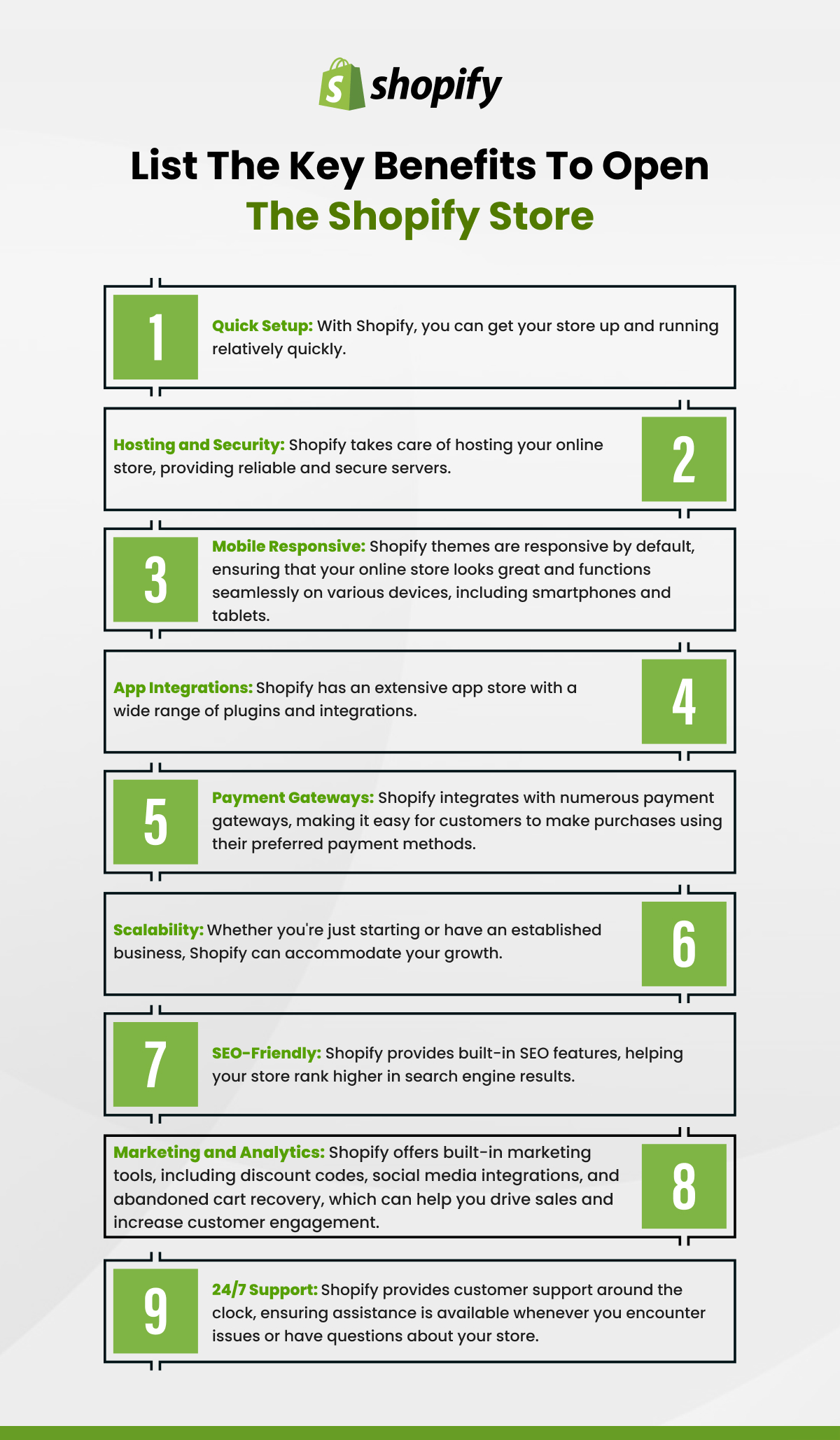
Shopping on Shopify-powered sites offers several distinct advantages for consumers. Firstly, you’re often directly supporting independent businesses, creators, and entrepreneurs, which can be a deeply satisfying aspect of your purchase. Secondly, many Shopify stores represent direct-to-consumer brands, meaning you’re buying directly from the manufacturer or creator, often resulting in competitive pricing due to fewer intermediaries. Thirdly, these stores typically offer a more curated and branded experience than general marketplaces, with unique product selections and dedicated customer service. Finally, the underlying Shopify technology provides a strong foundation for secure transactions and efficient order fulfillment, ensuring a reliable shopping journey.
Navigating and Discovering Products
With millions of stores, how do you find what you’re looking for, or even discover something new and exciting? The discovery process on Shopify is different from browsing a single giant catalog.
Direct Store Access vs. Marketplace Discovery
Often, you’ll encounter Shopify stores directly – perhaps through an advertisement on social media, a link from a blog, or a friend’s recommendation. In these cases, you navigate directly to the brand’s website. However, there are also aggregate platforms and directories that feature Shopify stores, though Shopify itself doesn’t operate a centralized consumer-facing marketplace. Tools like “Shop” (Shopify’s own app) or even broader search engines and social media feeds act as discovery channels, leading you to specific Shopify storefronts based on your interests and search queries.
Effective Search and Filtering Techniques
Once you’re on a specific Shopify store, the search and filtering tools are your best friends. Most well-designed Shopify sites will feature a prominent search bar (often a magnifying glass icon) and navigation menus that break down products into categories, collections, and sometimes even sub-categories (e.g., “Men’s Apparel > T-Shirts > Graphic Tees”). Utilize these filters for size, color, price range, brand (if a multi-brand store), and other attributes to quickly narrow down your options and find precisely what you’re looking for without endless scrolling.
Product Pages: What to Look For
The product page is where you gather all the crucial information before making a decision. Pay close attention to:
- High-Quality Images and Videos: Look for multiple angles, lifestyle shots, and zoom functionality. Videos can provide a better sense of scale and functionality.
- Detailed Descriptions: Read beyond the bullet points. Good descriptions convey material, dimensions, care instructions, and unique features.
- Customer Reviews: User-generated reviews and ratings are invaluable for gauging product quality, fit, and customer satisfaction. Look for reviews that are detailed and recent.
- Pricing and Discounts: Clearly displayed prices, potential sale prices, and any applicable discount codes should be visible.
- Shipping and Return Information: This is critical. Understand the shipping costs, estimated delivery times, and the store’s return policy before adding to cart.
- Availability: Check stock levels and if different variants (e.g., sizes, colors) are in stock.
Understanding Product Variants and Stock Availability
Many products come in different versions or “variants” – different sizes, colors, materials, or configurations. On Shopify product pages, these are usually presented as dropdown menus or swatches. Always select your desired variant carefully to ensure you’re adding the correct item to your cart. The platform will typically indicate if a specific variant is out of stock, preventing you from adding unavailable items.
The Seamless Checkout Process
Shopify’s checkout system is designed for efficiency and security, making the final steps of your purchase straightforward and reliable.
Adding Items to Your Cart
Once you’ve found an item and selected its desired variants, click the “Add to Cart” or “Buy Now” button. You can typically view your cart at any time, often via an icon in the top right corner of the website. Review your cart to ensure all items, quantities, and variants are correct. This is also the stage where you might find options to add gift wrapping or other services.
Reviewing Your Order and Applying Discounts
Before proceeding to payment, you’ll be presented with an order summary. Double-check all items, quantities, and the total cost, including any shipping fees. If you have a discount code or gift card, there will usually be a dedicated field (often labeled “Discount Code,” “Promo Code,” or “Gift Card”) where you can enter it. Ensure the discount is applied and reflected in your new total before moving forward.

Secure Payment Options on Shopify
Shopify stores prioritize secure transactions. The platform is PCI DSS compliant (Payment Card Industry Data Security Standard), meaning it adheres to strict security standards for handling credit card information. You’ll typically find a variety of payment options:
- Credit/Debit Cards: Visa, MasterCard, American Express, Discover are almost universally accepted.
- Digital Wallets: Apple Pay, Google Pay, and Shop Pay (Shopify’s accelerated checkout) offer quick and secure one-click purchasing using stored card details.
- Third-Party Payment Gateways: PayPal is a common option, allowing you to pay with your PayPal balance or linked cards without sharing details directly with the store.
- Buy Now, Pay Later (BNPL) Services: Klarna, Afterpay, and Sezzle are increasingly popular, allowing you to split your purchase into interest-free installments.
Always look for the padlock icon in your browser’s address bar and “https://” at the beginning of the URL to confirm you are on a secure connection when entering payment details.
Guest Checkout vs. Account Creation
Most Shopify stores offer the option to check out as a guest, which is convenient for one-off purchases. However, many also encourage account creation. Creating an account can offer benefits such as faster future checkouts (with saved shipping/billing info), access to order history, simplified returns, and sometimes exclusive discounts or loyalty programs. Weigh the convenience against your privacy preferences.
Post-Purchase: Tracking, Returns, and Support
Your shopping journey doesn’t end after clicking “Place Order.” Understanding the post-purchase process is crucial for a smooth experience.
Order Confirmation and Tracking Your Shipment
Immediately after purchase, you’ll receive an order confirmation email. This email usually contains your order number, a summary of your purchase, and often a link to track your shipment. This tracking link, powered by integrated shipping carriers, allows you to monitor your package’s journey from the warehouse to your doorstep. Keep this email handy for reference and tracking updates.
Understanding Return and Refund Policies
While Shopify provides the platform, each individual store sets its own return and refund policies. It is paramount to review these policies before purchasing, especially for high-value items or if you’re unsure about the product. Look for information on:
- Return Window: How many days do you have to initiate a return?
- Condition of Returned Items: Must they be unused, in original packaging, with tags?
- Return Shipping Costs: Who pays for return shipping?
- Refund Method: Will you receive store credit, exchange, or a full refund to your original payment method?
- Exclusions: Are there any items that are final sale (e.g., custom products, perishables)?
Contacting Store Support for Issues
Should you encounter any issues – a missing item, a damaged product, or a question about your order – the first point of contact is always the specific Shopify store you purchased from. Most stores provide clear contact information (email, phone, or a contact form) on their website, often in the footer or a dedicated “Contact Us” page. Shopify as a platform does not handle individual customer service issues for the stores it hosts, so direct communication with the merchant is key.
Leveraging Customer Reviews and Feedback
After a positive experience, consider leaving a review. Many Shopify stores integrate review apps, allowing you to share your thoughts on product quality, shipping speed, and customer service. Your feedback not only helps other shoppers make informed decisions but also provides valuable insights to the business, contributing to its improvement and success.
Ensuring a Secure and Savvy Shopping Experience
While Shopify’s underlying technology is robust, a proactive approach to online security and smart shopping habits will further enhance your experience.
Identifying Legitimate Shopify Stores
Most Shopify stores are legitimate and trustworthy. However, as with any online environment, vigilance is key. Look for:
- Professional Website Design: Legitimate stores invest in good design, clear navigation, and well-written product descriptions.
- Clear Contact Information: A reputable store will have an easily accessible “Contact Us” page with an email, phone number, or physical address.
- Consistent Branding: Professional stores maintain consistent branding across their website, social media, and communications.
- Presence of Policies: Look for clearly stated shipping, return, and privacy policies.
- Secure Connection (HTTPS): Always ensure the URL begins with “https://” and shows a padlock icon, especially on checkout pages.
Be wary of sites with unusually low prices, vague product descriptions, no contact information, or poor grammar/spelling.
Protecting Your Personal and Payment Information
Shopify uses industry-standard encryption (SSL/TLS) to protect data transmitted between your browser and the store’s servers. When you enter payment information, it’s processed securely through certified payment gateways. To further protect yourself:
- Use Strong, Unique Passwords: If you create an account, use a password that combines letters, numbers, and symbols, and don’t reuse it across multiple sites.
- Be Cautious with Public Wi-Fi: Avoid making purchases or entering sensitive information on unsecured public Wi-Fi networks.
- Monitor Bank Statements: Regularly check your bank and credit card statements for any unauthorized transactions.
Best Practices for Online Security
Beyond individual store interactions, general online security practices are crucial:
- Beware of Phishing: Be suspicious of unsolicited emails or messages claiming to be from a store, asking for personal information or directing you to suspicious links. Always verify the sender and the URL.
- Keep Software Updated: Ensure your operating system, web browser, and antivirus software are up to date.
- Use Reputable Payment Methods: Stick to well-known payment methods like credit cards (which offer fraud protection), PayPal, or Shop Pay.
Tips for Smart Shopping
Finally, a few tips to become a more savvy Shopify shopper:
- Read Reviews Diligently: Look beyond the star rating for detailed feedback on product quality, sizing, and customer service.
- Compare Prices: While many Shopify stores offer unique products, for more common items, a quick search can help you compare prices across different merchants.
- Sign Up for Newsletters (Strategically): Many stores offer a first-time purchase discount for signing up for their email list. You can always unsubscribe later if the emails become too frequent.
- Understand Sizing Charts: Especially for apparel, always consult the store’s specific sizing chart, as sizes can vary greatly between brands.
Shopping on Shopify stores offers an incredibly rich and diverse online experience, connecting consumers with unique brands and products from around the globe. By understanding the platform’s nature, utilizing its features effectively, and maintaining vigilance regarding security, you can confidently navigate the world of Shopify-powered e-commerce and enjoy a fulfilling and secure shopping journey.
aViewFromTheCave is a participant in the Amazon Services LLC Associates Program, an affiliate advertising program designed to provide a means for sites to earn advertising fees by advertising and linking to Amazon.com. Amazon, the Amazon logo, AmazonSupply, and the AmazonSupply logo are trademarks of Amazon.com, Inc. or its affiliates. As an Amazon Associate we earn affiliate commissions from qualifying purchases.