
Amazon Prime has become an indispensable digital utility for millions, offering a vast array of services from expedited shipping to an expansive entertainment library. While its individual benefits are clear, understanding the technical mechanisms and best practices for sharing these advantages within a household can optimize its value and enhance the digital experience for everyone involved. This guide delves into the technical intricacies of sharing your Amazon Prime account, focusing on the official methods, setup processes, security considerations, and the digital benefits shared across your connected household.
Understanding Amazon Prime Household: The Official Sharing Mechanism
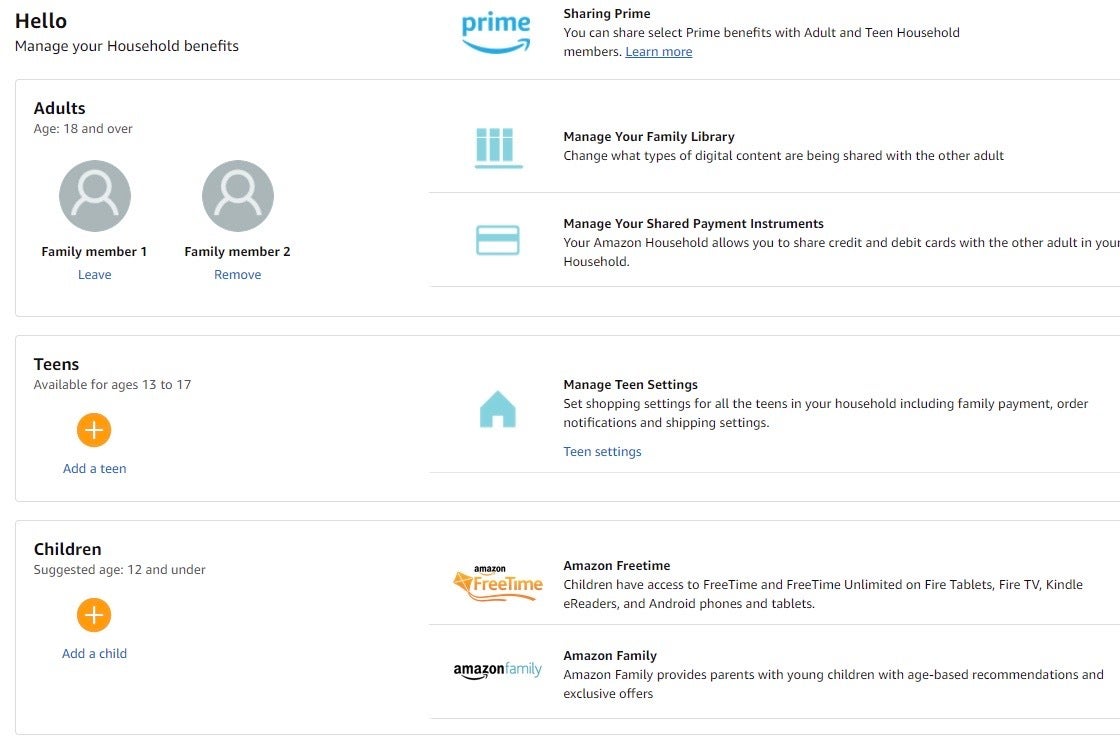
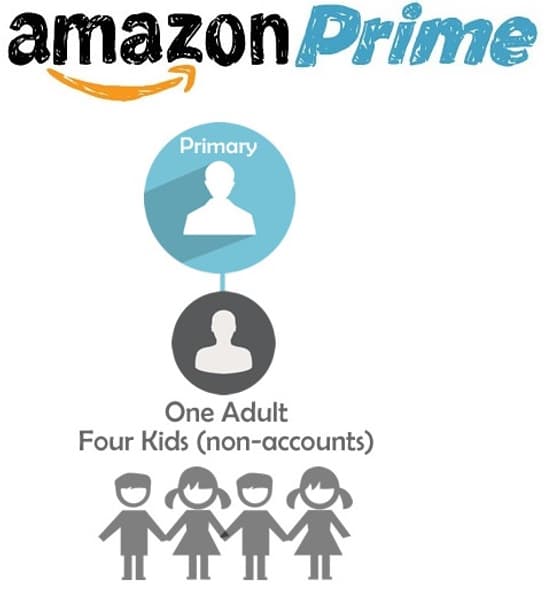
At its core, sharing an Amazon Prime account is primarily facilitated through a robust, Amazon-designed feature called Amazon Prime Household. This technical framework allows two adults and up to four children (teen and child profiles) to link their Amazon accounts and share select Prime benefits. It’s a structured system built to maintain individual account integrity while granting shared access to specific digital services and logistical advantages. This is not merely about sharing login credentials, which carries significant security risks; instead, it’s a managed linking of distinct Amazon accounts.
What is Prime Household and How Does it Work?
Amazon Prime Household is a technical configuration that allows up to two adults (18 years or older), each with their own Amazon account, to share Prime benefits. These adults can also manage up to four child profiles (under 13 years) and four teen profiles (13-17 years), though the benefits for these profiles are more restricted. The primary technical design ensures that while certain Prime benefits are communal, individual account elements—like personal purchase history, recommendations, and payment methods—remain separate and private. This distinction is crucial for both privacy and security, as it negates the need to disclose sensitive personal data or financial information to another user.
The system operates by creating a digital link between the primary Prime member’s account and the invited adult’s account. Once linked, Amazon’s backend systems grant specific Prime entitlements to the invited account. For children and teens, separate profiles are created, which can be managed and controlled by the adult accounts, providing filtered access to content and requiring adult approval for purchases. This layered access control is a key feature of the Prime Household’s architecture.
Eligibility Criteria and Shared vs. Unshared Benefits
To set up an Amazon Prime Household, both adult participants must reside at the same address, though Amazon typically verifies this through account settings rather than physical address checks. Each adult must have their own unique Amazon account. The technical limitations dictate that only two adults can directly share the full range of Prime benefits through this method.
Shared Benefits (across adults):
- Prime Delivery: Fast, free shipping on eligible items. This is perhaps the most utilized shared benefit, allowing both adults to leverage expedited shipping options from their respective accounts.
- Prime Video: Unlimited streaming of thousands of movies and TV episodes. Both adults can access the entire Prime Video library from their individual accounts, maintaining separate watch histories and recommendations.
- Prime Reading: Access to a rotating selection of ebooks, magazines, and comics.
- Amazon Photos: Unlimited full-resolution photo storage and 5 GB for video for both adults. This is a significant digital asset management benefit.
- Twitch Prime (now Prime Gaming): Free games, in-game content, and a free Twitch channel subscription.
- Early Access to Lightning Deals: Both adults receive the 30-minute early access benefit.
Unshared Benefits (remain with the primary account holder):
- Digital Content Credits: Any promotional credits or gift card balances are tied to the account they were issued to.
- Specific Digital Subscriptions: Prime Music Unlimited, Kindle Unlimited, or other third-party subscriptions purchased through Amazon are generally not shared unless explicitly stated or managed separately.
- Prime Wardrobe: This “try before you buy” fashion service is typically tied to the individual ordering account.
- Amazon Fresh/Whole Foods Market: While eligible delivery benefits may be shared, specific promotional discounts or region-locked services might vary.
- Purchase History: Crucially, purchase history and order details remain private to each individual account, safeguarding personal privacy.
Understanding these technical distinctions is vital to managing expectations and leveraging the feature effectively within a household.
Step-by-Step Guide to Setting Up Prime Household
Setting up an Amazon Prime Household is a straightforward process managed through Amazon’s account settings interface. It requires initiating an invitation and the invited adult accepting it, thereby digitally linking their accounts.
Initiating and Accepting the Invitation
- Log in to the Primary Prime Account: The adult who currently holds the active Prime membership should log into their Amazon account on a web browser.
- Navigate to Prime Membership Settings:
- Hover over “Account & Lists” in the top right corner.
- Click on “Your Account.”
- Under the “Shopping programs and rentals” section, click on “Prime.”
- On the Prime membership page, locate the section “Share your Prime benefits” or “Amazon Household.” Click “Manage your Household.”
- Add an Adult:
- On the Amazon Household page, click the “Add Adult” button.
- Enter the name and email address of the second adult you wish to invite. This email must be associated with their active Amazon account.
- Click “Continue.”
- Agree to Share Payment Methods (Important Technical Note): Amazon Household technically requires adults to agree to share payment methods. This doesn’t mean your credit card details are exposed or automatically used by the other person. Instead, it means that both adults will have access to all payment methods stored by either adult and can use them for purchases. However, each user must explicitly select a payment method during checkout. This is a foundational element of the Household’s technical design to facilitate shared benefits and ease of purchasing. Both parties must digitally agree to this stipulation.
- Send Invitation: After reviewing and agreeing, click “Send Invite.” An email invitation will be dispatched to the invited adult’s Amazon-registered email address.
For the Invited Adult:
- Open Invitation Email: The invited adult must open the email from Amazon and click the “Get Started” link within it.
- Log in to Their Amazon Account: They will be prompted to log in to their own Amazon account (or create one if they don’t have one).
- Agree to Terms: They must agree to the Amazon Household terms, including the shared payment method agreement.
- Confirm Link: Upon confirmation, their account will be digitally linked to the Prime Household.
Managing and Removing Members
Once established, the primary Prime member retains administrative control over the Household.
- Adding Teen and Child Profiles: From the same Amazon Household page, adults can add “Teens” (13-17 years) and “Children” (under 13 years). Teen profiles have their own login and can place orders requiring adult approval, offering a balance of independence and oversight. Child profiles are primarily for content access (e.g., FreeTime Unlimited) and do not have purchasing capabilities.
- Removing Members:
- Go back to the Amazon Household page from the primary Prime account.
- Locate the adult or child profile you wish to remove.
- Click “Remove” or “Remove Person from Household.”
- Confirm the removal.
Technical Implication of Removal: When an adult is removed, their Amazon account instantly loses access to all shared Prime benefits. There is a technical cooldown period of 180 days (6 months) before either of the adults involved in the breakup can join or create another Amazon Household. This is an Amazon policy designed to prevent frequent cycling of Household members and potential abuse of the system.
Digital Security and Best Practices for Shared Accounts
While Amazon Prime Household is a secure, officially sanctioned method for sharing Prime benefits, managing any shared digital access requires adherence to best practices in digital security. The convenience of sharing should never compromise the integrity and privacy of your personal data.
Prioritizing Strong Authentication and Password Hygiene
Even within the secure framework of Prime Household, maintaining robust authentication for each individual Amazon account is paramount.
- Unique, Complex Passwords: Both adults in the Household should use strong, unique passwords for their respective Amazon accounts. Passwords should be a combination of uppercase and lowercase letters, numbers, and symbols, and should not be reused across different online services. Password managers are highly recommended tools for generating and storing these complex credentials securely.
- Two-Factor Authentication (2FA): Enable 2FA on both adult Amazon accounts. This adds an essential layer of security by requiring a second verification code (typically sent to a mobile device or generated by an authenticator app) in addition to the password. This significantly mitigates the risk of unauthorized access even if a password is compromised. Amazon offers SMS-based 2FA and app-based 2FA; the latter is generally considered more secure.
- Regular Password Updates: While less critical with strong, unique passwords and 2FA, periodically updating passwords can add an extra layer of caution.
Managing Shared Payment Methods and Privacy
The technical requirement to share payment methods often raises privacy concerns. It’s crucial to understand how this system works and how to mitigate potential issues.
- Payment Method Access, Not Automatic Usage: As stated earlier, sharing payment methods means both adults can see and select each other’s stored payment methods during checkout. However, a purchase can only be completed by explicitly choosing a method and confirming the transaction. It does not mean one adult can automatically charge the other’s card without their active involvement in the checkout process.
- Privacy of Order History: A significant advantage of the Prime Household’s architecture is that individual order history remains private. The purchases made by one adult are not visible to the other. This ensures personal privacy regarding shopping habits and gift purchases.
- Communication is Key: Despite technical safeguards, open communication within the household about purchasing intentions and payment method usage is the most effective “social” security measure. Agree on which payment methods each person should use for their purchases to avoid confusion or accidental charges.
- Separate Accounts for Sensitive Digital Content: For highly sensitive digital content or subscriptions not covered by Prime Household, consider maintaining entirely separate Amazon accounts outside the Household link to ensure maximum privacy and control.
Protecting Teen and Child Profiles
For teen and child profiles, Amazon provides built-in parental controls to manage their digital interactions.
- Purchase Approval for Teens: Teen profiles can place orders, but adults can require an approval step before the purchase is finalized. This digital gatekeeping prevents unauthorized spending.
- Content Restrictions for Children: Child profiles, especially within services like Amazon FreeTime/Kids+, allow adults to curate available content, set screen time limits, and restrict access to web browsing or specific apps, ensuring age-appropriate digital experiences.
- Review Account Activity: Periodically review the activity on teen and child profiles to ensure they are being used appropriately and securely.
Navigating the Benefits of Prime Sharing for Your Household’s Tech Ecosystem
Integrating Prime sharing into your household’s tech ecosystem extends beyond merely saving on a subscription fee; it enhances the utility of various devices and digital services. By understanding how the shared benefits propagate across different platforms and devices, users can maximize their digital experience.
Maximizing Entertainment and Digital Content Access
The shared access to Prime Video and Prime Reading fundamentally alters a household’s entertainment options.
- Prime Video Across Devices: Both adults can individually stream content from the Prime Video library on their preferred devices—smart TVs, streaming sticks (Fire TV, Roku), tablets, and smartphones. Each user maintains their unique watchlists, viewing history, and recommendation algorithms, ensuring a personalized experience despite shared access to the content library. The technical backend ensures concurrent streams are managed within Amazon’s terms of service for multiple devices.
- Prime Reading on e-Readers and Apps: Access to Prime Reading means both adults can borrow books and magazines on their separate Kindle e-readers or Kindle apps on tablets/smartphones. This encourages a shared love for reading without individual purchases for every title.
- Amazon Photos for Collaborative Storage: Unlimited photo storage via Amazon Photos is a significant perk. Each adult can back up their personal photo collection to their own Amazon Photos account, yet the shared benefit often fosters an environment where families might create shared albums for events or vacations, leveraging the cloud storage for collaborative memory keeping. This is a practical application of shared tech infrastructure.
Streamlining Online Shopping and Logistics
Beyond entertainment, Prime sharing primarily optimizes the digital shopping experience and household logistics.
- Efficient Shipping for Multiple Users: The core benefit of Prime Delivery is replicated for both adults. This means two individuals can place orders independently from their separate accounts, each receiving expedited shipping benefits. This is particularly useful in busy households where individuals might manage their own shopping needs, reducing friction and cost.
- Alexa and Smart Home Integration: For households utilizing Amazon’s smart home ecosystem (Echo devices), shared Prime benefits can subtly enhance the experience. While Alexa profiles can be linked to individual Amazon accounts, a shared Prime membership ensures that requests like “Alexa, play something from Prime Video” or “Alexa, what’s my Prime order status?” are processed with the full suite of benefits accessible.
By embracing the Amazon Prime Household feature, users aren’t just splitting a bill; they’re strategically extending a sophisticated digital service across their living space. It’s a prime example of how thoughtful platform design can enable communal access to rich digital resources while respecting individual privacy and security. Implementing these technical features and following best practices ensures that the “how-to” of sharing an Amazon Prime account translates into a seamless, secure, and highly beneficial digital experience for the entire household.
aViewFromTheCave is a participant in the Amazon Services LLC Associates Program, an affiliate advertising program designed to provide a means for sites to earn advertising fees by advertising and linking to Amazon.com. Amazon, the Amazon logo, AmazonSupply, and the AmazonSupply logo are trademarks of Amazon.com, Inc. or its affiliates. As an Amazon Associate we earn affiliate commissions from qualifying purchases.