
In the modern landscape of digital commerce, the ability to move money securely and efficiently is the cornerstone of financial health. Whether you are a freelancer looking to capture global revenue, a consumer seeking a secure way to shop online, or a small business owner streamlining your accounts receivable, PayPal remains one of the most powerful financial tools at your disposal.
Setting up a PayPal account is more than just a technical exercise; it is a strategic move to integrate your financial life into the global digital economy. This guide focuses on the “Money” niche, detailing how to navigate the setup process with an eye toward fee optimization, asset security, and long-term financial growth.

1. Selecting the Right Financial Vehicle: Personal vs. Business Accounts
The first and most critical decision in your PayPal journey is determining which type of account aligns with your financial goals. PayPal offers two primary structures, each with distinct implications for your tax reporting, transaction limits, and cost of operation.
Choosing a Personal Account for Managed Spending
A Personal account is designed for the individual consumer or the casual peer-to-peer user. From a personal finance perspective, this account is ideal for managing discretionary spending. It allows you to link your credit cards and bank accounts to a single hub, providing a layer of “financial insulation” between your sensitive bank data and online merchants.
For those focused on budgeting, a Personal account helps track online subscriptions and purchases in one consolidated ledger. However, it is important to note that Personal accounts are not intended for high-volume sales. While you can receive money from friends and family for free (within the same country using a bank balance), using a Personal account for business transactions can lead to higher scrutiny and potential limitations on your funds.
Leveraging a Business Account for Revenue Growth
If your goal is to generate online income or scale a side hustle, a Business account is a non-negotiable requirement. This account structure allows you to operate under a company name, providing a level of professionalism that can increase your conversion rates.
More importantly, from a financial management standpoint, a Business account provides access to robust reporting tools. You can download monthly statements that simplify your bookkeeping and help you prepare for tax season. It also allows for “Multi-user Access,” meaning you can grant your accountant or bookkeeper limited view-only access to your transaction history without compromising your primary login credentials.
Tax Implications and Documentation
Regardless of the account type, the financial reality of digital payments involves tax compliance. In many jurisdictions, PayPal is required to report gross earnings to tax authorities (such as the IRS via Form 1099-K in the United States) once certain thresholds are met. During setup, ensuring your Tax Identification Number (TIN) or Social Security Number (SSN) is accurately recorded is vital to prevent the backup withholding of your funds—a situation that can severely disrupt your cash flow.
2. The Verification Architecture: Securing Your Assets and Expanding Liquidity
Once you have selected your account type, the next phase is “Verification.” In the financial world, this is known as “Know Your Customer” (KYC) compliance. Completing this process is essential for removing withdrawal limits and ensuring your money remains liquid.
Linking Bank Accounts vs. Credit Cards
To make PayPal a functional part of your financial ecosystem, you must link a funding source.
- Bank Accounts: Linking a bank account is the most cost-effective way to move money. It allows for “Instant Transfers” (for a small fee) or standard transfers (free, taking 1–3 days). For those focusing on wealth building, the ability to move PayPal earnings into a high-yield savings account efficiently is a key advantage.
- Credit Cards: Linking a credit card offers an extra layer of consumer protection and allows you to earn reward points or cash back on purchases made through PayPal. However, when sending money to others, using a credit card often incurs a percentage-based fee that can eat into your capital.
Removing Withdrawal and Sending Limits
Unverified accounts often face “caps” on how much money can be moved out of the system. To a business owner, a sudden limit can be a financial catastrophe. To verify your account, PayPal typically performs a “micro-deposit” test, where two small amounts are sent to your bank account. You then confirm these amounts in the PayPal dashboard. This process proves your ownership of the financial instrument and signals to the platform that you are a low-risk user, thereby unlocking higher transaction volumes.
Identity Verification and Fraud Prevention
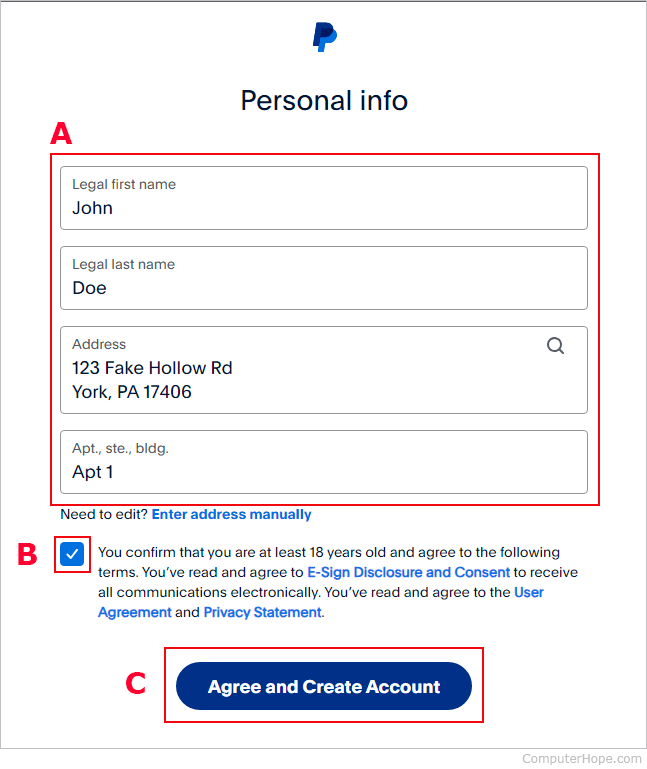
In an era of rampant digital fraud, the security of your financial tools is paramount. PayPal requires identity verification to comply with anti-money laundering (AML) laws. You will likely be asked to upload a government-issued ID and proof of address. While this may seem like an inconvenience, it is a critical security layer that protects your balance from being frozen during suspicious activity and ensures that your account remains a reliable repository for your capital.
3. Navigating the Fee Structure: Optimizing for Profitability
The most overlooked aspect of setting up PayPal is understanding the cost of doing business. Every percentage point lost to fees is a reduction in your net profit or personal net worth. Understanding the “Money” mechanics behind PayPal’s fee schedule is essential for any savvy user.
Standard Transaction Fees and the “Seller’s Tax”
For those using PayPal to receive income, the standard fee for domestic transactions usually hovers around 2.9% plus a fixed fee. While this is competitive for the convenience provided, it must be factored into your pricing strategy. If you are a freelancer, you should consider “grossing up” your invoices to account for these fees, ensuring that your take-home pay remains consistent with your financial targets.
The Hidden Cost of Currency Conversion
If you are operating globally, currency conversion fees can be a significant “silent killer” of your margins. PayPal often charges a spread on top of the wholesale exchange rate when you convert foreign currency into your local denomination.
To optimize this:
- Maintain Multiple Currency Balances: You can hold various currencies within your PayPal wallet. Instead of converting immediately, you can wait for a more favorable exchange rate.
- Use Specialized Borderless Accounts: Some users link accounts like Wise to PayPal to bypass internal conversion rates, though this requires careful setup to ensure compatibility.
Micropayments and High-Volume Strategies
For businesses that process many small transactions (under $10), the “fixed fee” portion of the standard rate can be devastating. PayPal offers a “Micropayments” fee structure that reduces the fixed fee in exchange for a slightly higher percentage. Switching to this model can save high-volume, low-ticket sellers hundreds of dollars a month, demonstrating how a simple administrative change in your account setup can yield direct financial returns.
4. Advanced Financial Tools: PayPal as a Cash Flow Catalyst
Once your account is verified and your fees are optimized, you can leverage PayPal’s more advanced financial instruments to grow your capital and manage your cash flow more effectively.
Utilizing the PayPal Business Debit Mastercard
For business account holders, the PayPal Business Debit Mastercard is a powerful tool for immediate liquidity. Instead of waiting for a bank transfer to clear, you can spend your PayPal balance directly at any merchant that accepts Mastercard. Many versions of this card also offer a 1% cash-back reward on eligible purchases. In the world of finance, a 1% “rebate” on all business expenses is a significant boost to the bottom line over the course of a fiscal year.
PayPal Working Capital and Business Loans
For established users with a consistent sales history, PayPal offers “Working Capital” loans. Unlike traditional bank loans that require a lengthy application and a hard credit check, these loans are based on your PayPal sales volume.
The beauty of this financial product lies in the repayment structure: a percentage of your daily sales is automatically deducted to pay back the loan. During slow sales periods, you pay less; during high-volume periods, you pay more. This flexible repayment model protects your cash flow and provides the “dry powder” needed to invest in inventory or marketing without the rigidity of traditional debt.
Instant Transfers and Capital Velocity
In finance, “capital velocity”—the speed at which you can reinvest your money—is key. PayPal’s “Instant Transfer” feature allows you to move funds to your bank account or debit card in minutes for a 1.75% fee (capped at a maximum amount). While it is generally better to avoid fees, the ability to access your money instantly to take advantage of a time-sensitive investment opportunity or to cover an emergency expense is a valuable financial safety net.
Conclusion: Building a Robust Digital Financial Hub
Setting up a PayPal account is more than a one-time task; it is the construction of a financial gateway. By choosing the correct account type, meticulously following verification protocols, and strategically managing fees, you transform a simple app into a sophisticated financial engine.
Whether you are saving for the future or building a global enterprise, the way you manage your digital “on-ramps” and “off-ramps” determines your financial agility. Treat your PayPal setup with the same rigor you would treat a traditional brokerage or bank account. In doing so, you ensure that your money is not just sitting in a digital wallet, but is actively working to support your broader financial objectives.
aViewFromTheCave is a participant in the Amazon Services LLC Associates Program, an affiliate advertising program designed to provide a means for sites to earn advertising fees by advertising and linking to Amazon.com. Amazon, the Amazon logo, AmazonSupply, and the AmazonSupply logo are trademarks of Amazon.com, Inc. or its affiliates. As an Amazon Associate we earn affiliate commissions from qualifying purchases.