
In an increasingly digital world, the ability to send and receive money electronically has become a fundamental aspect of personal finance, business operations, and online income generation. Among the myriad of platforms available, PayPal stands out as a pioneering and enduring solution, trusted by millions globally. Whether you’re a freelancer receiving payments from international clients, an online seller managing transactions, a small business owner, or simply splitting bills with friends, understanding how to effectively set up and utilize a PayPal account to receive money is an indispensable skill. This comprehensive guide will walk you through the process, offering insights into optimizing your account for various financial needs and ensuring secure, efficient transactions.
The Indispensable Role of PayPal in Modern Finance
PayPal’s journey began over two decades ago, revolutionizing how individuals and businesses transact online. It quickly became the go-to platform for e-commerce, P2P (person-to-person) payments, and global remittances, primarily due to its user-friendly interface, robust security features, and widespread acceptance. In today’s interconnected financial ecosystem, PayPal continues to play a pivotal role, bridging the gap between traditional banking and the rapidly evolving digital economy. Its presence in over 200 markets and support for more than 100 currencies underscores its global reach and enduring relevance.
Why PayPal Remains a Top Choice for Receiving Funds
Several factors contribute to PayPal’s continued dominance as a preferred method for receiving money. Firstly, its sheer ubiquity means that most people you might transact with, whether clients, customers, or friends, likely already have a PayPal account, simplifying the payment process. This widespread adoption reduces friction and increases the likelihood of successful transactions.
Secondly, PayPal offers a high degree of flexibility. Users can receive money directly into their PayPal balance, which can then be used for online purchases, sent to others, or withdrawn to a linked bank account. This flexibility is particularly beneficial for those managing online income, as it provides a convenient hub for all incoming funds. Moreover, PayPal’s buyer and seller protection programs, while primarily designed for e-commerce, offer a layer of security that instills confidence in users, knowing that disputes can be mediated if issues arise. For businesses, the ability to easily generate invoices, track payments, and integrate with e-commerce platforms makes it an invaluable financial tool.
Understanding PayPal’s Core Functionality for Users
At its heart, PayPal is a digital wallet service that allows individuals and businesses to make and receive payments online. For individuals, it simplifies splitting costs, sending gifts, or receiving reimbursements without needing bank account details. For freelancers and small businesses, it acts as a primary conduit for client payments, often preferred for its speed and lower transaction costs compared to traditional wire transfers, especially for international transactions.
The core functionality revolves around linking a funding source (like a bank account or credit/debit card) to your PayPal account. When you receive money, it typically lands in your PayPal balance. From there, you have several options: letting it sit for future PayPal purchases, transferring it to your linked bank account, or withdrawing it to an eligible debit card for quicker access. Understanding these basic functionalities is crucial for leveraging PayPal effectively for all your money-receiving needs.
Step-by-Step Guide to Setting Up Your PayPal Account
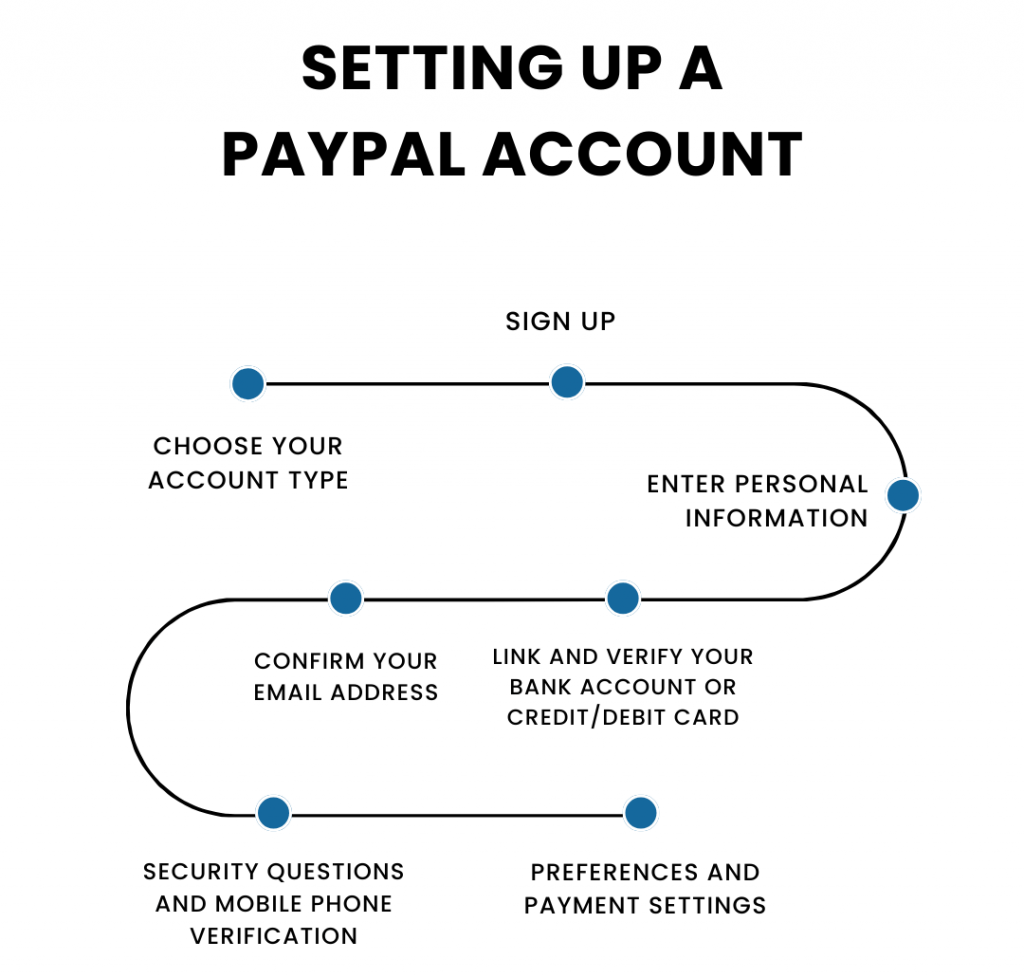
Setting up a PayPal account is a straightforward process, but paying attention to the details ensures a smooth experience, especially when it comes to receiving funds securely and efficiently.
Initial Account Creation and Verification
The journey begins on the PayPal website or through its mobile app. You’ll be prompted to choose between a “Personal Account” or a “Business Account.” For individuals primarily receiving money from friends, family, or occasional freelance work, a Personal Account is usually sufficient. If you anticipate high volume transactions, operate a formal business, or need features like multi-user access and detailed reporting, a Business Account is the more appropriate choice.
You will need to provide basic personal information: your name, email address, phone number, and a strong password. Following this, PayPal requires verification of your email address by clicking a link sent to your inbox. This initial step is critical for account security and unlocking full functionality. Further verification, often involving providing a government-issued ID and proof of address, may be required, especially as you increase your transaction volume or link additional financial instruments, complying with Know Your Customer (KYC) regulations. This helps PayPal prevent fraud and ensure compliance with financial regulations.
Linking Financial Instruments for Seamless Transactions
To fully utilize PayPal for receiving and withdrawing money, you must link a bank account or a debit/credit card. Linking a bank account is highly recommended as it allows you to withdraw funds from your PayPal balance directly to your bank, often at no cost (though standard bank processing times apply). PayPal typically verifies your bank account by making two small deposits (a few cents) into your account, which you then confirm on the PayPal website. This process helps ensure that the bank account belongs to you.
Linking a debit or credit card provides an alternative funding source for sending money and can also be used for faster withdrawals to eligible debit cards, often for a small fee. While not strictly necessary for receiving money, a linked card can be useful if you ever need to refund a payment or send money when your PayPal balance is insufficient. Carefully consider which bank account or card you link, prioritizing security and accessibility.
Navigating Security Measures and Two-Factor Authentication
PayPal employs robust security measures to protect your account and transactions. However, users also bear responsibility for safeguarding their information. Upon setup, it’s crucial to enable two-factor authentication (2FA). This adds an extra layer of security, requiring a code from your mobile device in addition to your password when logging in or making certain transactions. This significantly reduces the risk of unauthorized access, even if your password is compromised.
Furthermore, familiarize yourself with PayPal’s security center, which offers tips on identifying phishing scams and securing your devices. Regularly review your transaction history for any suspicious activity and immediately report any unauthorized transactions. Never share your PayPal password or sensitive information with anyone, and always use strong, unique passwords for your online accounts.
Mastering the Art of Receiving Money Through PayPal
Once your account is set up and secured, the primary objective is to receive money effortlessly. PayPal offers several methods to facilitate this, catering to various scenarios.
Accepting Payments from Friends, Family, and Clients
The simplest way to receive money is when someone sends it directly to your PayPal account. They only need your email address or phone number associated with your PayPal account. For personal transactions (e.g., splitting a dinner bill, repaying a loan), the sender can choose the “sending to a friend” option, which typically incurs no fees for either party if funded by a bank account or PayPal balance. However, if the sender uses a credit card for a “friend” payment, they might incur a fee.
For business-related payments (e.g., paying a freelancer, purchasing goods/services), the sender should select the “paying for goods or services” option. This protects both parties under PayPal’s buyer and seller protection policies but usually involves a fee for the recipient (the seller). Understanding the distinction between these payment types is vital for managing your finances and avoiding unexpected charges.
Generating Invoices and Payment Requests
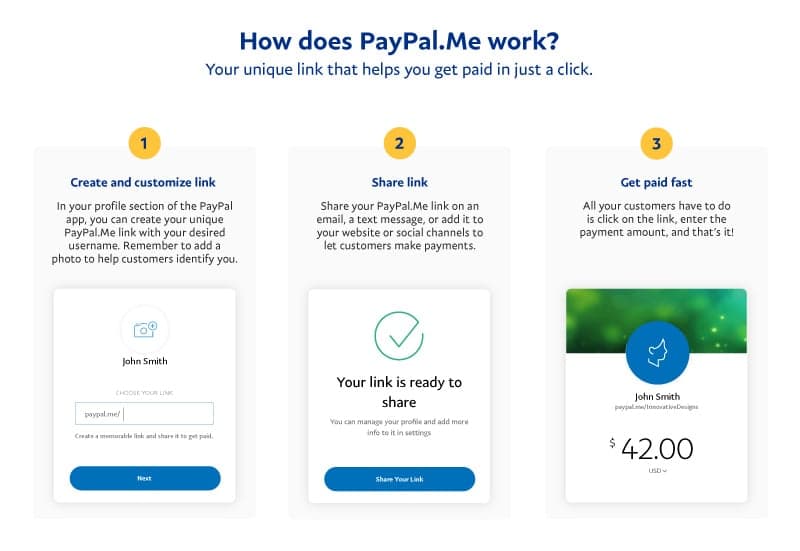
For freelancers, small businesses, or anyone selling goods or services, PayPal’s invoicing feature is a powerful tool. You can create professional invoices directly from your PayPal account, detailing services rendered, items sold, quantities, prices, and due dates. These invoices can be customized with your logo and sent directly to your clients via email. When the client receives the invoice, they can click a link to pay you directly through PayPal. This method streamlines the payment process, makes it easy for clients to pay, and provides a clear record of transactions for both parties.
Alternatively, you can send a “money request” or “request money” to an individual. This is less formal than an invoice but serves a similar purpose, allowing you to ask for a specific amount from someone by entering their email address or phone number. It’s ideal for collecting money for group activities or simply reminding someone they owe you.
Understanding Fees and Transaction Limits for Incoming Funds
While receiving money from friends and family (funded by bank account or PayPal balance) is generally free, receiving payments for goods and services or certain international transactions typically incurs fees. These fees are usually a percentage of the transaction amount plus a fixed fee, and they are borne by the recipient (the seller). PayPal’s fee structure varies by country, currency, and transaction type, so it’s essential to review the current fees on PayPal’s official website or within your account settings.
PayPal also imposes transaction limits, both for sending and receiving money, which can be daily, weekly, or monthly. These limits are usually higher for verified accounts. Understanding these limits is crucial for financial planning, especially if you anticipate receiving large sums or frequent payments. If you encounter a limit, PayPal will usually prompt you to verify more information to increase your sending/receiving thresholds.
Optimizing Your PayPal Account for Business and Online Income
For those relying on PayPal for their livelihood or substantial online income, optimizing the account is key to maximizing efficiency and minimizing costs.
Upgrading to a Business Account: When and Why
If your transaction volume grows, you’re operating a formal business, or you need advanced features, upgrading from a Personal to a Business Account is a logical step. A Business Account offers several advantages:
- Accepting multiple payment methods: Beyond PayPal balance, you can accept credit and debit card payments directly on your website.
- Business Tools: Access to invoicing tools, transaction reports, and integration with e-commerce platforms.
- Multi-user Access: Grant limited access to employees to manage specific tasks.
- Branding: Customize your checkout pages with your business logo.
- Legal Protection: Separate your personal and business finances, crucial for legal and tax purposes.
The decision to upgrade should align with your business growth and compliance needs. While personal accounts can sometimes be used for small-scale business activities, a Business Account provides the necessary framework for professional operation and scalability.
Integrating PayPal with E-commerce Platforms and Freelance Marketplaces
For online sellers, integrating PayPal with e-commerce platforms like Shopify, WooCommerce, or Etsy is seamless. PayPal offers robust APIs and plugins that allow customers to pay directly through your website checkout, often with a single click. This integration simplifies the payment process for customers, reducing cart abandonment, and automates payment processing for sellers.
Similarly, many freelance marketplaces (e.g., Upwork, Fiverr) offer PayPal as a withdrawal option for your earnings. Linking your PayPal account to these platforms allows for quick and secure transfers of your freelance income, often with minimal fees compared to other international transfer methods. This makes PayPal an essential tool for managing a diverse portfolio of online income streams.
Managing Multiple Currencies and International Payments
One of PayPal’s significant strengths is its ability to handle multiple currencies. If you receive payments from international clients, PayPal can automatically convert funds into your primary currency or allow you to hold them in the original currency. While currency conversion typically involves a fee (a spread on the exchange rate), it remains a convenient way to manage global transactions without needing multiple bank accounts in different countries.
For businesses dealing with international clients, understanding PayPal’s cross-border transaction fees and exchange rates is crucial for accurate financial planning and pricing. You can often set your preferred currency for incoming payments and choose how to handle conversions, giving you more control over your international finances.
Best Practices for Secure and Efficient PayPal Usage
Beyond the setup and functional aspects, long-term efficiency and security hinge on adopting best practices.
Protecting Your Account from Fraud and Scams
The digital landscape is rife with fraudulent activities, and PayPal accounts are frequent targets. Always be vigilant. Recognize common phishing attempts: emails requesting your login details, urgent threats of account suspension, or promises of large sums of money for minimal effort. PayPal will never ask for your password or sensitive information via email. Always log in directly to your PayPal account to check notifications or verify account status.
Use strong, unique passwords, enable 2FA, and regularly update your security software. Be cautious of unsolicited invoices or payment requests, as these can sometimes be part of scam attempts. If something seems too good to be true, it likely is.
Monitoring Transactions and Resolving Disputes
Regularly review your PayPal transaction history. This not only helps with financial record-keeping but also allows you to quickly identify and report any unauthorized transactions. If you spot a suspicious charge, PayPal has a robust dispute resolution center where you can report issues. For sellers, understanding PayPal’s Seller Protection policies is vital for managing chargebacks and disputes effectively. For buyers, the Buyer Protection program offers recourse if an item isn’t received or isn’t as described. Being proactive in monitoring and understanding the dispute process can save you significant headaches and financial losses.

Withdrawing Funds and Financial Planning Considerations
Once you’ve received money into your PayPal account, you’ll need a strategy for withdrawing it. The most common method is transferring funds to a linked bank account, which is usually free but takes 1-5 business days. For quicker access, you can transfer to an eligible debit card for a small fee, often within minutes.
From a financial planning perspective, consider how your PayPal income integrates with your overall financial picture. For businesses, ensure you track all PayPal fees for tax purposes. For individuals, factor in potential transfer times when budgeting. Using PayPal as a temporary holding account before transferring funds to a high-yield savings account or investment vehicle can also be a smart strategy for optimizing your cash flow and making your money work harder for you.
In conclusion, setting up and managing a PayPal account to receive money is a straightforward process that offers immense flexibility and convenience. By understanding its features, adhering to security best practices, and optimizing your account for your specific needs, you can leverage PayPal as a powerful tool in your personal and business financial arsenal, ensuring smooth, secure, and efficient money reception in the digital age.
aViewFromTheCave is a participant in the Amazon Services LLC Associates Program, an affiliate advertising program designed to provide a means for sites to earn advertising fees by advertising and linking to Amazon.com. Amazon, the Amazon logo, AmazonSupply, and the AmazonSupply logo are trademarks of Amazon.com, Inc. or its affiliates. As an Amazon Associate we earn affiliate commissions from qualifying purchases.