
In the rapidly evolving landscape of personal finance, automation has emerged as a cornerstone for effective money management. Among the most crucial automated processes for financial health is setting up autopay for credit cards. This simple yet powerful tool can safeguard your credit score, eliminate late fees, and instill a sense of calm amidst the complexities of managing multiple financial obligations. For Bank of America credit cardholders, leveraging their robust online platform to set up autopay is a straightforward process that offers significant long-term financial benefits. This comprehensive guide will walk you through the essential steps and considerations, ensuring your credit card payments are managed efficiently and responsibly within the realm of personal finance.
The Indispensable Role of Autopay in Modern Personal Finance
Automated payments, particularly for credit cards, are more than just a convenience; they are a strategic component of a sound financial plan. In an age where financial oversight can easily be neglected amidst busy schedules, autopay acts as a critical safety net, ensuring consistency and preventing costly oversights.
Eliminating Late Fees and Protecting Your Credit Score
One of the most immediate and tangible benefits of setting up autopay is the elimination of late fees. These charges, often ranging from $30 to $40 or more per incident, can quickly erode your budget and diminish the value of any rewards or cashback you might earn. Over time, recurring late fees represent a significant, avoidable financial drain.
Beyond the immediate financial penalty, consistently missing payment due dates can have a detrimental impact on your credit score. Payment history is the single most significant factor in calculating your FICO score, accounting for 35% of the total. A single late payment reported to credit bureaus (typically 30 days past the due date) can cause a substantial drop in your score, making it harder to secure favorable interest rates on loans, mortgages, or even impact rental applications and insurance premiums. Autopay acts as a shield, ensuring your payment history remains pristine and your credit score robust. This proactive approach to managing your credit not only saves money but also strengthens your financial foundation for future borrowing needs.
Streamlining Financial Management and Reducing Stress
Managing multiple credit cards, utility bills, loan payments, and subscriptions can become an overwhelming task. Each due date represents a mental note or a calendar entry, and the fear of missing a payment can contribute to significant financial stress. Autopay streamlines this entire process, transforming a manual, recurring chore into a seamless background operation.
By automating your Bank of America credit card payments, you free up valuable mental bandwidth. Instead of constantly tracking due dates, you can redirect your energy towards higher-level financial planning, such as budgeting, saving for long-term goals, or investing. This reduction in administrative burden fosters a greater sense of control over your finances, leading to decreased stress and improved overall financial well-being. It transforms financial management from a reactive scramble into a proactive, structured system.
Cultivating Responsible Spending Habits
While autopay handles the payment, it indirectly encourages responsible spending habits. Knowing that a payment will be automatically debited on a specific date can serve as a subconscious reminder of your financial commitments. This awareness can prompt cardholders to be more mindful of their purchases throughout the billing cycle, particularly if they have opted to pay the full statement balance each month.
When you know your financial obligations are consistently met, it allows you to view your credit card as a tool for convenience and rewards rather than a source of potential debt anxiety. This shift in perspective can empower you to use credit more judiciously, aligning your spending with your income and financial goals, ultimately fostering a healthier relationship with credit and money.
Navigating the Bank of America Online Platform for Autopay Setup
Bank of America provides an intuitive and secure online banking portal and mobile app, making the autopay setup process straightforward. Understanding the steps and having the necessary information readily available will ensure a smooth experience.
Pre-Setup Checklist: What You’ll Need
Before you begin the autopay setup, gather the following essential information to ensure a seamless process:
- Your Bank of America Login Credentials: Your User ID and Passcode for online banking.
- Your Bank of America Credit Card Details: The specific credit card account number for which you wish to set up autopay.
- External Bank Account Information (if applicable): If you plan to pay your Bank of America credit card from an external bank account (e.g., a checking or savings account from another institution), you will need that account’s routing number and account number. If you are paying from a Bank of America checking or savings account, it will typically be pre-linked or easily selectable.
- Payment Amount Strategy: Decide whether you want to pay the minimum due, the full statement balance, a custom amount, or the full current balance. This decision is crucial for managing interest and debt.
- Preferred Payment Date: While often linked to your due date, you might have some flexibility in choosing the exact day the payment is debited.
Having these details on hand will prevent interruptions and make the setup process quick and efficient.
Step-by-Step Guide: Setting Up Autopay Online
The process for setting up autopay for your Bank of America credit card is designed for clarity and ease of use.
- Log In to Your Bank of America Online Banking Account: Go to the Bank of America website (bankofamerica.com) and enter your User ID and Passcode. If you haven’t set up online banking, you’ll need to enroll first.
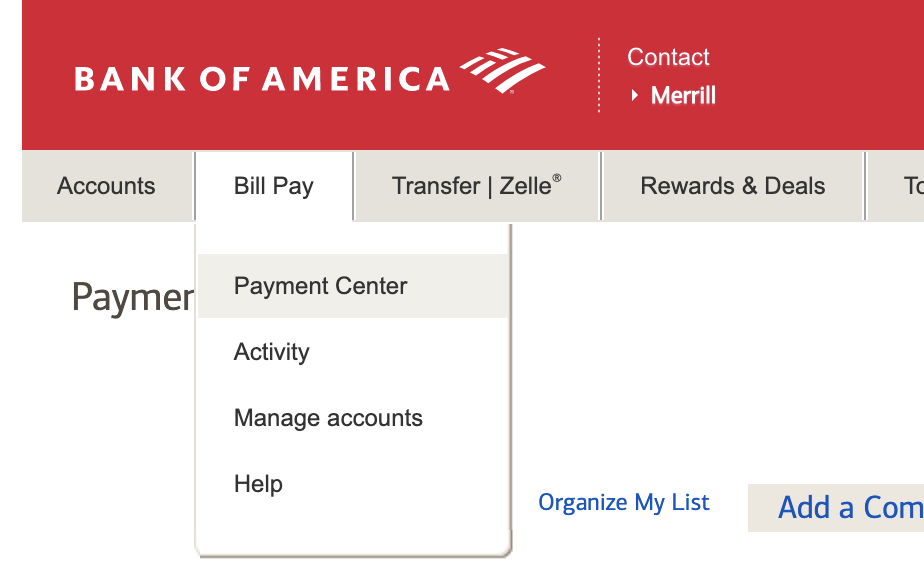
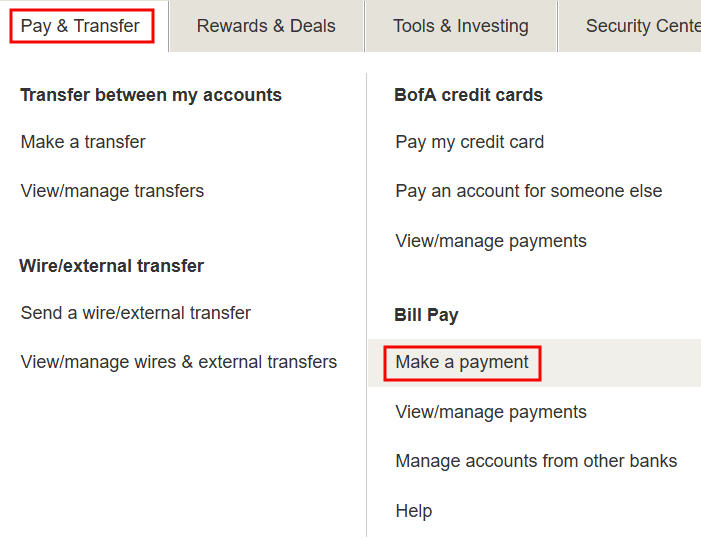
- Navigate to the Payments Section: Once logged in, locate the “Bill Pay” or “Payments” section. This is typically found in the main navigation menu at the top or side of the page.
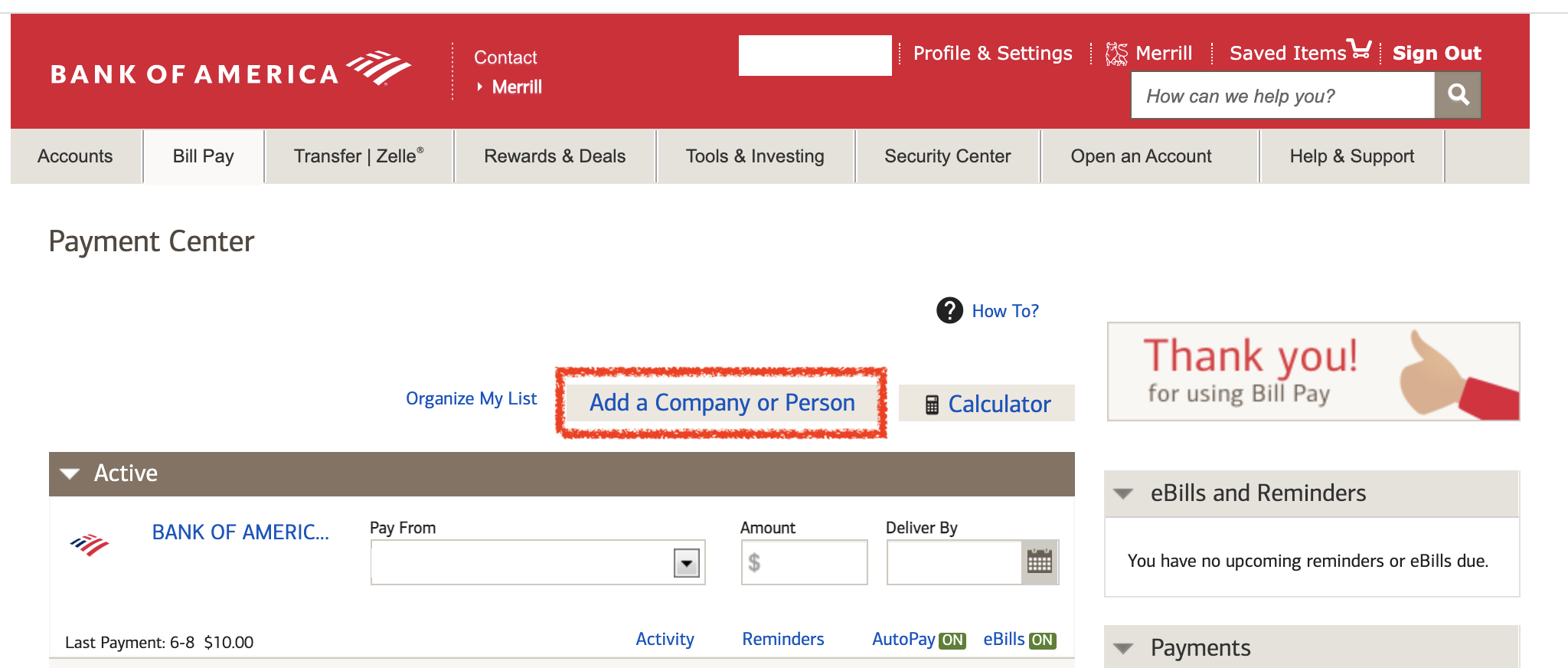
- Select Your Credit Card Account: Within the Payments section, you’ll see a list of your Bank of America accounts. Select the specific credit card for which you want to set up autopay.
- Find the Autopay Option: Look for an option titled “Set Up Autopay,” “Automatic Payments,” or “Enroll in Autopay.” It’s usually prominently displayed within the credit card’s payment management area.
- Choose Your Payment Amount: This is a critical step. Bank of America typically offers several options:
- Minimum Payment Due: This covers the minimum required to avoid late fees and maintain a good payment history but will incur interest on the remaining balance.
- Statement Balance: This is highly recommended as it pays off your entire balance each month, avoiding interest charges completely (assuming you pay before the grace period ends).
- Fixed Amount: You can specify a consistent dollar amount to pay each month. Ensure this amount covers at least the minimum due.
- Current Balance: This pays your balance in full at the time of payment processing, which might be more than your statement balance if you’ve made recent purchases.
- Select Your Payment Date: You’ll typically be given the option to have the payment debited on your due date or a few days before. Choosing a date a few days before the due date is a smart practice to account for any processing delays, especially if paying from an external bank.
- Select or Link Your Payment Account: Choose the checking or savings account from which the payment will be drawn. If you’re paying from a Bank of America account, it should be listed. If you’re paying from an external bank, you’ll need to enter its routing and account numbers and verify them, which may involve small test deposits.
- Review and Confirm: Carefully review all the details you’ve entered: the credit card account, payment amount, payment date, and the funding account. Ensure everything is accurate.
- Submit/Enroll: Once you’re certain everything is correct, click “Submit” or “Enroll” to finalize the setup.
Confirmation and Verification
After submitting, you should receive an immediate confirmation message on screen. Bank of America will also typically send a confirmation email to the address associated with your account, detailing the autopay setup. It’s crucial to retain this confirmation for your records.
Additionally, after your first scheduled autopayment is processed, check your credit card statement and the linked bank account statement to verify that the payment was debited correctly and applied to your credit card account as intended. This initial verification step helps ensure everything is functioning as expected and provides peace of mind.
Best Practices and Considerations for Autopay Management
While autopay offers immense convenience, it requires ongoing, albeit minimal, attention to ensure it aligns with your financial strategy and prevents potential pitfalls.
Understanding Payment Options: Minimum vs. Statement Balance
The choice between paying the minimum due and the full statement balance is a fundamental financial decision with significant long-term implications.
- Minimum Payment Due: This option is ideal for avoiding late fees and protecting your credit score. However, it means you will carry a balance, and interest charges will apply to the unpaid portion. Over time, paying only the minimum can significantly increase the total cost of your purchases due to accumulating interest. It can also prolong the debt repayment period.
- Statement Balance: This is the most financially prudent option. By paying your statement balance in full each month, you avoid all interest charges. This effectively makes your credit card a free short-term loan (assuming you pay within the grace period) and allows you to leverage rewards programs without incurring debt. It’s the cornerstone of responsible credit card usage.
Consider your financial capacity and goals when making this choice. If possible, always aim for the statement balance to maximize savings and maintain financial liquidity.
Monitoring Your Linked Bank Account
Autopay’s effectiveness hinges on having sufficient funds in your linked checking or savings account when the payment is due. A payment bounced due to insufficient funds (NSF) can lead to several problems:
- NSF Fees: Your bank will likely charge an NSF fee, and Bank of America (or the credit card issuer) might also impose a returned payment fee.
- Late Payment Reporting: If the payment isn’t successfully re-processed within the grace period, it could still be reported as late to credit bureaus, damaging your score.
- Loss of Autopay Privileges: Repeated failed payments could result in the cancellation of your autopay arrangement by the bank.
Regularly monitor the balance in your linked account, especially as the autopay date approaches, to ensure there are adequate funds to cover the payment. Set up low-balance alerts with your bank if available.
Reviewing Statements Regularly
Even with autopay active, diligently reviewing your monthly Bank of America credit card statements remains a critical financial habit. Autopay handles the “when” of the payment, but it doesn’t verify the “what.”
By reviewing statements, you can:
- Catch Errors: Identify any billing errors, duplicate charges, or incorrect transactions.
- Detect Fraud: Spot unauthorized purchases or fraudulent activity immediately.
- Track Spending: Monitor your spending patterns and ensure they align with your budget.
- Confirm Autopay Application: Verify that the autopayment was correctly applied to your account.
Promptly report any discrepancies to Bank of America to resolve them before they become larger issues. This vigilant approach ensures that even with automation, you maintain full control and oversight of your credit card activity.
Adjusting or Cancelling Autopay
Life circumstances and financial situations change, and your autopay settings may need to reflect these changes.
- Adjusting Payment Amount/Date: If your income changes, you consolidate debt, or you simply wish to modify your payment strategy (e.g., move from minimum payment to statement balance), you can adjust your autopay settings through the Bank of America online banking portal. Navigate back to the autopay section for your credit card and modify the relevant fields.
- Cancelling Autopay: If you close the credit card, switch banks, or decide to manage payments manually for a period, you can cancel autopay. Ensure that if you cancel, you immediately set up an alternative payment method to avoid missing future payments. Always allow a few business days for changes or cancellations to fully process before your next due date.
Understanding how to modify these settings ensures that autopay remains a flexible tool that adapts to your evolving financial needs.
The Broader Financial Impact of Automated Payments
Setting up autopay for your Bank of America credit card is not an isolated action; it’s a piece of a larger puzzle contributing to your overall financial health and success.
Building a Strong Financial Foundation
Consistent, on-time payments, facilitated by autopay, are fundamental to building a strong financial foundation. This reliability translates directly into:
- Excellent Credit History: A pristine payment record is invaluable for securing favorable terms on future loans and credit products.
- Reduced Debt Stress: Knowing your bills are consistently paid on time reduces anxiety and fosters a sense of financial stability.
- Enhanced Financial Reputation: A history of responsible credit management can be beneficial in various aspects of life, from renting an apartment to employment checks in certain industries.
By removing the risk of missed credit card payments, autopay helps solidify the bedrock of your financial future, allowing you to focus on growth and accumulation rather than damage control.
Integrating Autopay into a Comprehensive Budget
Autopay is most effective when integrated into a comprehensive personal budget. It ensures that a critical outgoing expense is accounted for and paid reliably. When budgeting, you should:
- Allocate Funds: Clearly allocate funds for your credit card payment each month, whether it’s the minimum, a fixed amount, or the full statement balance.
- Track Spending: Even with autopay, track your spending throughout the month to ensure you don’t overspend beyond your ability to pay.
- Review Cash Flow: Understand how the autopay debit impacts your bank account’s cash flow, ensuring other expenses can still be met comfortably.
Autopay is a powerful tool, but it doesn’t replace the need for thoughtful budgeting and spending analysis. It simply makes one part of the budget execution effortless.
Leveraging Technology for Financial Wellness
The ability to set up and manage autopay online or via a mobile app is a prime example of how technology can empower individuals to achieve greater financial wellness. Digital platforms provide:
- Accessibility: Manage your finances anytime, anywhere.
- Control: Easily view accounts, make payments, and adjust settings.
- Information: Access statements, transaction history, and financial insights at your fingertips.
Embracing these digital tools, like Bank of America’s online banking, allows you to automate routine tasks, reduce errors, and dedicate more time and energy to strategic financial planning, ultimately leading to a more secure and prosperous financial future.
Setting up autopay for your Bank of America credit card is a proactive step towards exemplary financial management. It’s an effective strategy to avoid late fees, protect your credit score, and reduce the stress associated with managing monthly bills. By following the clear steps outlined, choosing your payment strategy wisely, and maintaining regular oversight, you can leverage this simple automation to significantly enhance your financial stability and peace of mind, allowing you to focus on your broader financial goals within the realm of personal finance.
aViewFromTheCave is a participant in the Amazon Services LLC Associates Program, an affiliate advertising program designed to provide a means for sites to earn advertising fees by advertising and linking to Amazon.com. Amazon, the Amazon logo, AmazonSupply, and the AmazonSupply logo are trademarks of Amazon.com, Inc. or its affiliates. As an Amazon Associate we earn affiliate commissions from qualifying purchases.