
In an increasingly digital world, the ability to manage, send, and receive money seamlessly across borders and platforms is no longer a luxury but a necessity. PayPal, a pioneer in online payment solutions, has cemented its position as an indispensable financial tool for millions worldwide. Whether you’re a freelancer receiving international payments, an online shopper seeking secure transactions, a small business owner streamlining invoices, or simply looking for a convenient way to split bills with friends, setting up a PayPal account is your foundational step into a more flexible and efficient financial ecosystem.
This guide will walk you through the process of creating and optimizing your PayPal account, framing each step within the broader context of personal finance, online income, and business financial management. We’ll delve into its core benefits, the practical steps for setup, how to link your existing financial instruments, and crucial security measures to protect your digital assets.
PayPal: An Indispensable Financial Tool for the Modern Economy
The way we interact with money has undergone a profound transformation. Cash is receding, traditional banking is evolving, and digital platforms are becoming central to our financial lives. PayPal emerged at the forefront of this revolution, offering a simple yet powerful solution to the complexities of online transactions.
The Evolving Landscape of Digital Transactions
Gone are the days when sending money meant a trip to the bank or relying on slow, expensive wire transfers. The internet brought with it the promise of instant communication, and with PayPal, that promise extended to money. It democratized online payments, allowing individuals and businesses of all sizes to participate in the global digital economy without the need for complex merchant accounts or physical point-of-sale systems. Today, it stands as a testament to the power of financial technology, connecting buyers and sellers, friends and family, employers and freelancers, across virtually any geographical divide.
Why PayPal Remains a Cornerstone for Personal and Business Finance
For individuals, PayPal offers a convenient digital wallet. It allows you to shop online without exposing your credit card details to every vendor, send money to family abroad, and receive payments for goods or services. For businesses, from fledgling startups to established enterprises, PayPal provides a robust platform for invoicing, accepting payments, managing subscriptions, and even facilitating crowdfunding. Its widespread acceptance across millions of websites and its integration with e-commerce platforms make it a critical component of online financial operations. It removes friction from transactions, turning what could be a multi-day process into mere seconds.
Core Financial Benefits: Convenience, Security, and Global Reach
The enduring appeal of PayPal lies in its triple threat of benefits:
-
Convenience: Transactions can be completed with just a few clicks or taps on your smartphone. Funds often transfer instantly between PayPal accounts, and accessing your money through linked bank accounts is typically straightforward.
-
Enhanced Security: PayPal acts as an intermediary, meaning your sensitive financial information (bank account numbers, credit card details) is stored securely with them, not shared with every merchant you interact with. They employ advanced encryption and fraud monitoring to protect your financial data. Furthermore, their buyer and seller protection policies offer a crucial safety net for many transactions.
-
Global Reach: With availability in over 200 countries and regions, and support for over 25 currencies, PayPal facilitates international commerce and personal remittances, simplifying cross-border financial interactions that would otherwise be cumbersome and costly.
The Initial Steps: A Guided Walkthrough to Creating Your Account
Getting started with PayPal is a straightforward process designed for accessibility. However, understanding the initial choices and requirements will ensure a smooth setup that aligns with your financial goals.
Choosing the Right Account Type: Personal vs. Business
The first decision you’ll make is selecting between a Personal and a Business account. This choice is crucial as it determines the features and financial tools available to you.
-
Personal Account: Ideal for individuals who want to shop online, send money to friends and family, receive payments for occasional sales (e.g., selling items on eBay), or manage personal finances. It’s simple, free, and sufficient for most casual users.
-
Business Account: Designed for merchants, freelancers, and companies of all sizes. It offers features like accepting payments via debit/credit cards, managing multiple users, creating invoices, issuing refunds, and integrating with e-commerce platforms. While both account types can send and receive money, a Business account provides more robust tools for financial management and reporting, often at a transaction fee.
If you’re unsure, starting with a Personal account is fine; you can upgrade to a Business account later if your needs evolve.
Gathering Essential Financial Information
Before you begin, have the following information handy. This ensures a quick and uninterrupted sign-up process:
-
Personal Details: Your full legal name, address, phone number, and email address.
-
Identification (for verification): Depending on your region and transaction volume, PayPal may require a government-issued ID (e.g., driver’s license, passport) or social security number (for US users) to verify your identity and comply with financial regulations.
-
Bank Account Information: Your bank name, account number, and routing number.
-
Debit/Credit Card Information: Card number, expiration date, and security code (CVV).
Navigating the Sign-Up Process: Step-by-Step
-
Visit the PayPal Website: Go to www.paypal.com and click the “Sign Up” button (usually prominent on the homepage).
-
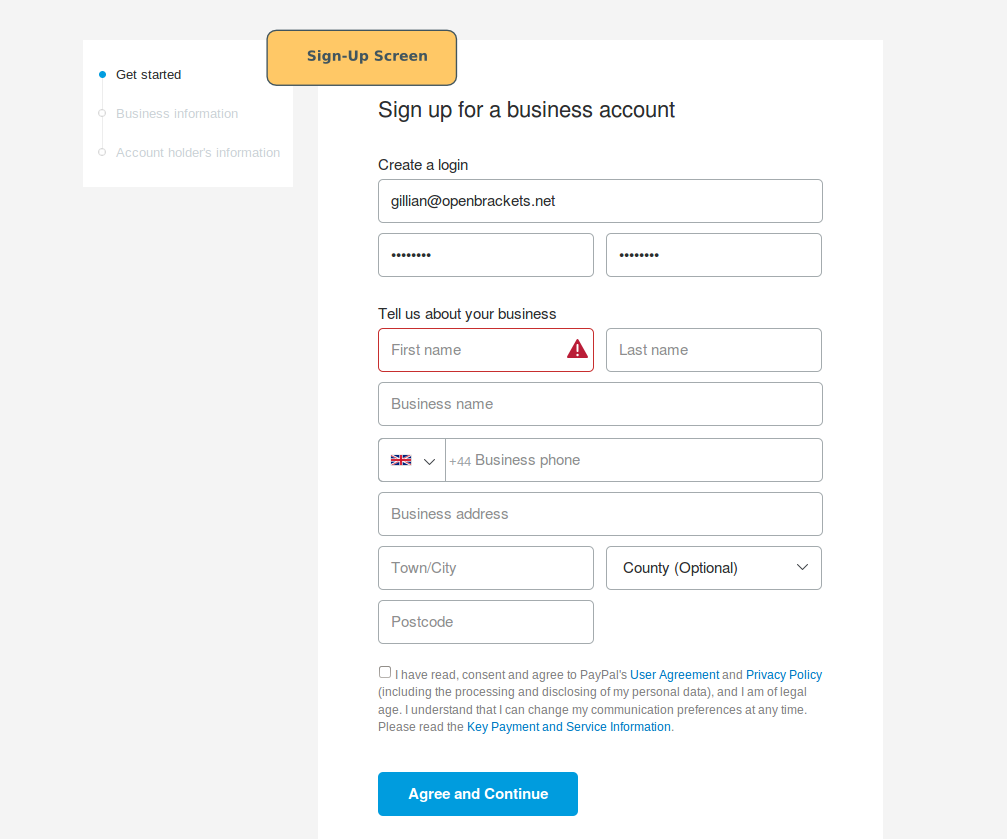
Select Account Type: Choose “Personal Account” or “Business Account” based on your needs.
-
Enter Your Details: Fill in the required personal information: country, mobile number (for verification), email address, and create a strong password. Ensure your email is active as it will be used for verification and notifications.
-
Confirm Mobile Number: PayPal will send a verification code to your mobile number. Enter this code to proceed.
-
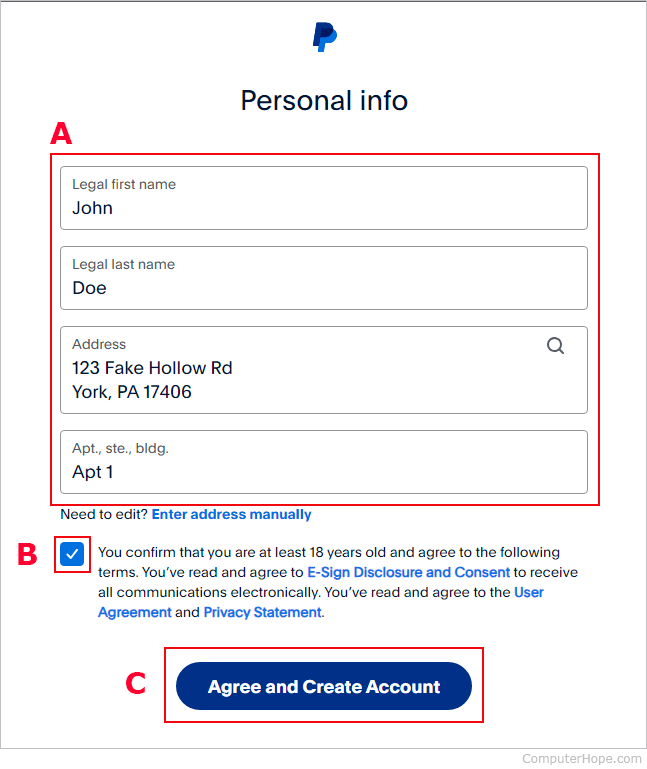
Provide Address and More Personal Info: Enter your physical address, date of birth, and agree to PayPal’s User Agreement and Privacy Policy.
-
Create Your Account: Click “Agree and Create Account.” At this stage, you technically have an account, but it’s limited until verified.
Verifying Your Account for Enhanced Financial Capabilities
Account verification is crucial for removing sending and withdrawal limits, accessing certain features, and enhancing the security of your financial activities.
-
Confirm Your Email: Check the inbox of the email address you used to sign up. You’ll receive an email from PayPal with a link to confirm your email address. Click this link.
-
Link a Bank Account or Card: This is often the primary method for verification. By linking and confirming a financial instrument, PayPal can verify your identity and ensure you have a legitimate funding source.
Integrating Financial Instruments: Linking Banks and Cards
The true power of PayPal as a financial tool lies in its ability to connect seamlessly with your existing bank accounts and credit/debit cards. This integration allows you to fund payments, receive transfers, and withdraw funds securely and efficiently.
The Importance of Securely Connecting Funding Sources
Linking your bank account or card to PayPal serves several critical financial purposes. Firstly, it provides a source of funds for purchases or money transfers, allowing you to use PayPal without always needing a balance within your PayPal account itself. Secondly, it enables you to withdraw any funds you receive into your PayPal account directly to your bank, transforming digital earnings into accessible cash. Thirdly, it’s a key part of PayPal’s verification process, which helps prevent fraud and keeps your financial limits high.
PayPal employs robust encryption and security protocols to protect your banking and card details. They act as a secure intermediary, meaning when you pay with PayPal, your bank or card details are not directly shared with the merchant, adding an extra layer of financial privacy and security.
Step-by-Step: Adding Your Bank Account

Adding your bank account is typically a two-part process to ensure accuracy and security.
-
Initiate Linkage: From your PayPal dashboard, navigate to “Wallet” (or “Money” in some regions) and select “Link a bank account.”
-
Choose Your Bank: You may be prompted to choose from a list of popular banks or search for yours.
-
Instant Verification (Recommended): Many banks support instant verification, where you securely log in to your online banking portal through PayPal. This method is fast and verifies your account almost immediately. PayPal will typically access only the necessary information to confirm ownership, not your login credentials directly.
-
Manual Verification: If instant verification isn’t available or preferred, you’ll enter your bank’s routing number and account number manually. PayPal will then make two small deposits (usually a few cents) into your bank account within 2-3 business days.
-
Confirm Deposits: Once these micro-deposits appear in your bank statement, return to your PayPal Wallet, click on your linked bank account, and enter the exact amounts of the two deposits. This confirms you are the account holder, and your bank account will then be fully linked and verified.
Step-by-Step: Linking Your Debit or Credit Card
Linking a card is generally quicker than a bank account but is also crucial for payment flexibility.
-
Initiate Linkage: From your PayPal Wallet, select “Link a debit or credit card.”
-
Enter Card Details: Provide the card number, card type (Visa, Mastercard, etc.), expiration date, and the 3 or 4-digit security code (CVV) usually found on the back of the card.
-
Confirm Card: PayPal may charge a small, temporary authorization fee (e.g., $1.95) to your card. This charge will appear on your card statement with a unique 4-digit code.
-
Enter Code: Return to your PayPal Wallet, select the linked card, and enter this 4-digit code to verify the card. The temporary charge will typically be refunded to your card once verified.
With your financial instruments linked, your PayPal account is now fully operational, ready to serve as a versatile tool for your personal and business financial needs.
Unlocking PayPal’s Full Financial Potential
Beyond merely sending and receiving money, a verified PayPal account opens up a broad spectrum of financial functionalities, transforming it into a powerful digital wallet for various aspects of your financial life.
Managing Personal Finances: Sending, Receiving, and Online Shopping
For individual users, PayPal simplifies everyday financial interactions:
-
Sending Money to Friends and Family: Easily split bills, send gifts, or repay debts without the hassle of cash or bank transfers. For personal transactions funded by your PayPal balance or linked bank account, these are often free.
-
Receiving Personal Payments: Get paid back by friends, or receive money from others directly into your PayPal account.
-
Secure Online Shopping: Make purchases on millions of websites worldwide. PayPal serves as a shield, protecting your sensitive card and bank details from being exposed to multiple vendors. This adds a significant layer of security to your online spending habits.
-
Bill Payments: Some utility providers and services allow direct PayPal payments, adding another layer of convenience to managing household expenses.
Facilitating Online Income and Freelance Payments
For those earning income online, PayPal is an indispensable tool:
-
Receiving Freelance Payments: Many international clients and platforms (like Upwork, Fiverr, etc.) prefer or require PayPal for paying freelancers, making it a critical channel for online income streams.
-
Selling Goods Online: Whether you’re an eBay seller, operate an Etsy shop, or run your own e-commerce site, PayPal provides integrated payment processing solutions, allowing customers to pay you easily and securely.
-
Donations: Non-profits and individual fundraisers can easily set up “Donate” buttons, making it simple for supporters to contribute financially.
Streamlining Business Transactions and Invoicing
For entrepreneurs and small to medium-sized businesses, a Business PayPal account is a comprehensive financial management suite:
-
Professional Invoicing: Create and send customized invoices directly through PayPal, track their status, and receive payments efficiently. This streamlines accounts receivable and enhances cash flow management.
-
Accepting Customer Payments: Integrate PayPal into your website checkout, allowing customers to pay using their PayPal balance, linked bank accounts, or credit/debit cards. This expands your payment options and caters to a wider customer base.
-
Mass Payments: For businesses that need to pay multiple individuals (e.g., affiliates, contractors), PayPal’s mass payment features can automate the process, saving significant administrative time and effort.
-
Sales Reporting: Business accounts offer reporting tools that provide insights into your sales, transactions, and financial performance, aiding in strategic business finance decisions.
Exploring Additional Financial Services: Xoom, PayPal Credit
PayPal has expanded its financial ecosystem to include specialized services:
-
Xoom: A PayPal service dedicated to international money transfers and bill payments, often with competitive exchange rates and faster delivery times than traditional wire services, catering to individuals supporting families abroad.
-
PayPal Credit (formerly Bill Me Later): A revolving credit line offered by PayPal, allowing users to make purchases and pay over time, similar to a credit card but managed directly through their PayPal account. This offers flexible financing options for larger purchases.
Safeguarding Your Digital Wallet: Essential Security Practices
While PayPal itself employs robust security measures, your active participation in safeguarding your account is paramount. A strong understanding of security best practices is crucial for protecting your financial well-being in the digital realm.
Implementing Two-Factor Authentication (2FA) for Financial Protection
One of the most effective steps you can take is to enable Two-Factor Authentication (2FA) for your PayPal account. This adds an extra layer of security beyond just your password.
-
How it Works: After entering your password, PayPal will send a unique code to your registered mobile device (via SMS or an authenticator app). You must enter this code to log in or complete certain transactions.
-
Why It’s Essential: Even if a malicious actor somehow obtains your password, they cannot access your account without also having physical access to your phone or your authenticator app. This significantly reduces the risk of unauthorized financial access.
Recognizing and Avoiding Financial Scams
Phishing and other forms of financial fraud are persistent threats. Be vigilant and aware of common scam tactics:
-
Phishing Emails/Messages: Scammers often send fake emails or texts impersonating PayPal, asking you to click a link to “verify” your account, update information, or claim a “prize.” These links often lead to fraudulent websites designed to steal your login credentials. Always check the sender’s email address and hover over links before clicking.
-
“Payment Pending” Scams: Be wary of messages claiming you have a large payment pending that requires you to pay a fee to release it. PayPal typically does not charge fees to receive money, and legitimate payments are usually clear and direct.
-
“Overpayment” Scams: A buyer sends more money than the agreed price and asks you to refund the difference to a third party before their original payment is reversed or found to be fraudulent.
-
Never Share Your Password: PayPal will never ask for your password via email, phone, or any other unsolicited communication.
Monitoring Your Account Activity for Unauthorized Transactions
Regularly reviewing your PayPal transaction history is a simple yet effective financial control.
-
Frequency: Make it a habit to log in and check your recent activity, especially if you use PayPal frequently.
-
What to Look For: Immediately report any transactions you don’t recognize. Swift action can help prevent further losses and facilitate investigations.
-
Set Up Notifications: Configure PayPal to send you email or mobile notifications for all transactions, allowing you to catch suspicious activity in real-time.
Understanding PayPal’s Buyer and Seller Protection Policies (Financial Safety Nets)
PayPal offers financial safety nets for both buyers and sellers, which are crucial to understanding:
-
Buyer Protection: If an eligible item doesn’t arrive or isn’t as described, PayPal’s Buyer Protection policy can help you get a full refund. This provides confidence when making online purchases.
-
Seller Protection: For eligible transactions, PayPal Seller Protection can safeguard sellers from claims of unauthorized transactions and “Item Not Received” disputes, helping to protect your online income.
These policies come with specific terms and conditions, so it’s always wise to familiarize yourself with them to ensure you meet eligibility requirements.
Conclusion
Setting up a PayPal account is more than just creating a digital login; it’s establishing a critical financial bridge that connects you to the vast and ever-growing digital economy. From managing your personal budget and securing online purchases to facilitating international freelance payments and streamlining business operations, PayPal offers a versatile suite of tools that are indispensable in modern finance. By carefully following the setup process, linking your financial instruments, and diligently applying security best practices, you empower yourself with a convenient, secure, and globally connected digital wallet, ready to navigate the financial landscape of today and tomorrow. Embrace the power of digital finance, and let PayPal be your trusted partner on that journey.
aViewFromTheCave is a participant in the Amazon Services LLC Associates Program, an affiliate advertising program designed to provide a means for sites to earn advertising fees by advertising and linking to Amazon.com. Amazon, the Amazon logo, AmazonSupply, and the AmazonSupply logo are trademarks of Amazon.com, Inc. or its affiliates. As an Amazon Associate we earn affiliate commissions from qualifying purchases.