
In today’s digitally-driven economy, the ability to receive money quickly and securely online is not just a convenience—it’s a necessity for individuals, freelancers, small businesses, and anyone engaged in online income generation. PayPal stands as a global titan in this arena, offering a robust platform that facilitates countless transactions every day. Whether you’re selling handmade crafts, offering professional services, managing a side hustle, or simply receiving funds from friends and family, understanding how to effectively set up and utilize a PayPal account to receive money is paramount.
This comprehensive guide will walk you through the entire process, from choosing the right account type to optimizing your setup for seamless income reception and responsible financial management. We’ll delve into the nuances that ensure your online earnings are not only received but also managed with efficiency and foresight, aligning perfectly with sound personal and business financial practices.
Understanding PayPal Account Types and Their Implications for Receiving Funds
Before diving into the setup process, it’s crucial to understand that not all PayPal accounts are created equal. The type of account you choose will significantly impact your ability to receive funds, the fees you incur, and the financial tools available to you. Making the right choice upfront can save you headaches and optimize your online income streams.
Personal Accounts: The Foundation for Casual Transactions
A Personal account is PayPal’s most basic offering, designed for individual users engaging in everyday online activities. This account type is ideal if you primarily intend to:
- Send and receive money from friends and family members.
- Make online purchases.
- Occasionally receive payment for goods or services as part of a very casual side hustle, without expecting regular or large commercial volumes.
While a Personal account allows you to receive money, its primary limitation for income generation lies in its fee structure for commercial transactions. If you receive payments for goods or services, PayPal will typically charge a standard seller fee. The system often prompts senders to categorize payments, and if they select “goods and services,” the fee is automatically applied. If you consistently receive commercial payments through a Personal account, you might eventually face scrutiny or be encouraged by PayPal to upgrade, as it’s not designed for sustained business activity.
Business Accounts: Optimizing for Commercial Income Streams
For anyone serious about generating income online, whether as a freelancer, a small business owner, or an e-commerce entrepreneur, a Business account is the unequivocal choice. This account type is specifically tailored to meet the needs of commercial entities, offering a suite of features that transform PayPal from a simple payment processor into a powerful financial tool. Key advantages include:
- Professionalism and Credibility: Operate under a business name, not your personal name, which enhances your professional image.
- Lower Commercial Transaction Fees: Often, Business accounts benefit from more favorable fee structures for receiving commercial payments, especially with higher volumes.
- Advanced Tools: Access to invoicing tools, multi-user access for employees, detailed sales reports, and integration options for websites and e-commerce platforms.
- Enhanced Dispute Resolution: More robust tools and support for managing chargebacks and disputes, crucial for protecting your financial interests.
- Accept Credit/Debit Cards: Ability to accept payments directly via credit or debit cards without requiring the sender to have a PayPal account.
A Business account is essential for legitimacy, scalability, and accurate financial tracking when your online income becomes more than just an occasional windfall. It segregates your personal and commercial finances, a critical step towards sound financial management.
Upgrading and Verification: Unlocking Full Potential
Regardless of whether you start with a Personal account or dive straight into a Business one, verification is a non-negotiable step to unlock your account’s full potential and ensure financial security. Verification typically involves:
- Linking a Bank Account: Providing your bank account details and confirming small deposits PayPal sends to verify ownership.
- Linking a Credit or Debit Card: Used for backup funding, sending payments, and additional identity confirmation.
- Confirming Identity: Submitting personal identification documents (e.g., driver’s license, passport) to meet Know Your Customer (KYC) regulations, especially for higher transaction limits or specific services.
Verification removes sending and receiving limits, enhances account security, and establishes your legitimacy, making it easier to manage substantial funds. If you start with a Personal account and your income grows, upgrading to a Business account is a straightforward process within PayPal’s settings, allowing you to seamlessly transition your financial operations.
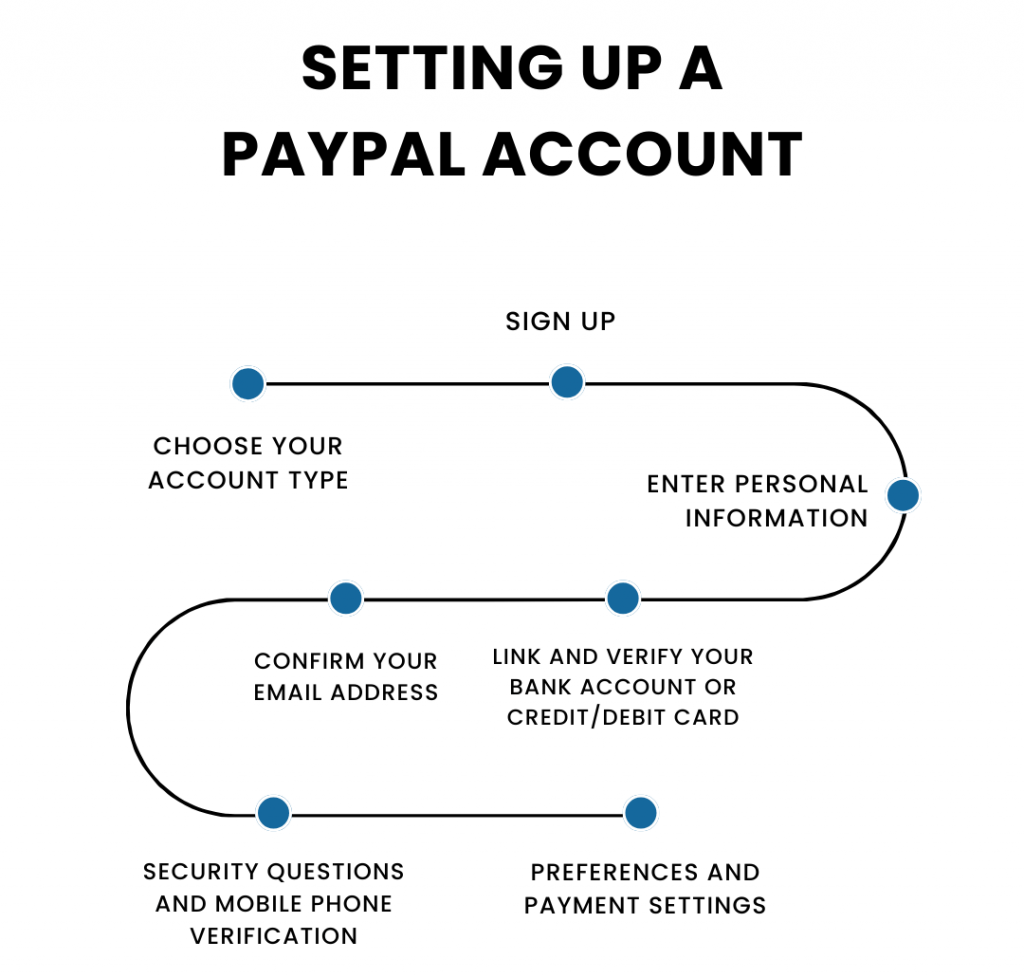
Step-by-Step Guide to Setting Up Your PayPal Account for Receiving Payments
Once you’ve decided on the appropriate account type, setting up your PayPal account to receive money is a systematic process. Following these steps will ensure your account is properly configured for optimal financial flow.
The Initial Registration Process
- Visit PayPal’s Website: Navigate to www.paypal.com and click the “Sign Up” button, usually located in the top right corner.
- Choose Account Type: Select either “Personal Account” or “Business Account” based on your needs, as discussed in the previous section. Remember, you can always upgrade later if you start with a Personal account.
- Provide Basic Information:
- For a Personal account: You’ll typically enter your phone number, which PayPal uses to send a verification code, and then your name, email address, and a secure password.
- For a Business account: You’ll provide your business name, contact information, business type, and a primary contact person’s details, along with an email and password.
- Agree to Terms: Read and accept PayPal’s User Agreement and Privacy Policy.
Linking Financial Instruments for Seamless Transactions
This is a critical step for both receiving and withdrawing funds. Without linked financial instruments, any money you receive will simply sit in your PayPal balance, unable to be transferred to your actual bank account.
- Link a Bank Account:
- From your PayPal dashboard, go to “Wallet” or “Link a bank or card.”
- Select “Link a Bank Account.”
- Enter your bank’s name (if not prompted), then your bank account number and routing number.
- PayPal will typically send two small deposits (micro-deposits) to your bank account within 1-3 business days. You’ll need to return to your PayPal account and enter the exact amounts of these deposits to confirm ownership. This verifies your bank account.
- Link a Debit or Credit Card: While not strictly necessary for receiving money, linking a card serves as a backup funding source for sending payments and can contribute to your account’s verification status. Enter your card details (number, expiration date, security code).
Completing Verification and Security Measures
To maximize your account’s capabilities and security, ensure you complete these steps:
- Confirm Your Email Address: PayPal sends a confirmation email to the address you registered with. Click the link in this email to verify your account.
- Add and Confirm Your Phone Number: This adds another layer of security and is often used for two-factor authentication.
- Set Up Two-Factor Authentication (2FA): Enable 2FA in your account settings. This requires a code from your phone or a security app in addition to your password when logging in, significantly enhancing security.
- Complete Identity Verification (KYC): Depending on your transaction volume, location, and account type, PayPal may request additional identification documents. Promptly providing these ensures uninterrupted service and adherence to financial regulations.
Strategies for Efficiently Receiving Money Through PayPal
With your PayPal account set up and verified, the next step is to understand the various methods for receiving money, each suited for different scenarios. Employing the right strategy can streamline your financial operations and enhance your professional image.

Sharing Your PayPal.Me Link for Quick Payments
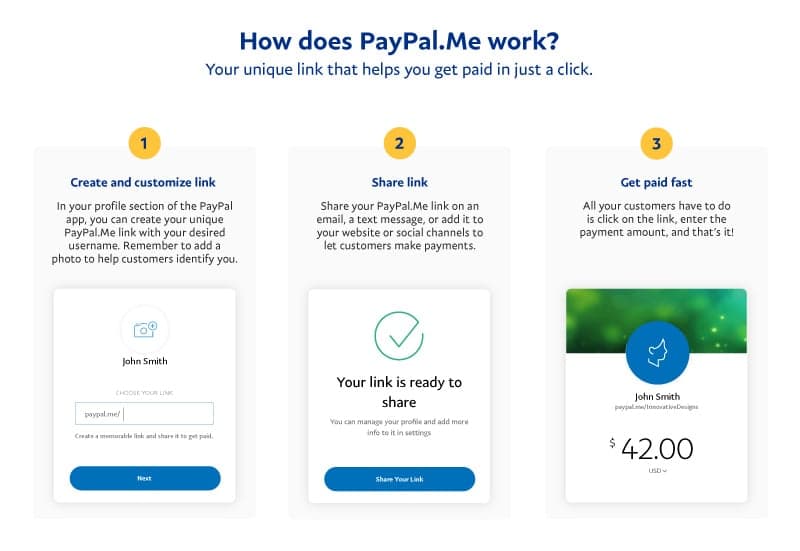
PayPal.Me is a personalized link that makes requesting and receiving money incredibly simple. It’s a clean, professional way to get paid without sharing your email address publicly.
- How to Create It: Once logged in, visit paypal.me or navigate to the “PayPal.Me” section in your account settings. You can create a custom link (e.g., paypal.me/yournameorbusiness).
- Benefits: It’s easy to remember and share via text, email, social media, or even on business cards. Senders simply click the link, enter the amount, and send.
- Customization: You can even pre-fill the amount by adding it to the end of your link (e.g., paypal.me/yourname/25 for $25).
Sending Professional Invoices (Business Accounts)
For freelancers and businesses, PayPal’s invoicing system is an invaluable tool for professional payment requests.
- Creating an Invoice: From your Business account dashboard, go to “Send & Request” and select “Create Invoice.”
- Details: You can customize invoices with your logo, itemize services/products, add tax, specify payment terms, include due dates, and even apply discounts.
- Benefits: Invoices provide a clear record of services rendered and payments due, fostering transparency and trust with clients. They also offer a degree of buyer/seller protection, which is crucial for dispute resolution and financial security.
Integrating PayPal into Websites and E-commerce Platforms
For online stores or service providers with a web presence, integrating PayPal offers a seamless checkout experience for your customers.
- PayPal Buttons: For simple transactions (e.g., “Buy Now,” “Donate,” “Add to Cart”), PayPal provides code snippets that you can embed directly into your website.
- E-commerce Platform Integration: Platforms like Shopify, WooCommerce, Etsy, and many others have built-in PayPal integration, allowing customers to pay directly via PayPal during checkout. This simplifies payment processing and broadens your customer base.
- API Integration: For developers, PayPal offers robust APIs (Application Programming Interfaces) that allow for highly customized payment solutions, enabling more complex integrations with bespoke business systems.
Understanding Transaction Fees and Receiving Options
An essential aspect of receiving money through PayPal is understanding the associated fees. These can vary significantly based on the type of transaction, account type, and currency.
- Personal Payments (“Friends & Family”): Typically, there are no fees for sending or receiving personal payments within your country if funded by a bank account or PayPal balance. If funded by a debit or credit card, a small fee (usually around 2.9% + fixed fee) may apply to the sender.
- Commercial Payments (“Goods & Services”): For payments received for items sold or services rendered, PayPal charges a seller fee. This generally involves a percentage of the transaction amount plus a fixed fee (e.g., 2.9% + $0.30 in the US), with variations for international transactions or different countries. Business accounts often have tiered fee structures where higher volume can lead to slightly lower percentage rates.
- International Transactions: Receiving money from another country often incurs additional fees, including currency conversion fees, which can impact the final amount you receive.
- Receiving Options: When someone sends you money, it lands in your PayPal balance. From there, you can:
- Keep it in your PayPal balance to make purchases or send payments.
- Withdraw it to your linked bank account (standard transfer typically takes 1-3 business days and is usually free).
- Use instant transfer to your linked debit card or bank (usually incurs a small fee but is processed within minutes).
Always review PayPal’s current fee schedule in your specific region to accurately account for costs and optimize your financial planning.
Managing Your Received Funds and Financial Health
Receiving money is only half the battle; effectively managing those funds is key to maintaining good financial health, especially when dealing with online income. PayPal offers tools to help you keep track of your earnings and integrate them into your broader financial strategy.
Monitoring Transactions and Account Activity
PayPal’s dashboard and transaction history are powerful tools for financial oversight.
- Dashboard Overview: Your PayPal home screen provides a quick summary of your recent activity and current balance.
- Detailed Transaction History: Navigate to the “Activity” section to view a comprehensive list of all incoming and outgoing transactions. You can filter by date, transaction type, and sender/receiver, and download detailed reports for specific periods.
- Reconciliation: Regularly reconciling your PayPal activity with your personal or business financial records (e.g., spreadsheets, accounting software) is crucial. This ensures accuracy, helps identify discrepancies, and provides a clear picture of your cash flow. For businesses, this is a standard accounting practice that facilitates tax preparation and financial analysis.
Withdrawing Funds to Your Bank Account
Moving money from your PayPal balance to your traditional bank account is a straightforward process.
- Initiate Transfer: From your PayPal dashboard, click on “Transfer Money” or “Withdraw Funds.”
- Choose Destination: Select your linked bank account or debit card.
- Select Amount and Type: Enter the amount you wish to transfer. You’ll then typically have two options:
- Standard Transfer: Usually free and takes 1-3 business days to reach your bank account. This is the most common method for routine withdrawals.
- Instant Transfer: Available to eligible debit cards or bank accounts, this option transfers funds within minutes for a small fee (e.g., 1.75% of the transfer amount, with a minimum and maximum fee). This is ideal when you need immediate access to your funds.
- Automatic Withdrawals: For regular income, consider setting up automatic withdrawals if PayPal offers this feature in your region. This can simplify your financial routine by ensuring funds are regularly moved to your primary bank account.
Tax Implications of Receiving Money via PayPal
Understanding the tax implications of online income received through PayPal is vital for all users, particularly those engaged in side hustles, freelancing, or running a small business.
- Income Tracking: Every dollar you receive for goods or services through PayPal is generally considered taxable income. It’s imperative to keep meticulous records of all earnings. Use PayPal’s transaction history and reports to track your gross income.
- 1099-K Forms: In the United States, PayPal (and other third-party payment processors) is required to report certain payment activity to the IRS. For businesses and individuals receiving payments for goods and services, PayPal will issue a Form 1099-K if you meet specific thresholds (e.g., typically over $20,000 in gross payments and more than 200 transactions in a calendar year, although these thresholds can change and vary by state). Even if you don’t receive a 1099-K, the income is still taxable.
- Self-Employment Tax: If your online income constitutes self-employment, you may be subject to self-employment taxes (Social Security and Medicare taxes) in addition to income tax.
- Consult a Tax Professional: Tax laws are complex and vary by jurisdiction. It is always highly recommended to consult with a qualified tax professional to understand your specific obligations and ensure compliance. Maintaining accurate financial records throughout the year will significantly ease the tax preparation process.
Conclusion
Setting up a PayPal account to receive money effectively is a fundamental step for anyone navigating the digital financial landscape. By strategically choosing the right account type, diligently completing the verification process, and leveraging the diverse tools PayPal offers for payment reception, you empower yourself to manage your online income with professionalism and efficiency.
Remember, PayPal is more than just a payment gateway; it’s a financial instrument that, when properly utilized, can be a cornerstone of your personal finance strategy or business operations. From sharing a simple PayPal.Me link to integrating sophisticated invoicing and e-commerce solutions, understanding these facets ensures that your hard-earned money not only arrives safely but is also positioned for smart financial management, contributing positively to your overall financial health.
aViewFromTheCave is a participant in the Amazon Services LLC Associates Program, an affiliate advertising program designed to provide a means for sites to earn advertising fees by advertising and linking to Amazon.com. Amazon, the Amazon logo, AmazonSupply, and the AmazonSupply logo are trademarks of Amazon.com, Inc. or its affiliates. As an Amazon Associate we earn affiliate commissions from qualifying purchases.