
In today’s fast-paced digital economy, the ability to transfer funds quickly, securely, and conveniently has become paramount. Traditional banking methods, while reliable, often involve delays and cumbersome processes that don’t always align with the immediate needs of personal finance. Enter financial technology (FinTech) applications like Cash App, which have revolutionized how individuals manage and move their money. Designed for simplicity and speed, Cash App has emerged as a go-to solution for millions seeking an efficient way to send and receive funds, pay bills, and even invest. Understanding how to leverage this powerful tool is essential for anyone looking to optimize their personal financial management in the digital age.
This article delves into the mechanics of sending money with Cash App, framed within the broader context of personal finance. We will explore its utility as a financial tool, provide a detailed guide to its core functions, and offer insights into best practices for secure and effective money management.
Understanding Cash App’s Role in Modern Personal Finance
Cash App, developed by Block, Inc. (formerly Square, Inc.), is more than just a peer-to-peer payment service. It’s an ecosystem designed to simplify various aspects of personal finance, from routine money transfers to more sophisticated investment options. Its intuitive interface and diverse features have made it a popular choice for users across various demographics, enabling them to navigate their financial lives with greater ease and efficiency.
The Rise of Digital Payment Platforms
The proliferation of smartphones and the increasing demand for instant gratification have fueled the growth of digital payment platforms. These applications bridge the gap between traditional banking and modern consumer habits, offering a level of convenience previously unimaginable. They eliminate the need for physical cash or checks, providing a seamless way to split dinner bills, pay rent to roommates, send money to family members, or even receive payments for freelance work. Cash App stands out in this crowded market due to its user-friendly design, integrated services, and robust security measures, establishing itself as a vital component of many individuals’ financial toolkit. Its integration into daily life underscores a significant shift in how we perceive and interact with our money.
Cash App as a Versatile Financial Tool
Beyond its primary function of sending and receiving money, Cash App offers a suite of features that enhance its utility as a comprehensive financial tool. Users can link bank accounts or debit cards, use a dedicated “Cash Card” for everyday spending, set up direct deposits for paychecks, and even engage in basic investing by buying and selling stocks or Bitcoin. This versatility positions Cash App not merely as a transaction facilitator but as an accessible platform for broader financial management. For individuals navigating personal budgets, managing side hustles, or exploring initial steps into investment, Cash App provides an approachable entry point, democratizing access to financial services that were once more complex or exclusive.
A Step-by-Step Guide to Sending Money Securely
Sending money with Cash App is designed to be straightforward, but understanding each step ensures a secure and successful transaction. Here’s how to initiate and complete a payment.
Linking Your Bank Account or Debit Card
Before you can send money, you need a funding source. Cash App primarily uses a linked bank account or debit card for transactions.
- Download and Set Up: First, download the Cash App from your device’s app store and create an account using your phone number or email. You’ll need to verify your identity with some personal details for security and transaction limits.
- Navigate to the Banking Tab: On the main screen, tap the banking icon (the house icon in the bottom left).
- Link Account: Select “Link Bank” or “Add Bank.” You’ll be prompted to enter your debit card details (card number, expiration date, CVV, and ZIP code). This links your debit card directly to your Cash App account. For larger transactions or to enable more features, you may also be asked to link your bank account via your bank’s online login credentials, providing an additional layer of funding. It’s crucial to ensure you are entering this information securely and that your device is protected.
Initiating a Payment to Another User
Once your funding source is linked, sending money is quick and intuitive.
- Open Cash App: Launch the application on your smartphone.
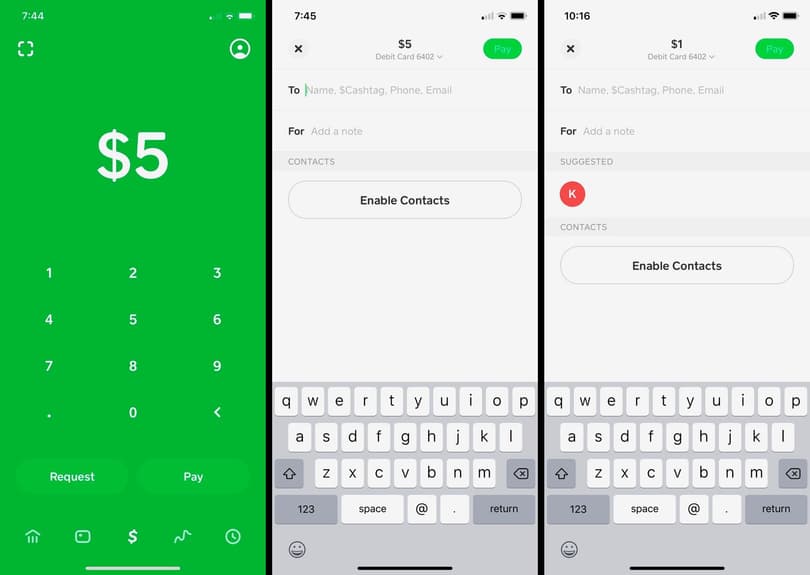
- Enter Amount: On the main screen, you’ll see a dollar sign ($) and a keypad. Enter the exact amount of money you wish to send.
- Tap “Pay”: After entering the amount, tap the “Pay” button located at the bottom right of the screen.
- Enter Recipient Details: You will then be prompted to enter the recipient’s identifier. This can be their:
- $Cashtag: Their unique Cash App username (e.g., $JohnDoe). This is the most common and often preferred method.
- Phone Number: The phone number they used to register for Cash App.
- Email Address: The email address they used to register for Cash App.
- Always double-check the recipient’s information to ensure you are sending money to the correct person. A mistake here can lead to irreversible loss of funds.
- Add a Note (Optional): Below the recipient field, there’s an optional “For” field where you can add a brief memo or description of the payment (e.g., “Dinner,” “Rent,” “Birthday Gift”). This is highly recommended for financial record-keeping.
Confirming and Completing Your Transaction
The final step involves reviewing and authorizing the payment.
- Review Details: After entering the recipient and a note, a confirmation screen will appear, summarizing the amount, recipient, and memo. Carefully review all the details to ensure accuracy.
- Select Payment Source: If you have multiple funding sources linked (e.g., Cash App balance, debit card), you may be prompted to select which one to use.
- Confirm Payment: Once you are satisfied that all details are correct, tap the “Pay” button again to authorize the transaction.
- Confirmation: You will receive an instant confirmation that the money has been sent, and the recipient will also be notified. The transaction will appear in your activity feed. For future reference, always check your activity feed to verify sent payments.
Advanced Features and Considerations for Money Management
Cash App’s utility extends beyond basic transfers, offering features that cater to more complex financial interactions and encourage prudent money management.

Requesting Money and Splitting Bills
Just as easily as you can send money, you can also request it. This feature is invaluable for splitting expenses, collecting dues, or receiving payments.
- Enter Amount: On the main screen, enter the amount you wish to request.
- Tap “Request”: Instead of “Pay,” tap the “Request” button.
- Select Payer(s): Choose the person or people from whom you are requesting money using their $Cashtag, phone number, or email.
- Add a Note (Optional): Include a note explaining the request (e.g., “Your share of utilities,” “Concert tickets”).
- Send Request: Tap “Request” to send the notification. The payer will then have the option to accept and send the funds to you. This streamlined process simplifies shared financial responsibilities among friends, family, or colleagues.
The Importance of Transaction History and Records
Every transaction you make on Cash App, whether sending, receiving, or investing, is meticulously recorded in your activity feed. This digital ledger is a critical tool for personal finance management.
- Budgeting: Regularly reviewing your transaction history helps you track spending, identify financial patterns, and adhere to your budget.
- Reconciliation: It allows you to reconcile your Cash App activity with your bank statements, ensuring accuracy and detecting any discrepancies.
- Tax Purposes: For freelancers or small business owners using Cash App for income, this history can be essential for tax preparation and demonstrating income streams.
- Dispute Resolution: In the rare event of a dispute, a clear transaction history provides verifiable evidence. It’s good practice to periodically export your transaction history for external record-keeping, especially for significant financial activities.
Enhancing Security for Your Funds
While Cash App employs advanced security measures, user vigilance is key to protecting your funds.
- Enable Security Lock: Always activate the Security Lock feature, which requires your PIN or Touch ID/Face ID for every transaction. This prevents unauthorized access even if your phone is lost or stolen.
- Two-Factor Authentication (2FA): Utilize 2FA if available, adding another layer of security by requiring a second verification step, usually a code sent to your phone or email.
- Monitor Activity: Regularly check your transaction history for any unfamiliar activity. Report suspicious transactions immediately to Cash App support.
- Strong, Unique Passwords: Use strong, unique passwords for your Cash App account and any linked email accounts.
Beyond Sending Money: Expanding Your Financial Capabilities with Cash App
Cash App’s evolution has seen it transform into a multi-faceted financial platform, offering more than just P2P payments. These additional features can significantly enhance an individual’s financial capabilities.
Direct Deposit and Cash Card Benefits
For many users, Cash App serves as a primary banking alternative, thanks to features like direct deposit and the Cash Card.
- Direct Deposit: Users can receive their paychecks directly into their Cash App account, often up to two days earlier than traditional banks. This can be a game-changer for budgeting and managing immediate financial needs, offering flexibility and faster access to funds.
- Cash Card: The Cash Card is a free, customizable debit card linked to your Cash App balance. It allows you to spend your Cash App funds anywhere Visa is accepted, online or in physical stores. It also enables ATM withdrawals, providing real-world access to your digital balance. The card comes with “Boosts,” instant discounts at various merchants, adding tangible value for everyday spending.
Investing in Stocks and Bitcoin
One of Cash App’s most innovative features is its integrated investing platform, democratizing access to financial markets.
- Stocks: Users can buy fractional shares of thousands of publicly traded companies with as little as $1. This low barrier to entry makes stock market investing accessible to beginners who might be intimidated by traditional brokerage accounts. It allows individuals to gradually build a diversified portfolio and learn about market dynamics.
- Bitcoin: Cash App also allows users to buy, sell, and send Bitcoin directly within the app. This feature caters to the growing interest in cryptocurrency, providing a simple and secure way to participate in the digital asset market. It’s a convenient way for users to explore alternative investments and gain exposure to the rapidly evolving world of digital currencies, all within a familiar interface.
These investment features, while simplifying the process, also underscore the importance of understanding market risks and making informed financial decisions. Cash App acts as an entry point, but continuous learning and careful consideration are paramount for successful investing.
Maximizing Safety and Avoiding Pitfalls
While Cash App offers incredible convenience, like any financial tool, it comes with responsibilities. Users must be proactive in protecting their accounts and understanding potential risks.
Recognizing and Preventing Scams
The popularity of Cash App unfortunately makes it a target for scammers. Being aware of common tactics is your best defense:
- “Cash App Flip” Scams: These promise to multiply your money if you send a small amount first. Always avoid these; they are fraudulent.
- Fake Customer Support: Scammers may impersonate Cash App support via calls, texts, or social media, asking for account details or asking you to send them money to “verify” your account. Cash App will never ask for your PIN or to send them money.
- Phishing Attempts: Be wary of emails or messages that look like they’re from Cash App but ask for personal information or direct you to suspicious links. Always check the sender’s email address and look for inconsistencies.
- Payment for Goods/Services: If buying from an unknown seller, be cautious. Cash App payments are instant and generally irreversible. Only send money to people you know and trust.
- Unsolicited Money: If you receive unexpected money, do not spend it. Contact Cash App support. It could be an error or part of a scam where the sender later requests it back after you’ve spent it, leaving you responsible.

Best Practices for Account Protection
Adhering to security best practices is crucial for safeguarding your Cash App account and linked financial assets.
- Never Share Your PIN/Login: Your personal identification number (PIN) or login credentials are for your eyes only. Cash App support will never ask for them.
- Verify Recipient Details: As stressed earlier, always double-check the $Cashtag, phone number, or email of your recipient before confirming a payment.
- Use Strong Passwords: Ensure your Cash App password is strong, unique, and not used for other online accounts.
- Enable Security Lock: This feature, requiring a PIN or biometric authentication for transactions, is your first line of defense against unauthorized use.
- Monitor Notifications: Pay attention to Cash App notifications for transactions and account changes.
- Keep Your App Updated: Regular app updates often include security patches that protect against new threats.
- Report Suspicious Activity: If you suspect any unauthorized activity or encounter a scam, report it to Cash App support immediately and consider contacting your bank if a linked account is compromised.
By embracing Cash App’s functionalities with an informed and cautious approach, users can harness its power to simplify their financial lives, streamline payments, and even take their first steps into the world of investing, all while maintaining robust security over their valuable funds.
aViewFromTheCave is a participant in the Amazon Services LLC Associates Program, an affiliate advertising program designed to provide a means for sites to earn advertising fees by advertising and linking to Amazon.com. Amazon, the Amazon logo, AmazonSupply, and the AmazonSupply logo are trademarks of Amazon.com, Inc. or its affiliates. As an Amazon Associate we earn affiliate commissions from qualifying purchases.