
In an increasingly digital world, the way we manage and transfer money has undergone a profound transformation. Gone are the days when bank branches and physical checks were the primary conduits for financial transactions between individuals. Today, mobile payment applications like Cash App have emerged as powerful, convenient, and often indispensable tools for personal finance, enabling instant money transfers with just a few taps on a smartphone.
Cash App, developed by Square (now Block, Inc.), has carved out a significant niche in the peer-to-peer payment landscape. It’s more than just a way to split dinner bills; it’s a comprehensive financial tool offering direct deposits, stock investing, Bitcoin trading, and, crucially, a seamless mechanism for sending and receiving funds. For anyone navigating the complexities of modern personal finance, understanding how to leverage such platforms is paramount. This guide will provide an insightful, step-by-step walkthrough of sending money with Cash App, contextualizing its features within a broader financial management perspective.
The Evolution of Digital Money Transfers: Why Cash App Matters
The digital revolution has democratized finance, bringing sophisticated tools directly to our fingertips. For many, traditional banking systems, while robust, often feel slow and cumbersome, especially for immediate peer-to-peer transfers. Cash App, alongside its competitors, represents a fundamental shift in how individuals interact with their money, prioritizing speed, accessibility, and user-friendliness.
The Shift from Traditional Methods
Historically, sending money involved a series of deliberate steps: writing a check, visiting a bank or ATM, or waiting for bank transfers to clear. These methods, while reliable, presented significant friction points, particularly for urgent transfers or splitting costs among friends. The advent of the internet banking began to simplify this, but mobile-first solutions like Cash App took it a step further, integrating financial services directly into the daily lives of smartphone users.
This shift isn’t merely about convenience; it reflects a broader cultural embrace of digital solutions for every aspect of life. From ordering groceries to hailing a ride, our expectations for immediate, on-demand services have permeated finance. Cash App meets this demand by offering an intuitive interface that abstracts away the underlying banking complexities, making financial transactions feel as simple as sending a text message. For those managing personal budgets, this immediacy can be a double-edged sword, emphasizing the need for disciplined use, but also providing invaluable flexibility.
Cash App’s Place in Modern Personal Finance
Cash App is no longer just a simple payment app; it’s a multifaceted financial ecosystem. Its integration of features like direct deposit (providing users with a routing and account number), a debit card (the Cash Card) linked directly to the app balance, and options for investing in stocks and Bitcoin, positions it as a significant player in personal finance. For individuals who might be unbanked or underbanked, or simply prefer the agility of a mobile-first platform, Cash App offers a robust alternative or supplement to traditional banking.
Its utility extends beyond basic transfers. Users can manage small investments, receive paychecks, and spend directly from their Cash App balance. This consolidation of financial activities within a single app streamlines personal finance management for many, reducing the need to juggle multiple platforms. However, relying heavily on any single financial tool requires understanding its capabilities, limitations, and security features, which is particularly true for a platform handling your hard-earned money.
A Step-by-Step Guide to Sending Money with Cash App
The primary function of Cash App, and often the first feature users engage with, is sending and receiving money. The process is designed to be straightforward, making it accessible even for those new to digital payment platforms.
Getting Started: Account Setup and Funding
Before you can send money, you need an active Cash App account and a funding source.
- Download and Install: Begin by downloading the Cash App from the Apple App Store (for iOS) or Google Play Store (for Android).
- Sign Up: Open the app and follow the prompts to sign up. You’ll need to provide a phone number or email address, which will be used to verify your account.
- Link a Bank Account/Debit Card: To send money from your own funds (or “cash out” received money), you’ll need to link a bank account or debit card. Tap the “Banking” tab (icon looks like a house or a bank) on the bottom left, then select “Link Bank” or “Link Debit Card.” Follow the secure prompts to connect your financial institution. This step is crucial for adding funds to your Cash App balance or for the app to draw money directly from your linked debit card when sending.
- Add Funds (Optional): While Cash App can often pull funds directly from your linked debit card for transactions, you can also add money to your Cash App balance beforehand. On the “Banking” tab, tap “Add Cash,” enter the desired amount, and confirm. This money will reside in your Cash App balance, ready for use.
The Core Process: Sending Funds
Once your account is set up and funded, sending money is a quick and intuitive process:
- Open Cash App: Launch the application on your smartphone.
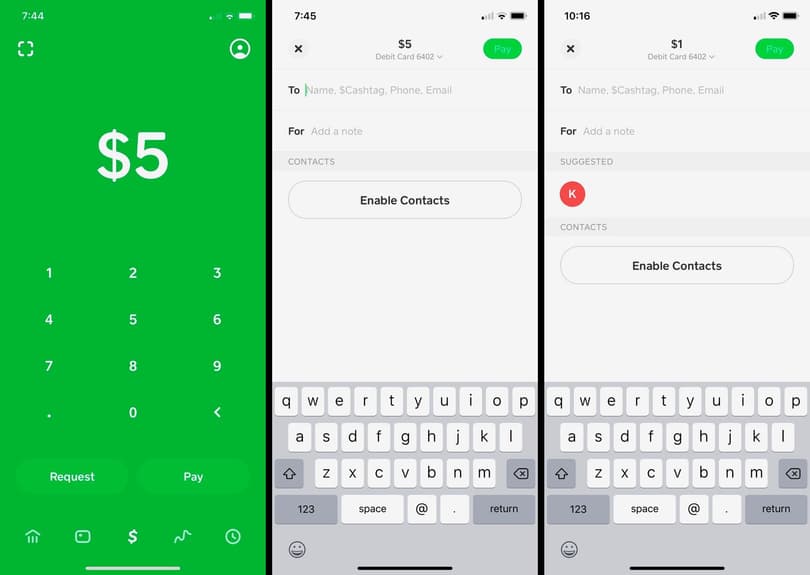
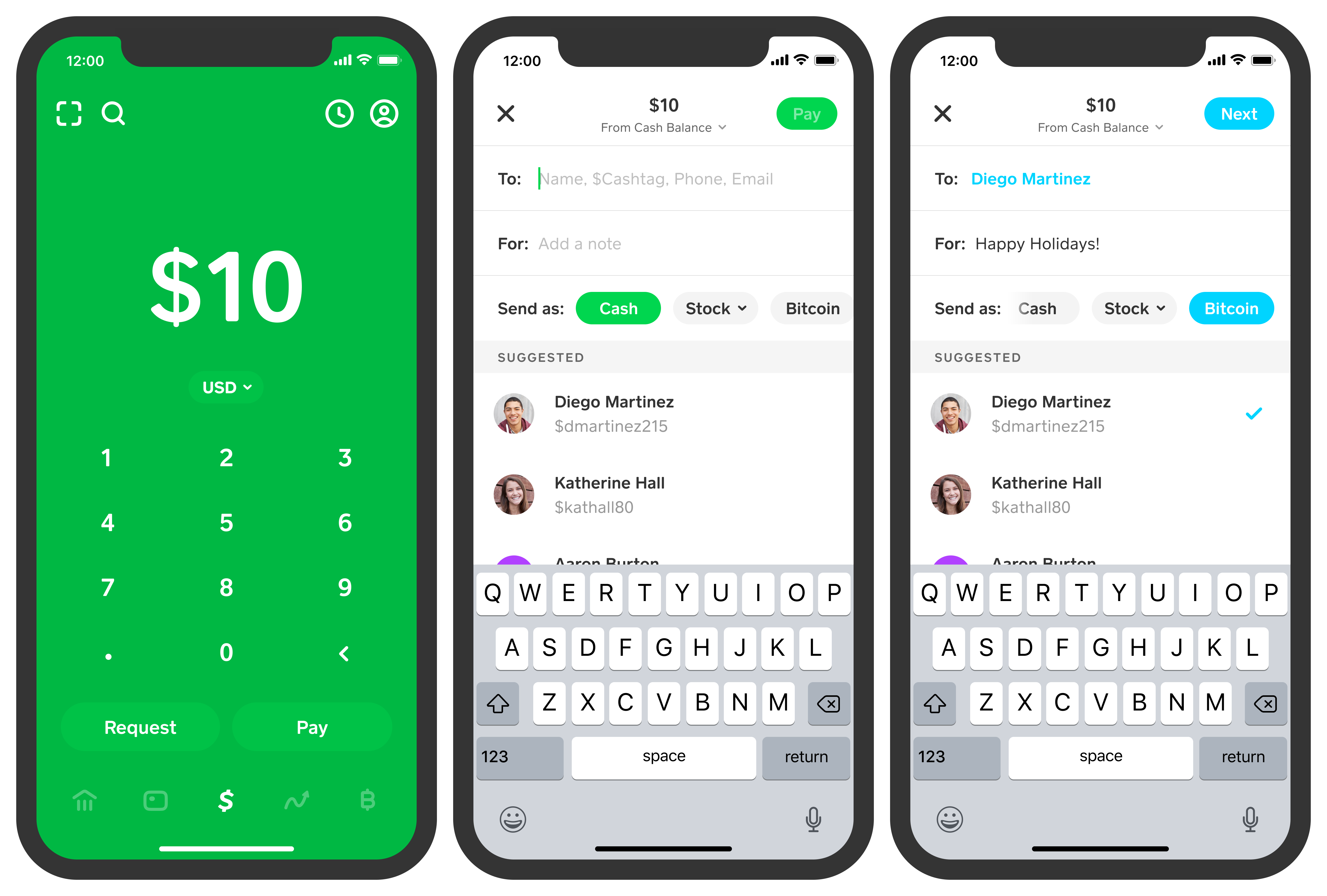
- Enter Amount: On the main screen, enter the dollar amount you wish to send using the large numeric keypad.
- Tap “Pay”: Below the amount, you’ll see a green “Pay” button. Tap it.
- Identify Recipient: You’ll then be prompted to enter the recipient’s information. You can use their:
- $Cashtag: This is their unique Cash App username (e.g., $JohnDoe).
- Phone Number: The phone number linked to their Cash App account.
- Email Address: The email address linked to their Cash App account.
- Pro Tip: Always double-check the recipient’s $Cashtag, phone number, or email. Money sent to the wrong person via Cash App is often difficult, if not impossible, to recover.
- Add a Note (Optional): Below the recipient’s field, you can add a short note or memo explaining the purpose of the payment (e.g., “Dinner,” “Rent,” “Gift”). This is good practice for personal finance record-keeping.
- Confirm Payment: Review all the details on the confirmation screen: the amount, the recipient, and your note. If everything is correct, tap the green “Pay” button at the bottom.
- Verification: You may be asked to enter your PIN or use Touch ID/Face ID to authorize the transaction, adding an extra layer of security.
The money is typically sent instantly and appears in the recipient’s Cash App balance within moments.
Requesting Money and Other Features
Cash App isn’t just for sending; it’s also excellent for requesting money, which can be useful for splitting bills or reminding someone of a shared expense.
- Requesting Funds: On the main screen, enter the amount you wish to request, then tap the “Request” button (instead of “Pay”). You’ll then select the person you’re requesting money from (using their $Cashtag, phone, or email), add an optional note, and tap “Request.” The recipient will receive a notification and can choose to accept or decline the request.
- Cash Card: The free Cash Card is a customizable debit card linked to your Cash App balance. It allows you to spend your Cash App funds directly in stores or online, and withdraw cash from ATMs. It also offers “Boosts,” which are instant discounts at specific merchants, providing potential savings in your everyday spending.
- Direct Deposit: Users can set up direct deposit for paychecks, tax refunds, or other payments by getting a routing and account number within the app. This makes Cash App a viable alternative to traditional bank accounts for some users.
- Investing: Cash App allows users to buy and sell fractional shares of stocks and Bitcoin directly within the app, making investing accessible to a broader audience with smaller amounts. While convenient, it’s crucial for users to understand the risks associated with these investments and integrate them wisely into their overall financial planning.
Understanding Costs, Limits, and Speed
While Cash App offers immense convenience, savvy financial users must understand the nuances of its costs, transaction limits, and speed. These factors can significantly impact how you integrate the app into your personal finance strategy.
Transaction Fees and Free Transfers
The primary appeal of Cash App for many personal finance needs is its cost-effectiveness.
- Standard Transfers (Bank Account/Cash App Balance): Sending money from your Cash App balance or a linked bank account is typically free. This covers most peer-to-peer transfers.
- Credit Card Transfers: If you choose to send money using a linked credit card, Cash App charges a 3% fee of the transaction amount. This is similar to many other payment apps and covers the cost of processing credit card transactions. From a personal finance perspective, it’s generally advisable to avoid using a credit card for peer-to-peer payments unless absolutely necessary, as this fee can quickly add up.
- Instant Deposits: While receiving money into your Cash App balance is free, moving that money to a linked bank account can incur a fee if you want it instantly. Standard deposits to your bank account (which take 1-3 business days) are free. Instant deposits incur a 0.5% to 1.75% fee (minimum $0.25). Users must weigh the urgency against the cost.
Daily and Weekly Sending Limits
Cash App implements limits on how much money users can send and receive, primarily for security and regulatory compliance. These limits can vary based on whether your account is verified.
- Unverified Accounts: Typically, unverified accounts can send up to $250 within any 7-day period and receive up to $1,000 within any 30-day period.
- Verified Accounts: To increase these limits, you must verify your identity. This usually involves providing your full name, date of birth, and the last four digits of your Social Security Number. Once verified, sending limits can significantly increase, allowing users to send up to $7,500 per week and receive unlimited amounts.
Understanding these limits is vital for financial planning, especially for larger transactions or if you frequently use the app for significant transfers. Verifying your account early on is recommended for most users.
Instant vs. Standard Transfers
The speed of money transfer is a critical feature distinguishing modern payment apps.
- Sending Money: When you send money to another Cash App user, it’s almost always instantaneous, appearing in their Cash App balance immediately. This immediate settlement is one of the app’s biggest advantages for peer-to-peer payments.
- Cashing Out: Moving money from your Cash App balance to your linked bank account has two options:
- Standard Deposit: This is free and typically takes 1-3 business days. It’s suitable when you’re not in a hurry to access the funds in your traditional bank account.
- Instant Deposit: This incurs a fee (0.5% to 1.75%) but makes the funds available in your bank account within minutes. This option is valuable for urgent financial needs but remember the associated cost.
Careful consideration of these speed and cost factors is essential for effective personal financial management, ensuring you don’t incur unnecessary fees for non-urgent transfers.
Security and Best Practices for Financial Transactions
The convenience of digital payment apps comes with an inherent responsibility to safeguard your financial information. Cash App employs robust security measures, but user vigilance is equally important to protect your money.
Protecting Your Account and Funds
Cash App utilizes several security features to protect its users:
- PIN/Touch ID/Face ID: Always enable a PIN or biometric authentication (Touch ID/Face ID) for your Cash App transactions. This prevents unauthorized access even if your phone is lost or stolen.
- Transaction Notifications: Cash App sends instant notifications for all transactions. Regularly review these notifications to catch any suspicious activity immediately.
- Official Communication: Cash App will never ask for your sign-in code, PIN, or full debit card number outside of the app. Be wary of unsolicited calls, emails, or texts claiming to be from Cash App support.
- Two-Factor Authentication (2FA): While not explicitly a toggle in the same way as some other apps, Cash App often uses email or SMS verification codes for logins from new devices or for sensitive actions, adding an extra layer of security.
- Strong, Unique Password: If you use an email to log in, ensure it has a strong, unique password not reused elsewhere.
Avoiding Scams and Fraud
Unfortunately, the popularity of digital payment apps makes them targets for scammers. Educating yourself on common fraud tactics is a critical component of modern personal finance security.
- “Payment Pending” Scams: Be wary of messages claiming your payment is “pending” or requires a small fee to release. Legitimate Cash App payments are instant and do not require additional fees to be “released” to the recipient.
- Giveaway/Prize Scams: Do not trust messages promising large sums of money in exchange for a small upfront payment. Cash App, nor any legitimate entity, will ask you to send money to receive a prize.
- Phishing Attempts: Always double-check sender information for emails or texts. Phishing attempts try to trick you into revealing your login credentials on fake websites.
- Impersonation Scams: Scammers may impersonate businesses, government agencies, or even friends and family. Verify unusual requests for money through a separate, trusted communication channel (e.g., call your friend directly).
- Only Send to Trusted Individuals: The golden rule of Cash App: only send money to people you know and trust. Once money is sent, especially to an unknown or fraudulent account, it’s exceedingly difficult to get back. Cash App cannot reverse a payment once it’s sent unless the recipient agrees to return it.
Responsible Use of Digital Payment Platforms
Integrating Cash App into your personal finance strategy requires a degree of discipline and awareness. Use the app for its intended purpose: convenient, small-to-medium peer-to-peer transfers. For very large sums, significant investments, or complex financial transactions, traditional banking or specialized financial advisors may still be more appropriate. Regularly reconcile your Cash App transactions with your overall budget and bank statements to maintain a clear picture of your financial health.
Integrating Cash App into Your Personal Finance Strategy
Cash App is a powerful tool, but its true value is unlocked when integrated thoughtfully into a holistic personal finance strategy. It can complement traditional banking, offer investment avenues, and simplify everyday spending, provided it’s used judiciously.
Budgeting and Tracking Transactions
For effective budgeting, every dollar matters. Cash App provides a clear transaction history within the app, allowing you to review all money sent, received, added, and cashed out.
- Categorization: While Cash App doesn’t offer sophisticated budgeting categories like some dedicated budgeting apps, the “add a note” feature when sending money is invaluable. Use descriptive notes (e.g., “Utilities – Jan,” “Dinner with Sarah,” “Birthday Gift for Mom”) to easily recall the purpose of each transaction.
- Regular Review: Periodically review your Cash App transaction history. This helps in understanding your spending patterns, identifying areas where you might be overspending, and ensuring all transactions are legitimate.
- Integration with Overall Budget: Treat your Cash App balance and transactions as another component of your total financial picture. If you use a spreadsheet or a dedicated budgeting app, manually or semi-automatically import your Cash App data to get a comprehensive view of your income and expenditures.
Comparing Cash App with Other Financial Tools
The digital payment landscape is crowded, with competitors like Venmo, PayPal, and Zelle offering similar services. Each has its strengths and weaknesses, and the best choice often depends on individual needs and network effects (i.e., which app your friends and family use).
- Cash App vs. Venmo/PayPal: All offer peer-to-peer transfers. Cash App distinguishes itself with its Cash Card, Boosts, and direct access to stock/Bitcoin investing. Venmo is known for its social feed, while PayPal offers broader international payment capabilities and purchase protection for goods/services.
- Cash App vs. Zelle: Zelle is typically integrated directly into traditional banking apps, offering bank-to-bank transfers without a separate app. Zelle transfers often have higher limits and don’t charge fees, but they lack the additional features like investing or a debit card found in Cash App. For immediate, purely peer-to-peer bank transfers, Zelle can be very efficient.
- Choosing Your Tool: Consider your primary needs: frequent small transfers, investing, a debit card, or international payments. Many individuals use a combination of these tools to optimize their financial operations.

Future Trends in Digital Payments and Your Money
The financial technology (FinTech) sector is rapidly evolving. Innovations like central bank digital currencies (CBDCs), further integration of AI in financial advice, and advancements in blockchain technology are set to redefine personal finance further. Cash App, by incorporating features like Bitcoin trading, demonstrates an awareness of these emerging trends.
For the savvy financial manager, staying abreast of these developments is crucial. Understanding how platforms like Cash App adapt to new technologies and regulations will ensure that your digital money management remains secure, efficient, and aligned with your long-term financial goals. The convenience of sending money instantly with Cash App is just one facet of a much larger, ongoing revolution in how we interact with our money. Mastering these tools today prepares us for the financial landscape of tomorrow.
aViewFromTheCave is a participant in the Amazon Services LLC Associates Program, an affiliate advertising program designed to provide a means for sites to earn advertising fees by advertising and linking to Amazon.com. Amazon, the Amazon logo, AmazonSupply, and the AmazonSupply logo are trademarks of Amazon.com, Inc. or its affiliates. As an Amazon Associate we earn affiliate commissions from qualifying purchases.