
In an increasingly digital world, managing and transferring money has evolved far beyond traditional banking methods. Peer-to-peer (P2P) payment platforms have revolutionized how individuals interact with their finances, making splitting bills, paying friends, and even handling small business transactions incredibly convenient. Among these platforms, Venmo stands out as a dominant player, celebrated for its user-friendly interface and integrated social features. For anyone looking to efficiently manage their personal finances or conduct swift transactions, understanding the intricacies of sending money via Venmo is essential.
This guide delves into the core functionalities of Venmo, offering a detailed, step-by-step approach to sending money, alongside crucial insights into financial security, fee structures, and troubleshooting common issues. By embracing Venmo effectively, users can unlock a powerful tool for modern money management, ensuring their financial interactions are both effortless and secure.

Understanding Venmo’s Core Functionality for Personal Finance
At its heart, Venmo is more than just a payment app; it’s a financial tool designed to simplify everyday money transfers between individuals. Its widespread adoption is a testament to its convenience, integrating seamlessly into the personal finance landscape of millions.
What is Venmo and Why It’s Popular for Money Transfers?
Venmo is a mobile payment service owned by PayPal that allows users to send and receive money from each other quickly and easily. Launched in 2009, it quickly gained traction, particularly among younger demographics, due to its intuitive design and social feed that displays public transactions. While the social aspect is unique, its true value lies in its ability to facilitate swift financial exchanges without the hassle of cash or traditional bank transfers. For splitting dinner bills, sharing rent, or contributing to a group gift, Venmo streamlines these common personal finance scenarios, making it an indispensable tool for many. Its popularity stems from its speed, ease of use, and the immediate notification system that keeps both sender and receiver informed.
Linking Your Financial Accounts: The Foundation of Venmo Transactions
Before any money can change hands on Venmo, users must first link a financial account. This is the bedrock of all transactions on the platform, providing the source for payments and the destination for received funds. Venmo offers several options for linking:
- Bank Account: This is the most common and often preferred method. Linking a bank account allows for fee-free payments (unless using a credit card as the primary source) and enables users to transfer their Venmo balance to their bank account without additional charges for standard transfers.
- Debit Card: Debit cards can also be linked, offering similar functionality to bank accounts for sending money. Transactions funded by a debit card typically don’t incur fees.
- Credit Card: While credit cards can be linked for payments, it’s crucial to note that Venmo typically charges a 3% fee for payments funded by a credit card. This is an important consideration for personal budgeting and avoiding unnecessary expenses.
The process of linking an account usually involves verifying micro-deposits or logging into your bank through Venmo’s secure portal. Ensuring these links are accurate and current is paramount for uninterrupted service and responsible money management.
Venmo Balances and Instant Transfers: Managing Your Funds
When you receive money on Venmo, it first resides in your “Venmo balance.” This balance can then be used to send payments to others, or it can be transferred to an external bank account. Understanding how these transfers work is key to managing your funds effectively:
- Standard Transfers: Moving funds from your Venmo balance to your linked bank account typically takes 1-3 business days and is completely free of charge. This is the most economical option for accessing your money.
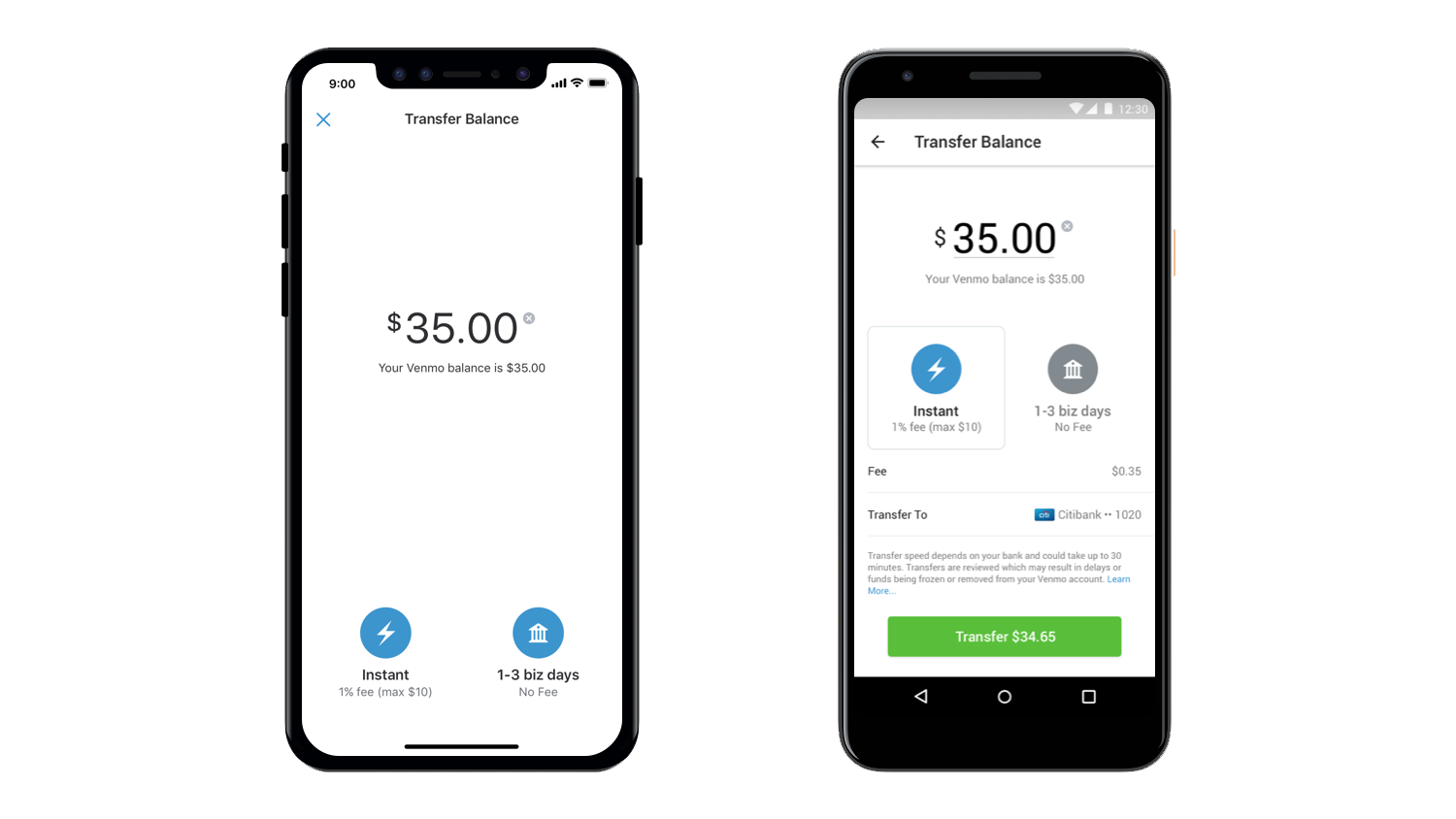
- Instant Transfers: For those who need immediate access to their funds, Venmo offers an “Instant Transfer” option. This service allows you to move money from your Venmo balance to a linked debit card or eligible bank account, usually within minutes, even outside of banking hours. However, this convenience comes with a fee, typically 1.75% of the transferred amount (with a minimum fee of $0.25 and a maximum fee of $25). For careful financial planners, weighing the urgency against the cost is essential.
Managing your Venmo balance strategically, whether by using it for subsequent payments or opting for fee-free standard transfers, is a critical component of smart personal finance with the app.
Step-by-Step Guide to Sending Money on Venmo
Sending money on Venmo is designed to be intuitive, but a clear understanding of each step ensures a smooth and error-free transaction.
Initiating a Payment: Finding Your Recipient
The process begins by opening the Venmo app on your mobile device.
- Tap the “Pay or Request” Icon: This is typically located at the bottom center of the screen, often represented by a pen-and-paper or a payment icon.
- Search for Your Recipient: Venmo offers several ways to find the person you want to pay:
- Username: The most common method. If you know their unique Venmo username (e.g., @JaneDoe), type it directly.
- Name: You can search by their full name, but be aware that multiple users might share the same name.
- Phone Number/Email: If their phone number or email is linked to their Venmo account, you can use these.
- QR Code: For in-person payments, you can tap the QR code icon (usually near the search bar) and scan the recipient’s personal Venmo QR code. This is a highly secure and accurate method.
- Select the Correct User: Always double-check that you’re selecting the intended recipient. A small mistake here can lead to significant financial inconvenience. Verify their profile picture or username carefully.
Entering Payment Details and Funding Sources
Once you’ve selected your recipient, you’ll be directed to the payment screen.
- Enter the Amount: Input the exact amount of money you wish to send. Accuracy is crucial here.
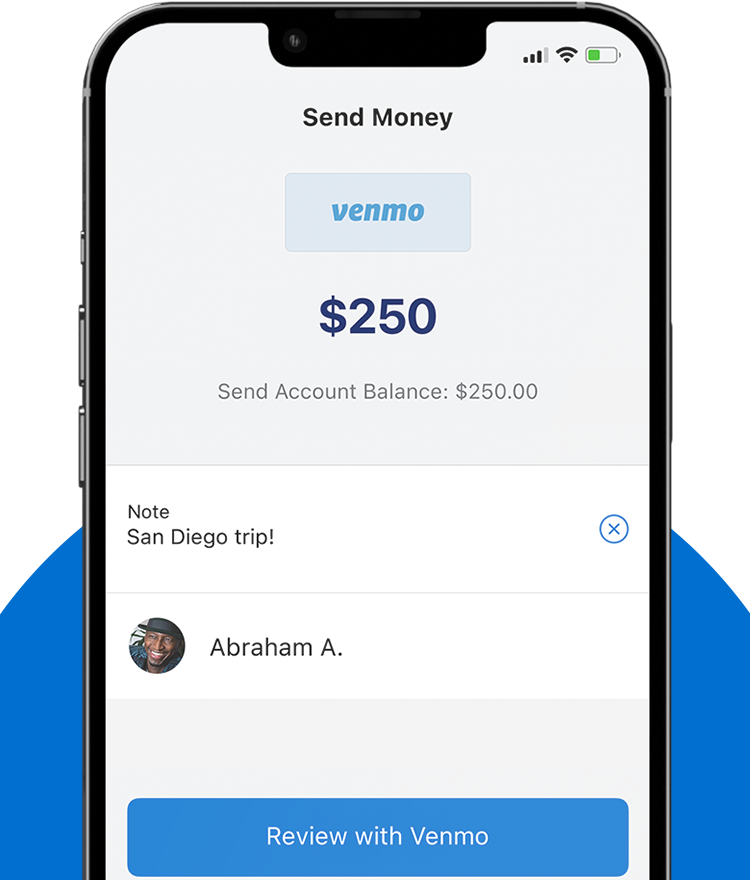
- Add a Note: Venmo requires a note for every transaction. This can be a simple emoji, a short description (e.g., “Dinner,” “Rent,” “Movie Tickets”), or a more detailed explanation. You also have the option to set the privacy of this note:
- Public: Visible on the Venmo social feed to everyone.
- Friends: Visible only to your Venmo friends.
- Private: Visible only to you and the recipient.
- For sensitive financial transactions, always opt for “Private.”
- Choose Your Funding Source: Below the note, you’ll see the option to select how you want to pay. Your Venmo balance is the default if you have sufficient funds. If not, or if you prefer a different source, you can choose from your linked bank account, debit card, or credit card. Remember the 3% fee for credit card payments.
Reviewing and Confirming Your Transaction
Before you finalize the payment, Venmo provides a summary screen.
- Review All Details: This is the most critical step. Verify the recipient’s name/username, the amount, the note, and the selected funding source. A quick check here can prevent costly errors.
- Tap “Pay”: Once you’re confident all details are correct, tap the “Pay” button (usually highlighted in green). You may be prompted to enter your PIN or use biometric authentication for added security.
- Confirmation: You and the recipient will both receive an instant notification that the payment has been sent/received. The transaction will appear in your Venmo history.
Remember, Venmo payments are typically irreversible once sent. Taking an extra moment to verify details can save immense frustration and potential financial loss.
Smart Money Management with Venmo: Tips for Financial Security and Efficiency
While Venmo offers unparalleled convenience, responsible use involves understanding its financial implications and prioritizing security.
Understanding Transaction Fees and Their Impact on Your Budget
For savvy personal finance management, being aware of Venmo’s fee structure is paramount:
- Credit Card Fees: As mentioned, using a credit card to fund a payment incurs a 3% fee. While convenient, consistently using a credit card for Venmo payments can chip away at your budget over time. Whenever possible, opt for your Venmo balance, bank account, or debit card for fee-free transactions.
- Instant Transfer Fees: The 1.75% fee for instant transfers from your Venmo balance to your bank account or debit card should be considered. If you don’t need immediate access to funds, waiting 1-3 business days for a standard transfer is the financially prudent choice. For large sums, this fee can add up quickly.
- No Fees for Standard P2P Payments: Crucially, sending money from your Venmo balance, linked bank account, or debit card to another Venmo user for personal payments is generally free. This makes it a highly economical option for regular peer-to-peer exchanges.
By understanding and planning around these fees, users can maximize Venmo’s utility while minimizing unnecessary costs.
Enhancing Security for Your Financial Transactions
Protecting your financial information is crucial when using any digital payment platform.
- Strong, Unique Passwords and PINs: Always use a complex password that is unique to your Venmo account. Enable a PIN or biometric lock (fingerprint, Face ID) for opening the app.
- Two-Factor Authentication (2FA): Activate 2FA in your Venmo settings. This adds an extra layer of security by requiring a code from your phone in addition to your password when logging in from a new device.
- Be Wary of Scams: Phishing attempts, fake payment requests, and imposter scams are prevalent. Always verify the identity of the person requesting money, especially if the request seems unusual or unexpected. Never click on suspicious links or provide your login credentials outside the official Venmo app or website.
- Only Send Money to Trusted Individuals: Venmo is primarily designed for transactions between friends and family. Its purchase protection is limited for goods and services from unknown sellers. Exercise extreme caution when sending money to strangers or for online purchases outside of Venmo’s authorized merchant network.
- Monitor Your Account: Regularly review your Venmo transaction history for any unauthorized activity.
Leveraging Venmo’s Features for Better Personal Finance Tracking
Venmo isn’t just for sending money; it can also be a valuable tool for tracking expenses.
- Transaction History: Every payment sent or received is recorded in your activity feed. This can serve as a simple record for budgeting purposes, helping you see where your money is going.
- Splitting Bills: The “Split” feature simplifies dividing costs among friends. This ensures fair contributions to shared expenses, making group outings and shared living arrangements financially transparent.
- Venmo Debit Card and Credit Card: For those who wish to extend their Venmo ecosystem, the company offers a physical debit card and a credit card. The debit card allows you to spend your Venmo balance anywhere Mastercard is accepted, while the credit card offers rewards and seamlessly integrates with your Venmo app for spending tracking and management. These tools can centralize your spending and financial tracking within the Venmo platform.
Common Scenarios and Troubleshooting for Venmo Users
Even with careful planning, issues can arise. Knowing how to navigate common problems is part of being a financially responsible Venmo user.
What If a Payment Goes Wrong? Addressing Errors and Disputes
Accidentally sending money to the wrong person or the incorrect amount can be a stressful financial mishap.
- Wrong Recipient: If you send money to the wrong person, the first step is to politely request the money back from them within the app. Go to the erroneous transaction in your feed and tap “Request” for the same amount. However, this is not guaranteed, as the recipient is not obligated to return the funds, especially if they are a stranger.
- Incorrect Amount: If you sent too much, request the excess back. If you sent too little, send another payment for the remainder.
- Contacting Venmo Support: For uncooperative recipients or more complex issues, you may need to contact Venmo’s customer support. While Venmo has limited buyer protection for P2P transactions, they can sometimes mediate or offer advice. It’s crucial to understand that Venmo is not a bank and its consumer protections differ from traditional financial institutions.
The best defense against these scenarios is prevention: always double-check recipient and amount before confirming.
Managing Payment Limits and Restrictions
Venmo imposes limits on how much money users can send and transfer, which are important for personal finance planning, especially for larger transactions.
- Unverified Accounts: New or unverified accounts typically have lower weekly sending limits. These limits can vary but are generally conservative.
- Verified Accounts: To increase your sending and transfer limits, Venmo requires users to verify their identity by providing personal information such as their full name, date of birth, and the last four digits of their Social Security number. This process helps Venmo comply with financial regulations and enhances security. Verified accounts have significantly higher limits, which are crucial for those who use Venmo for more substantial financial exchanges or frequent transactions.
- Transfer Limits: There are also separate limits for transferring funds from your Venmo balance to your bank account, especially for instant transfers. Familiarize yourself with these limits in your account settings to avoid unexpected delays in accessing your funds.
Privacy Settings and Their Financial Implications
Venmo’s social feed is a defining feature, but understanding its privacy settings is vital for personal financial discretion.
- Public, Friends, Private: As discussed, each transaction note can be set to Public, Friends, or Private. For any sensitive financial transactions, or simply for personal preference, it is highly recommended to set the privacy to “Private.” This prevents your financial activities from being visible to a wider audience.
- Default Settings: Be aware of your default privacy setting, which can be changed in the app’s settings. Many users prefer to default to “Private” to ensure their financial transactions remain confidential.
- Profile Privacy: You can also control who can see your friend list and other profile information. Regularly review these settings to ensure they align with your desired level of financial privacy.
Beyond Peer-to-Peer: Exploring Other Financial Uses of Venmo
While predominantly known for P2P payments, Venmo has expanded its capabilities, offering additional financial tools that extend its utility beyond simple transfers.
Paying Businesses and Merchants with Venmo
Venmo is increasingly being adopted by businesses as a payment method.
- In-App Purchases: Many apps and online retailers now offer Venmo as a checkout option, allowing users to pay directly from their Venmo balance or linked funding sources.
- QR Code Payments: Small businesses, particularly, have embraced Venmo’s QR code feature. Customers can scan a business’s Venmo QR code to quickly pay for goods or services, offering a convenient alternative to cash or traditional card readers. This expansion into merchant services provides another layer of utility for Venmo users, allowing them to consolidate more of their financial transactions within a single platform.
The Venmo Debit Card and Credit Card: Extending Your Financial Tools
For users who are deeply integrated into the Venmo ecosystem, the Venmo Debit Card and Credit Card offer further financial flexibility.
- Venmo Debit Card: This card is directly linked to your Venmo balance, allowing you to spend the money you receive on Venmo anywhere Mastercard is accepted, without transferring it to your bank account first. It provides immediate access to your funds and can be a practical tool for daily spending, often with cash-back rewards at select merchants.
- Venmo Credit Card: This credit card offers cash-back rewards on eligible purchases, automatically depositing these rewards into your Venmo account. It also allows users to manage their credit spending and payments directly through the Venmo app, integrating credit management into their existing financial interface. These cards represent Venmo’s ambition to become a more comprehensive financial tool, catering to a wider range of spending and credit needs.
Conclusion
Venmo has undeniably transformed the landscape of peer-to-peer money transfers, offering a fast, convenient, and often social way to manage personal finances. From seamlessly splitting restaurant bills to paying rent to a roommate, its utility in everyday financial interactions is unmatched. However, to truly harness its power, users must move beyond its surface-level convenience and embrace a proactive approach to understanding its features, fee structures, and security protocols.
By diligently following the steps for sending money, remaining vigilant against scams, strategically managing fees, and utilizing privacy settings, individuals can ensure their Venmo experience is both efficient and secure. As Venmo continues to evolve, expanding its reach into merchant payments and offering dedicated financial products like its debit and credit cards, it solidifies its position as a versatile tool in the modern financial toolkit. Taking control of your digital financial transactions, starting with how you send money on Venmo, is a crucial step towards smarter and more secure money management in the digital age.
aViewFromTheCave is a participant in the Amazon Services LLC Associates Program, an affiliate advertising program designed to provide a means for sites to earn advertising fees by advertising and linking to Amazon.com. Amazon, the Amazon logo, AmazonSupply, and the AmazonSupply logo are trademarks of Amazon.com, Inc. or its affiliates. As an Amazon Associate we earn affiliate commissions from qualifying purchases.