
In an increasingly digitized world, peer-to-peer (P2P) payment applications have become indispensable tools for managing personal finances, streamlining transactions, and simplifying everyday exchanges. Among these, Venmo stands out as a prevalent platform, renowned for its user-friendly interface and social payment features. Understanding “how to send money through Venmo” isn’t merely about executing a transaction; it’s about navigating a sophisticated piece of financial technology designed for efficiency and security. This article will provide a comprehensive, tech-centric guide to utilizing Venmo for sending money, delving into its core functionalities, security protocols, and advanced features from a technological perspective.

Understanding Venmo’s Core Functionality and Tech Stack
At its heart, Venmo is a mobile-first application that facilitates instant money transfers between individuals. Its underlying technology is built to create a seamless digital wallet experience, integrating various financial instruments into a cohesive ecosystem.
The Peer-to-Peer Payment Mechanism
Venmo’s primary offering is its P2P payment system. This mechanism allows users to send and receive funds directly from one person’s Venmo balance to another’s, bypassing traditional banking wire transfers or physical cash exchanges. Technologically, this involves a robust backend infrastructure that securely authenticates users, verifies transaction details, and updates account balances in near real-time. Each transaction is recorded and processed through a network of secure servers, ensuring data integrity and preventing double-spending. The social feed, a distinct Venmo feature, layers a public (or private) commentary system over these financial transfers, leveraging social networking technology to make payments more interactive.
Account Setup: Initial Tech Configuration
Before any money can be sent, a user must configure their Venmo account. This initial setup is a critical technological gateway. It involves downloading the mobile application from an app store (iOS or Android), creating an account with an email address or phone number, and establishing a secure password. The system then requires identity verification, which might involve linking a phone number, email, or providing personal details (like name and zip code) to comply with Know Your Customer (KYC) and Anti-Money Laundering (AML) regulations. This verification process often leverages secure data encryption and identity management technologies to protect user information. Without proper setup, the app’s core functionalities remain inaccessible, highlighting the importance of this initial technical configuration for security and regulatory compliance.
Linking Funding Sources: Integrating Digital Wallets and Bank Accounts
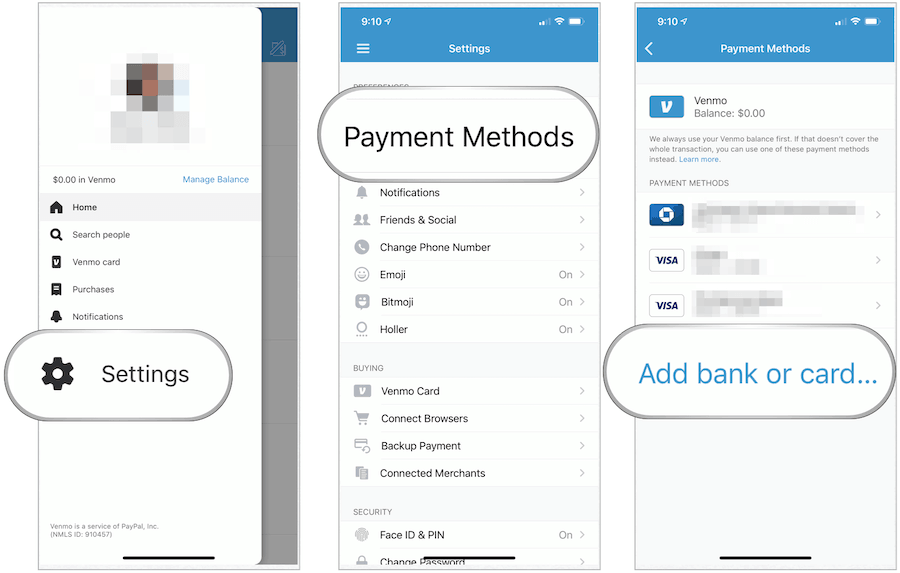
To fund transactions, Venmo requires users to link external financial accounts. The most common funding sources include debit cards, bank accounts (via micro-deposits verification or instant verification methods), and, to a lesser extent, credit cards (which typically incur a fee for sending money). The process of linking these sources involves secure API integrations between Venmo’s platform and various financial institutions. When a user links a bank account, for instance, Venmo uses encrypted connections to verify ownership, often requiring the user to log into their bank’s portal through a secure third-party service or by confirming small test deposits. This integration is a prime example of fintech interoperability, allowing the app to act as a digital bridge between a user’s bank and their Venmo balance.
A Step-by-Step Tech Guide to Sending Money
Sending money through Venmo is designed to be intuitive, but understanding the underlying technical flow enhances the user’s confidence and efficiency.
Navigating the App Interface
Upon opening the Venmo app, users are greeted by a home screen typically displaying a social feed of transactions (public or private) and quick access buttons. The primary “Pay & Request” button, usually represented by a pencil and paper icon or a dollar sign, is the entry point for sending money. The app’s user interface (UI) and user experience (UX) are meticulously designed to guide users through the process with minimal friction, employing clear iconography and responsive elements. The search functionality, powered by efficient database querying, allows users to quickly find recipients by username, phone number, or email.
Initiating a Payment: User Input and Verification
Once the “Pay & Request” button is tapped, the app transitions to a new screen where the user inputs the recipient’s details. This involves selecting a contact from their phone’s contact list (requiring app permissions), searching for a Venmo user, or scanning a Venmo QR code (a form of visual data encoding for quick transfers). After selecting the recipient, the user enters the amount to be sent. At this stage, the app typically performs real-time validation checks, such as ensuring the amount is within daily limits and that the user has sufficient funds or a linked funding source.
Reviewing and Confirming the Transaction Flow
Before final confirmation, Venmo presents a summary screen detailing the recipient, amount, and the chosen funding source. This review step is crucial for preventing errors and allows the user to make any necessary adjustments. The system might also prompt for two-factor authentication (2FA) if enabled, adding an extra layer of security before authorizing the transaction. Once confirmed, the app sends a secure instruction to Venmo’s servers to process the payment. This instruction is cryptographically signed and transmitted over encrypted channels to ensure its integrity and authenticity.
Adding Notes and Privacy Settings: Data Management Features
A distinctive feature of Venmo is the ability to add a note to each transaction. This text field, while seemingly simple, is a key data management feature that allows users to contextualize their payments. Users can also select the privacy level for each transaction: Public (visible to everyone on the Venmo feed), Friends (visible to mutual Venmo friends), or Private (visible only to sender and recipient). These privacy settings are managed by the app’s backend, which controls the visibility rules for each transaction entry in the social feed, demonstrating a blend of social media and financial technology.
Ensuring Digital Security and Transaction Integrity
Security is paramount for any financial application. Venmo employs multiple layers of technology to safeguard user data and ensure transaction integrity.
Venmo’s Built-in Security Protocols
Venmo utilizes industry-standard encryption protocols (like TLS/SSL) to protect all communications between the user’s device and its servers. This ensures that sensitive data, such as login credentials and financial information, is encrypted during transit, making it extremely difficult for unauthorized parties to intercept. Furthermore, Venmo’s servers are housed in secure data centers, protected by firewalls and intrusion detection systems. The platform also monitors for suspicious activity using advanced fraud detection algorithms, which analyze transaction patterns and user behavior to identify and flag potentially fraudulent transfers.
Best Practices for User-Side Digital Safety
While Venmo’s infrastructure is robust, user-side vigilance is equally critical. Users are advised to enable two-factor authentication (2FA), which requires a second verification step (e.g., a code sent to their phone) in addition to a password, significantly hardening account security. Using strong, unique passwords and regularly updating them is another fundamental practice. Users should also be wary of phishing attempts and only log into Venmo through the official app or website. Regularly reviewing transaction history for any unauthorized activity is also a good habit.
Recognizing and Reporting Potential Tech Scams
Unfortunately, digital payment platforms can be targets for scammers. Common Venmo scams include requests for money from unknown sources, fake payment notifications, or promises of large sums for small upfront payments. Venmo leverages machine learning and user reporting systems to identify and mitigate such threats. Users should be educated to recognize these patterns and know how to report suspicious activity directly through the app’s support features, contributing to the platform’s collective security intelligence.
Beyond Basic Payments: Advanced Venmo Tech Features
Venmo has evolved beyond simple P2P transfers, integrating more sophisticated functionalities to meet diverse user needs.
Requesting Money and Splitting Payments
Complementing its sending feature, Venmo allows users to request money from others, which is particularly useful for splitting bills or collecting debts. The “Request” function mirrors the “Pay” function in its technical flow, but initiates a notification to the recipient, prompting them to authorize a payment to the requester. The “Split” feature takes this further, allowing a user to divide a cost among multiple people, automating the calculation and sending individual requests. This multi-party transaction management is a testament to the app’s advanced algorithmic capabilities.
Business Profiles and QR Code Payments
Venmo offers business profiles, enabling small businesses and freelancers to accept payments for goods and services. These profiles often come with enhanced tracking and reporting features, integrating payment processing technologies typically found in e-commerce platforms. The integration of QR code payments further streamlines commercial transactions. By scanning a unique Venmo QR code, customers can instantly pay a business, eliminating the need for manual input and reducing transaction errors. This technology leverages smartphone cameras and image recognition for quick, secure payment initiation.
Instant Transfers: Understanding the Underlying Tech Speed
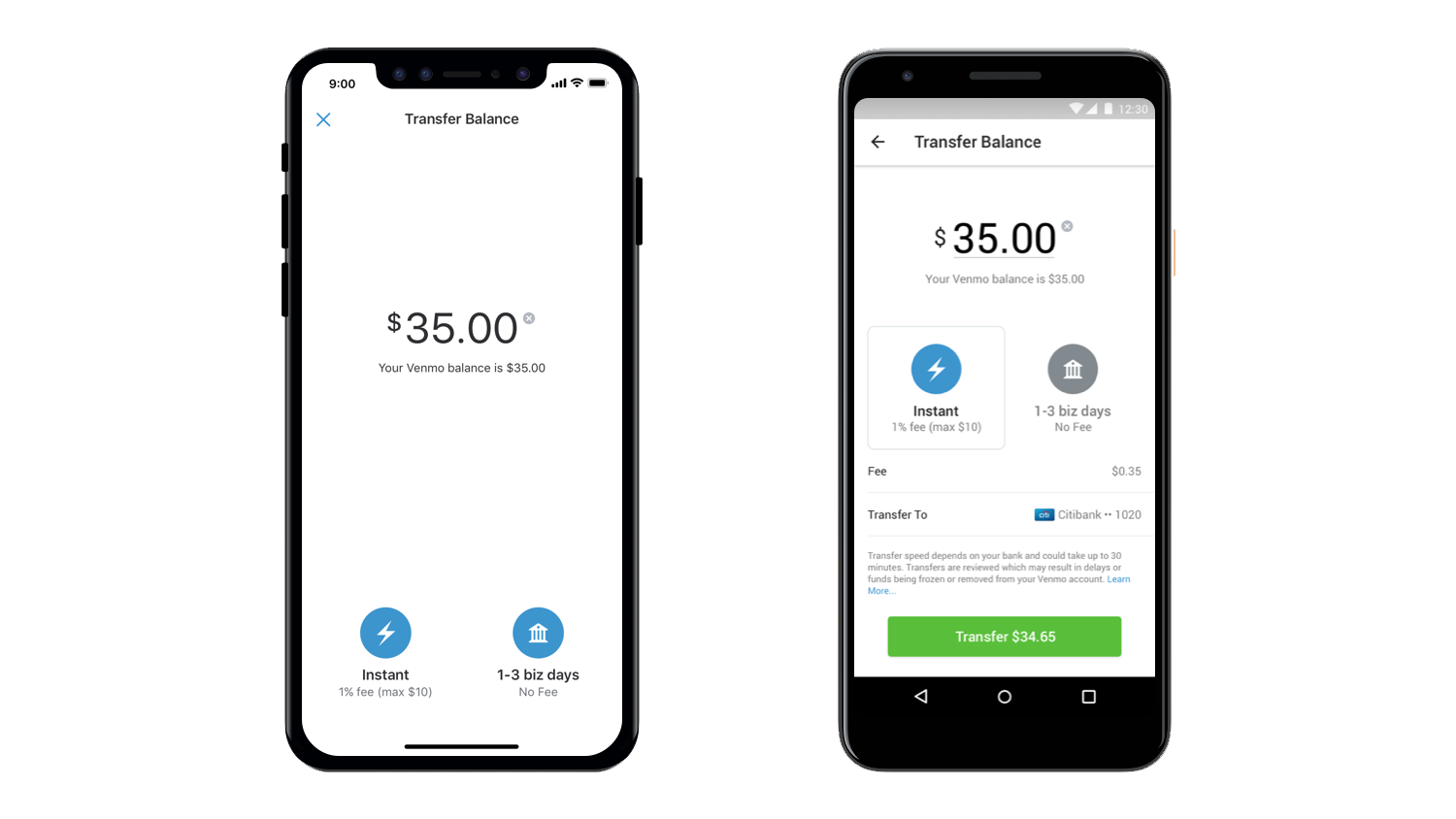
While standard Venmo transfers to a bank account can take 1-3 business days, the “Instant Transfer” feature allows users to move funds from their Venmo balance to a linked debit card or eligible bank account within minutes, often for a small fee. This speed is achieved through real-time payment networks (like RTP or push-to-card services) that financial institutions are increasingly adopting. Venmo’s integration with these faster payment rails showcases its commitment to leveraging cutting-edge financial technology for user convenience.
Venmo Debit Card and Credit Card Integration
Extending its ecosystem, Venmo offers a physical debit card and a credit card, both deeply integrated with the app. The debit card allows users to spend their Venmo balance directly wherever Mastercard is accepted, essentially making the Venmo balance accessible offline. The credit card, a partnership with a major issuer, provides rewards and budgeting tools directly within the Venmo app, transforming the app into a more comprehensive financial management tool. These integrations demonstrate Venmo’s aspiration to move beyond a simple P2P app to a full-fledged digital banking solution.
Troubleshooting Common Technical Issues
Even with robust technology, users may occasionally encounter technical glitches. Understanding common issues and their resolutions is part of being a savvy Venmo user.
Payment Failures and Network Connectivity
Payment failures can occur due to various reasons: insufficient funds, incorrect recipient details, or issues with the linked funding source. From a technical standpoint, these often manifest as transaction declines. Users should first check their internet connection, as a stable network is crucial for the app’s real-time communication with Venmo’s servers. They should also verify their linked bank or card details for accuracy and ensure their bank isn’t flagging the transaction for security reasons.
Account Freezes and Verification Challenges
Occasionally, Venmo might temporarily freeze an account due to suspicious activity, a high volume of transactions, or pending verification requirements. This is a security measure designed to protect users. Resolving an account freeze typically involves contacting Venmo support and providing additional verification documents or explanations. The platform’s automated systems trigger these freezes, and human intervention is often required to review and unfreeze accounts.
Contacting Venmo Support: Leveraging Customer Service Tech Tools
For persistent or complex issues, Venmo provides customer support channels, including in-app messaging, email, and phone support. These channels leverage various customer relationship management (CRM) and communication technologies to log user queries, track resolutions, and provide assistance. When contacting support, providing detailed information about the technical issue, including error messages and timestamps, can significantly expedite the resolution process.
Conclusion
Sending money through Venmo is a testament to the power and convenience of modern financial technology. From the initial account setup and secure linking of funding sources to the intuitive step-by-step payment process, Venmo has engineered an application that simplifies digital transactions for millions. Its robust security protocols, continuously evolving feature set (including business profiles, instant transfers, and integrated cards), and accessible troubleshooting mechanisms underscore its position as a leading P2P payment solution. By understanding the technological underpinnings of “how to send money through Venmo,” users can not only execute transactions more efficiently but also engage with the platform more securely and confidently in an increasingly digital financial landscape.
aViewFromTheCave is a participant in the Amazon Services LLC Associates Program, an affiliate advertising program designed to provide a means for sites to earn advertising fees by advertising and linking to Amazon.com. Amazon, the Amazon logo, AmazonSupply, and the AmazonSupply logo are trademarks of Amazon.com, Inc. or its affiliates. As an Amazon Associate we earn affiliate commissions from qualifying purchases.