
In today’s fast-paced digital economy, managing personal finances effectively often hinges on the ability to move money swiftly and securely between various platforms. Cash App has emerged as a prominent player in the mobile payment landscape, facilitating everything from peer-to-peer transfers to direct deposits. However, for many users, the ultimate goal is to consolidate funds or prepare them for traditional banking operations. This guide is designed to demystify the process of transferring money from your Cash App balance directly to your linked bank account, offering a professional, insightful, and engaging exploration of a crucial financial maneuver. Understanding these steps is not just about moving numbers; it’s about gaining control over your liquidity, optimizing your financial strategy, and ensuring your money works for you, when and where you need it.

Understanding Cash App and Its Role in Personal Finance
Cash App, developed by Block, Inc., has rapidly become a ubiquitous tool for millions seeking a simplified approach to everyday financial transactions. Its intuitive interface belies its powerful capabilities, making it a cornerstone for many in managing their personal finances.
What is Cash App?
At its core, Cash App is a mobile payment service that allows users to send and receive money, often without transaction fees for standard transfers. Beyond peer-to-peer payments, it offers a Cash Card (a customizable debit card), facilitates direct deposits, and even enables users to invest in stocks and Bitcoin. For the purpose of this guide, its primary function as a digital wallet that holds funds and facilitates transfers to external bank accounts is paramount. It bridges the gap between digital currency convenience and traditional banking infrastructure, acting as an intermediary for numerous financial activities. Its popularity stems from its accessibility and ease of use, making it an indispensable financial tool for many, particularly those who frequently engage in digital transactions or freelance work.
Why Transfer Funds to a Bank Account?
While Cash App offers a degree of financial flexibility, there are compelling reasons why users often choose to transfer their funds to a traditional bank account. First and foremost is liquidity and consolidation. Funds held in a bank account are typically more accessible for a broader range of financial activities, such as paying mortgages, managing larger utility bills, or making significant purchases where a traditional bank transfer or check is required. Banks offer a more comprehensive suite of services, including loans, credit lines, and more sophisticated savings instruments, which often necessitate direct access to your primary funds.
Secondly, for financial planning and budgeting, consolidating funds in one primary account simplifies tracking income and expenditures. It allows for a clearer overview of your financial health, making it easier to allocate funds towards savings goals, investments, or debt repayment. Relying solely on a Cash App balance for significant financial obligations can introduce complexities and potential limitations. A bank account also often comes with higher deposit insurance (FDIC), providing an additional layer of security for larger balances compared to potentially varying protections offered by non-bank financial apps.
Key Benefits of Using Cash App for Transfers
Despite the eventual need to transfer funds to a bank, Cash App itself offers distinct advantages in the initial stages of money management. Its convenience is unparalleled; sending or receiving money takes just a few taps on a smartphone, eliminating the need for bank visits or complex wire transfer forms. The speed options are another major draw: while standard transfers are free and take 1-3 business days, the option for instant deposits (for a small fee) provides immediate access to funds, which can be critical in emergencies or for time-sensitive payments. This flexibility empowers users to control the pace of their financial transactions according to their immediate needs and budget. Furthermore, for those who receive regular payments via Cash App, such as freelancers or gig economy workers, it serves as an accessible and efficient income channel, making the subsequent transfer to a bank account a natural and necessary step in their financial workflow.
Step-by-Step Guide to Transferring Funds
Transferring money from your Cash App to your bank account is a straightforward process, but it requires careful attention to detail to ensure a smooth and successful transaction.
Ensuring Your Bank Account is Linked
Before you can initiate any transfer, your bank account must be securely linked to your Cash App profile. This is a one-time setup process that typically involves providing your bank’s routing number and your account number. Cash App uses secure encryption to protect this sensitive information. If you haven’t done this yet, navigate to the Banking tab (the house icon or dollar sign icon) in Cash App, select “Link Bank,” and follow the prompts. For verification, Cash App might send small deposits (micro-deposits) to your bank account, which you’ll need to confirm within the app. This step is a crucial security measure, ensuring that only you can direct funds to your designated financial institution, safeguarding your personal finance integrity. Incorrectly linked or unverified accounts will prevent any transfer from succeeding.
Initiating a Standard Transfer
The standard transfer option is the most common and cost-effective way to move funds. Here’s how to do it:
-
Open Cash App: Launch the application on your mobile device.
-
Navigate to the Banking Tab: This is usually represented by a house icon or a dollar sign icon at the bottom of the screen.
-
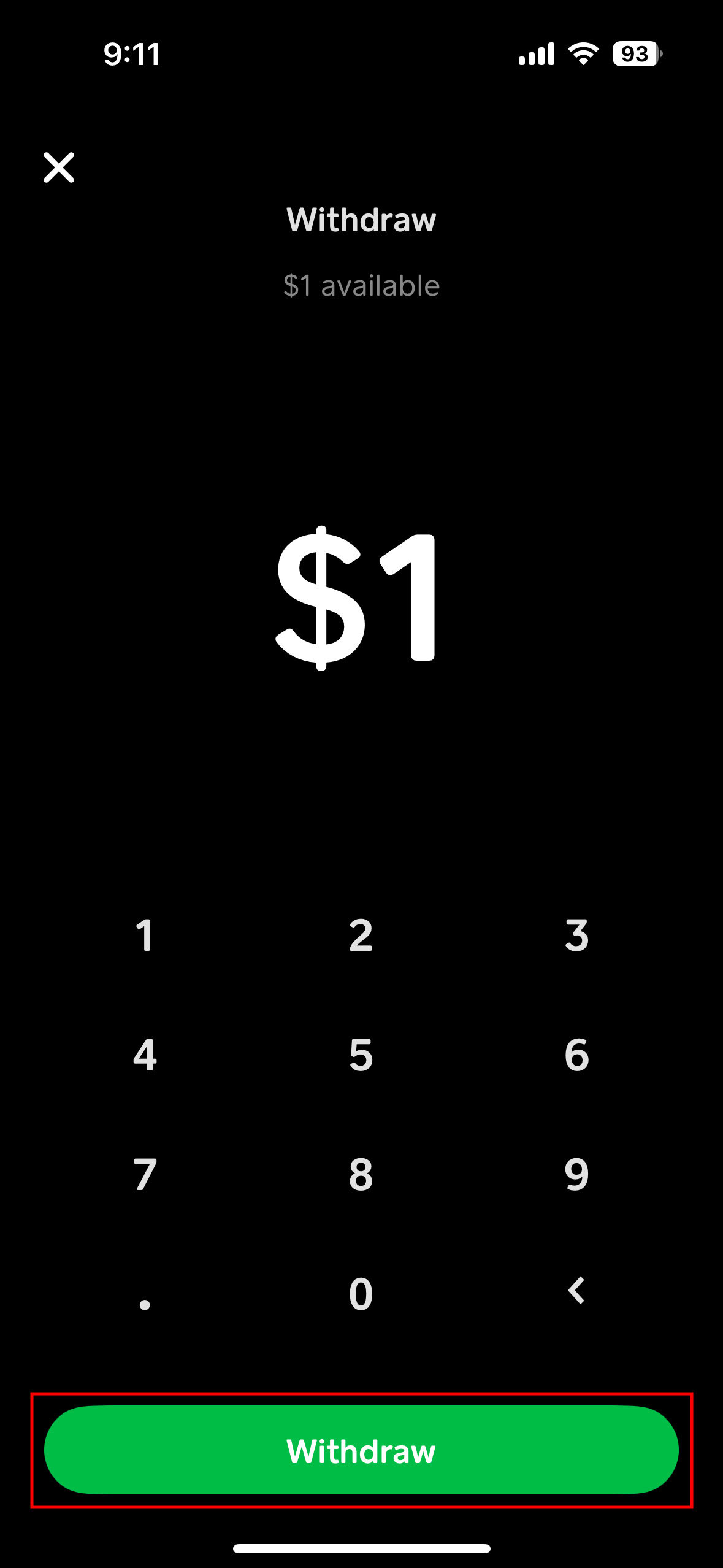
Tap “Cash Out”: This button typically appears prominently, displaying your current Cash App balance.
-
Enter the Amount: Specify the exact amount you wish to transfer to your bank account. You can choose to transfer your full balance or a partial amount.
-
Select “Standard” Transfer: Confirm that you want the free, standard transfer option. The app will usually inform you that funds will arrive within 1-3 business days.
-
Confirm Transfer: Review the details and tap “Confirm” to finalize the transaction.
Standard transfers are ideal for planned financial movements, such as consolidating weekly earnings, moving savings, or preparing funds for upcoming bills, as they incur no additional fees. However, it’s important to factor in the processing time when budgeting or planning for specific payment deadlines.
Expediting Your Funds with Instant Deposit
For situations demanding immediate access to your funds, Cash App offers an “Instant Deposit” option. This service, while faster, comes with a nominal fee, typically 0.5% to 1.75% of the transferred amount, with a minimum fee of $0.25.
The steps are largely similar to a standard transfer:
-
Open Cash App and go to the Banking Tab.
-
Tap “Cash Out”.
-
Enter the Amount you wish to transfer.
-
Crucially, select “Instant” Transfer when prompted. The app will clearly display the fee associated with the instant transfer before you proceed.
-
Confirm Transfer: Review the amount and fee, then tap “Confirm.”
Once confirmed, the funds should appear in your linked bank account within minutes, often instantly. This feature is particularly useful for urgent financial needs, such as covering an unexpected expense, making a last-minute bill payment to avoid late fees, or bridging a temporary cash flow gap. While the fee is a consideration, the value of immediate liquidity can often outweigh the cost for critical financial situations.
Troubleshooting Common Transfer Issues
Even with a straightforward process, users might occasionally encounter issues. Understanding common problems can help in quick resolution:
-
Incorrect Bank Details: The most frequent error. Double-check your routing and account numbers when linking your bank. If a transfer fails due to incorrect details, funds are typically returned to your Cash App balance within a few business days.
-
Bank Rejection: Your bank might reject a transfer for various reasons, such as daily deposit limits, security flags, or if the account is frozen. Contact your bank directly to understand the specific reason for the rejection.
-
Insufficient Funds: Ensure your Cash App balance covers the transfer amount, especially for instant transfers which include a fee.
-
App Updates: Outdated app versions can sometimes cause glitches. Ensure your Cash App is always updated to the latest version.
-
Identity Verification: For larger transfers or if there’s suspicious activity, Cash App might require additional identity verification (KYC – Know Your Customer). This is a standard financial security measure.
If a transfer is pending for an unusually long time beyond the stated timeframe, or if funds haven’t appeared, check your Cash App activity feed and your bank statement first. If the issue persists, contacting Cash App support through the app is the next step.
Navigating Fees and Transfer Limits
Effective personal finance management requires a clear understanding of all associated costs and limitations. Cash App transfers are no exception.
Decoding Transfer Fees
The fee structure for Cash App transfers is relatively simple but important to grasp. As discussed, standard transfers are free. This makes them the go-to option for routine financial management where speed is not the primary concern. In contrast, instant deposits incur a fee, typically ranging from 0.5% to 1.75% of the transaction amount. For example, transferring $100 instantly could cost you between $0.50 and $1.75. While these percentages may seem small, they can add up over time, especially for frequent instant transfers. For individuals managing tight budgets or optimizing for maximum savings, minimizing these fees by opting for standard transfers whenever possible is a prudent financial strategy. Always review the fee displayed by Cash App before confirming an instant transfer.
Understanding Daily and Weekly Limits
Cash App imposes limits on how much money you can send and receive, as well as how much you can transfer to your bank account. These limits are primarily in place for security reasons and to comply with financial regulations. While these limits can vary based on whether your account is verified, typically, unverified users have lower limits. Verified users (who have provided their full name, date of birth, and the last four digits of their SSN) generally have higher limits for sending and receiving.
For cashing out, there might be a daily limit and a weekly limit, which can vary by user and verification status. For instance, a common limit might be $2,500 per day and $25,000 per week for verified accounts. It’s crucial to check your specific limits within the Cash App under your profile or settings. These limits impact how you plan larger financial movements. If you need to transfer a substantial sum that exceeds your daily or weekly limit, you’ll need to plan to split the transfer over several days or weeks, or explore alternative financial tools for such large-scale transactions.
Impact on Your Personal Budget
The implications of fees and limits on your personal budget are significant. Constantly opting for instant transfers, even with small fees, can erode your available funds over time. For someone transferring $500 instantly twice a week, a 1.5% fee would amount to $15 per month – money that could otherwise be allocated to savings, debt reduction, or discretionary spending. Budgeting should always account for these transactional costs. Similarly, transfer limits can affect your cash flow planning. If you’re expecting a large payment via Cash App, knowing its limit for cashing out helps you prepare for when the full amount will be accessible in your bank account, ensuring you can meet larger financial obligations without delay. Strategic financial planning involves integrating these operational aspects of Cash App into your broader budgeting and cash flow management.
Strategic Financial Management with Cash App Transfers
Integrating Cash App transfers into a broader financial strategy can significantly enhance your ability to manage money efficiently and securely.
Integrating Cash App into Your Budgeting Strategy
For many, Cash App is more than just a payment tool; it’s a component of their daily financial ecosystem. By strategically using its transfer features, you can reinforce your budgeting efforts. For instance, if you use Cash App for specific spending categories like dining out or small discretionary purchases, regularly cashing out any remaining balance to your main savings or checking account at the end of the week can act as a natural budgeting mechanism. This practice helps prevent overspending by limiting the funds available in your instant-access digital wallet and ensures surplus funds are channeled towards broader financial goals.
Furthermore, for freelancers or gig economy workers who receive income via Cash App, treating it as an initial income gateway and then promptly transferring funds to a dedicated business or personal checking account can streamline income tracking and tax preparation. By regularly moving funds out of Cash App and into an account linked to your budgeting software, you maintain a clearer, consolidated view of your financial inflows and outflows, which is vital for effective personal finance.
Security Best Practices for Your Financial Transfers
Security is paramount in all financial transactions. While Cash App employs robust security measures, users also play a critical role in protecting their funds:
-
Enable Two-Factor Authentication (2FA): This adds an extra layer of security, requiring a code from your phone or email in addition to your password for login or large transactions.
-
Use a Strong, Unique Password: Never reuse passwords, especially for financial apps. A strong password combines uppercase and lowercase letters, numbers, and symbols.
-
Recognize Phishing Scams: Be vigilant against emails, texts, or calls purporting to be from Cash App asking for personal information, login credentials, or to click suspicious links. Cash App will never ask for your PIN or full social security number outside of the app.
-
Monitor Your Account Activity: Regularly review your transaction history in Cash App and your bank statements for any unauthorized activity. Report discrepancies immediately.
-
Secure Your Mobile Device: Use a strong passcode, fingerprint, or facial recognition to protect your phone, preventing unauthorized access to your Cash App if your device is lost or stolen. From a financial perspective, protecting your device is protecting your digital wallet.
When to Use Cash App vs. Other Financial Tools
The choice between Cash App and other financial tools for transferring money often depends on the specific context and the financial goal.
-
Peer-to-Peer Payments: Cash App excels here. For splitting dinner bills, paying friends back, or small informal transactions, its speed and convenience are unmatched.
-
Regular Income and Bill Payments: For receiving paychecks (via direct deposit) and then paying larger bills (like rent, utilities, or loan payments), transferring funds to a traditional bank account is usually more practical. Bank accounts offer greater flexibility for recurring payments, higher transaction limits, and often provide better record-keeping for tax purposes.
-
Large Transfers: For transferring significant sums (e.g., down payments, investments, large business transactions), traditional bank wire transfers or ACH transfers are generally more secure, offer higher limits, and come with specific legal protections, despite potentially higher fees or longer processing times.
-
International Transfers: For sending money across borders, specialized international money transfer services or traditional banks often provide better exchange rates and compliance mechanisms than Cash App, which is primarily designed for domestic transactions.
Understanding these nuances allows you to leverage Cash App for its strengths while relying on traditional banking or other specialized financial tools for scenarios where they are better suited, leading to a more robust and adaptable personal financial strategy.
Conclusion
Mastering the process of transferring money from Cash App to your bank account is a fundamental skill for anyone seeking to effectively manage their personal finances in the digital age. It’s about more than just moving funds; it’s about integrating a powerful mobile payment tool into a holistic financial strategy. By understanding the straightforward steps, making informed choices between standard and instant transfers based on your financial needs and budget, and staying vigilant about security, you can ensure your money is always where it needs to be, when it needs to be there. Embracing these insights empowers you to maintain greater control over your liquidity, streamline your budgeting, and ultimately contribute to a more secure and efficient financial future.
aViewFromTheCave is a participant in the Amazon Services LLC Associates Program, an affiliate advertising program designed to provide a means for sites to earn advertising fees by advertising and linking to Amazon.com. Amazon, the Amazon logo, AmazonSupply, and the AmazonSupply logo are trademarks of Amazon.com, Inc. or its affiliates. As an Amazon Associate we earn affiliate commissions from qualifying purchases.