
In the increasingly digital landscape of personal finance, managing your bank account details securely and efficiently is paramount. Whether you’re setting up direct deposit, initiating a wire transfer, linking third-party financial apps, or simply verifying information, knowing how to quickly locate your Chase account number is an essential skill. While routing numbers often take center stage for general transactions, your unique account number is the specific identifier that directs funds to and from your individual account. This comprehensive guide will demystify the process, offering multiple reliable methods to access this crucial piece of financial information, alongside best practices for security and accuracy.
Understanding Your Chase Account Details: Why They Matter
Before diving into the “how-to,” it’s vital to grasp the significance of your account number and differentiate it from other financial identifiers. This foundational knowledge empowers you to interact with your finances more confidently and accurately.
The Core Difference: Account Numbers vs. Routing Numbers
Often confused, the account number and routing number serve distinct, yet complementary, purposes in the banking ecosystem. Understanding this distinction is crucial for correct financial transactions.
- Routing Number: This is a nine-digit code that identifies the financial institution (in this case, Chase Bank) where your account is held. It’s like the street address of the bank. Every bank has one or more routing numbers, which vary depending on the region or the type of transaction (e.g., wire transfer vs. ACH transfer). When you set up direct deposit, the routing number tells the payer which bank to send the money to. Chase, being a national bank, utilizes several routing numbers depending on the state where the account was opened.
- Account Number: This is a unique string of numbers (typically 10 to 12 digits for Chase checking and savings accounts) that identifies your specific account within Chase Bank. It’s like your individual apartment number within that bank’s building. Once funds arrive at the correct bank via the routing number, the account number ensures they are credited to your exact account. This number is unique to you and critical for personal identification within the banking system.
Key Scenarios Requiring Your Chase Account Number
While your routing number is often sufficient for common transactions like direct deposit setup, your account number comes into play for a range of specific and critical financial activities. Knowing where to find it ensures you’re prepared for these situations.
- Setting Up Direct Deposit for Your Salary: While some employers might only ask for a routing number and account number, others might require you to provide a voided check, which explicitly displays both. Ensuring the account number is correct guarantees your paycheck lands in the right place.
- Receiving Wire Transfers: Both domestic and international wire transfers almost always require your full account number, in addition to the routing number, and sometimes even the SWIFT/BIC code for international transfers. Accuracy here is paramount to avoid delays or misdirected funds.
- Linking External Accounts: If you’re connecting your Chase account to an external bank account (e.g., for transfers to a savings account at another institution, or linking to investment platforms like Vanguard or Fidelity), you’ll typically need to provide both your Chase routing and account numbers for verification.
- Automating Bill Payments: For setting up recurring payments directly from your Chase account to utilities, credit cards, or loan providers, the payee might request your account number to ensure the funds are drawn from the correct source.
- Ordering New Checks or Deposit Slips: When reordering checks through a third-party vendor (though it’s often safer to do so directly through Chase), you’ll need to provide your account number to ensure they are printed correctly.
- Resolving Banking Issues: In instances of a misdirected payment, an unauthorized transaction, or other account discrepancies, Chase customer service representatives will often ask for your account number to quickly pull up your specific records.
Having easy access to your account number streamlines these processes, preventing delays and potential headaches.
Navigating Chase Online: The Digital Path to Your Account Number
In today’s digital age, Chase provides robust online and mobile platforms that make accessing your account number straightforward and secure. These methods are often the quickest and most convenient for most users.
Step-by-Step Guide via Chase.com
The Chase website offers a comprehensive portal for managing all aspects of your banking, including locating your account details.
- Log In to Chase Online: Open your web browser and navigate to
Chase.com. Enter your User ID and Password to securely log in to your account. - Select the Desired Account: Once logged in, you’ll see a dashboard displaying all your Chase accounts (checking, savings, credit cards, investments, etc.). Click on the specific checking or savings account for which you need the account number.
- Access Account Details: After selecting the account, you’ll typically be taken to its transaction history page. Look for a link or tab labeled “Account Services,” “Show Details,” “See Account Details,” or similar. The exact wording can vary slightly based on website updates.
- Reveal Your Account Number: Clicking this link will usually expand a section displaying more detailed information, including your full account number and the associated routing number. For security, Chase often masks part of the account number initially (e.g., showing only the last few digits or asterisks). There will usually be an option, like an “eye” icon or a “Show” button, to reveal the full number. Click this to see the complete sequence.
- Copy or Note Down: Carefully copy the number or write it down in a secure location. Avoid sharing it unnecessarily.
Accessing Your Details Through the Chase Mobile App
The Chase Mobile App, available for both iOS and Android devices, offers a streamlined experience for on-the-go banking, including access to your account number.
- Open and Log In to the Chase Mobile App: Launch the Chase app on your smartphone or tablet. Use your User ID and Password, or a biometric login method (fingerprint or facial recognition) if enabled, to log in.
- Select the Account: From the app’s home screen, tap on the checking or savings account whose number you need. This will take you to the account’s transaction history.
- Find Account Details: Look for an icon or section that leads to “Account Details,” “See Details,” or a similar option. This is often found by scrolling down the account summary page or by tapping an ellipsis (…) or gear icon for more options.
- View Routing & Account Numbers: Within the account details section, you will find both your routing number and your full account number. Similar to the website, the account number may initially be partially masked. Tap to reveal the full number.
- Securely Use the Information: Once revealed, you can view, copy, or securely share the information as needed. Always be mindful of your surroundings when accessing sensitive financial data on your mobile device, especially in public.
Traditional Methods: Finding Your Account Number Offline
While digital methods are convenient, there are several reliable offline sources where you can find your Chase account number. These can be particularly useful if you prefer physical documentation or if you’re unable to access your online accounts.
Leveraging Your Chase Paper Checks

Your personal checks are one of the most common and readily available sources for both your routing and account numbers.
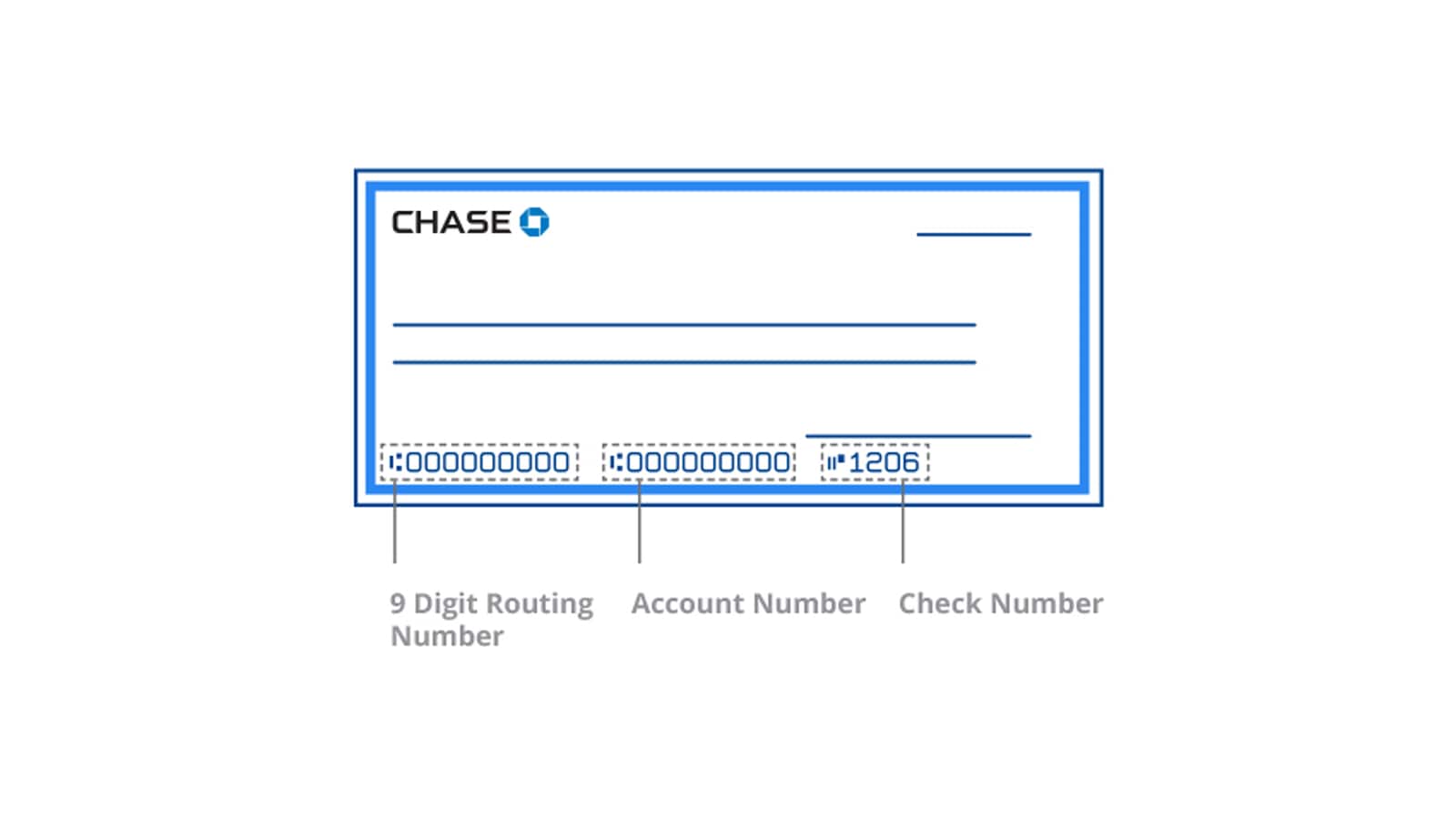
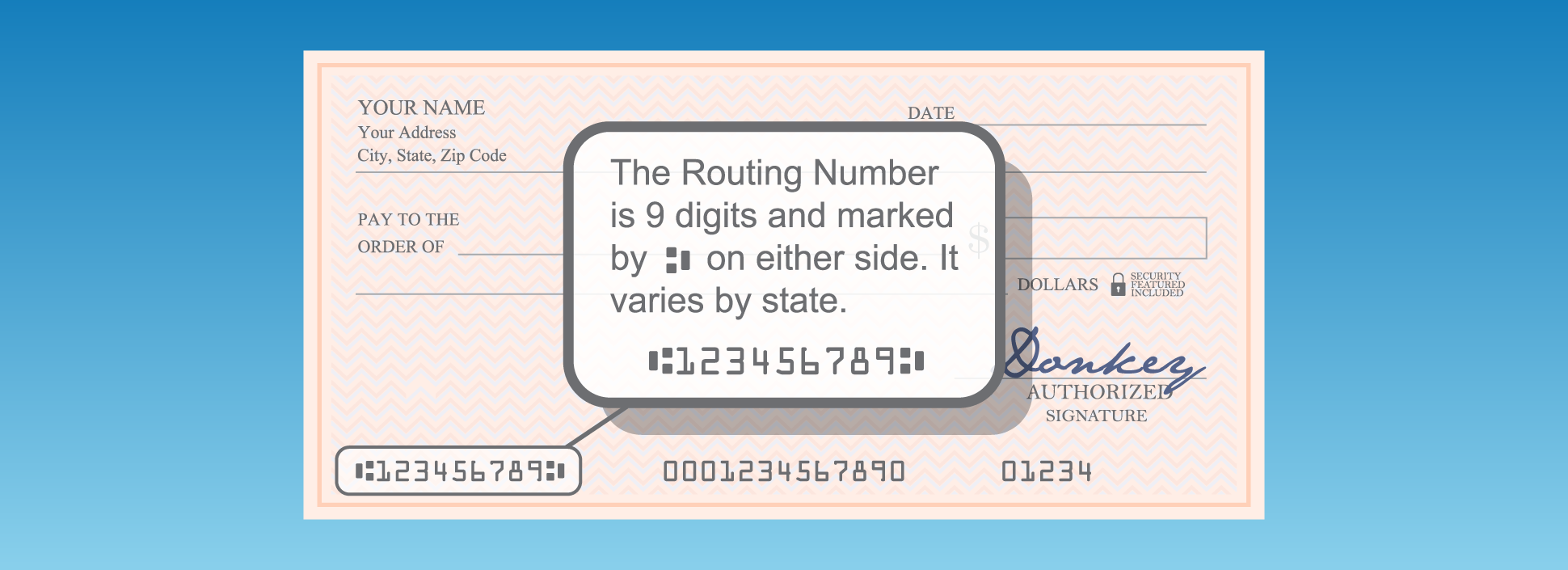
- Locating the Numbers: Look at the bottom of any personalized Chase check. You will find a sequence of numbers printed in magnetic ink.
- The first set of numbers on the left (usually nine digits) is your routing number.
- The second set of numbers (typically 10-12 digits) is your account number.
- The third set, which follows your account number, is the check number (this is not relevant for identifying your account).
- Using a Voided Check: Many institutions and employers require a “voided check” for direct deposit or automatic payments. To void a check, simply write “VOID” in large letters across the front of a blank check. This renders the check unusable for payment but clearly displays your routing and account numbers for reference. Always use a blank check that hasn’t been written to anyone, and keep the voided check for your records or submit it as requested.
Deciphering Your Monthly Bank Statements
Chase sends out monthly statements detailing your account activity. These statements are a comprehensive record and reliably contain your account number.
- Online Statements: If you’ve opted for paperless statements, you can access these through your Chase Online account.
- Log in to Chase.com.
- Navigate to the specific account.
- Look for a “Statements” or “Documents” section.
- Select the most recent statement (or any statement from the past year).
- Once the PDF statement loads, your full account number will typically be displayed near the top, usually below your name and address, or in the account summary section.
- Paper Statements: If you receive paper statements by mail, simply locate your most recent statement. Your account number will be clearly printed, usually in the upper section of the first page, near your personal details and the account summary. Be sure to keep physical statements in a secure location to protect your privacy.
When All Else Fails: Direct Assistance from Chase
If you’ve exhausted the digital and traditional methods, or if you encounter any issues accessing your information, contacting Chase directly is always a viable and secure option. Their customer service channels are equipped to assist you.
Contacting Chase Customer Service
Chase’s customer service representatives can verify your identity and provide your account number over the phone.
- Prepare for Verification: Before calling, have some personal identification details ready. This might include your full name, address, date of birth, the last four digits of your Social Security Number, and possibly answers to security questions you’ve set up with Chase. This is crucial for them to verify your identity and protect your account.
- Find the Correct Number: The primary customer service number for Chase can be found on the back of your debit card, on your bank statement, or on the official Chase.com website under “Contact Us.”
- For general inquiries: 1-800-935-9935
- There may be specific numbers for different account types (e.g., credit cards, business accounts), so verify the most appropriate one for your needs.
- Speak to a Representative: Follow the automated prompts to reach a customer service representative. Explain that you need your account number and be prepared to go through the identity verification process.
- Note Down Information Securely: Once your identity is verified, the representative will provide your account number. Make sure to write it down accurately and store it in a secure place. Avoid writing it on easily accessible notes or sharing it verbally in public.
Visiting a Local Chase Branch
For those who prefer face-to-face interaction or need additional assistance, a visit to a Chase branch is an excellent option.
- Locate a Branch: Use the Chase website or mobile app’s branch locator feature to find the nearest Chase branch.
- Bring Identification: When visiting a branch, always bring a valid government-issued photo ID (e.g., driver’s license, passport) and potentially your Chase debit card. This is essential for the bank staff to verify your identity.
- Speak with a Teller or Personal Banker: Inform the staff that you need to retrieve your account number. They will guide you through the process, which will involve identity verification.
- Assistance with Other Services: While at the branch, you can also inquire about other services, such as ordering new checks, setting up direct deposit forms, or addressing any other banking questions you might have. This personal touch can be reassuring and efficient for complex inquiries.
Ensuring Security and Accuracy
While knowing how to find your account number is vital, equally important are the measures you take to protect this sensitive information and ensure its accuracy in transactions.
Safeguarding Your Financial Information
Your account number, along with your routing number and other personal details, is a key to your financial accounts. Treat it with the utmost care.
- Keep it Private: Never share your account number, especially online or over the phone, unless you are absolutely certain of the recipient’s legitimacy and the necessity of providing it. Chase or any legitimate institution will never ask for your full account number via unsolicited email or text message.
- Secure Storage: If you must write down your account number, store it in a secure location, like a locked drawer or a password-protected digital vault, not in plain sight or easily accessible files.
- Beware of Phishing: Be vigilant against phishing attempts. Scammers often try to trick you into revealing your account details by impersonating banks or other reputable organizations. Always verify the sender and the legitimacy of the request.
- Shred Old Documents: Before discarding old bank statements, voided checks, or any documents containing your account number, shred them to prevent identity theft.
- Monitor Your Accounts: Regularly check your Chase account statements and transaction history for any unauthorized activity. Promptly report any suspicious transactions to Chase.
Verifying Your Account Details for Transactions
Accuracy is paramount when dealing with financial transactions. A single digit error can lead to significant delays or misdirected funds.
- Double-Check Everything: When entering your account number for direct deposit, wire transfers, or linking accounts, always double-check every digit. A quick review can prevent costly mistakes.
- Use Official Sources: Whenever possible, retrieve your account number directly from official Chase sources (website, app, statements) rather than relying on old notes that might be outdated or incorrect.
- Confirm with Recipient: For significant transactions like wire transfers, it’s often wise to confirm the recipient’s full bank details (including routing and account numbers) through a secondary, trusted communication channel (e.g., a phone call after receiving details via email) to guard against fraud.
In conclusion, knowing how to see your Chase account number through various channels—online, via the mobile app, on checks, statements, or by contacting customer service—is a fundamental aspect of effective personal finance management. By understanding its importance, utilizing available resources, and adhering to robust security practices, you can ensure your financial transactions are always smooth, secure, and accurate.
aViewFromTheCave is a participant in the Amazon Services LLC Associates Program, an affiliate advertising program designed to provide a means for sites to earn advertising fees by advertising and linking to Amazon.com. Amazon, the Amazon logo, AmazonSupply, and the AmazonSupply logo are trademarks of Amazon.com, Inc. or its affiliates. As an Amazon Associate we earn affiliate commissions from qualifying purchases.