
Fractions are fundamental building blocks of mathematics, representing parts of a whole. While conceptually straightforward, working with them – especially reducing them to their simplest form – can sometimes be a tedious task without the right tools. Enter the modern calculator: a ubiquitous gadget that has revolutionized how we approach numerical computations. Far from being a mere number cruncher, today’s scientific and graphing calculators possess sophisticated functions designed to simplify complex mathematical operations, including the reduction of fractions. This guide delves into the essence of fraction reduction, explores the technological prowess of various calculators, and provides a clear, step-by-step approach to mastering this essential skill. Whether you’re a student grappling with homework, an engineer performing calculations, or simply someone looking to sharpen their mathematical proficiency, understanding how to leverage your calculator for fraction reduction can significantly enhance efficiency and accuracy.
The Foundation: Understanding Fractions and Reduction
Before we dive into the technological methods, a solid understanding of fractions themselves and the concept of reduction is paramount. A calculator is a tool; knowing why and what it’s doing empowers you to use it more effectively and troubleshoot when necessary.
What is a Fraction?
At its core, a fraction represents a part of a whole. It’s written as a ratio of two numbers, the numerator (the top number) and the denominator (the bottom number). For example, in the fraction 3/4, ‘3’ is the numerator, indicating three parts, and ‘4’ is the denominator, indicating the total number of equal parts the whole is divided into. Fractions can be proper (numerator smaller than the denominator, e.g., 1/2), improper (numerator equal to or greater than the denominator, e.g., 5/4), or mixed numbers (a whole number and a proper fraction combined, e.g., 1 1/4). Each form serves a specific purpose, but often, especially in final answers, proper fractions are preferred, or improper fractions are converted to mixed numbers.
The Concept of Fraction Reduction
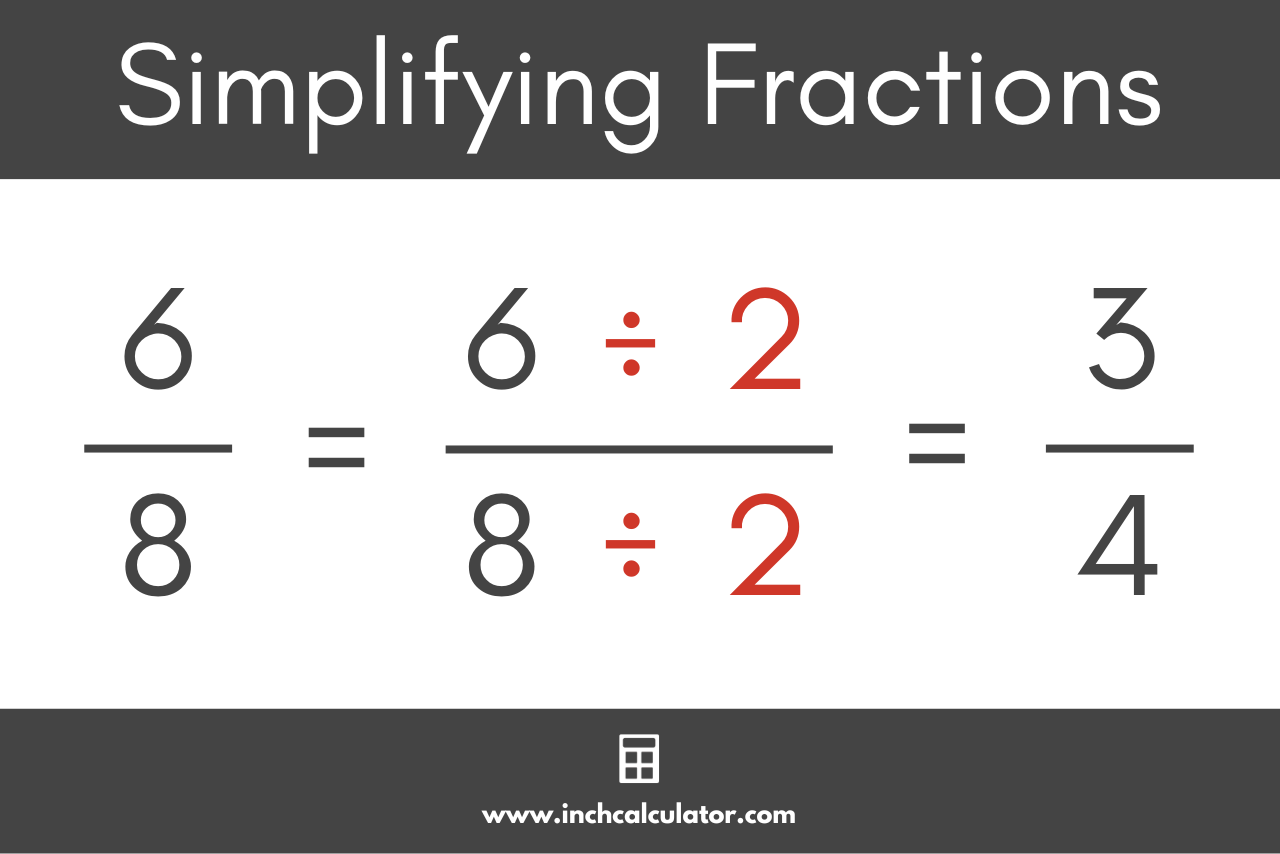
Fraction reduction, also known as simplifying or putting a fraction in its lowest terms, means rewriting a fraction so that its numerator and denominator have no common factors other than 1. For instance, 4/8 can be reduced to 1/2 because both 4 and 8 are divisible by 4. The underlying principle is the division of both the numerator and the denominator by their Greatest Common Divisor (GCD). The GCD is the largest positive integer that divides two or more integers without leaving a remainder. Finding the GCD for smaller numbers might be simple by inspection, but for larger numbers, it can become a time-consuming exercise. This is precisely where the calculator becomes an invaluable ally, automating this otherwise manual process.
Why Reduce Fractions?
The act of reducing a fraction isn’t just an academic exercise; it serves several practical purposes. Firstly, it simplifies the fraction, making it easier to understand and work with. A fraction like 25/100 is less intuitive than 1/4, even though they represent the same value. Secondly, reducing fractions ensures consistency in mathematical expressions, providing a standard form for answers, which is crucial in various fields from engineering to finance. Lastly, simplified fractions prevent unnecessary complexity in subsequent calculations. Adding 1/2 + 1/3 is much simpler than adding 4/8 + 3/9, even though the latter pairs could be equivalent before reduction. The ability to quickly and accurately reduce fractions is a cornerstone of mathematical fluency.
The Calculator’s Role in Mathematical Operations
The calculator, in its various forms, has dramatically transformed how individuals interact with numbers. From basic arithmetic to advanced calculus, these electronic devices have made complex computations accessible, efficient, and less prone to human error. When it comes to fractions, modern calculators bring a suite of dedicated functionalities that streamline what was once a laborious manual process.
Evolution of Calculators
Calculators have come a long way from their mechanical predecessors. The digital age brought us basic four-function calculators, followed by scientific calculators capable of trigonometric, logarithmic, and statistical functions. Graphing calculators emerged as powerful educational tools, visualizing equations and data. Today, we also have advanced online calculators and mobile apps that leverage the processing power of computers and smartphones. Each iteration has aimed to enhance user experience and computational capability, with fraction handling often a key feature in scientific and graphing models. Early calculators might have only handled fractions by converting them to decimals, but current models often treat them as distinct numerical entities, preserving their form.
Basic Fraction Input Methods
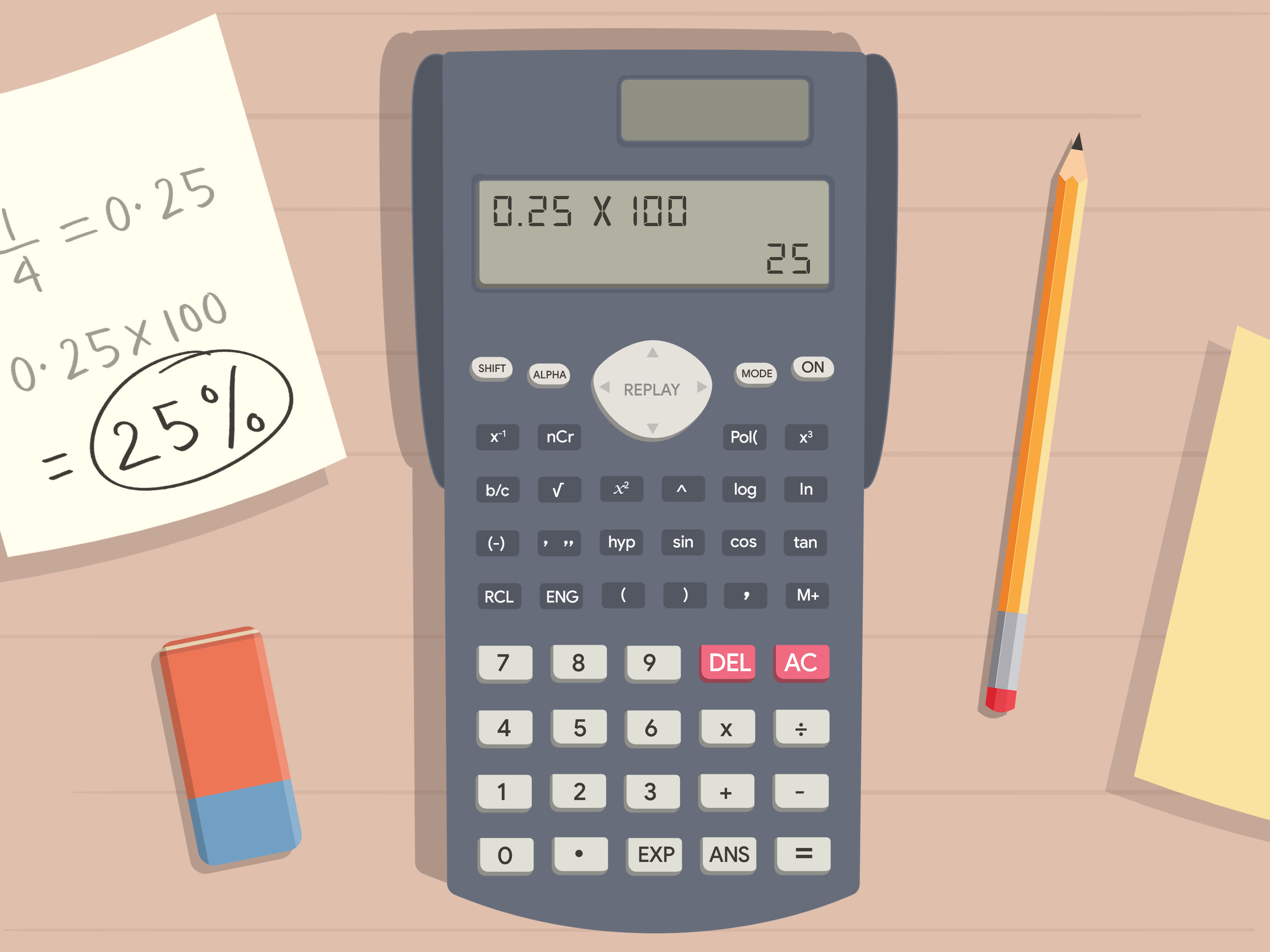
For many modern scientific and graphing calculators, inputting fractions is straightforward. The most common method involves a dedicated fraction key, often labeled a b/c or d/c. To enter a simple fraction like 3/4, you would typically press 3, then the a b/c key, then 4. For mixed numbers, like 1 1/2, you might press 1, then a b/c, then 1, then a b/c again, then 2. Some advanced calculators (especially graphing ones like TI-83/84) offer a visual fraction template, accessed via key combinations (e.g., ALPHA then Y= on TI), which displays the fraction with numerator above the denominator, making input highly intuitive. This direct input is crucial because it tells the calculator to treat the numbers as a fraction, not just a division problem that might immediately yield a decimal.
The Power of Dedicated Fraction Functions
The true power for fraction reduction lies in the calculator’s dedicated fraction functions. Many scientific calculators are designed to automatically reduce fractions to their simplest form upon input or after an operation. If you input 4 a b/c 8, the display might immediately show 1 a b/c 2. If not automatic, there’s usually a specific key or sequence to trigger reduction. For instance, after performing an operation that results in an unsimplified fraction (e.g., adding 1/4 + 1/4 resulting in 2/4), pressing SHIFT then a b/c (or a similar ‘simplify’ function) will reduce it to 1/2. Graphing calculators often have a MATH menu with a FRAC option, which converts a decimal or an unsimplified fraction to its lowest-terms fractional equivalent. These functions eliminate the need for manual GCD calculation, significantly reducing the potential for error and speeding up computations.
Step-by-Step Guide: Reducing Fractions on Different Calculators
While the core principle remains the same, the exact keystrokes for reducing fractions can vary depending on the calculator model and brand. This section outlines common procedures for some popular types.
Scientific Calculators (e.g., Casio fx-series, Texas Instruments TI-30X)
Scientific calculators are the workhorses for many students and professionals due to their balance of functionality and affordability.
-
Inputting Fractions: Most scientific calculators feature an
a b/ckey (sometimesS<>Dorx/y).-
To enter a proper or improper fraction (e.g., 4/8): Press
4, thena b/c, then8. -
To enter a mixed number (e.g., 1 2/4): Press
1, thena b/c, then2, thena b/c, then4.
-
-
Automatic Reduction: Many modern scientific calculators will automatically reduce the fraction to its lowest terms immediately after you input it and press
=, or after you perform an operation. So, entering4 a b/c 8 =might directly display1 a b/c 2. -
Manual Reduction/Simplification Key: If automatic reduction doesn’t occur, or if you perform an operation that results in an unsimplified fraction (e.g., 1/4 + 1/4 = 2/4), you’ll need to use a dedicated simplification function.
-
Look for a key often labeled
SIMP,SHIFTa b/c,F<>D(Fraction to Decimal and vice-versa), or an arrow pointing left and right↔. -
Typically, you’d input your fraction or perform the operation, then press the
SIMPkey orSHIFT+a b/cto reduce it. Some calculators might require you to repeatedly press the simplification key until no further reduction is possible.
-
-
Handling Improper Fractions and Mixed Numbers: Most calculators can seamlessly switch between improper fractions and mixed numbers. Often, this is done by pressing
SHIFTfollowed by thea b/ckey if it’s dual-labeled ford/c(improper to mixed) ora b/c(mixed to improper).
Graphing Calculators (e.g., TI-83, TI-84, Casio fx-CG series)
Graphing calculators offer more advanced interfaces, often with menu-driven functions and visual displays.
-
Fraction Template Input (TI-series):
-
To get a visual fraction template, press
ALPHAfollowed byY=(which often hasF1orn/dabove it). Select option 1:n/d. -
This will display a fraction template with placeholders for the numerator and denominator. Use the arrow keys to navigate and enter your values (e.g.,
4in the top,8in the bottom). PressENTER.
-
-
Reducing Fractions using the MATH Menu (TI-series):
-
After inputting your unsimplified fraction or performing an operation that results in a decimal, press the
MATHbutton. -
Select option 1:
►Frac(meaning “to fraction”). -
The calculator will convert the displayed number (be it a decimal or an unsimplified fraction from a previous calculation) into its simplest fractional form. For example, if your screen shows
0.5, pressingMATH, then1, thenENTERwill display1/2. If you’ve entered4/8using the template, it will automatically simplify to1/2when you pressENTER. If it’s2/4,MATHthen1thenENTERwill simplify to1/2.
-
-
Casio fx-CG series: These calculators often have a similar
a b/ckey as scientific calculators, and they typically reduce automatically. They also feature dedicated menus or aMATHmenu for fraction conversions and simplifications.
Online Calculators and Apps
Numerous websites and mobile applications offer fraction calculators, often with very intuitive interfaces.
-
Dedicated Fraction Calculators: Many online tools (e.g., Wolfram Alpha, Mathway, basic fraction calculators) allow you to input fractions directly into dedicated fields for numerator and denominator. They almost always reduce the fraction automatically upon calculation or pressing “simplify.”
-
Advantages: User-friendly interfaces, often free, and accessible on any internet-enabled device. Great for quick checks or when a physical calculator isn’t handy.
-
Limitations: Requires internet access. May not integrate as seamlessly into a classroom or professional exam setting where specific physical calculators are mandated. They can also sometimes lack the deeper understanding and troubleshooting insights a user gains from interacting with a physical device.
Beyond Simple Reduction: Advanced Fraction Operations and Tips
While reducing fractions is a primary use case, understanding the full spectrum of calculator capabilities for fractions can unlock greater efficiency and deeper mathematical insights.
Operations with Fractions and Calculator Use
Calculators excel at performing arithmetic operations (addition, subtraction, multiplication, division) with fractions. Instead of finding common denominators manually, you simply input the fractions and the desired operation.
-
Addition/Subtraction: Input
(1 a b/c 2) + (1 a b/c 3) =. The calculator will output the simplified sum (e.g.,5 a b/c 6). -
Multiplication/Division: Input
(2 a b/c 3) * (3 a b/c 4) =. The calculator will multiply and simplify (e.g.,1 a b/c 2).
This functionality is invaluable for saving time and reducing errors in multi-step problems.
Converting Between Fraction, Decimal, and Mixed Number Forms
Modern calculators offer seamless conversion between these three forms, which is incredibly useful depending on the context of the problem.
-
Fraction to Decimal: Simply perform the division. For
1/2, press1 ÷ 2 =. The result will be0.5. Many calculators also have anS↔D(Scientific to Decimal) orF↔D(Fraction to Decimal) button to toggle between fractional and decimal displays of the same number. -
Decimal to Fraction: Input the decimal (e.g.,
0.75), then use theMATHmenu►Fracon graphing calculators, orSHIFT+a b/c(if it’s a dual-function key) on scientific calculators. This will convert0.75to3/4. -
Improper Fraction to Mixed Number and Vice Versa: As mentioned, the
SHIFT+a b/ckey often toggles between these forms. For example,7 a b/c 4might display1 3/4(mixed number) if toggled, or7/4(improper fraction) if toggled back.
Troubleshooting Common Calculator Errors
Even with advanced calculators, users might encounter issues.
-
Syntax Error: Often occurs when inputting an operation incorrectly (e.g., too many parentheses, missing operands). Review your input sequence carefully.
-
MATH ERROR / DIVIDE BY ZERO: Happens if you attempt to divide by zero, which is undefined. Check your denominator.
-
Non-Reducing Fractions: If your calculator isn’t reducing a fraction you expect it to, ensure you’re using the correct “simplify” function or that the fraction isn’t already in its lowest terms. Sometimes, a very large fraction might take a moment to process, or the calculator might only show the first few factors simplified. In rare cases, a very large number might exceed the calculator’s internal precision, resulting in an approximation rather than an exact fraction.
-
Decimal Output Instead of Fraction: Ensure you’re pressing the correct “to fraction” key (
MATH►FracorSHIFTa b/c). If the calculator outputs a repeating decimal, it may not be able to represent it as a simple fraction exactly, especially if the decimal is very long or irrational.
When Manual Reduction is Still Necessary
While calculators are incredibly powerful, it’s crucial not to become overly reliant on them without understanding the underlying mathematics.
-
Understanding the ‘Why’: Knowing how to find the GCD and manually reduce fractions builds number sense and mathematical intuition. It helps you verify calculator outputs and understand the principles at play.
-
Mental Math & Estimation: For simpler fractions, mental reduction is often faster than reaching for a calculator.
-
Exam Conditions: In some exams, calculator use might be restricted, or specific steps of reduction might need to be shown. A solid manual skill is indispensable.
-
Conceptual Learning: The process of reduction itself reinforces concepts of factors, multiples, and common divisors, which are foundational in mathematics.
Choosing the Right Calculator for Your Needs
The market offers a vast array of calculators, each designed with different user needs in mind. Selecting the appropriate device can significantly impact your efficiency and learning experience.
Factors to Consider
-
Purpose: Are you a high school student, a university engineering major, a finance professional, or just need a basic tool for household calculations? Simple arithmetic calculators suffice for basic needs, scientific calculators are excellent for algebra and trigonometry, while graphing calculators are indispensable for calculus, statistics, and advanced visualization.
-
User Level: Beginners might prefer simpler interfaces with clearly labeled fraction keys. Advanced users might appreciate programming capabilities and extensive function menus.
-
Features: Beyond fraction reduction, consider other essential functions you might need: trigonometry, logarithms, statistics, complex numbers, matrices, graphing capabilities, equation solvers, and unit conversions.
-
Budget: Calculators range from under $10 for basic models to over $100 for high-end graphing calculators. Determine what features are essential versus what might be overkill for your budget.
-
Exam Compliance: If you’re a student, always check what calculator models are permitted for specific exams (e.g., SAT, ACT, AP, professional licensure exams).
Recommendations for Students and Professionals
-
For Middle/High School Students: A good scientific calculator (e.g., Casio fx-115ES PLUS, TI-30X IIS) is usually sufficient. They handle fractions, basic algebra, and some statistics, offering excellent value.
-
For College Students (Math, Science, Engineering): A graphing calculator (e.g., TI-84 Plus CE, Casio fx-CG50) is often required or highly recommended. They offer advanced graphing, calculus features, and programming capabilities.
-
For Professionals: Depending on the field, a scientific calculator might be enough, or specialized financial calculators (e.g., HP 12c) might be more appropriate. Engineers often use advanced scientific or graphing calculators for complex problem-solving.
-
For Casual Use: Online calculators and smartphone apps are often the most convenient and free options for quick fraction reductions or everyday math.

Integrating Calculators into a Digital Workflow
In today’s increasingly digital world, calculators are evolving. Many are now capable of connecting to computers for data transfer, programming, and software updates. Online calculator platforms and educational apps are becoming more sophisticated, offering not just calculations but also step-by-step solutions and interactive learning experiences. Integrating these tools effectively can enhance productivity, facilitate collaborative learning, and provide access to powerful computational resources wherever you are. Understanding how to use your calculator efficiently, including for fraction reduction, is a key component of this digital literacy.
In conclusion, reducing fractions on a calculator is a simple yet powerful skill that leverages modern technology to streamline mathematical processes. By understanding the underlying concepts of fractions and their reduction, and by familiarizing yourself with the specific functions of your chosen calculator, you can significantly enhance your computational accuracy and efficiency. Whether through dedicated fraction keys on scientific calculators, visual templates on graphing calculators, or intuitive interfaces on online platforms, these tools empower users to master fraction operations with ease. Choosing the right calculator and integrating it effectively into your workflow ensures that you are well-equipped to tackle mathematical challenges, from the simplest simplification to the most complex equations.
aViewFromTheCave is a participant in the Amazon Services LLC Associates Program, an affiliate advertising program designed to provide a means for sites to earn advertising fees by advertising and linking to Amazon.com. Amazon, the Amazon logo, AmazonSupply, and the AmazonSupply logo are trademarks of Amazon.com, Inc. or its affiliates. As an Amazon Associate we earn affiliate commissions from qualifying purchases.