
In an increasingly digital financial landscape, tools like Apple Pay have become indispensable for managing personal funds and streamlining transactions. Far more than just a convenient way to pay, Apple Pay — particularly its integrated Apple Cash feature — offers a robust platform for handling money directly from your iPhone, Apple Watch, iPad, or Mac. Understanding how to effectively “put money into” this ecosystem is crucial for leveraging its full potential in your personal finance strategy, from daily spending to peer-to-peer payments.
Understanding Apple Pay’s Financial Ecosystem
To effectively put money into Apple Pay, it’s essential to first differentiate between Apple Pay itself and Apple Cash. While often used interchangeably, they serve distinct yet complementary functions within your digital wallet, each contributing to how you manage your funds.

Apple Pay vs. Apple Cash: The Distinction for Your Wallet
Apple Pay is the secure digital payment service that allows you to make purchases in stores, within apps, and on the web using a linked credit or debit card. When you use Apple Pay, you are not literally “putting money into” Apple Pay itself; rather, you are authorizing a transaction using the funds from your existing bank account or credit line that is linked to a card in your Wallet app. Your card details are never shared with merchants, providing an enhanced layer of security over traditional card payments.
Apple Cash, on the other hand, is a digital debit card stored in your Wallet app. This is where you can actually “put money” directly. It functions much like a prepaid debit card, allowing you to hold a balance that can be used for purchases anywhere Apple Pay is accepted, or to send money to friends and family directly through Messages. Funds in Apple Cash are held by Green Dot Bank, Member FDIC, and are linked to your Apple ID. This distinction is critical: if your goal is to have a usable balance within Apple’s financial tools, Apple Cash is the feature you’ll be interacting with.
Benefits of Using Apple Pay for Personal Finance
Integrating Apple Pay and Apple Cash into your financial routine offers several tangible benefits:
- Enhanced Security: Your actual card numbers are never stored on your device or Apple servers, nor are they shared with merchants. Instead, a unique, encrypted Device Account Number is used for each transaction, significantly reducing the risk of fraud.
- Convenience and Speed: Making payments is quicker and easier, often requiring just a glance or touch with Face ID or Touch ID. This streamlines daily transactions, saving time and effort.
- Transaction Tracking: All Apple Pay transactions, including those from Apple Cash, are recorded in your Wallet app, providing a clear history that can aid in budgeting and expense tracking.
- Seamless Peer-to-Peer Payments: Apple Cash simplifies sending and receiving money with contacts, making it effortless to split bills, send allowances, or repay friends.
Practical Steps to Fund Your Apple Cash Account
If you aim to have a spendable balance directly within Apple Pay’s ecosystem, your focus will be on funding your Apple Cash card. There are a few primary methods to achieve this, each offering flexibility depending on your immediate needs.
Adding Funds from Your Bank Account
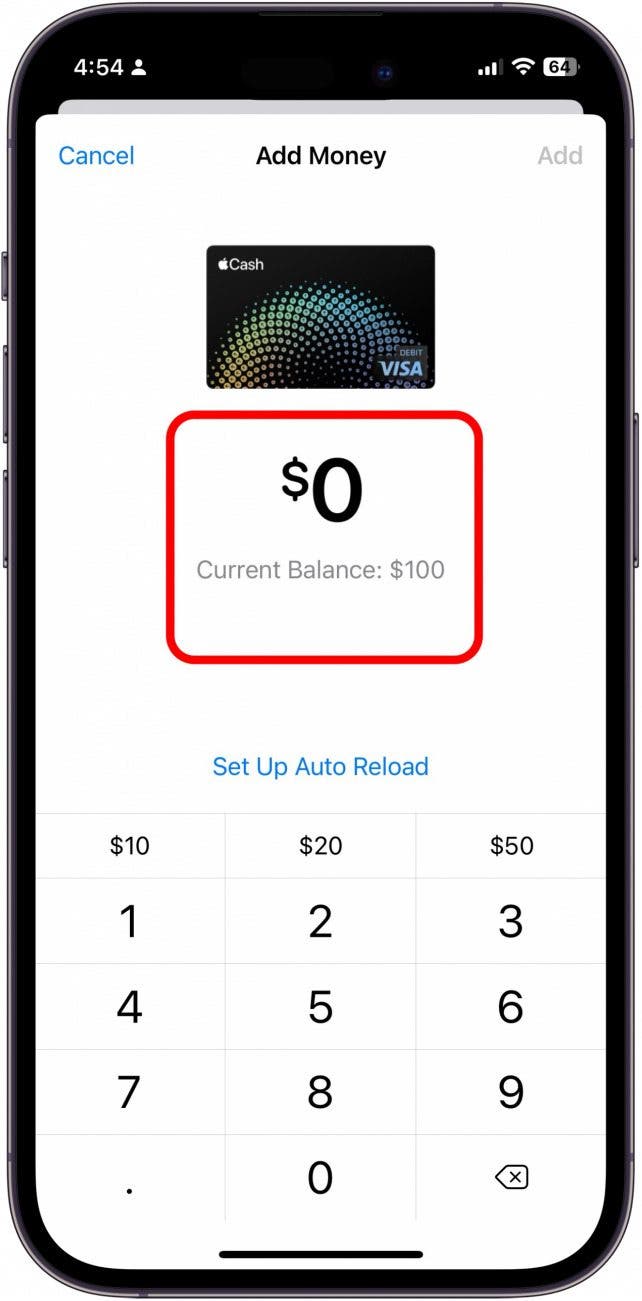
The most direct way to put money into your Apple Cash account is by transferring funds from a linked debit card. This effectively moves money from your traditional bank account into your digital wallet.
- Open the Wallet App: Locate and tap the Wallet app icon on your iPhone.
- Select Apple Cash: Tap on your Apple Cash card within the Wallet app.
- Tap the “More” Button: This is usually represented by three dots in a circle (…).
- Choose “Add Money”: Select this option from the menu.
- Enter Amount: Input the desired amount you wish to add to your Apple Cash balance. There are typically minimum and maximum limits for transfers.
- Select Funding Source: Choose the debit card you wish to transfer money from. If you haven’t added a debit card yet, you’ll be prompted to do so. Only debit cards can be used to add money to Apple Cash; credit cards are not supported for this function.
- Confirm with Face ID/Touch ID/Passcode: Authorize the transfer using your device’s security features.
Funds are usually available in your Apple Cash account instantly, making it a quick way to top up your balance for immediate use.
Receiving Money from Others (Person-to-Person Payments)
A significant feature of Apple Cash is its integration with Apple Messages, allowing for easy peer-to-peer payments. When someone sends you money through Messages, those funds automatically deposit into your Apple Cash account.
- Receive a Payment: When a contact sends you money via Apple Cash in the Messages app, you’ll receive a notification.
- Accept the Payment: Tap on the message containing the payment. If it’s your first time receiving Apple Cash, you might need to accept the terms and conditions and set up your Apple Cash card.
- Funds Deposit Automatically: Once accepted, the money is immediately added to your Apple Cash balance, ready for use. This method is incredibly convenient for splitting dinner bills, sharing costs, or receiving quick reimbursements.
Transferring Money from a Linked Debit Card
This method is essentially a reiteration of adding funds from your bank account, but it emphasizes the role of your existing debit card as the conduit. It’s important to ensure your primary debit card (the one linked to your checking account) is properly set up in the Wallet app to facilitate these transfers smoothly. The process is identical to the “Add Money” steps outlined above, relying on your debit card as the source.
Managing Your Funds and Security within Apple Pay
Beyond simply putting money in, effective financial management with Apple Pay also involves understanding how to use your linked cards for transactions and ensuring the security of your digital wallet.
Linking Debit and Credit Cards for Transactions
While you can’t “put money into” a credit card in Apple Pay, adding your credit and debit cards is fundamental to using Apple Pay for purchases. This enables you to pay directly from your linked accounts without relying on an Apple Cash balance.
- Open the Wallet App: Tap the Wallet app icon.
- Tap the “+” Button: Usually found in the top-right corner, this allows you to add a new card.
- Choose Card Type: Select “Debit or Credit Card.”
- Scan or Enter Details: Position your card in the frame to automatically scan its details, or manually enter the card number, expiration date, and security code.
- Verify with Your Bank: Your bank may require an additional verification step, such as entering a code sent via SMS or email, or logging into your banking app.
Once verified, your card is ready for use with Apple Pay. Remember, transactions using these cards draw directly from their respective accounts, bypassing your Apple Cash balance unless you specifically choose Apple Cash as your payment method.
Monitoring Your Apple Cash Balance and Transaction History
Keeping an eye on your Apple Cash balance and reviewing your transaction history is crucial for sound financial management.
- View Balance: Your current Apple Cash balance is always visible at the top of your Apple Cash card in the Wallet app.
- Transaction History: Tap on your Apple Cash card, then scroll down to see a detailed list of all your transactions, including money added, money sent, and purchases made. This feature is invaluable for tracking spending, reconciling statements, and adhering to your budget.
Safeguarding Your Digital Wallet
The security features of Apple Pay are robust, but user vigilance is also key to protecting your funds.
- Face ID/Touch ID/Passcode: Ensure these biometric or passcode protections are always enabled on your device. Every Apple Pay transaction requires your authorization, meaning even if your device falls into the wrong hands, your financial information remains protected.
- Device Security: Keep your iOS, iPadOS, or macOS updated to the latest version to benefit from the newest security patches.
- Lost or Stolen Device: In case your device is lost or stolen, you can use Find My iPhone to remotely suspend or remove cards from Apple Pay, or even wipe your device completely, securing your financial data.
Integrating Apple Pay into Your Financial Strategy
Understanding how to put money into and utilize Apple Pay and Apple Cash allows for deeper integration into your broader financial planning. These tools can serve as powerful enablers for everyday money management.
Everyday Spending and Budgeting
By channeling a portion of your everyday spending through Apple Pay, you can consolidate your transaction records in the Wallet app. This centralizes data that can then be used to inform your budgeting efforts. While Apple Pay doesn’t offer native budgeting tools, the clear transaction history serves as a valuable input for external budgeting apps or spreadsheets. Using Apple Cash for specific spending categories, such as daily coffee or public transport, can also help you stick to micro-budgets.
Peer-to-Peer Payments for Shared Expenses
Apple Cash significantly simplifies shared expenses. Whether splitting a restaurant bill with friends, contributing to a group gift, or sending funds to family, the ability to send and receive money directly through Messages eliminates the hassle of cash or external payment apps. This efficiency saves time and reduces friction in managing shared financial obligations.

Considerations for Digital Wallets
While highly beneficial, it’s important to view Apple Pay and Apple Cash as sophisticated financial tools, not standalone bank accounts.
- Linked Accounts Are Key: Your Apple Pay functionality relies heavily on your linked debit and credit cards and, for Apple Cash, your primary bank account.
- Transfer Limits and Fees: Be aware of any daily or transaction limits for adding money to Apple Cash or transferring funds out. Instant transfers from Apple Cash to a bank account may incur a small fee, though standard transfers typically remain free.
- Not a Savings Vehicle: Apple Cash is designed for transactional use, not for earning interest or long-term savings. Large balances are better kept in interest-bearing savings accounts.
By thoughtfully integrating “how to put money in Apple Pay” into your financial routine, you can leverage a secure, convenient, and efficient method for managing your personal funds in the digital age.
aViewFromTheCave is a participant in the Amazon Services LLC Associates Program, an affiliate advertising program designed to provide a means for sites to earn advertising fees by advertising and linking to Amazon.com. Amazon, the Amazon logo, AmazonSupply, and the AmazonSupply logo are trademarks of Amazon.com, Inc. or its affiliates. As an Amazon Associate we earn affiliate commissions from qualifying purchases.