
In the modern digital landscape, the tools we use to manage our online presence are constantly evolving. As users become more tech-savvy and privacy-conscious, the decision to decommission legacy accounts is no longer just a matter of convenience; it is a critical component of digital hygiene. PayPal, one of the pioneers of the electronic commerce era, has served as a cornerstone of online transactions for decades. However, shifts in software preferences, the rise of specialized payment gateways, and a heightened focus on data security have led many to seek a permanent exit from the platform.
Deleting a PayPal account is a technical process that requires more than a simple click of a button. It involves decoupling your digital identity from a vast network of third-party integrations, clearing encrypted data caches, and ensuring that your financial software transition is seamless. This guide provides a deep dive into the technicalities of account closure, focusing on the software interface, data retention protocols, and the security implications of managing your digital footprint.
Preparing Your Digital Workspace: Crucial Pre-Deletion Steps
Before initiating the deletion sequence, it is imperative to treat your PayPal account as a complex software node that is likely connected to various other applications. Simply deleting the account without preparation can lead to “broken” payment loops in other apps or the loss of vital transaction metadata.
Clearing Outstanding Transactions and Balances
From a technical standpoint, the PayPal database will not allow an account to be closed if there are “pending” flags in the system. This includes unresolved disputes, pending transfers, or an active balance.
First, ensure your balance is exactly zero. Any remaining funds must be transferred to a linked bank account. In the world of fintech software, these transfers are not instantaneous; they require ACH (Automated Clearing House) communication. You should wait until the status of these transfers shifts from “Pending” to “Completed” in the UI. If you have a negative balance, the software will block the deletion request until the deficit is resolved via a secondary funding source.
Decoupling Third-Party Apps and Subscriptions
One of the most overlooked aspects of deleting a fintech account is the “OAuth” and “Automatic Payment” permissions. PayPal often acts as a central hub for subscriptions like Spotify, Netflix, or cloud hosting services.
To prevent service interruptions, you must navigate to the ‘Settings’ gear icon, select ‘Payments,’ and then ‘Manage Automatic Payments.’ Here, you are essentially revoking the API permissions that allow third-party software to pull data from your PayPal vault. Manually transitioning these subscriptions to a new payment method ensures that your software ecosystem remains functional post-deletion.
Exporting Your Transaction History for Data Integrity
Once an account is deleted, your access to the user interface (UI) and the underlying database is permanently severed. For tax purposes or digital record-keeping, you must export your data.
PayPal provides a robust “Activity Download” tool. Within the reports section, you can request a CSV or TAB file containing your entire history. From a data management perspective, a CSV file is preferable as it allows for easy ingestion into personal finance software or spreadsheets for future auditing. Ensure you download this data before clicking the final “Close Account” button, as the platform does not offer a “grace period” for data retrieval once the deletion is executed.
A Technical Step-by-Step Walkthrough to Closing Your Account
The process of account closure varies depending on the platform you are using. While mobile apps offer convenience, the desktop web interface provides the most comprehensive access to the account’s backend settings.
Navigating the Desktop Interface
The most reliable way to delete your account is through a secure desktop browser. This minimizes the risk of UI glitches often found in mobile wrappers.
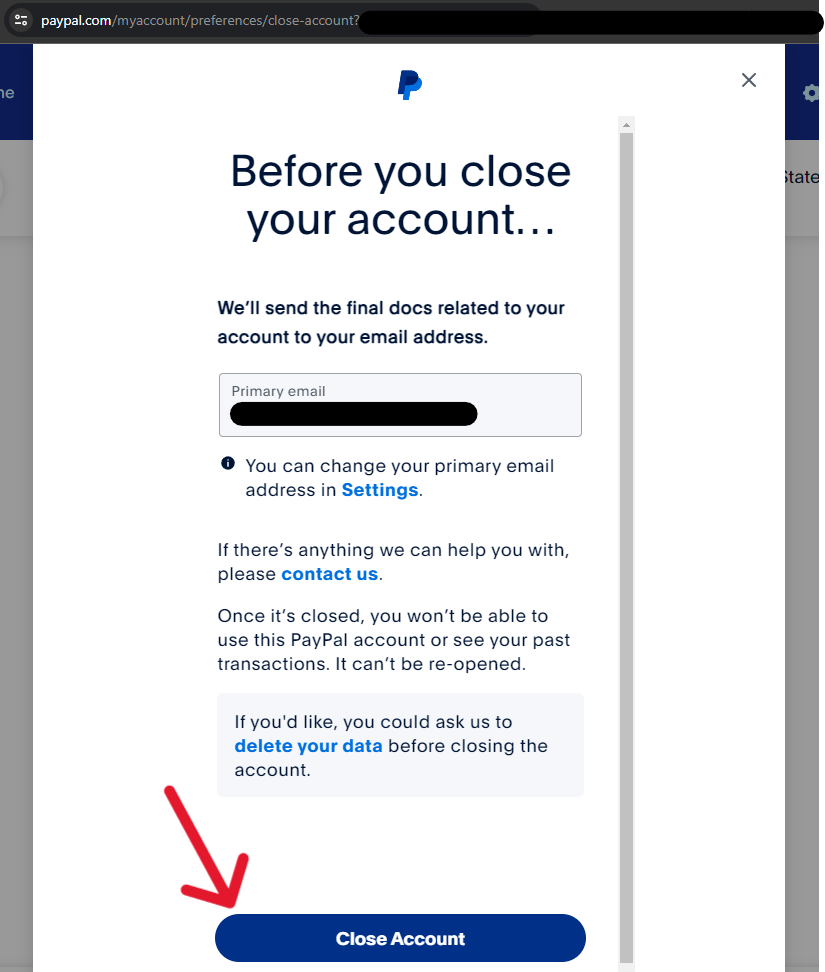
- Authentication: Log in to your account. If you have Two-Factor Authentication (2FA) enabled—which is a security best practice—ensure you have your physical security key or mobile device ready.
- Settings Access: Click on the ‘Settings’ (gear icon) located in the top right corner of the dashboard.
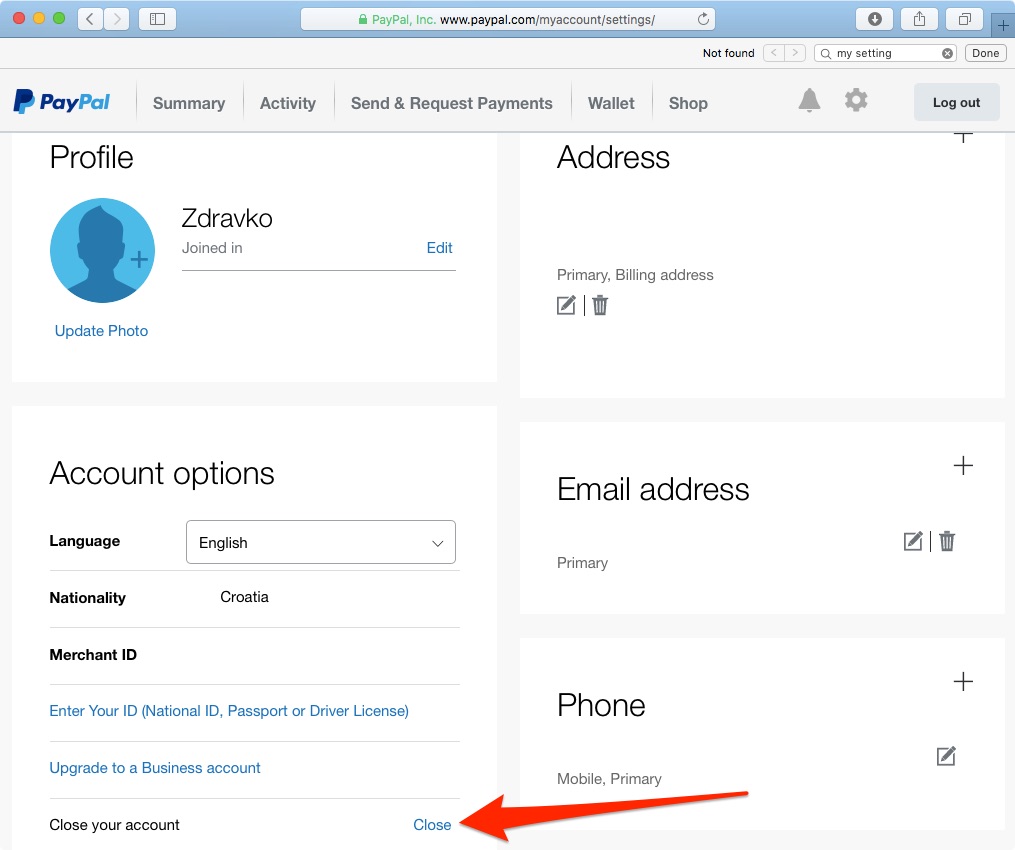
- Account Options: Scroll to the bottom of the ‘Account’ tab. You will find the “Close your account” link under the ‘Account Options’ section.
- Validation: The system will prompt you for a final confirmation. This is a failsafe designed to prevent accidental deletions. In some cases, the software may ask for a final identity verification via an SMS code or email link to ensure the request is authorized.
Mobile Limitations and Workarounds
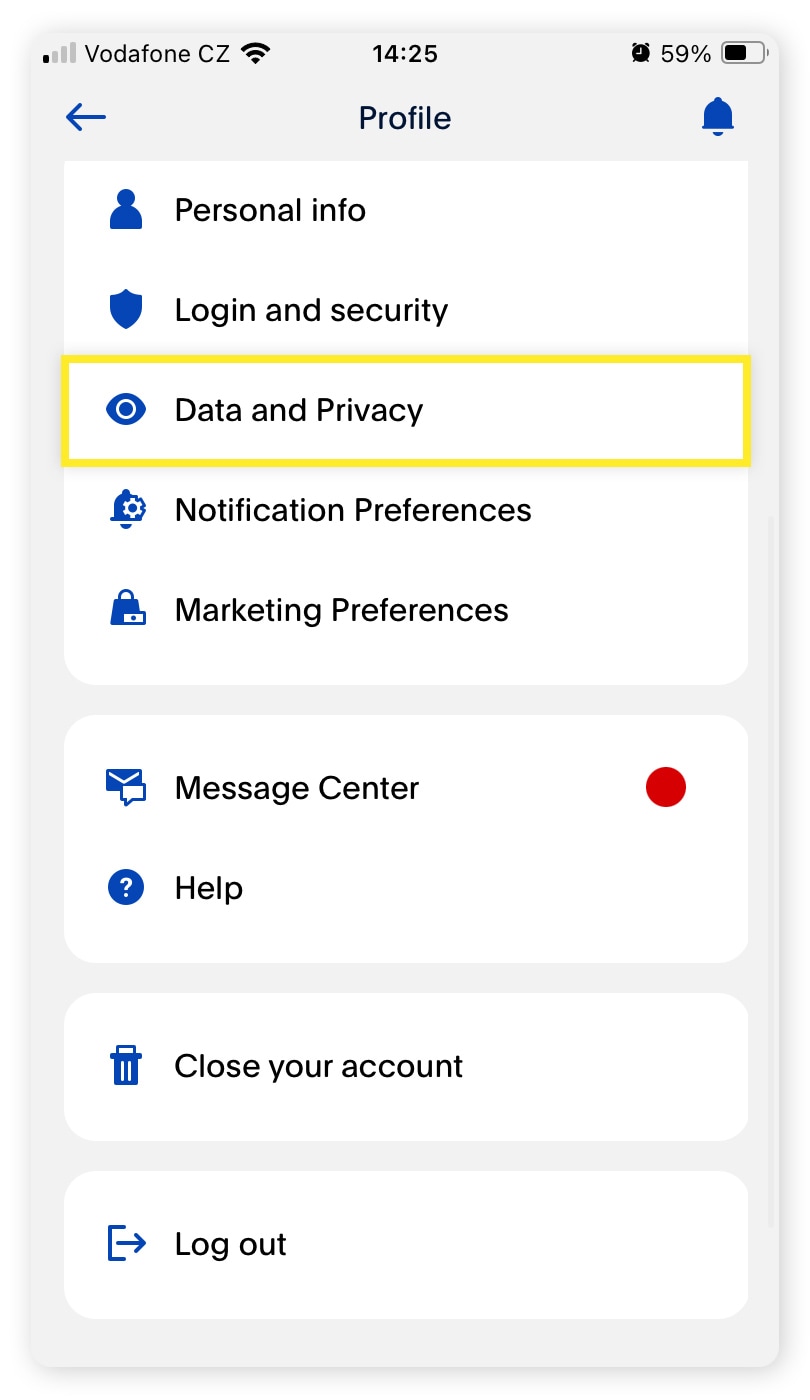
The PayPal mobile application (iOS and Android) has undergone several UI overhauls. In some versions, the “Close Account” option is buried deep within the ‘Help’ or ‘Profile’ menus, or it may redirect you to a mobile web view.
If you find that the mobile app lacks the specific “Close Account” button due to regional software variations or app versioning, the best workaround is to use your mobile device’s browser in “Desktop Mode.” This forces the server to serve the full version of the site, giving you access to the administrative tools required for total account decommissioning.
Troubleshooting Common Technical Errors During Deletion
Sometimes, the software returns an error message such as “There’s a problem with your account. Please contact us.” This typically occurs due to backend flags. Common technical triggers include:
- Active Disputes: If there is an open “Buyer Protection” claim, the database locks the account to prevent fraud.
- Unverified Identity: If your account was flagged for a security review (KYC – Know Your Customer), you may need to upload identification before the system allows you to delete the account.
- Linked Credit Lines: If you have a PayPal Credit or a linked “Buy Now, Pay Later” balance, the software architecture treats this as an active loan, preventing closure until the debt is cleared.
The Digital Security Implications of Account Deletion
Deleting your account is a major step in reducing your “attack surface”—the total number of points where an unauthorized user can try to enter a data environment. However, it is important to understand what happens to your data after you click “Confirm.”
Data Retention Policies: What Happens to Your Information?
A common misconception is that deleting an account results in the immediate and total purging of all personal data from the provider’s servers. In reality, fintech companies are subject to strict regulatory requirements, such as the GDPR (General Data Protection Regulation) in Europe and various financial record-keeping laws globally.
Even after you delete your account, PayPal is legally obligated to retain certain data (like transaction logs and identity verification) for a period of five to ten years. From a technical security perspective, this data is moved from an “active” database to a “cold storage” archive. While the data is no longer accessible via the web UI, it remains in the company’s encrypted backups to assist in anti-money laundering (AML) investigations or tax audits.
Protecting Your Identity Post-Deletion
Once the account is closed, the email address previously associated with it may eventually become eligible for a new account. To maintain your digital security:
- Remove Browser Autofill: Clear your browser’s saved passwords and autofill data for PayPal. This prevents “ghost” login attempts.
- Revoke Email Access: If you had granted PayPal access to your contact list or calendar via Google or Outlook integrations, navigate to those providers’ security settings and revoke the “PayPal” app permission.
- Monitor for Phishing: Ironically, the period immediately following an account deletion is a high-risk time for phishing. Scammers may send “Account Reactivation” emails. Remember that once an account is closed, the company will rarely reach out unless it is related to a legal or tax matter.
Exploring Modern Alternatives: Shifting to New Fintech Architectures
The decision to delete PayPal often stems from a desire to move toward more modern, specialized, or secure software stacks. The fintech industry has evolved significantly, offering several categories of alternatives.
Privacy-First Payment Platforms
For users concerned with digital tracking, several platforms now focus on “masked” or virtual cards. These tools allow you to create a unique, software-defined credit card for every merchant. This ensures that even if one merchant’s database is breached, your primary financial data remains untouched. This “tokenization” of payment info is a significant tech upgrade over the centralized model used by legacy providers.
Decentralized Finance (DeFi) Considerations
A segment of the tech community is moving away from centralized “walled garden” platforms entirely, opting for decentralized finance (DeFi) protocols. These systems use blockchain technology to facilitate peer-to-peer transfers without a central intermediary. While this offers a high level of technical autonomy and transparency, it also requires a deeper understanding of private key management and digital wallet security.
Integrated OS Wallets
For many, the move is toward deeper integration within the operating system. Apple Pay and Google Pay utilize the hardware-level security (such as the Secure Element chip in iPhones) to process transactions. This integration provides a more frictionless UI experience and higher hardware-level encryption than traditional web-based platforms.
By successfully navigating the technical hurdles of deleting a PayPal account, you take a proactive step in managing your digital identity. Whether you are streamlining your software ecosystem or enhancing your personal cybersecurity, understanding the underlying mechanics of account closure ensures that your transition to the next generation of digital tools is both secure and efficient.
aViewFromTheCave is a participant in the Amazon Services LLC Associates Program, an affiliate advertising program designed to provide a means for sites to earn advertising fees by advertising and linking to Amazon.com. Amazon, the Amazon logo, AmazonSupply, and the AmazonSupply logo are trademarks of Amazon.com, Inc. or its affiliates. As an Amazon Associate we earn affiliate commissions from qualifying purchases.