
In an increasingly digital world, the way we manage our finances and conduct transactions has undergone a profound transformation. Gone are the days when a bulky leather wallet, overflowing with cards and cash, was the only means of payment. Today, the power of secure, instant transactions resides in the palm of our hand, thanks to innovations like Google Wallet. More than just a digital stand-in for your physical cards, Google Wallet is a sophisticated application designed to streamline payments, manage digital passes, and enhance the overall convenience and security of your financial interactions. This guide will walk you through the intricacies of setting up, using, and maximizing the potential of Google Wallet, ensuring you’re well-equipped to navigate the future of digital payments.

The Evolution of Digital Payments and Google Wallet’s Role
The journey from physical currency to digital transactions has been a rapid and fascinating one, driven by technological advancements and a growing demand for convenience and security. Understanding this evolution helps to contextualize Google Wallet’s significance in the modern financial ecosystem.
From Physical Cards to Digital Wallets
For decades, credit and debit cards revolutionized commerce, offering a portable and secure alternative to cash. However, even these plastic rectangles had their limitations: susceptibility to loss, theft, and the need for physical swiping or inserting. The advent of smartphones, coupled with near-field communication (NFC) technology, paved the way for digital wallets. These applications began by merely storing digitized versions of payment cards, allowing users to tap their phones at compatible terminals. This initial step marked a fundamental shift, moving payment information from a physical medium to a secure, encrypted digital environment. Digital wallets promised not just convenience but also an added layer of security, as actual card numbers were often not transmitted during transactions.
Google Wallet’s Place in the Contactless Revolution
Google Wallet stands as a pivotal player in this contactless revolution. While Google had previous iterations like Google Pay and Android Pay, Google Wallet consolidates and refines these experiences, aiming to be a central hub for all things payment and digital identity. It leverages NFC technology to enable “tap-to-pay” functionalities, allowing users to complete transactions by simply holding their smartphone or smartwatch near a compatible payment terminal. Beyond just credit and debit cards, Google Wallet is designed to store loyalty cards, transit passes, event tickets, and even digital IDs in some regions, transforming the smartphone into a universal passkey for various aspects of daily life. Its widespread adoption is supported by the vast Android ecosystem and Google’s commitment to creating seamless user experiences across its suite of services. The ease of integration with existing payment infrastructures has propelled Google Wallet to the forefront of mainstream digital payment solutions.
Key Benefits of Embracing Digital Payment Solutions
The shift to digital wallets like Google Wallet offers a multitude of benefits that extend beyond mere convenience. For consumers, it means enhanced security through tokenization, where actual card numbers are replaced with unique encrypted tokens during transactions, significantly reducing the risk of fraud. The ability to track transactions within the app provides better financial oversight. Furthermore, the sheer speed of contactless payments reduces checkout times, improving efficiency for both shoppers and merchants. From an environmental perspective, reducing the reliance on physical plastic cards and paper receipts contributes to sustainability efforts. For businesses, accepting digital payments opens up broader customer bases and often integrates seamlessly with modern point-of-sale systems, offering valuable data insights into consumer behavior.
Setting Up Your Google Wallet for First-Time Use
Getting started with Google Wallet is a straightforward process designed to be intuitive and user-friendly. A few simple steps will transform your smartphone into a powerful payment tool.
Downloading and Installing the Google Wallet App
The first step is to ensure you have the Google Wallet app installed on your Android device. It’s readily available on the Google Play Store. Simply search for “Google Wallet” and tap “Install.” The app is designed to be lightweight and compatible with most modern Android smartphones and Wear OS smartwatches. Once installed, open the app, and you’ll be prompted to sign in with your Google Account. If you have multiple Google Accounts, ensure you select the one you wish to associate with your Wallet for ease of management and access to other Google services.
Adding Payment Methods: Cards, Passes, and More
The core functionality of Google Wallet lies in its ability to store your payment methods. To add a card:
- Open Google Wallet: Tap the “+” button, typically found at the bottom right or center of the screen.
- Select “Payment Card”: You’ll be given options like “Payment card,” “Transit pass,” “Loyalty card,” etc. Choose “Payment card.”
- Scan or Manually Enter Card Details: You can either use your phone’s camera to scan your credit or debit card, which automatically populates most of the fields, or manually enter the card number, expiration date, and CVV.
- Agree to Terms and Verify: After entering the details, your bank will require verification to ensure you are the legitimate cardholder. This usually involves receiving a one-time code via SMS, email, or a quick call to your bank. Once verified, your card is ready for use.
You can repeat this process for multiple credit, debit, and even some prepaid cards. Additionally, Google Wallet allows you to add loyalty cards from various retailers, transit passes for public transportation systems, and even digital versions of event tickets or boarding passes, streamlining access to these items.
Securing Your Wallet: Biometrics and PINs
Security is paramount for any financial tool, and Google Wallet incorporates robust features to protect your information. Before making your first payment, it’s crucial to set up a screen lock on your device. Google Wallet requires a screen lock (PIN, pattern, password, fingerprint, or face unlock) for tap-to-pay transactions. For enhanced security, enabling biometric authentication (fingerprint or face unlock) for individual transactions within the Wallet app adds an extra layer of protection, requiring your unique biometric data to authorize a payment. This ensures that even if your phone is unlocked, unauthorized individuals cannot use your stored cards without your explicit biometric consent or PIN. These security measures prevent fraudulent use and provide peace of mind.
Customizing Settings and Notifications
Google Wallet offers various customization options to tailor the experience to your preferences. Within the app’s settings, you can:
- Set a default payment method: Choose which card you prefer to use for quick tap-to-pay transactions.
- Manage notifications: Decide whether you want to receive alerts for successful transactions, promotional offers, or security updates.
- Review privacy settings: Control how your data is used and shared with Google services.
- Organize your passes: Reorder or archive old loyalty cards and tickets for easier navigation.
These settings allow you to optimize the app’s functionality and keep your digital wallet organized and secure.
Mastering the Art of Contactless Payments
With your Google Wallet set up, you’re ready to experience the convenience of contactless payments. The process is remarkably simple, yet understanding the nuances ensures a smooth experience every time.
Making In-Store Purchases with Tap-to-Pay (NFC)
The most common way to pay with Google Wallet in physical stores is through tap-to-pay, utilizing NFC technology.
- Look for the Symbols: At the checkout, look for the contactless payment symbol (four curved lines) or the Google Pay logo.
- Wake Your Phone: You typically don’t need to open the Google Wallet app. Simply wake your phone (unlock it if required by your settings, or ensure the screen is on) and hold it near the payment terminal.
- Confirm Payment: For smaller transactions, you might not need to do anything further than hold your phone. For larger transactions or if your security settings require it, you might be prompted to enter your PIN, pattern, or use your fingerprint/face to verify the purchase directly on your phone.
- Transaction Confirmation: A checkmark on your phone screen and an audible beep from the terminal will confirm a successful payment.
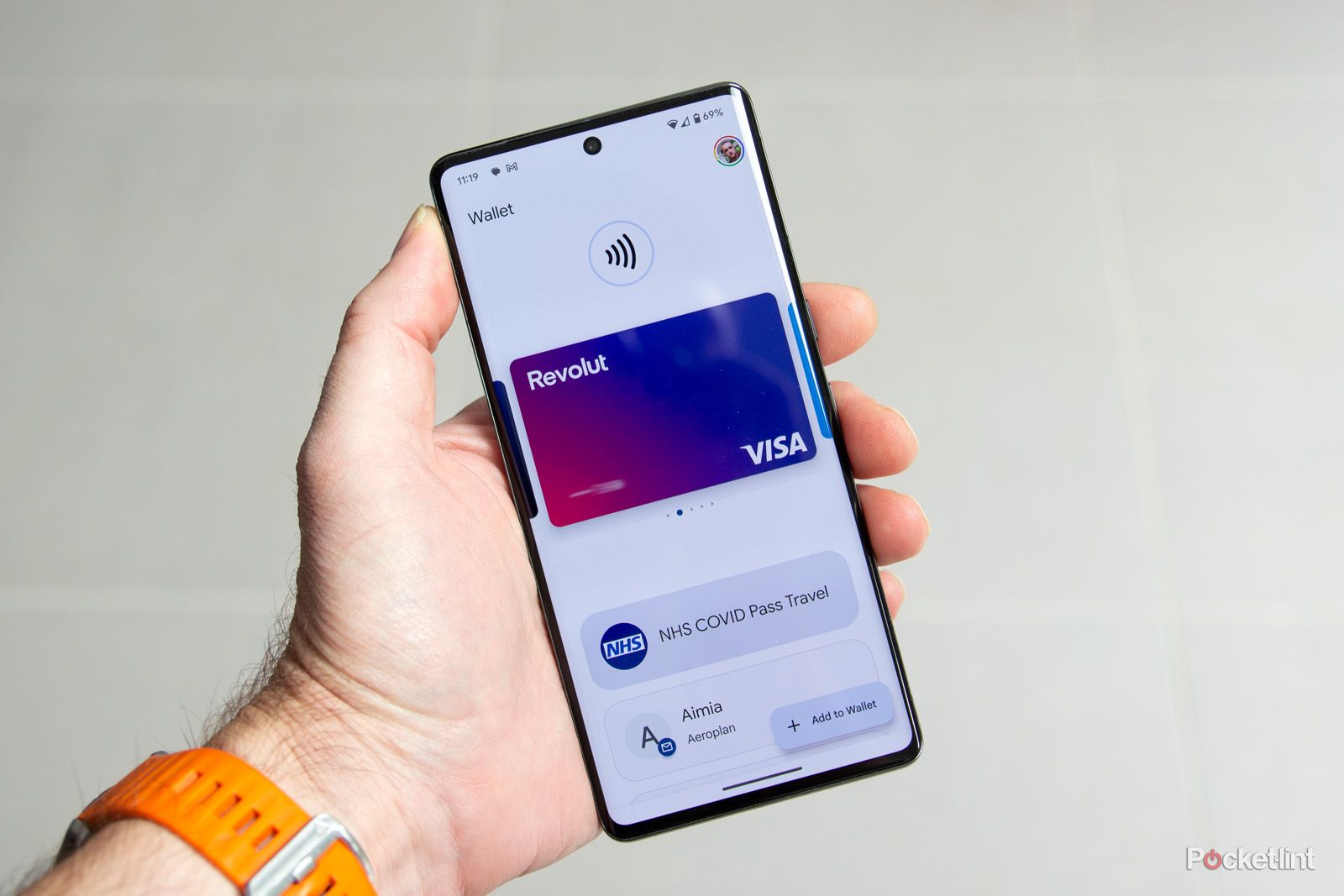
It’s important to ensure NFC is enabled in your phone’s settings for tap-to-pay to function correctly.
Paying Online and In-App with Google Pay
Beyond physical stores, Google Wallet (which integrates with Google Pay services) streamlines online and in-app purchases. When shopping online or within an app, look for the “Buy with Google Pay” button. Clicking this button will securely access your stored payment methods from your Google Wallet, allowing you to complete the purchase without manually entering card details, shipping addresses, or billing information. This not only speeds up the checkout process but also enhances security by not exposing your card details to every individual merchant. You’ll often be asked to confirm the purchase with your Google account password or biometric authentication.
Using Transit Cards and Loyalty Programs
Google Wallet extends its utility beyond primary payment cards. If you’ve added a transit card (e.g., specific metro passes) or a loyalty card to your Wallet, using them is just as easy:
- Transit Cards: For transit, simply hold your phone near the reader at the turnstile or on the bus, much like a payment card. The app can often intelligently detect it’s a transit reader and present the correct pass.
- Loyalty Cards: When prompted for a loyalty card at checkout, you can often open the Google Wallet app, select the relevant loyalty card, and either tap your phone or have the cashier scan the barcode displayed on your screen. Some systems might even automatically apply loyalty points if the payment card used is linked to the loyalty program within your Wallet.
Troubleshooting Common Payment Issues
While Google Wallet is designed for reliability, occasional issues can arise.
- “Can’t complete transaction”: Check your internet connection, ensure NFC is on, and verify your card isn’t expired or blocked.
- Terminal incompatibility: Not all terminals are NFC-enabled. Look for the contactless symbol.
- Default card not selected: If you have multiple cards, ensure the correct one is set as default or manually selected before tapping.
- Phone case interference: Thick phone cases or metallic cases can sometimes interfere with NFC signals. Try removing the case if you consistently face issues.
- Software updates: Ensure your Google Wallet app and phone’s operating system are up to date.
Beyond Payments: Maximizing Google Wallet’s Features
Google Wallet is evolving beyond just a payment mechanism, positioning itself as a comprehensive digital identity and pass management tool. Leveraging its additional features can further simplify your digital life.
Managing Digital IDs and Keys
In select regions and with increasing government and institutional support, Google Wallet is beginning to support digital versions of official IDs, such as driver’s licenses, and even digital car keys or hotel room keys. This technology represents a significant leap, aiming to reduce the need for physical documents and keys. The underlying technology involves secure digital credentials that are cryptographically signed and verified, offering enhanced security over their physical counterparts. While still in early adoption phases for many of these features, they highlight the long-term vision for Google Wallet as a central hub for verifiable personal information and access.
Storing Event Tickets and Boarding Passes
Attending a concert, flying, or catching a train? Google Wallet can store your digital event tickets and airline or train boarding passes. Many ticketing platforms and airlines now offer the option to “Add to Google Wallet” directly from their apps or confirmation emails. Once added, your tickets and passes are easily accessible in the Wallet app, often showing relevant details like gate numbers, seat assignments, or event times, and sometimes even updating dynamically with real-time information. This eliminates the need to print physical tickets or fumble through emails, ensuring you have your access credentials readily available on your device.
Sharing Passes and Payment Info Securely
While sharing payment cards directly is generally not recommended for security reasons, Google Wallet does allow for secure sharing of certain types of passes. For instance, if you have a shared concert ticket or a family transit pass, the app may offer options to securely share it with another Google Wallet user. This functionality is carefully designed with security protocols to prevent unauthorized access or duplication. Google’s infrastructure ensures that such shares are authenticated and permission-based, maintaining the integrity and security of the digital assets.
Understanding Transaction History and Receipts
A valuable feature of Google Wallet is its integrated transaction history. Every payment made through the app is recorded, providing a clear and organized log of your spending. This feature allows you to:
- Track expenses: See where and when your money is being spent.
- Verify transactions: Cross-reference charges with your bank statements.
- Access digital receipts: For many transactions, the app can even pull in digital receipts, further reducing paper waste and simplifying record-keeping.
This level of detail offers greater transparency and control over your personal finances, contributing to better financial management within the Tech niche of app utility.
The Future of Digital Wallets and Security Considerations
The trajectory of digital wallets like Google Wallet is one of continuous innovation, pushing the boundaries of convenience, integration, and, critically, security.
Emerging Trends: AI, Biometrics, and Cryptocurrency Integration
The future of digital wallets is poised to be even more intelligent and integrated. Artificial intelligence (AI) could enhance personalized offers and spending insights, predicting user needs and proactively suggesting relevant passes or payment options. Advanced biometrics, beyond just fingerprints and face scans, such as behavioral biometrics (how you type, walk, or hold your phone), could offer continuous authentication for even higher security. Furthermore, as cryptocurrencies gain broader acceptance, their integration into mainstream digital wallets could become a reality, allowing users to spend digital assets alongside traditional fiat currencies directly from their Google Wallet. These technological advancements underscore a future where your digital wallet is not just a payment tool but a comprehensive financial and identity hub.
Robust Security Measures: Tokenization and Encryption
Google Wallet’s security is built upon a foundation of industry-leading technologies:
- Tokenization: When you add a card, the actual card number is not stored on your device or shared with merchants. Instead, a unique, encrypted “token” or virtual account number is generated. This token is used for transactions, making it useless to fraudsters even if intercepted.
- Encryption: All data stored within Google Wallet and transmitted during transactions is heavily encrypted, protecting sensitive information from unauthorized access.
- Secure Element: Many modern smartphones include a dedicated hardware “Secure Element” that acts as a tamper-resistant chip to store payment credentials, providing an additional layer of hardware-level security.
These measures work in concert to provide a highly secure environment for your financial information, far exceeding the security often associated with carrying physical cards.
Best Practices for Protecting Your Digital Assets
While Google Wallet is inherently secure, user vigilance is key.
- Strong Screen Lock: Always maintain a strong PIN, pattern, or password for your phone, and ideally enable biometric authentication.
- Regular Software Updates: Keep your phone’s operating system and the Google Wallet app updated to benefit from the latest security patches.
- Beware of Phishing: Be cautious of suspicious emails or messages asking for your Google Wallet credentials. Google will never ask for your PIN or full card number via email.
- Monitor Transactions: Regularly review your transaction history in the Google Wallet app and your bank statements to spot any unauthorized activity.
- Remote Wipe Capability: In case your phone is lost or stolen, know how to use Google’s “Find My Device” service to remotely lock or wipe your phone, protecting your Wallet data.
By understanding and utilizing Google Wallet, users can unlock a new era of convenient, secure, and efficient digital transactions. It’s more than just a way to pay; it’s a powerful technological tool that simplifies our interaction with the financial world and paves the way for a truly seamless digital future.
aViewFromTheCave is a participant in the Amazon Services LLC Associates Program, an affiliate advertising program designed to provide a means for sites to earn advertising fees by advertising and linking to Amazon.com. Amazon, the Amazon logo, AmazonSupply, and the AmazonSupply logo are trademarks of Amazon.com, Inc. or its affiliates. As an Amazon Associate we earn affiliate commissions from qualifying purchases.