
The smartphone has evolved far beyond a mere communication device. Today, it serves as a personal assistant, an entertainment hub, a powerful productivity tool, and, increasingly, a sophisticated digital wallet. The ability to pay for goods and services with a simple tap or scan of your phone has transformed the retail experience, offering unparalleled convenience, speed, and often, enhanced security. This comprehensive guide delves into the technological fabric of mobile payments, equipping you with the knowledge to leverage your phone for seamless financial transactions.
The Evolution and Mechanics of Mobile Payments
The journey from physical cash and cards to digital transactions via a smartphone is a testament to rapid technological advancement and changing consumer habits. Understanding the foundational principles and technologies is key to appreciating the revolution in payment methods.
From Wallets to Wireless: A Brief History
Historically, payments were constrained by physical mediums – coins, banknotes, and later, plastic cards. The advent of the internet opened doors for online transactions, but in-person payments remained largely tethered to physical forms until the early 21st century. The concept of using a phone for payment began to materialize with SMS-based payments and early proprietary systems, but it was the widespread adoption of smartphones and the integration of specific hardware that truly kickstarted the mobile payment era. Early pioneers like NFC (Near Field Communication) technology laid the groundwork, transforming phones into conduits for secure data exchange, and paving the way for the sophisticated mobile wallets we use today. This shift represents not just a change in tool, but a fundamental reimagining of how we interact with our money and the broader economy.
Core Technologies Powering Phone Payments
At the heart of mobile payments are several ingenious technologies that enable secure and rapid transactions. The most prevalent of these include:
-
Near Field Communication (NFC): This short-range wireless technology allows two devices, typically a smartphone and a payment terminal, to communicate when brought within a few centimeters of each other. NFC operates on the principle of electromagnetic induction, creating a secure, low-power data link. When you tap your phone to a compatible terminal, NFC transmits encrypted payment information, facilitating a quick and contactless transaction. It’s the backbone of systems like Apple Pay, Google Pay, and Samsung Pay in most regions.
-
QR Codes: Quick Response (QR) codes are two-dimensional barcodes that can be scanned by a smartphone camera. Once scanned, the code can direct the phone to a web page, an app, or trigger a payment transaction. In many markets, particularly Asia, QR code payments are exceedingly popular. A merchant might display a QR code linked to their payment gateway, which the customer scans to initiate a payment, or the customer might display a QR code generated by their mobile wallet, which the merchant scans.
-
Magnetic Secure Transmission (MST): Developed by LoopPay and later acquired by Samsung, MST technology allows smartphones to mimic the magnetic stripe of a traditional credit card. This means that a phone equipped with MST (like older Samsung Galaxy models) can be held near a standard magnetic stripe card reader, and it will generate a changing magnetic field that the reader interprets as a card swipe. While less common in newer devices due to the dominance of NFC, MST provided a crucial bridge for mobile payments in environments where NFC terminals were not yet ubiquitous.
These technologies, often working in concert or as alternatives depending on the region and infrastructure, are the invisible engines driving the convenience of phone-based payments.
Setting Up Your Smartphone for Seamless Transactions
Before you can tap and pay, your smartphone needs to be configured with your payment details. This process is generally intuitive but requires a few key steps to ensure security and functionality.
Choosing Your Preferred Mobile Wallet
The primary interface for phone payments is the mobile wallet app. The choice largely depends on your device’s operating system:
- Apple Pay: Integrated seamlessly into iOS devices (iPhones, Apple Watches) and Macs. It leverages the Wallet app to store credit, debit, and loyalty cards, and uses NFC for in-store payments, as well as working for online and in-app purchases.
- Google Pay: Available for Android and Wear OS devices. It serves a similar function, allowing users to store card details and make contactless payments via NFC, as well as facilitating online and peer-to-peer transactions. Google Pay is also available for iOS users for online and P2P payments, though NFC in-store functionality is exclusive to Android due to Apple’s ecosystem restrictions.
- Samsung Pay: Exclusively for Samsung Galaxy devices. It stands out by supporting both NFC and MST, offering broader acceptance at older payment terminals. Like its counterparts, it stores cards and enables in-store, in-app, and online payments.
Beyond these platform-specific options, many banks and third-party payment apps (e.g., PayPal, Venmo, Square Cash) offer their own mobile payment solutions, often using QR codes or direct app-to-app transfers. The key is to select a wallet that integrates well with your device and offers the features most relevant to your payment habits.
Adding Payment Cards and Authentication
Once you’ve chosen your mobile wallet, the next step is to add your credit, debit, or loyalty cards. This typically involves:
- Opening the Wallet App: Locate the pre-installed wallet app (e.g., Wallet on iOS, Google Pay on Android, Samsung Wallet on Samsung devices).
- Adding a Card: Look for an option like “Add Credit or Debit Card” or a ‘+’ icon.
- Scanning or Manual Entry: You’ll usually have the option to scan your physical card using your phone’s camera, which auto-fills most details, or to manually enter the card number, expiry date, and CVC/CVV.
- Verification: To ensure you are the legitimate cardholder, your bank will typically require a verification step. This might involve receiving a one-time passcode via SMS to your registered phone number, an email to your registered email address, or a call to your bank. Some banks may require you to verify through their banking app.
- Terms and Conditions: Review and accept the terms and conditions.
After successful verification, your card will be securely tokenized and ready for use. This process converts your actual card number into a unique, encrypted digital token, which is used during transactions, never exposing your actual card details to the merchant.
Ensuring Device Compatibility and Software Updates
For optimal performance and security, it’s crucial to ensure your device meets the technical requirements for mobile payments. Most modern smartphones support NFC and have the necessary security architecture (like a Secure Element or Trusted Execution Environment). Regularly updating your phone’s operating system and your mobile wallet app is equally vital. Software updates often include security patches that protect against vulnerabilities, improve performance, and introduce new features. An outdated system can compromise the security of your transactions and limit functionality. Always keep your device and apps up to date for the best and most secure mobile payment experience.
Mastering the Art of Contactless Payment
Once your phone is set up, using it to pay is often simpler and faster than fumbling with physical cards or cash. The specific steps vary slightly depending on whether you’re paying in a store, online, or sending money to a friend.
Tapping to Pay at Point-of-Sale (POS) Terminals
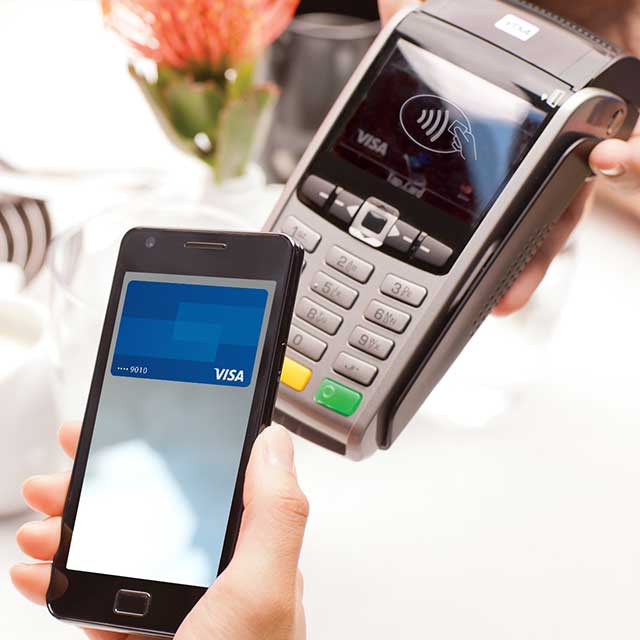
This is the most common and perhaps iconic form of phone payment. At a store, look for the contactless payment symbol (four curved lines) on the POS terminal.

- Activate Your Mobile Wallet: For iPhones, double-click the side button (or home button on older models) to bring up your default card. For Android devices, simply unlock your phone, or open the Google Pay/Samsung Pay app if multiple cards are stored. Some Android devices allow direct tapping without opening the app if it’s set as the default.
- Authenticate: Your phone will prompt you for authentication, typically via Face ID, Touch ID, or your device passcode. This crucial step ensures that only you can authorize a payment.
- Tap Your Phone: Hold the top of your phone near the contactless reader on the POS terminal. You’ll usually hear a beep or see a checkmark on your phone or the terminal indicating a successful transaction.
The entire process usually takes just a few seconds, making checkout incredibly efficient.
Making In-App and Online Purchases with Your Phone
Mobile payments extend beyond physical stores, offering a streamlined experience for digital transactions.
- In-App Purchases: When shopping within an app (e.g., ordering food, booking tickets), you’ll often see options like “Pay with Apple Pay” or “Pay with Google Pay” at checkout. Selecting this option will prompt you to authenticate the purchase using your device’s biometrics or passcode, eliminating the need to manually enter card details and shipping information. The app securely communicates with your mobile wallet to complete the transaction.
- Online Purchases (on Websites): Many e-commerce websites now offer direct integration with mobile payment services. When shopping on your phone’s browser, look for the “Pay with Apple Pay” or “Pay with Google Pay” buttons at checkout. Clicking these buttons will typically open a secure prompt for authentication, drawing your payment and shipping details directly from your mobile wallet, significantly speeding up the online checkout process and reducing friction. This is especially convenient for guest checkouts where you don’t want to create an account.
Peer-to-Peer Payments: Sending Money Instantly
Mobile phones have also revolutionized how we send money to friends, family, or even pay for shared expenses. While not strictly “paying with a phone” at a merchant, it’s a fundamental aspect of phone-based financial interactions. Apps like Venmo, Zelle, PayPal, and Google Pay allow users to link bank accounts or debit cards and send money directly to another user’s account using their phone number or email address. These services often feature instant transfers, making it easy to split bills, send gifts, or reimburse others without needing cash or bank transfers. The technology behind these services ensures secure data transmission and often involves authentication steps to protect user funds.
The Technological Underpinnings of Mobile Payment Security
While the convenience of mobile payments is undeniable, concerns about security are paramount. Fortunately, the technology behind these systems incorporates multiple layers of protection, often making them more secure than traditional card transactions.
Tokenization and Encryption: Protecting Your Financial Data
The cornerstone of mobile payment security is tokenization. When you add a card to your mobile wallet, your actual 16-digit card number is never stored on your phone or transmitted to the merchant. Instead, a unique, encrypted digital token (a randomly generated number) is created and linked to your card. During a transaction, this token, along with a cryptogram that changes with each purchase, is sent to the payment terminal and then to the payment network. If a merchant’s system were to be breached, hackers would only obtain these tokens, which are useless without the underlying decryption key and the specific transaction context.
In addition to tokenization, all data transmitted during a mobile payment is heavily encrypted. This scrambling of information prevents unauthorized parties from intercepting and understanding your payment details as they travel between your phone, the terminal, and the payment network. The combination of tokenization and robust encryption provides an extremely secure environment for your financial transactions.
Biometric Authentication: Fingerprints, Face ID, and Beyond
Another critical security layer is biometric authentication. To authorize a mobile payment, you must typically verify your identity using:
- Fingerprint Scanners (Touch ID): Found on many smartphones, this technology scans your unique fingerprint patterns to confirm your identity.
- Facial Recognition (Face ID): Utilizes advanced sensors to map the unique contours of your face, providing a highly secure and convenient authentication method.
- Iris Scanners: Some devices historically used iris patterns for authentication.
These biometric methods are inherently more secure than PINs or passwords, which can be forgotten, guessed, or stolen. Biometrics are tied directly to your physical self, making unauthorized use incredibly difficult. Furthermore, your biometric data is typically stored securely on your device’s hardware, often within a “Secure Enclave” or “Trusted Execution Environment,” and is never uploaded to cloud servers, further enhancing privacy and security.
Best Practices for Securing Your Mobile Wallet
While the technology is robust, user vigilance remains important:
- Keep Your Device Locked: Always use a strong passcode, pattern, or biometric lock for your phone.
- Enable Biometrics for Payments: Ensure Face ID, Touch ID, or fingerprint authentication is active for your mobile wallet transactions.
- Beware of Phishing: Be cautious of suspicious emails or messages asking for your payment details or prompting you to click unfamiliar links.
- Use Strong, Unique Passwords: For any accounts linked to your mobile wallet or payment apps.
- Keep Software Updated: Regularly update your phone’s operating system and all payment apps to benefit from the latest security patches.
- Report Lost/Stolen Devices Immediately: If your phone is lost or stolen, use remote wipe features (e.g., Find My iPhone, Find My Device) and contact your bank to temporarily suspend your cards linked to mobile wallets.
- Review Transaction History: Regularly check your mobile wallet and bank statements for any unauthorized transactions.
By combining cutting-edge technology with smart user habits, mobile payments offer a highly secure way to manage your finances.
The Future Landscape of Phone-Based Transactions
The rapid evolution of mobile payment technology suggests that the current landscape is just the beginning. Innovation continues to push boundaries, promising even more integrated, intelligent, and seamless ways to transact.
Beyond NFC: Emerging Payment Technologies
While NFC currently dominates, research and development are exploring alternatives and enhancements:
- Sound-Based Payments: Using inaudible sound waves to transmit payment data between devices. This could offer an alternative in situations where NFC is not available or practical.
- LiFi Payments: Leveraging light for data transmission. While still largely experimental, LiFi could offer extremely fast and secure communication over short distances.
- Blockchain and Cryptocurrencies: While still niche for everyday retail, blockchain technology offers decentralized, transparent, and secure transaction methods. As regulatory frameworks evolve and usability improves, cryptocurrency payments via phone wallets could become more mainstream.
- Gesture-Based Payments: Imagine authenticating a payment with a unique hand gesture detected by your phone’s camera, or completing a transaction with a specific movement. These are concepts being explored to add another layer of convenience and personal authentication.
These emerging technologies aim to broaden accessibility, enhance security, and further streamline the payment experience, potentially reducing the reliance on specific hardware like NFC chips.
The Integration of AI and Wearables in Payments
Artificial intelligence (AI) is set to play an increasingly significant role in personalizing and securing mobile payments. AI algorithms can analyze spending patterns to offer smart budgeting insights, detect fraudulent activities with greater accuracy, and even anticipate purchasing needs. For example, an AI-powered wallet could automatically suggest the best card to use for a particular purchase to maximize rewards.
Wearable technology, such as smartwatches and fitness trackers, is also rapidly integrating payment capabilities. These devices, often leveraging NFC, offer an even more seamless “tap and go” experience, eliminating the need to even pull out your phone. As wearables become more sophisticated, incorporating advanced biometrics and greater processing power, they are poised to become primary payment instruments for many. Voice-activated payments, facilitated by AI assistants like Siri, Google Assistant, and Alexa, are also gaining traction, particularly for smart home purchases and online orders.

Mobile Payments as a Catalyst for Digital Transformation
The widespread adoption of phone payments is not merely a convenience; it’s a powerful catalyst driving broader digital transformation. For businesses, it pushes the adoption of modern POS systems, enhances customer data collection, and streamlines back-end operations. For consumers, it fosters greater financial literacy, encourages digital inclusivity, and provides a safer, more efficient alternative to traditional payment methods. As governments and financial institutions continue to invest in digital infrastructure, mobile payments will undoubtedly play a central role in shaping a future where financial transactions are instantaneous, secure, and deeply integrated into our daily digital lives. The phone, once a communication tool, is now undeniably the central hub of our personal financial ecosystem.
aViewFromTheCave is a participant in the Amazon Services LLC Associates Program, an affiliate advertising program designed to provide a means for sites to earn advertising fees by advertising and linking to Amazon.com. Amazon, the Amazon logo, AmazonSupply, and the AmazonSupply logo are trademarks of Amazon.com, Inc. or its affiliates. As an Amazon Associate we earn affiliate commissions from qualifying purchases.