
In an increasingly digitized world, peer-to-peer (P2P) payment applications have revolutionized how we manage and transfer money. Among these, Venmo stands out as a dominant platform, blending financial utility with social connectivity. More than just an app for sending and receiving funds, Venmo represents a significant shift in digital transaction paradigms, offering users an intuitive interface to settle debts, split bills, and even pay for goods and services with remarkable ease. For tech-savvy individuals and newcomers alike, mastering Venmo’s functionalities is key to navigating modern financial interactions efficiently and securely. This comprehensive guide delves into the technical intricacies and user-friendly processes of making payments on Venmo, ensuring you can leverage its full potential for all your digital transaction needs. We will explore the app’s architecture, walk through the payment execution steps, examine advanced features, and discuss crucial security protocols, all within the exclusive lens of technology and app utility.

I. Understanding Venmo’s Core Functionality for Digital Payments
Venmo, at its heart, is a mobile payment service owned by PayPal, designed to facilitate quick and easy money transfers between individuals and, increasingly, businesses. Its technological foundation is built upon a robust system that integrates banking networks with a user-friendly application layer, making digital transactions accessible to millions. Understanding its core components is the first step towards effective utilization.
The Digital Wallet Ecosystem: More Than Just Payments
Venmo operates within a broader digital wallet ecosystem, allowing users to link various financial instruments such as bank accounts, debit cards, credit cards, and even maintain a balance directly within the app. This multifaceted approach provides flexibility in how funds are sourced and managed. The application’s architecture processes transactions by securely encrypting payment information and facilitating the transfer of value, not just data. It acts as an intermediary, streamlining what would traditionally be complex interbank transfers into a few taps on a smartphone. This technical abstraction is what makes Venmo so appealing: it hides the underlying complexity of financial networks from the end-user, presenting a simplified, immediate experience.
Key Components of the Venmo Application Interface
The Venmo app is designed with user experience (UX) at its forefront, featuring a clean, intuitive interface. Key components include:
- Home Feed: A social feed displaying public and friends-only transactions, emphasizing Venmo’s community aspect. While payments are fundamentally financial, the feed integrates a social layer, making transactions visible to chosen audiences.
- “Pay or Request” Button: The central action hub, typically an omnipresent floating button, which initiates all payment and request processes. This is the primary gateway for digital transactions.
- Balance Display: A clear indicator of the funds available within your Venmo account, which can be used for payments or cashed out to a linked bank account.
- User Profile: Contains personal information, linked payment methods, and privacy settings, all crucial for managing one’s digital identity and transaction security within the app.
- Notifications: Real-time alerts for incoming payments, outgoing payments, and other account activities, ensuring users are always informed about their transaction status.
These interface elements work in concert to provide a seamless and engaging user experience, leveraging common mobile application design patterns for ease of use.
Ensuring Compatibility and System Requirements
For optimal performance and security, Venmo requires specific technological compatibility. The application is available on both iOS (Apple App Store) and Android (Google Play Store) platforms, necessitating devices running modern operating systems. Regular updates are pushed to users, not only introducing new features but also patching security vulnerabilities and improving performance. Ensuring your device’s operating system and the Venmo app itself are up-to-date is critical for maintaining access to the latest security protocols and functionalities, safeguarding your digital transactions against evolving threats and ensuring a smooth user experience. Older devices or outdated OS versions may experience compatibility issues, performance degradation, or even be locked out of certain features due to security requirements.
II. Setting Up Your Venmo Account: The Foundation for Digital Transactions
Before you can initiate your first payment, establishing and configuring your Venmo account correctly is a prerequisite. This foundational setup involves several critical steps, from initial app installation to linking secure payment methods and configuring privacy settings. Each step is designed to integrate your personal financial instruments with Venmo’s digital infrastructure, ensuring secure and efficient transfers.
App Installation and Initial Account Creation Steps
The journey begins with downloading the Venmo application from your device’s respective app store. Once installed, you’ll be prompted to create an account. This process typically requires:
- Phone Number Verification: A crucial security step, validating your mobile device and linking it directly to your Venmo identity. This often involves sending a verification code via SMS.
- Email Address: For account recovery and communication purposes.
- Full Name: Used for identity verification and displaying your profile within the Venmo social feed.
- Password Creation: A strong, unique password is vital for account security, adhering to best practices like a mix of uppercase, lowercase, numbers, and symbols.
- Username Selection: Your unique Venmo identifier, simplifying how others find and pay you.
This initial setup establishes your digital identity within the Venmo ecosystem, creating a secure conduit for future transactions. The backend systems perform checks to ensure uniqueness and validity, laying the groundwork for robust account management.
Linking Payment Methods: Cards, Bank Accounts, and Venmo Balance
To send money, you must link a funding source. Venmo offers several options, each with slightly different technical implications and associated fees (though most P2P payments funded by linked bank accounts or debit cards are free):
- Debit Cards: Directly linked to your checking account, offering real-time funding without significant delays. Venmo uses secure tokenization to store card details, meaning your actual card number is not directly stored on their servers after initial verification, enhancing security.
- Bank Accounts: Connected via your bank’s login credentials (using secure third-party services like Plaid) or manual entry of routing and account numbers. This method often requires micro-deposit verification, where Venmo sends small deposits to your account which you then verify in the app, confirming ownership.
- Credit Cards: Can be linked for payments, though a standard 3% fee typically applies to the sender for each transaction. This fee covers the processing costs associated with credit card transactions.
- Venmo Balance: Funds received from other users or direct deposits held within your Venmo account. Payments made from your Venmo balance are always free and instantaneous.
Linking these methods involves secure data encryption and transmission protocols to protect sensitive financial information. Venmo adheres to industry-standard security practices, including PCI DSS compliance for card processing, to ensure the integrity of your financial data.
Configuring Privacy Settings and Notification Preferences
Venmo’s unique social feed makes privacy settings particularly important. Users can choose the audience for each transaction:
- Public: Visible to everyone on Venmo (default setting).
- Friends: Visible only to your Venmo friends.
- Private: Visible only to the sender and recipient.
It’s crucial to review and adjust these settings according to your comfort level. The app also allows granular control over notification preferences, letting you decide whether to receive push notifications, emails, or SMS alerts for various activities like payment receipts, requests, and account updates. These configurable options empower users to manage their digital footprint and interaction frequency within the application, balancing social engagement with personal privacy and notification fatigue.
III. Executing a Payment: A Step-by-Step Technical Walkthrough
The core functionality of Venmo lies in its streamlined payment execution process. This section provides a detailed technical walkthrough of how to send money, from initiating the transaction to confirming its successful completion, highlighting the underlying mechanisms that ensure accuracy and security.
Navigating the “Pay or Request” Feature
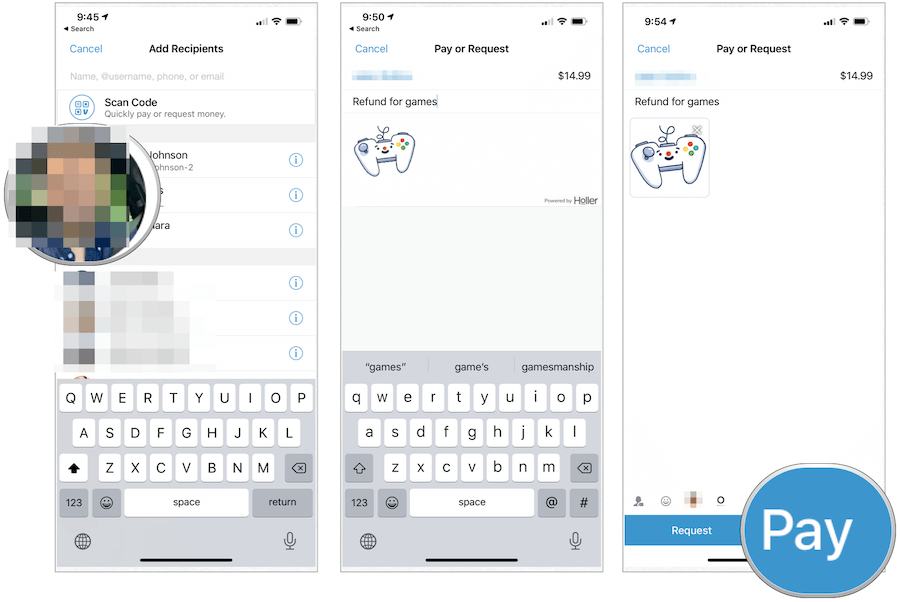
The gateway to all transactions on Venmo is the prominent “Pay or Request” button, usually located at the bottom center of the app’s interface. Tapping this button initiates a new transaction flow, guiding the user through a series of input screens. This intuitive design minimizes cognitive load and ensures that users can quickly move from intent to action. The application’s backend simultaneously prepares for data input, activating the necessary modules for user identification and payment source selection.
Identifying Recipients: Usernames, Phone Numbers, and QR Codes
Accurate recipient identification is paramount to avoid sending money to the wrong person. Venmo provides several robust methods for finding who you want to pay:
- Username Search: The most common method. Users can type in the recipient’s unique Venmo username. The app’s search algorithm rapidly queries its user database to find matching profiles, often with profile pictures for visual confirmation.
- Phone Number Search: If the recipient’s phone number is linked to their Venmo account, you can search for them using this. This leverages contact list integration if permission is granted, cross-referencing your device’s contacts with Venmo’s user base.
- Email Address Search: Similar to phone numbers, an email address linked to a Venmo account can be used for identification.
- QR Code Scanning: A fast and error-proof method for in-person transactions. Venmo generates a unique QR code for each user; scanning this code instantly populates the recipient field, eliminating manual entry and potential typos. This utilizes the device’s camera API for scanning and real-time data interpretation.
Once a recipient is selected, their profile information is temporarily displayed for verification, allowing the sender to confirm they are indeed sending money to the intended party.
Specifying Transaction Details: Amount, Notes, and Payment Source Selection
After identifying the recipient, the next critical steps involve detailing the transaction:
- Amount Entry: Input the exact numerical value to be sent. The app typically includes a numerical keypad for this purpose, ensuring accuracy.
- Adding a Note: A crucial, yet often overlooked, feature. The note field allows users to describe the purpose of the payment (e.g., “Dinner,” “Rent,” “Concert Tickets”). This descriptive text is associated with the transaction record and is visible according to the chosen privacy setting. It’s also the entry point for emoji and GIF integration, enhancing the social aspect.
- Selecting Payment Source: Below the amount and note, the app displays your linked payment methods (Venmo balance, bank account, debit card, credit card). You select your preferred funding source with a tap. The app clearly indicates if any fees apply (e.g., for credit card transactions). The underlying system then routes the payment request through the appropriate financial gateway based on your selection.
Understanding Transaction Confirmations and Digital Receipts
Before final submission, Venmo presents a review screen summarizing all transaction details: recipient, amount, note, and funding source. This is the last chance to verify accuracy. Upon confirmation, the app initiates the secure transfer.
- Real-time Processing: Payments funded by Venmo balance or debit cards are typically processed almost instantly. Bank account transfers, while initiated immediately, may take a few business days to fully clear, depending on interbank processing times.
- Digital Receipts: Upon successful completion, both sender and recipient receive immediate notifications and a digital receipt within the app. This receipt includes a unique transaction ID, timestamp, amount, and the associated note. This digital record serves as proof of payment and is accessible within the app’s transaction history, providing an immutable audit trail for both parties. Any processing errors or delays are typically communicated via in-app notifications and email, with technical support links provided for assistance.
IV. Advanced Payment Scenarios and Optimizing Your Venmo Experience
Beyond simple peer-to-peer transfers, Venmo offers a suite of advanced features designed to enhance user convenience, streamline complex financial interactions, and extend its utility beyond casual payments. Leveraging these functionalities can significantly optimize your digital payment experience.
Business Payments and QR Code Integration
Venmo has expanded its capabilities to facilitate payments to businesses and authorized merchants, blurring the lines between P2P and consumer-to-business (C2B) transactions.
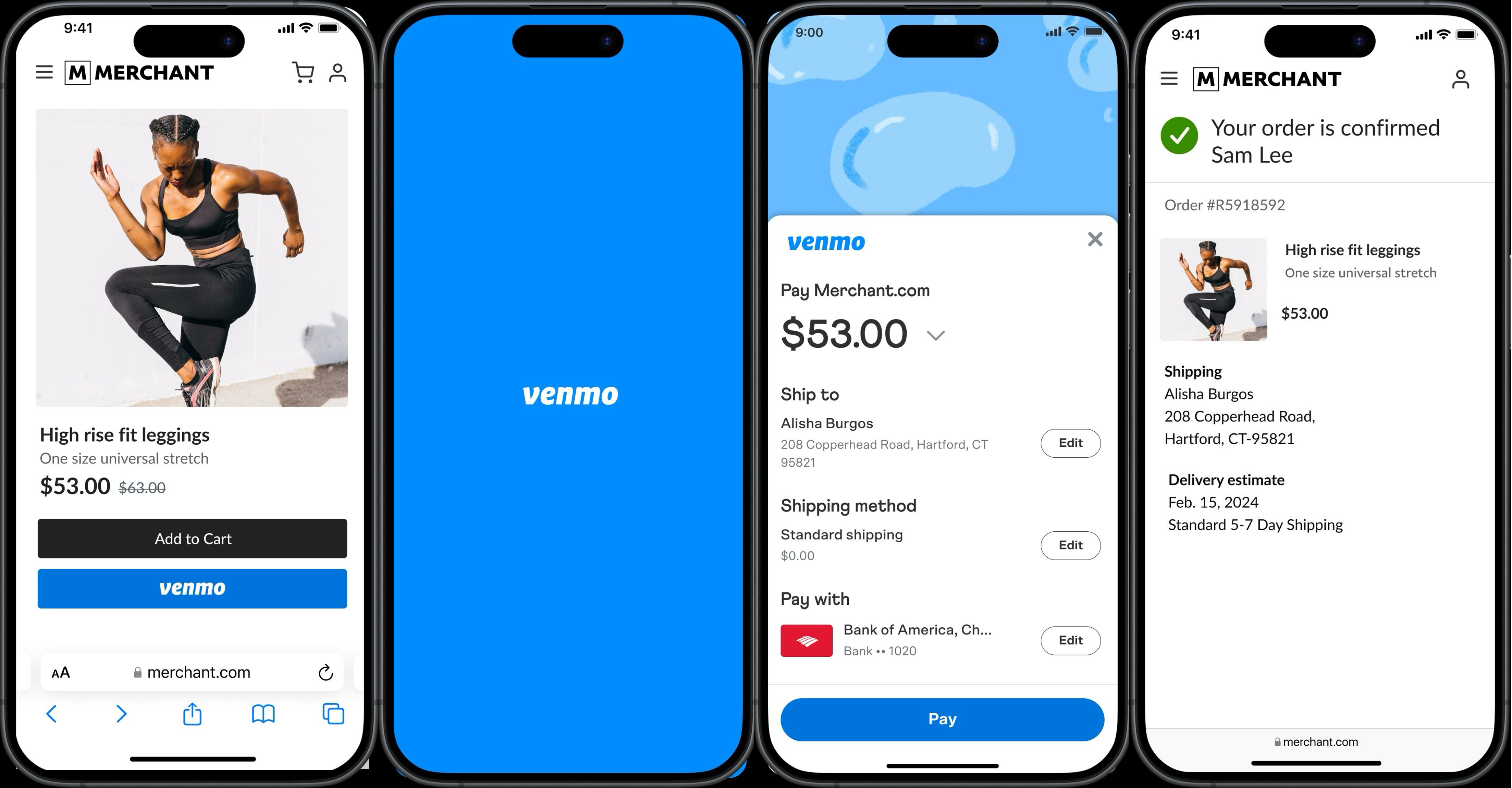
- Venmo for Business Profiles: Merchants can create dedicated business profiles, allowing customers to pay them directly through the app. This integration provides businesses with a simplified payment acceptance mechanism, often at lower transaction fees than traditional credit card processors. The customer experience remains identical to paying a friend, enhancing convenience.
- QR Code Payments at Point of Sale: Many businesses now display unique Venmo QR codes at their physical locations. Customers can simply scan these codes using the Venmo app’s built-in scanner to initiate and complete payments swiftly. This technology leverages the ubiquity of smartphone cameras and real-time data processing to offer a contactless and efficient payment solution, reducing checkout times and the need for physical cash or cards. The backend systems securely link the scanned QR code to the merchant’s account, ensuring accurate fund allocation.
Group Payments and Split Requests: Streamlining Shared Expenses
One of Venmo’s most celebrated features is its ability to simplify shared expenses among groups.
- Split the Bill Feature: For situations like dining out or shared household costs, Venmo allows users to “split” a total amount among multiple friends. The app calculates individual shares and sends requests to each participant simultaneously. This eliminates the awkwardness of manual calculations and chasing individual payments, automating a common financial pain point.
- Requesting Money from Multiple Users: Similarly, if one person covers an expense, they can easily send individual payment requests to multiple friends for their respective shares. The app tracks who has paid and who still owes, providing a clear overview of group finances within the app. This functionality is particularly useful for event organizers, housemates, or trip planners, providing a centralized platform for managing collective financial contributions.
Mastering the Venmo Feed: Privacy Controls and Social Features
While primarily a payment app, Venmo’s social feed is a distinctive feature. Users can choose to make transactions public, visible to friends, or entirely private.
- Strategic Privacy Settings: Understanding and adjusting the privacy settings for each transaction is crucial. For sensitive or personal payments, always opt for “Private.” For more casual, shareable moments, “Friends” or even “Public” (with caution) can be used. Venmo’s technology allows for dynamic privacy control per transaction, offering flexibility that balances social sharing with financial discretion.
- Interactive Transaction Notes: The notes section for each payment supports emojis, GIFs, and short messages. This transforms a purely transactional interaction into a more engaging and personal exchange. From a technical perspective, this involves integrating rich media components and basic messaging functionalities within the payment metadata, enhancing the user experience beyond mere numerical transfers.
Utilizing the Venmo Card for Everyday Purchases
Venmo has expanded its ecosystem with physical and virtual debit cards linked directly to your Venmo balance.
- Venmo Debit Card: A Mastercard-branded debit card that allows users to spend their Venmo balance wherever Mastercard is accepted. If the Venmo balance is insufficient, it can automatically pull funds from a linked bank account. This effectively bridges the gap between the digital Venmo balance and traditional retail payment infrastructure.
- Venmo Credit Card: A Visa-branded credit card that integrates deeply with the Venmo app, offering cashback rewards on eligible purchases, managed directly within the app. This extends Venmo’s reach into the credit market, providing users with a comprehensive financial tool that encompasses P2P payments, debit spending, and credit facilities, all controlled through a single, familiar interface. These cards leverage existing payment network technologies (Mastercard, Visa) while routing transactions through Venmo’s secure infrastructure.
V. Digital Security and Troubleshooting Common Payment Issues
The convenience of digital payments must always be balanced with robust security measures and clear pathways for troubleshooting. Venmo employs sophisticated security protocols to protect user data and transactions, while also providing users with tools to manage their account integrity and resolve common issues.
Safeguarding Your Account: Multi-Factor Authentication and PINs
Venmo prioritizes the security of its users’ financial information and digital identities:
- Multi-Factor Authentication (MFA): This is perhaps the most critical security feature. When enabled, MFA requires users to provide two or more verification factors to gain access to their account, typically a password combined with a code sent to their registered phone number or email. This significantly reduces the risk of unauthorized access, even if a password is compromised. Venmo leverages industry-standard protocols for SMS and email-based MFA, providing an extra layer of defense.
- PIN Code/Biometric Security: Users can set up a PIN code or enable biometric authentication (fingerprint or facial recognition) for the app. This ensures that even if your phone is unlocked, unauthorized individuals cannot access your Venmo account without an additional layer of verification. This utilizes the device’s native security features, integrating them seamlessly with the Venmo app’s access controls.
- Transaction Monitoring and Fraud Detection: Venmo employs advanced algorithms and AI-powered systems to continuously monitor transactions for suspicious activity. Anomalous patterns or unusual transaction behaviors can trigger alerts or temporarily hold transactions, prompting further verification to prevent fraud. This proactive security measure works in the background, protecting users without requiring constant manual intervention.
- Encryption: All data transmitted between your device and Venmo’s servers is encrypted using industry-standard TLS (Transport Layer Security) protocols, protecting sensitive information like payment details and personal data from interception.
Addressing Failed Transactions and Payment Holds
Despite robust systems, transactions can occasionally fail or be placed on hold. Understanding the common technical reasons can help in quick resolution:
- Insufficient Funds: The most straightforward reason. If your linked bank account or Venmo balance lacks sufficient funds, the transaction will be declined.
- Payment Method Issues: An expired debit/credit card, an unverified bank account, or a temporary block placed by your bank can lead to transaction failures. Venmo will usually provide an error message indicating the specific issue with the payment method.
- Security Holds: Venmo’s fraud detection system might place a hold on a transaction if it detects suspicious activity, such as unusually large amounts, frequent payments to new recipients, or transactions originating from an unfamiliar location. In such cases, Venmo may request additional verification from the user.
- Network Connectivity: A poor internet connection on your device can disrupt the transmission of payment data, leading to failed transactions. Ensuring a stable Wi-Fi or cellular connection is crucial during payment initiation.
Contacting Venmo Support for Technical Assistance
When troubleshooting in-app solutions aren’t sufficient, direct technical support is available:
- In-App Help Center: Venmo provides an extensive in-app help center with FAQs and troubleshooting guides covering a wide range of common issues. This knowledge base is usually the first point of contact for self-resolution.
- Email Support: For more complex issues or those requiring account-specific investigation, users can submit support tickets via email.
- Phone Support: For urgent matters, Venmo offers phone support, allowing users to speak directly with a technical support representative who can access account information (with proper verification) and provide guided assistance. This tiered support system ensures that users can find appropriate help based on the complexity and urgency of their issue, leveraging different communication channels for efficient problem resolution.
By understanding Venmo’s security features and knowing how to address potential transaction issues, users can engage with the platform confidently and ensure their digital payments are both seamless and protected.
aViewFromTheCave is a participant in the Amazon Services LLC Associates Program, an affiliate advertising program designed to provide a means for sites to earn advertising fees by advertising and linking to Amazon.com. Amazon, the Amazon logo, AmazonSupply, and the AmazonSupply logo are trademarks of Amazon.com, Inc. or its affiliates. As an Amazon Associate we earn affiliate commissions from qualifying purchases.