
The digital transformation of the global financial landscape has fundamentally altered how individuals and businesses interact with fiscal authorities. Gone are the days of standing in long queues at designated bank branches or mailing thick envelopes of paper forms to tax offices. Today, the ability to pay income tax online represents a pinnacle of convenience, offering taxpayers a streamlined, secure, and efficient way to settle their liabilities. For the modern earner, mastering the digital tax payment ecosystem is not just about compliance; it is about sophisticated personal finance management and maintaining a healthy financial profile.
The Strategic Shift to Digital Tax Management
The transition from manual to digital tax payments is more than a mere change in medium; it is a shift in financial philosophy. Online tax portals provide a level of transparency and real-time tracking that was previously impossible. When you transition to paying your taxes online, you are engaging with a system designed to minimize human error and maximize the accuracy of your financial records.
The Benefits of Real-Time Processing
One of the most significant advantages of paying income tax online is the immediacy of the transaction. Traditional methods often involved a lag time of several days or even weeks before a payment was acknowledged. In the digital realm, electronic confirmation is usually instantaneous. This real-time processing is crucial for taxpayers who are managing tight cash flows or those making last-minute payments to avoid penalties. From a personal finance perspective, having an immediate receipt allows for more accurate month-end reconciliations.
Security and Data Integrity
Financial security is the cornerstone of any online transaction. Government tax portals and authorized banking partners utilize high-level encryption protocols to ensure that sensitive financial data remains protected. By paying online, you eliminate the risk of physical documents being lost in the mail or intercepted. Furthermore, digital payments create an immutable audit trail, making it significantly easier to prove compliance during future financial inquiries or when applying for credit products like mortgages and business loans.
Preparing Your Financial Profile for Online Submission
Before navigating the technical aspects of a tax portal, a period of financial preparation is essential. Successful online tax payment is the result of disciplined record-keeping throughout the fiscal year. Without a structured approach to your data, the digital process can become overwhelming.
Gathering Essential Documentation
The first step in the online payment process is aggregating all sources of income. For the modern professional, this often includes a mix of traditional salary (W-2 or equivalent), freelance earnings (1099 or contract work), investment dividends, and capital gains.
In a digital-first environment, it is advisable to maintain a dedicated folder for digital invoices, bank statements, and tax-deductible receipts. Having these documents ready in PDF format allows you to cross-reference your figures as you enter them into the online tax forms, ensuring that the amount you are paying is calculated down to the last cent.
Understanding Tax Liability and Timing
To manage your cash flow effectively, you must understand the difference between your gross income and your taxable income. Before initiating an online payment, use financial tools or spreadsheets to estimate your liability. This prevents “sticker shock” when the final amount is calculated on the portal. Furthermore, being aware of tax deadlines is vital. Most online systems experience high traffic volumes as deadlines approach, so preparing your finances early allows you to execute the payment during off-peak times, reducing the risk of system timeouts or technical glitches.
A Step-by-Step Guide to Navigating Online Tax Portals
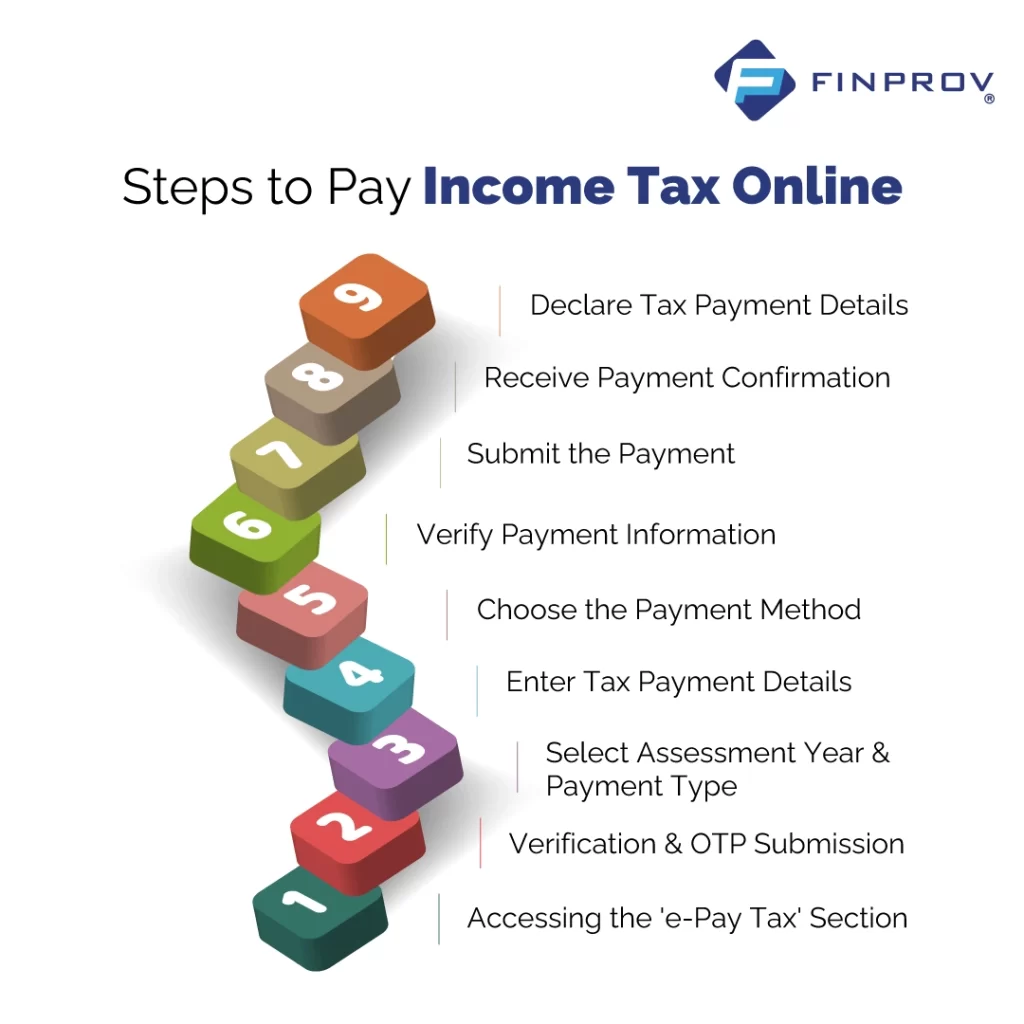
While specific interfaces vary by jurisdiction, the logic governing online tax payments remains consistent across most modern economies. Understanding this workflow allows you to navigate any portal with confidence.
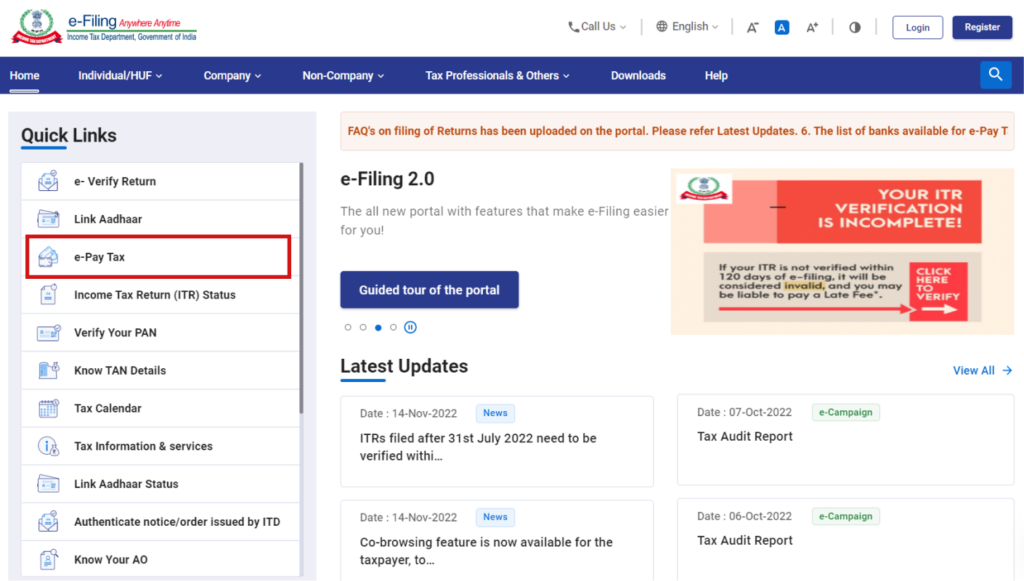
Step 1: Authentication and Profile Setup
To begin, you must log in to the official government tax portal. This typically requires a unique identifier, such as a Social Security Number (SSN), Permanent Account Number (PAN), or a dedicated Taxpayer Identification Number (TIN).
Most modern portals now require Multi-Factor Authentication (MFA). While this adds an extra step, it is a critical security layer for your financial data. Ensure that your contact information—specifically your email and mobile number—is current, as these will be used to send transaction receipts and verification codes.
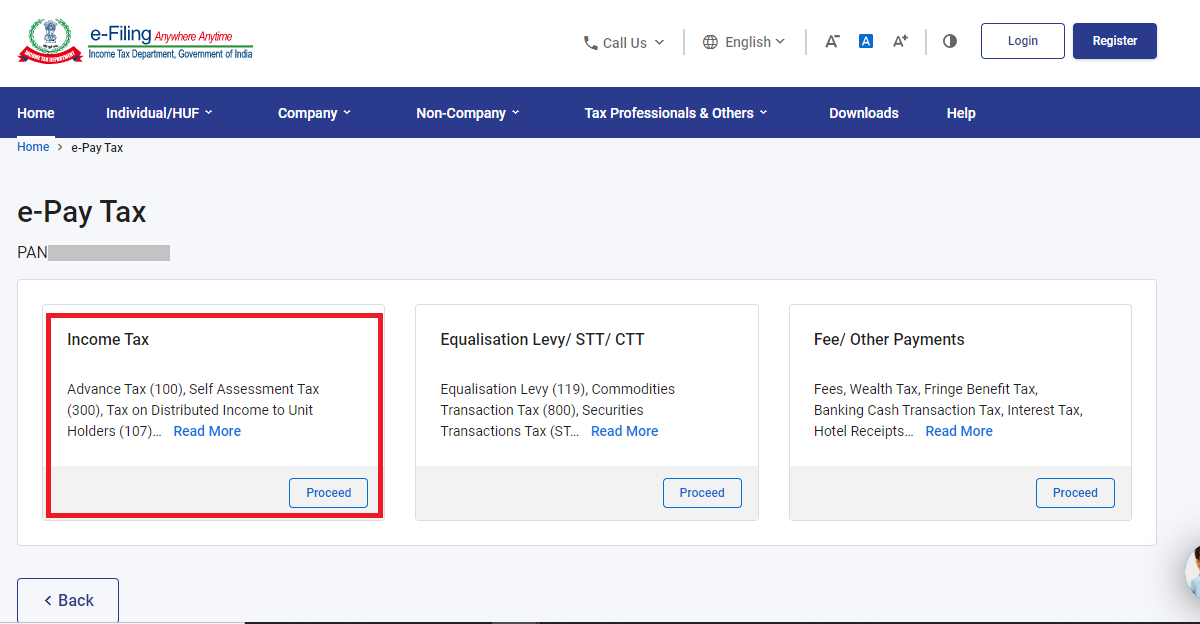
Step 2: Selecting the Correct Assessment Year and Challan
One of the most common mistakes in online tax payment is selecting the wrong assessment year. In many tax systems, the year in which you earn the income is different from the year in which you pay the tax (the assessment year).
You will also need to select the appropriate “challan” or payment form. There are usually different categories for self-assessment tax, advance tax, or tax on regular assessment. Selecting the correct category ensures that your payment is credited to the right bucket in the government’s ledger.
Step 3: Entering Financial Details and Reviewing
Once the correct form is selected, you will enter the breakdown of your tax components. This may include the basic tax amount, surcharges, education cesses, and any interest accrued due to late filing.
The portal will calculate the total amount due. Before proceeding to the payment gateway, perform a final audit of the numbers. Ensure that the tax-deductible amounts you have claimed align with the documentation you prepared earlier. In the world of finance, a small typo can lead to significant reconciliation issues later.
Optimizing Payment Methods and Cash Flow
Choosing the right method to transfer funds to the tax department is a strategic financial decision. Online portals generally offer multiple avenues for payment, each with its own set of pros and cons regarding speed, cost, and liquidity management.
Net Banking and Direct Debit (ACH)
Net banking is often the preferred method for many taxpayers because it involves a direct transfer from a bank account to the treasury. This method usually incurs the lowest transaction fees (often zero) and provides a clear line item on your bank statement. For businesses and individuals with significant tax liabilities, direct debit is the most straightforward way to ensure the funds are moved securely without the limitations of daily card spending limits.
Credit Cards and Liquidity Management
Paying income tax via credit card is an increasingly popular option, particularly for those looking to manage short-term liquidity. By using a credit card, you can effectively defer the cash outflow until your next billing cycle.
However, this strategy comes with two caveats. First, most tax portals charge a “convenience fee” or a percentage-based processing fee for credit card transactions, which can be substantial on large tax bills. Second, you must ensure you can pay off the credit card balance in full to avoid high-interest charges. From a rewards perspective, some high-end cards offer points or cashback on tax payments, which can occasionally offset the processing fees, making this a viable “money hack” for the financially savvy.
Digital Wallets and Unified Payments
In certain regions, digital wallets and unified payment interfaces (like UPI) are now accepted for tax payments. These methods are excellent for smaller, incidental tax payments or for those who prefer mobile-first financial management. They offer the highest level of convenience but may have lower transaction limits compared to traditional net banking.
Post-Payment Strategy: Verification and Record Keeping
The process does not end once the “Payment Successful” screen appears. Strategic financial management requires a post-payment workflow to ensure that the credit is properly recognized by the authorities.
Downloading the Acknowledgment Receipt
Immediately after the transaction, the portal will generate a receipt or a “Challan Identification Number” (CIN). This document is your primary proof of payment. Download and save it in multiple locations (e.g., a local drive and an encrypted cloud storage service). This receipt contains the BSR code, the date of payment, and the challan serial number, all of which are required when you file your final tax return.
E-Verification and Reconciling Statements
After making the payment, it is wise to wait 48 to 72 hours and then log back into the portal to check your “Tax Credit Statement” or “Form 26AS” (or your local equivalent). This statement reflects all the taxes that have been credited to your name. Reconciling your payment receipt with this official statement is a vital step in financial hygiene. If there is a discrepancy, you can address it immediately with your bank or the tax department rather than discovering the error months later during a formal audit.
Planning for the Next Fiscal Cycle
Finally, use the data from your online payment to inform your future financial planning. If you found yourself paying a large lump sum in self-assessment tax, it might be a sign that you need to increase your “Advance Tax” payments or adjust your withholdings. Online tax payment history provides a clear trend of your tax liability growth, which is an invaluable data point for long-term wealth planning and investment strategy.
By mastering the nuances of paying income tax online, you transition from a passive participant in the tax system to a proactive manager of your financial destiny. The efficiency, security, and analytical depth provided by digital platforms are essential tools for any modern individual seeking to optimize their personal finances.
aViewFromTheCave is a participant in the Amazon Services LLC Associates Program, an affiliate advertising program designed to provide a means for sites to earn advertising fees by advertising and linking to Amazon.com. Amazon, the Amazon logo, AmazonSupply, and the AmazonSupply logo are trademarks of Amazon.com, Inc. or its affiliates. As an Amazon Associate we earn affiliate commissions from qualifying purchases.