
The automotive industry has undergone a radical transformation over the last decade, shifting from a traditional, high-pressure dealership model to a streamlined, software-centric approach. At the forefront of this evolution is Tesla. Ordering a Tesla is less like buying a traditional car and more like configuring a high-end workstation or a premium smartphone. The process is handled almost entirely through digital interfaces, prioritizing user experience (UX) and technical precision over negotiation and physical paperwork. To successfully navigate this journey, one must understand the digital ecosystem Tesla has built, from the web configurator to the mobile app integration that manages the vehicle’s lifecycle.
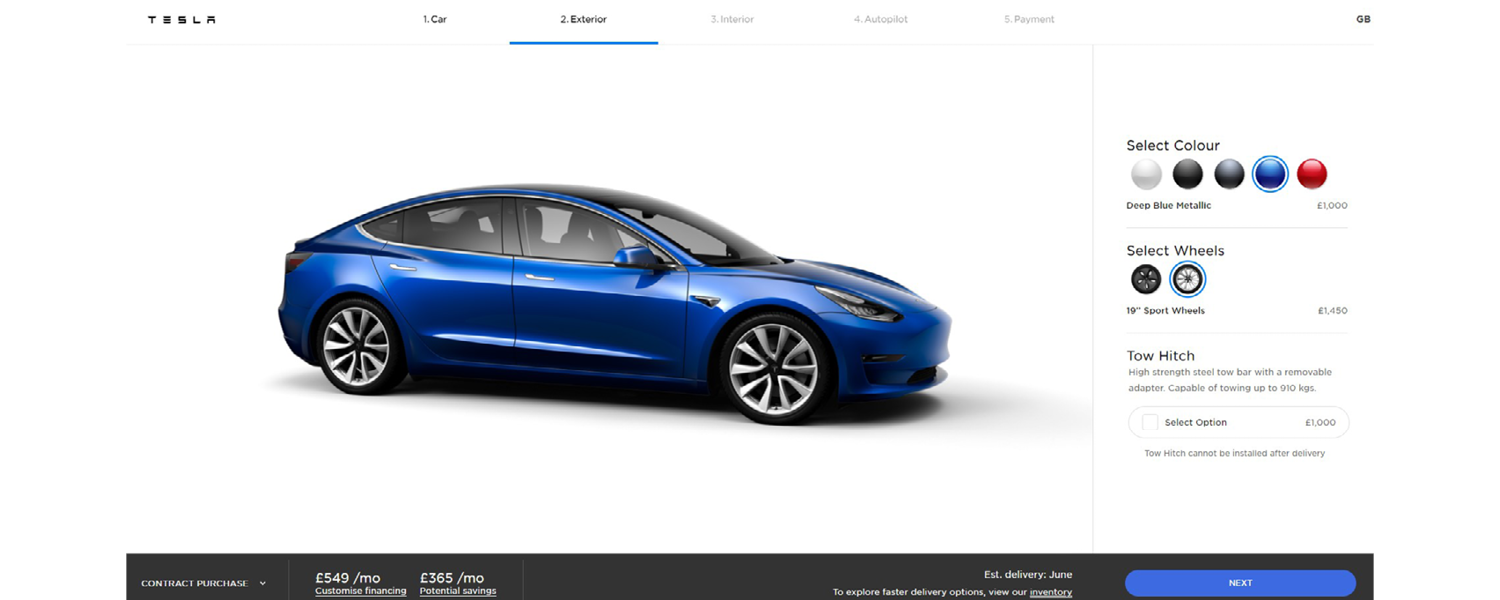
Navigating the Digital Showroom: The Configurator Interface
The first step in ordering a Tesla involves engaging with the company’s web-based configurator. Unlike legacy automakers whose websites often redirect users to local inventory or third-party dealers, Tesla’s platform is a direct-to-consumer portal. This interface is designed with a minimalist aesthetic, focusing on clarity and ease of use, which reflects the software philosophy found inside the vehicles themselves.
Choosing Your Platform: Model Selection
Tesla’s current lineup consists of the Model S, Model 3, Model X, and Model Y, along with the specialized Cybertruck. Each model serves a distinct hardware purpose. The Model 3 and Model Y represent the mass-market hardware stack, built on a high-efficiency architecture designed for high-volume production. The Model S and Model X serve as the flagship tech demonstrators, featuring advanced tri-motor “Plaid” drivetrains and sophisticated air suspension systems. Selecting a model is the first “logic gate” in the ordering process, determining the baseline performance characteristics and the physical footprint of the vehicle.
Real-Time Visual Rendering
As you select different paint colors, wheels, and interior trims, the configurator uses high-fidelity 3D rendering to update the vehicle’s profile in real-time. This isn’t just for aesthetics; it provides a digital twin of what will eventually be assigned a Vehicle Identification Number (VIN). Tech-savvy users will note the precision of these renderings, which are designed to minimize “visual debt”—the discrepancy between what is seen on screen and what is delivered.
Range vs. Performance Software Tuning
One of the most critical decisions in the configurator is the choice between “Long Range,” “Performance,” or “Rear-Wheel Drive” variants. In the world of Tesla, these aren’t just physical differences in battery size; they are often software-defined performance levels. The Performance models, for instance, utilize upgraded inverters and specific software maps to extract higher discharge rates from the battery cells, enabling faster acceleration and higher top speeds.
The Software Stack: Configuring Autopilot and FSD
Perhaps the most unique aspect of ordering a Tesla is the ability to customize the vehicle’s artificial intelligence capabilities at the point of purchase. Tesla frames its cars as “computers on wheels,” and the software features you select are just as important as the physical hardware.
Basic Autopilot vs. Enhanced Autopilot
Every Tesla comes standard with Basic Autopilot, which includes traffic-aware cruise control and autosteer within a clearly marked lane. However, during the ordering process, you are presented with the option to upgrade to Enhanced Autopilot. This adds a layer of software sophistication, including “Navigate on Autopilot” (which handles on-ramp to off-ramp maneuvers), Auto Lane Change, and Autopark. From a tech perspective, this is a “software unlock”—the hardware (cameras and the FSD computer) is already present in the car, but the functionality is gated behind a digital purchase.
Full Self-Driving (FSD) Capability
The pinnacle of Tesla’s software offering is the Full Self-Driving (FSD) suite. When you select this option during the order process, you are essentially purchasing a license for Tesla’s most advanced neural networks. FSD aims to handle city street driving, traffic light and stop sign recognition, and complex turns.
It is important to understand the hardware-software synergy here. Tesla’s “Vision” system relies exclusively on cameras and powerful onboard processing (the FSD Computer) rather than LiDAR or radar. When you order FSD, you are opting into an iterative software ecosystem that receives frequent over-the-air (OTA) updates, meaning the capabilities of the car you order today will likely evolve by the time it is delivered.

Connectivity Tiers
During the configuration, you will also encounter “Premium Connectivity.” While usually offered as a trial, this is a vital component of the Tesla tech experience. It enables live traffic visualization, satellite-view maps, and in-car streaming services (like Netflix, YouTube, and Twitch) via the car’s integrated LTE/5G modem. Ordering a Tesla means considering your data needs, as the vehicle functions as a mobile IoT (Internet of Things) device.
The Mobile App Integration: From Order to Delivery
Once the “Order” button is clicked and the non-refundable order fee is paid, the experience shifts from the web browser to the Tesla mobile app. This is where the digital-first philosophy truly shines. The app becomes the central hub for the entire ownership experience, starting with the pre-delivery tasks.
Managing Documentation and Hardware Requirements
The Tesla app utilizes a “task-based” UI to guide the buyer through the necessary steps. This includes:
-
Registration Details: Uploading digital copies of driver’s licenses and insurance.
-
Trade-in Evaluation: A process where you upload photos and data about your current vehicle for a software-driven appraisal.
-
Financing and Payment: Tesla integrates with various financial institutions directly through the app, allowing for credit applications and final payment transfers (via ACH or Plaid) without ever visiting a bank or a dealership office.
Preparing Your Digital Infrastructure: Home Charging
Ordering the car is only half of the technical setup. You must also prepare your home’s “charging hardware.” Tesla offers a Wall Connector, which is a smart charging station that connects to your home Wi-Fi. This allows the charger to receive its own firmware updates and enables you to monitor charging speeds and energy consumption via the same Tesla app used to order the car. Integrating the car into your home’s electrical and data network is a crucial step in the “Tesla as a gadget” ecosystem.
Tracking the Build via VIN Assignment
As the factory processes the order, the app provides real-time updates. The most significant milestone is the assignment of a VIN. This signifies that a specific piece of hardware has been matched to your digital profile. Tech enthusiasts often track “build signatures” during this phase, looking for the latest hardware revisions (such as the transition to Hardware 4.0 cameras or the inclusion of the latest lithium-iron-phosphate battery chemistries).
The Touchless Delivery: Finalizing the Tech Loop
The culmination of the ordering process is Delivery Day. In keeping with the tech-centric theme, Tesla has pioneered the “Touchless Delivery” model. This process removes the traditional human intermediary and replaces it with a purely digital interaction.
Digital Key Activation
Upon arriving at the delivery center (or when the car is dropped off at your home), you use the Tesla app to “Accept Delivery.” Once clicked, the app sends a signal to Tesla’s servers, which then pushes a command to the vehicle to unlock and authorize your smartphone as the primary key. This is a sophisticated use of Bluetooth Low Energy (BLE) and public-key cryptography to ensure that the hand-off is both seamless and secure.
Onboarding and System Calibration
Once inside, the “onboarding” is handled by the vehicle’s massive central touchscreen. The car will guide you through setting up your “Driver Profile,” which saves your seat position, mirror angles, and software preferences to the cloud. This means if you ever drive another Tesla, you can sign in and have your digital environment mirrored instantly.
Furthermore, new Teslas require a “Camera Calibration” period during the first few miles of driving. The onboard computer analyzes the feed from all eight cameras to build a highly accurate 3D model of the surrounding environment. You can monitor this progress on the display, watching as the blue progress bar completes the setup of the car’s visual “cortex.”

The OTA Future
Ordering a Tesla is not a static transaction; it is an entry into a continuous software lifecycle. Unlike a traditional vehicle that begins to age the moment it leaves the lot, a Tesla is designed to improve. Through Over-the-Air updates, the vehicle you ordered will receive new features—ranging from improved braking distances through ABS software tweaks to new entertainment apps and enhanced Autopilot logic—long after the initial purchase.
By viewing the process through a technological lens, it becomes clear that “ordering a Tesla” is the initial configuration of a sophisticated, networked device. From the initial 3D rendering in the web configurator to the final cryptographic key exchange via the mobile app, the entire journey is a testament to how software and hardware can be integrated to redefine the concept of automotive retail. For those who value digital efficiency, data-driven performance, and an evolving feature set, the Tesla ordering process represents the current gold standard of the modern tech experience.
aViewFromTheCave is a participant in the Amazon Services LLC Associates Program, an affiliate advertising program designed to provide a means for sites to earn advertising fees by advertising and linking to Amazon.com. Amazon, the Amazon logo, AmazonSupply, and the AmazonSupply logo are trademarks of Amazon.com, Inc. or its affiliates. As an Amazon Associate we earn affiliate commissions from qualifying purchases.