
Opening a bank account is a fundamental step in managing your personal or business finances effectively. For many, Bank of America, one of the largest financial institutions in the United States, presents a compelling option due to its extensive reach, diverse offerings, and robust digital platforms. This comprehensive guide will walk you through everything you need to know about opening a bank account with Bank of America, from understanding your options to navigating the application process and leveraging your new financial tools.
Establishing a relationship with a reputable bank like Bank of America provides more than just a place to store your money; it’s a gateway to a suite of financial services designed to help you save, spend, and grow your wealth responsibly. From direct deposits and online bill pay to investment opportunities and loan access, your bank account serves as the central hub of your financial life. Understanding how to initiate this relationship smoothly and efficiently is crucial for setting yourself up for financial success. Whether you’re a first-time account holder, new to the country, or simply looking to switch banks, this guide aims to demystify the process and equip you with the knowledge to make informed decisions about your banking needs at Bank of America.
Why Choose Bank of America for Your Banking Needs?
Before diving into the mechanics of opening an account, it’s beneficial to understand why Bank of America might be a suitable choice for your financial journey. Its position as a major player in the financial industry comes with several distinct advantages that cater to a wide range of individuals and businesses.
Extensive Network and Accessibility
One of Bank of America’s most significant assets is its vast physical presence across the United States. With thousands of branches and ATMs nationwide, accessing your funds or speaking with a financial specialist in person is often convenient. This extensive network is particularly valuable for those who prefer face-to-face interactions for complex transactions or personalized financial advice. Beyond physical locations, Bank of America also boasts a powerful online presence and mobile application, ensuring that your banking is always within reach, regardless of where you are. This blend of physical and digital accessibility provides unparalleled convenience, allowing you to manage your money on your terms, whether it’s making a deposit at an ATM, consulting with a banker at a branch, or transferring funds via your smartphone.
Diverse Account Offerings
Bank of America understands that financial needs are not one-size-fits-all. As such, they offer a wide array of checking and savings accounts designed to meet different objectives, from basic transaction accounts to interest-bearing savings and premium packages. For checking accounts, options typically include Advantage SafeBalance Banking for those seeking a no-overdraft-fee solution, Advantage Plus Banking for more traditional day-to-day transactions, and Advantage Relationship Banking, which offers more benefits for maintaining higher balances. On the savings front, they provide standard savings accounts, certificates of deposit (CDs), and even investment options to help grow your wealth. This diversity allows you to select an account that aligns perfectly with your spending habits, saving goals, and overall financial strategy, ensuring you’re not paying for features you don’t need or missing out on benefits that could serve you.
Digital Banking and Convenience
In today’s fast-paced world, digital banking is no longer a luxury but a necessity. Bank of America excels in this area, offering a highly rated mobile app and an intuitive online banking platform. These digital tools empower you to perform a vast range of banking tasks from the comfort of your home or on the go. You can check balances, pay bills, transfer money between accounts (internal and external), deposit checks via mobile, set up alerts, and even manage your investments. The integration of advanced security features, like biometric login and fraud monitoring, ensures your financial information remains protected. This emphasis on digital convenience means you spend less time on banking logistics and more time focusing on your financial goals.
Financial Tools and Resources
Beyond transactional services, Bank of America provides a wealth of financial tools and educational resources designed to help customers manage their money more effectively. Their online portal offers budgeting tools, spending trackers, and goal-setting features that can assist you in understanding your financial habits and working towards specific objectives. They also offer access to financial specialists who can provide advice on everything from savings strategies to retirement planning and investment opportunities. For small businesses, there are specialized resources and accounts tailored to their unique needs. This commitment to customer empowerment through education and tools makes Bank of America a partner in your financial journey, not just a service provider.
Essential Preparations Before Opening Your Account
Opening a bank account at Bank of America is a straightforward process, but being prepared can make it even smoother. Gathering the necessary documents and understanding your options beforehand will save you time and ensure a successful application.
Required Identification Documents
To comply with federal regulations designed to prevent identity theft and financial fraud, banks require specific identification. You will typically need at least two forms of identification, one of which must be a primary photo ID.
-
Primary Photo ID: This generally includes a valid, government-issued photo ID such as a U.S. state-issued driver’s license, a U.S. state-issued ID card, a U.S. passport, or a foreign passport with a U.S. visa and I-94 form (for non-residents).
-
Secondary ID: This can be another primary ID, a credit or debit card with your name and signature, a major utility bill, or a voter registration card. It’s always best to have more than one form of identification ready.
Proof of Address
Banks need to verify your current residential address. This can often be satisfied with a document that includes your name and current address, such as:
-
A recent utility bill (electricity, gas, water, internet)
-
A lease agreement or mortgage statement
-
A bank statement from another institution (dated within the last 60 days)
-
A valid driver’s license or state ID (if it has your current address)
Ensure the documents are recent and clearly show your name and address.
Social Security Number (SSN) or ITIN
For U.S. citizens and permanent residents, a Social Security Number (SSN) is mandatory. Non-resident aliens who file taxes in the U.S. will need an Individual Taxpayer Identification Number (ITIN). These numbers are crucial for tax reporting purposes and for the bank to comply with federal regulations. If you do not have an SSN or ITIN, you may still be able to open an account, particularly for non-resident alien checking accounts, but the requirements might differ, often necessitating additional documentation like foreign passports and proof of non-resident status.
Initial Deposit Requirements
Most bank accounts require an initial deposit to activate them. The amount can vary depending on the specific account type you choose. For example, some basic checking accounts might require a modest sum, while premium accounts could demand a higher initial deposit. It’s wise to check Bank of America’s current requirements for your chosen account type on their website or by asking a representative. You can typically make this deposit with cash, a check, or by transferring funds from an existing account.
Understanding Different Account Types (Checking vs. Savings)
Before applying, understand the fundamental differences between checking and savings accounts:
-
Checking Accounts: Designed for day-to-day transactions, bill payments, and frequent withdrawals. They offer easy access to your money through debit cards, checks, and online transfers. Most checking accounts offer limited or no interest on your balance.
-
Savings Accounts: Intended for accumulating funds and earning interest over time. While accessible, they are generally not meant for frequent transactions and may have limits on monthly withdrawals. They are ideal for building an emergency fund or saving for specific goals.
-
Combined Needs: Many individuals benefit from having both a checking account for daily expenses and a savings account for long-term goals, often linked for easy transfers. Bank of America offers various options that can be paired to optimize your financial management.
Step-by-Step Guide to Opening Your Bank of America Account
Once you have gathered your documents and decided on the account type, you are ready to apply. Bank of America offers two primary methods for opening an account: online or in person.
Online Application Process
Opening an account online is often the quickest and most convenient option for many.
-
Visit the Bank of America Website: Navigate to the official Bank of America website and look for the “Open an Account” or “Personal Banking” section.
-
Choose Your Account Type: Browse the checking and savings account options and select the one that best fits your needs. Read the terms and conditions carefully, especially regarding fees, minimum balances, and interest rates.
-
Start the Application: Click on “Open Now” or a similar prompt. You will be guided through a secure online form.
-
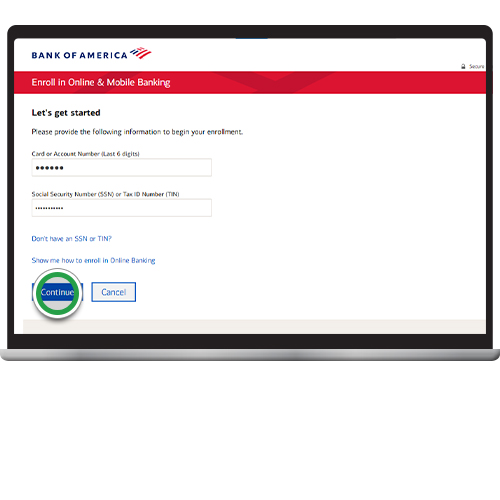
Provide Personal Information: Input your full name, date of birth, Social Security Number (or ITIN), U.S. residential address, phone number, and email.
-
Verify Identity: You may be asked to provide details from your identification documents, such as your driver’s license number or passport details. In some cases, Bank of America may use third-party services to verify your identity electronically.
-
Fund Your Account: You will be prompted to make your initial deposit, typically through an electronic transfer from another bank account or by setting up a direct deposit.
-
Review and Submit: Carefully review all the information you’ve entered before submitting your application.
-
Confirmation: You will usually receive an immediate confirmation of your application. Further instructions, including how to set up online banking and when to expect your debit card, will follow via email or mail.
In-Person Application at a Branch
For those who prefer face-to-face assistance or have more complex banking needs, visiting a Bank of America branch is an excellent option.
-
Locate a Branch: Use the Bank of America website or mobile app to find the nearest branch location.
-
Gather Documents: Bring all your required identification documents, proof of address, SSN/ITIN, and your initial deposit funds.
-
Consult with a Representative: Inform the representative that you wish to open a new account. They will guide you through the available options, explain their features, and help you select the best fit. This is an opportune time to ask any questions you may have.
-
Complete the Application Form: The representative will help you fill out the necessary paperwork.
-
Identity Verification: They will review and verify your identification documents.
-
Make Initial Deposit: Provide your initial deposit to fund the new account.
-
Sign Agreements: You will sign account agreements and disclosures.
-
Receive Temporary Card/Information: You may receive a temporary debit card on the spot, along with information on how to access online banking. Your personalized debit card will be mailed to you later.
What to Expect During the Application
Regardless of the method, the application process generally takes 10-20 minutes if you have all your documents ready. Be prepared to answer questions about your employment, income, and financial history, as banks are required to assess your suitability for certain products and comply with financial regulations. You might also be asked about your financial goals to help tailor product recommendations.
Setting Up Online Access and Mobile Banking
Once your account is open, setting up online and mobile banking is crucial for modern financial management.
-
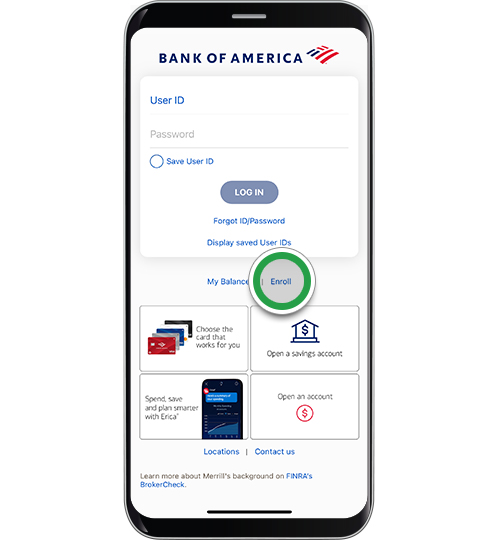
Enroll Online: Visit the Bank of America website and click “Enroll” for online banking. You’ll typically need your new account number and some personal identifying information to create a secure username and password.
-
Download the Mobile App: Download the official Bank of America app from your smartphone’s app store.
-
Log In: Use your newly created online banking credentials to log into the app.
-
Explore Features: Familiarize yourself with features like mobile check deposit, bill pay, Zelle for sending money, balance alerts, and transaction history.
-
Set Up Alerts: Customize alerts for transactions, low balances, and other activities to stay informed about your account.
Maximizing Your Bank of America Account: Beyond the Basics
Opening an account is just the beginning. To truly harness its power for your personal finance, it’s essential to understand and utilize the various features Bank of America offers.
Linking Accounts and Transfers
If you have multiple Bank of America accounts (e.g., checking and savings), linking them for easy transfers is highly beneficial. You can set up recurring transfers from your checking to your savings account to automate your savings, a cornerstone of effective personal finance. This “set it and forget it” approach helps build your savings diligently without constant manual effort. You can also link external bank accounts for seamless fund transfers, providing a consolidated view of your financial landscape.
Utilizing Bill Pay and Direct Deposit
These two features can significantly streamline your financial management:
-
Online Bill Pay: Bank of America’s online bill pay service allows you to schedule payments to various companies and individuals directly from your checking account. This eliminates the need for checks, stamps, and trips to the post office, ensuring your bills are paid on time and helping you avoid late fees. You can set up one-time payments or recurring payments for regular expenses like rent, utilities, and loan payments.
-
Direct Deposit: Arrange for your employer to directly deposit your paycheck into your Bank of America account. This is not only convenient but also provides immediate access to your funds on payday, avoiding delays associated with physical checks. For gig economy workers or those with irregular income, setting up direct deposit for platforms like PayPal or Stripe, if applicable, can also be efficient.
Managing Your Finances with Bank of America’s Tools
Bank of America provides a suite of digital tools designed to help you budget, track spending, and achieve financial goals:
-
Spend & Save Analysis: This feature categorizes your transactions, offering insights into where your money goes each month. Understanding your spending habits is the first step toward creating a realistic budget and identifying areas for potential savings.
-
Goal Setting: You can set financial goals within the online banking platform or app, such as saving for a down payment, a vacation, or an emergency fund. The tools can help you track progress and suggest ways to reach your targets faster.
-
Budgeting: Use the bank’s budgeting tools to create and stick to a monthly budget, ensuring you live within your means and allocate funds effectively towards your financial priorities.
-
Erica, Your Virtual Financial Assistant: Erica is an AI-driven virtual assistant embedded within the mobile app, offering personalized insights, proactive alerts, and assistance with various banking tasks. From checking your balance to finding transactions or getting spending summaries, Erica can be a valuable resource.
Understanding Fees and Avoiding Them
While Bank of America offers a range of beneficial services, it’s crucial to be aware of potential fees and how to avoid them. Common fees include monthly maintenance fees, ATM fees (for out-of-network ATMs), overdraft fees, and foreign transaction fees.
-
Monthly Maintenance Fees: Many checking accounts have a monthly fee, but these can often be waived by meeting certain criteria, such as maintaining a minimum daily balance, setting up direct deposit, or being a student. Always check the specific requirements for your account type.
-
Overdraft Fees: These occur when you spend more money than you have in your account. Bank of America offers services like Advantage SafeBalance Banking, which helps prevent overdrafts, or overdraft protection plans that link to a savings account or line of credit.
-
ATM Fees: Use Bank of America ATMs to avoid fees. If you must use an out-of-network ATM, be aware that you might incur fees from both Bank of America and the ATM owner.
-
Foreign Transaction Fees: If you use your debit card internationally, be mindful of foreign transaction fees. Consider travel-specific cards or alternative payment methods for international travel.
By understanding the fee structure and actively managing your account, you can minimize costs and maximize the value you receive from your Bank of America banking relationship.
Common Questions and Troubleshooting
Even with a comprehensive guide, questions can arise. Here are answers to some common inquiries about opening and managing a Bank of America account.
What if I don’t have all the required documents?
If you are missing a specific document, it’s best to contact Bank of America directly or visit a branch to speak with a representative. They can advise you on acceptable alternative documents or guide you through the process of obtaining what’s needed. For example, if you don’t have a utility bill, a lease agreement or a notarized letter from a landlord might suffice. Flexibility can sometimes be offered, especially for unique situations.
How long does it take to open an account?
The application process itself is usually quick, often taking 10-20 minutes online or in a branch if all documents are ready. However, the account may take a few business days to fully activate, especially if an initial deposit transfer needs to clear. Your debit card typically arrives by mail within 5-7 business days. Online banking access is often available immediately or within 24 hours of approval.
Can I open an account if I’m not a U.S. citizen?
Yes, non-U.S. citizens can open a bank account with Bank of America. However, the documentation requirements will be different. You will typically need a foreign passport with a U.S. visa, an I-94 form (record of arrival/departure), and potentially proof of U.S. residence (even if temporary). An ITIN (Individual Taxpayer Identification Number) may be required for tax purposes if you are earning income in the U.S. It’s highly recommended to visit a branch in person with all available documents to ensure a smooth process.
What happens after my account is open?
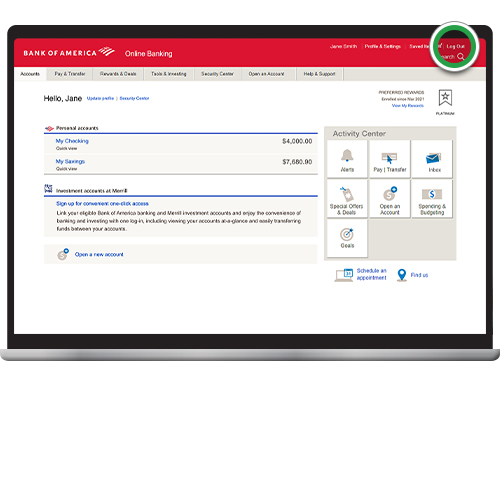
After your account is open and funded, you will receive your debit card in the mail, usually within a week. You should activate your card as soon as it arrives and set up your PIN. You will also be encouraged to enroll in online banking and download the mobile app to manage your account efficiently. Begin setting up direct deposits, bill pay, and exploring the financial tools available to start actively managing your finances. Keep an eye on your statements and transactions, and don’t hesitate to reach out to Bank of America customer service if you have any questions or concerns.
Opening a bank account at Bank of America is a significant step towards sound financial management. By understanding the choices available, preparing adequately, and actively utilizing the bank’s tools and resources, you can effectively manage your money, achieve your financial goals, and build a secure financial future.
aViewFromTheCave is a participant in the Amazon Services LLC Associates Program, an affiliate advertising program designed to provide a means for sites to earn advertising fees by advertising and linking to Amazon.com. Amazon, the Amazon logo, AmazonSupply, and the AmazonSupply logo are trademarks of Amazon.com, Inc. or its affiliates. As an Amazon Associate we earn affiliate commissions from qualifying purchases.