
In today’s digitally driven world, web-based applications have become indispensable tools for businesses and individuals alike. From sophisticated enterprise resource planning (ERP) systems to intuitive social media platforms and personal productivity tools, web apps power much of our daily online interactions. Unlike traditional desktop software, web applications run directly in a web browser, offering unparalleled accessibility, cross-platform compatibility, and ease of deployment. This comprehensive guide will walk you through the essential steps and considerations for developing your own web-based application, transforming an idea into a functional, user-friendly digital product.
Understanding the Fundamentals of Web Applications
Before diving into the development process, it’s crucial to grasp the core concepts that define a web-based application. This foundational understanding will inform your design decisions, technology choices, and overall development strategy.

What is a Web-Based Application?
At its simplest, a web-based application (or web app) is a client-server software application where the client (user interface and user experience logic) runs in a web browser. The server-side logic and database are typically hosted on remote servers and accessed over a network, most commonly the internet. This model eliminates the need for users to install and maintain software locally, as all updates and functionalities are managed centrally on the server. Examples range from Google Docs and Facebook to online banking portals and e-commerce websites. Their inherent accessibility and platform independence make them a preferred choice for a vast array of digital solutions.
Key Components: Frontend, Backend, Database
Every web application, regardless of its complexity, is built upon three fundamental pillars:
-
Frontend (Client-Side): This is everything the user sees and interacts with directly in their web browser. It includes the user interface (UI), layout, graphics, text, and any interactive elements like buttons, forms, and animations. Frontend development focuses on creating a seamless and engaging user experience (UX) using languages like HTML (for structure), CSS (for styling), and JavaScript (for interactivity). Frameworks and libraries such as React, Angular, and Vue.js significantly streamline frontend development.
-
Backend (Server-Side): The backend is the engine of your web application, responsible for processing user requests, handling business logic, interacting with the database, and sending data back to the frontend. It operates on a server, invisible to the end-user. Backend languages include Python (with frameworks like Django, Flask), Node.js (with Express), Ruby (with Ruby on Rails), PHP (with Laravel), and Java (with Spring). The backend ensures data integrity, security, and the smooth operation of the application’s core features.
-
Database: The database is where all your application’s data is stored, organized, and retrieved. This includes user profiles, content, transactions, settings, and any other persistent information. Databases can be relational (SQL databases like PostgreSQL, MySQL, SQL Server) which store data in structured tables, or non-relational (NoSQL databases like MongoDB, Cassandra, Redis) which offer more flexible, schema-less data storage. The choice of database depends on the type and scale of data your application will handle.
Client-Server Architecture Explained
The client-server architecture is the backbone of all web applications. In this model:
-
The client (typically a web browser) sends a request to the server. This request could be to load a page, submit a form, or retrieve data.
-
The server receives the request, processes it according to its backend logic (which might involve querying the database), and generates a response.
-
The response (often HTML, CSS, JavaScript, or JSON data) is then sent back to the client.
-
The client (browser) renders this response, displaying the updated information or interface to the user.
This continuous cycle of request and response forms the interactive experience users have with web applications, ensuring that information is dynamically delivered and updated.
Planning Your Web Application: The Crucial First Steps
A well-conceived plan is the bedrock of any successful web application. Skipping this phase often leads to scope creep, technical debt, and a product that fails to meet user expectations. This stage involves meticulous thought about the application’s purpose, its users, and the technical landscape.
Defining Your Application’s Purpose and Features
Start by clearly defining what problem your application solves or what value it provides. Who is your target audience? What are their needs and pain points? Outline the core functionalities (minimum viable product – MVP) that are essential for the application to deliver its primary value. Avoid the temptation to build every possible feature upfront; prioritize key functionalities that address the core problem. This stage involves creating user stories, use cases, and functional specifications to document precisely what the application should do.
User Experience (UX) and User Interface (UI) Design Principles
Good design isn’t just about aesthetics; it’s about usability, accessibility, and creating a positive emotional connection with the user.
-
User Experience (UX) Design: Focuses on how users interact with the application and their overall journey. It involves user research, creating user flows, wireframing (skeletal layouts), and prototyping (interactive mockups) to ensure the application is intuitive, efficient, and enjoyable to use. A positive UX minimizes frustration and maximizes engagement.
-
User Interface (UI) Design: Deals with the visual aspects of the application – the look and feel. This includes color schemes, typography, iconography, button styles, and overall visual hierarchy. UI design translates the UX wireframes into a visually appealing and branded interface, making it easy for users to understand and navigate the application. Tools like Figma, Sketch, and Adobe XD are commonly used for UI/UX design.
Choosing the Right Technology Stack (Languages, Frameworks, Databases)
The “technology stack” refers to the set of programming languages, frameworks, libraries, and databases used to build your application. This is a critical decision that impacts scalability, performance, development time, and future maintenance.
-
Consider your team’s expertise: If your team is proficient in Python, leveraging a Python-based stack (like Django or Flask) makes sense.
-
Project requirements: A real-time chat application might benefit from Node.js, while a data-heavy analytics platform might lean towards Python or Java.
-
Scalability: How many users do you anticipate? Will the data volume grow significantly? This influences your choice of database and infrastructure.
-
Community and Ecosystem: Larger communities mean more resources, libraries, and easier troubleshooting.
-
Cost: Licensing for certain enterprise-level software can be prohibitive for startups. Open-source alternatives often provide excellent value.
Common stacks include:
-
MEAN Stack: MongoDB, Express.js, Angular, Node.js
-
MERN Stack: MongoDB, Express.js, React, Node.js
-
LAMP Stack: Linux, Apache, MySQL, PHP
-
Python/Django/Flask with React/Vue: A highly popular combination for robust web applications.
Careful consideration at this stage will prevent costly reworks down the line.
The Development Process: Bringing Your Vision to Life
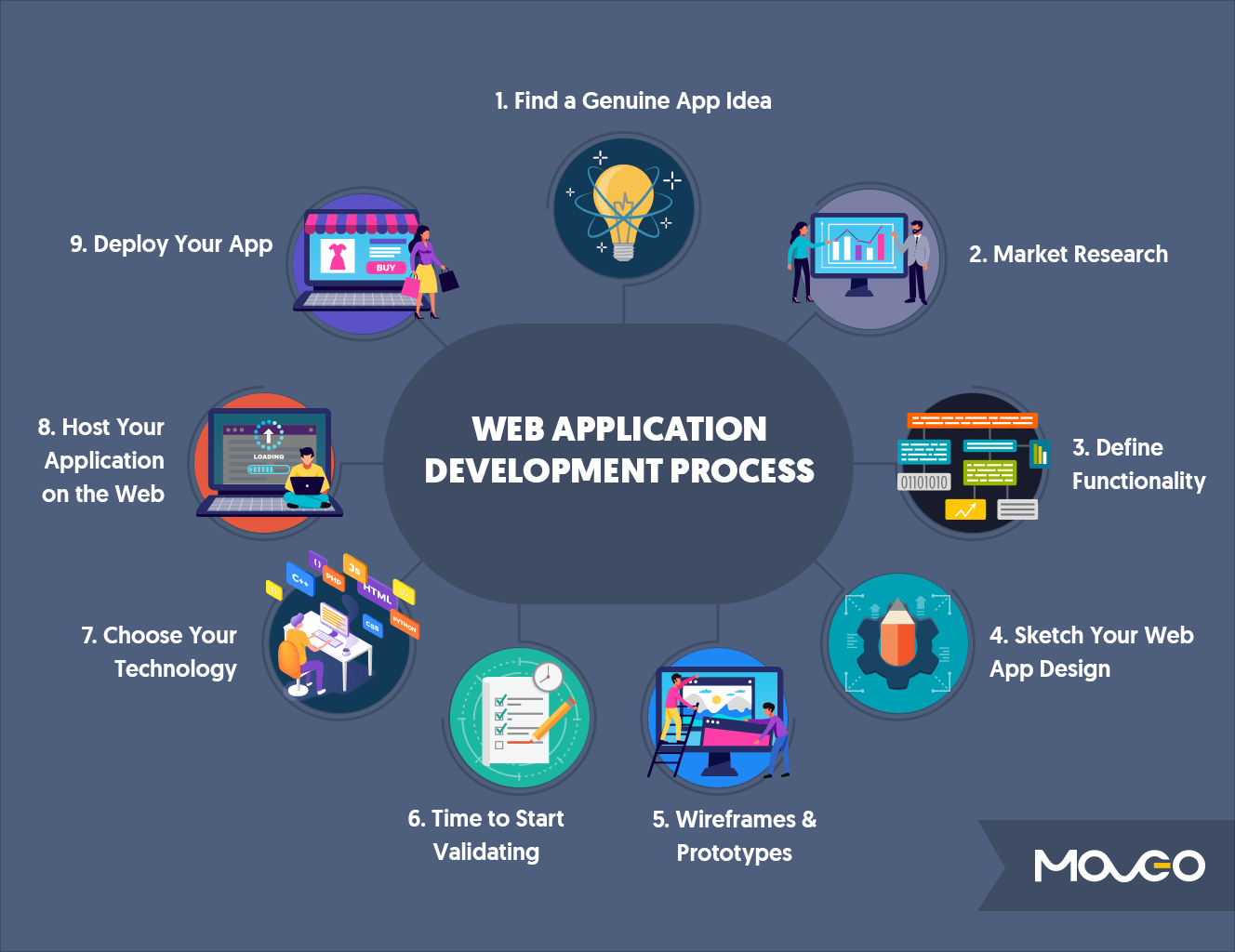
With a solid plan and chosen tech stack, the development phase transforms designs and specifications into functional code. This is an iterative process, often following Agile methodologies, involving continuous coding, testing, and refinement.
Frontend Development: Crafting the User Interface
Frontend developers focus on implementing the UI/UX designs. This involves writing HTML for structure, CSS for styling, and JavaScript for interactive elements and dynamic content updates. Modern frontend development heavily relies on JavaScript frameworks like React, Angular, or Vue.js, which provide efficient ways to build complex, single-page applications (SPAs) that offer a fluid, app-like experience within the browser. These frameworks manage state, component logic, and data flow, making it easier to create reusable UI components and manage application complexity.
Backend Development: Building the Server-Side Logic
Backend developers are responsible for building the “invisible” parts of the application. They write code that runs on the server, handling tasks such as:
-
API (Application Programming Interface) Development: Creating endpoints that the frontend can use to send and receive data.
-
Business Logic: Implementing the core rules and processes of the application (e.g., user authentication, payment processing, data validation).
-
Database Interactions: Writing code to store, retrieve, update, and delete data from the database.
-
Security: Implementing authentication, authorization, and data encryption to protect the application and user data.
-
Server Management: Configuring web servers (like Nginx or Apache) and ensuring the application can handle requests efficiently.
Robust backend development ensures that the application is secure, scalable, and performs reliably under various loads.
Database Management: Storing and Retrieving Data
Effective database management is crucial for the performance and integrity of your web application. This involves:
-
Schema Design: Defining the structure of your database, including tables, fields, relationships (for SQL databases), or collections and documents (for NoSQL databases). A well-designed schema is vital for efficient data storage and retrieval.
-
Database Interactions (ORM/ODM): Backend frameworks often come with Object-Relational Mappers (ORMs) for SQL databases (e.g., Django ORM, SQLAlchemy, Hibernate) or Object-Document Mappers (ODMs) for NoSQL databases (e.g., Mongoose for MongoDB). These tools allow developers to interact with the database using their programming language, abstracting away raw SQL queries or complex document structures.
-
Data Migration: Managing changes to the database schema over time, ensuring data integrity during updates.
-
Backup and Recovery: Implementing strategies to regularly back up database content and restore it in case of data loss.
Version Control and Collaborative Development
For any development project, especially with a team, version control systems like Git are indispensable. Git allows developers to track changes to their codebase, revert to previous versions, and collaborate effectively without overwriting each other’s work. Platforms like GitHub, GitLab, and Bitbucket provide hosting for Git repositories, facilitating code reviews, issue tracking, and continuous integration/continuous deployment (CI/CD) pipelines. Adopting a structured branching strategy (e.g., Git Flow or GitHub Flow) ensures a smooth and organized development workflow.
Testing, Deployment, and Maintenance
Developing the application is only part of the journey. Ensuring its quality, getting it into the hands of users, and keeping it running smoothly are equally critical.
Types of Testing: Unit, Integration, End-to-End
Thorough testing is non-negotiable for delivering a reliable web application.
-
Unit Testing: Tests individual components or functions of the code in isolation to ensure they work as expected. This is typically done by developers during the coding process.
-
Integration Testing: Verifies that different modules or services of the application work correctly together (e.g., frontend communicating with backend, backend interacting with the database).
-
End-to-End (E2E) Testing: Simulates a real user scenario by testing the entire application flow from start to finish, interacting with the UI, backend, and database to ensure the complete system behaves as intended. Tools like Selenium, Cypress, and Playwright are popular for E2E testing.
-
Performance Testing: Evaluates the application’s responsiveness, stability, and scalability under various load conditions.
-
Security Testing: Identifies vulnerabilities that could be exploited by malicious actors.
Automated testing is highly recommended to catch bugs early and ensure code quality throughout the development lifecycle.
Deployment Strategies: Cloud Providers and CI/CD
Once tested, the application needs to be deployed to a live server where users can access it.
-
Cloud Providers: Services like Amazon Web Services (AWS), Microsoft Azure, Google Cloud Platform (GCP), and Heroku offer robust, scalable, and cost-effective infrastructure for hosting web applications. They provide virtual servers, databases, storage, and networking services.
-
Continuous Integration/Continuous Deployment (CI/CD): This practice automates the process of integrating code changes, running tests, and deploying the application. CI/CD pipelines ensure that new features and bug fixes are delivered rapidly and reliably, reducing manual errors and accelerating the release cycle. Tools like Jenkins, GitLab CI, GitHub Actions, and CircleCI are widely used for this purpose.
Choosing the right deployment strategy depends on factors like budget, scalability needs, and complexity.
Post-Launch Maintenance, Monitoring, and Updates
Deployment is not the finish line; it’s the beginning of the operational phase.
-
Monitoring: Continuously track the application’s performance, uptime, error rates, and user activity using tools like New Relic, Datadog, or Prometheus. Proactive monitoring helps identify and resolve issues before they impact users.
-
Maintenance: Regularly update dependencies, patch security vulnerabilities, and ensure server health. This includes operating system updates, database optimization, and framework upgrades.
-
Bug Fixing and Iteration: Users will invariably discover bugs or suggest improvements. Establishing a system for reporting issues and planning iterative updates (based on feedback and analytics) is crucial for the application’s long-term success.
-
Scalability Management: As your user base grows, you may need to scale your infrastructure (e.g., add more servers, optimize database queries) to maintain performance.
A robust maintenance plan ensures your web application remains secure, performant, and relevant over time.
Essential Tools and Technologies for Web Application Development
The ecosystem of web development tools is vast and constantly evolving. Here’s a brief overview of some common and highly recommended technologies:
Frontend Frameworks (React, Angular, Vue)
-
React: A JavaScript library developed by Facebook for building user interfaces. Known for its component-based architecture and virtual DOM, making it efficient for dynamic UIs.
-
Angular: A comprehensive, opinionated framework developed by Google. It’s a full-fledged solution for building complex enterprise-level applications, offering features like data binding, routing, and dependency injection out-of-the-box.
-
Vue.js: A progressive JavaScript framework, often praised for its simplicity and ease of integration. It’s highly adaptable and can be used for both small projects and large-scale applications.
Backend Frameworks (Node.js/Express, Python/Django/Flask, Ruby on Rails)
-
Node.js with Express: Node.js allows JavaScript to be used on the server-side, and Express is a minimalist web framework for Node.js. It’s excellent for building fast, scalable network applications and real-time services.
-
Python with Django/Flask:
-
Django: A “batteries-included” framework that follows the “Don’t Repeat Yourself” (DRY) principle, offering rapid development for complex, database-driven websites.
-
Flask: A lightweight micro-framework, providing more flexibility and control for smaller applications or APIs.
-
-
Ruby on Rails: A convention-over-configuration framework that emphasizes developer productivity and simplicity, excellent for rapid prototyping and developing feature-rich applications.
Databases (SQL vs. NoSQL)
-
SQL Databases (Relational):
-
PostgreSQL: Powerful, open-source, and highly feature-rich, often preferred for complex applications requiring data integrity.
-
MySQL: Widely used, open-source, and known for its reliability and ease of use, especially popular with LAMP stack.
-
-
NoSQL Databases (Non-Relational):
-
MongoDB: A document-oriented database, highly flexible and scalable, excellent for handling large volumes of unstructured or semi-structured data.
-
Redis: An in-memory data store, often used for caching, real-time analytics, and message brokers due to its extreme speed.
-
Cloud Platforms (AWS, Azure, Google Cloud)
These platforms provide the infrastructure and services needed to host, scale, and manage web applications globally. They offer computing power (VMs, serverless functions), databases, storage, networking, and a vast array of specialized services.
Development Environments and Code Editors
-
VS Code (Visual Studio Code): A free, open-source code editor from Microsoft, packed with extensions and features for almost any programming language.
-
Integrated Development Environments (IDEs): Tools like WebStorm (for JavaScript), PyCharm (for Python), and IntelliJ IDEA (for Java) offer more comprehensive features like advanced debugging, refactoring, and project management.

Conclusion
Making a web-based application is a journey that combines creativity, technical skill, and meticulous planning. From understanding the core components and meticulously planning your architecture to the iterative process of development, testing, and continuous maintenance, each phase is crucial for success. By choosing the right technologies, adhering to best practices in UI/UX design, and committing to a robust development lifecycle, you can create powerful, accessible, and engaging web applications that effectively serve your users and achieve your objectives in the dynamic digital landscape. The path may be challenging, but the reward of bringing a valuable digital product to life is immensely satisfying.
aViewFromTheCave is a participant in the Amazon Services LLC Associates Program, an affiliate advertising program designed to provide a means for sites to earn advertising fees by advertising and linking to Amazon.com. Amazon, the Amazon logo, AmazonSupply, and the AmazonSupply logo are trademarks of Amazon.com, Inc. or its affiliates. As an Amazon Associate we earn affiliate commissions from qualifying purchases.