
In an increasingly digital financial landscape, tools like the Cash App card have become indispensable for managing personal finances, facilitating quick transactions, and offering a convenient alternative to traditional banking. For millions, understanding how to effectively load and utilize their Cash App card is fundamental to harnessing its full potential. This guide delves deep into the practicalities of adding funds, ensuring you can seamlessly integrate this powerful financial tool into your daily money management strategy. From direct deposits to retail cash loads, we’ll explore every avenue, emphasizing the financial implications and best practices for optimizing your card’s utility.

Understanding the Cash App Card as a Financial Tool
The Cash App card, a free, customizable debit card linked directly to your Cash App balance, represents more than just a piece of plastic; it’s a versatile financial instrument designed for the modern economy. Its utility extends beyond simple spending, touching upon budgeting, savings, and even investment opportunities.
The Role of the Cash App Card in Personal Finance
At its core, the Cash App card functions much like any other debit card, allowing you to spend the funds available in your Cash App account wherever Visa is accepted, both online and in physical stores. However, its integration with the Cash App ecosystem—a platform renowned for its ease of peer-to-peer payments—elevates its financial utility. For individuals managing their finances on the go, the card offers a direct conduit to their digital wallet, enabling real-time spending and eliminating the need to transfer funds to a traditional bank account before use. This immediacy is crucial for those who rely on quick access to funds, whether it’s for urgent payments or everyday expenses. It serves as a bridge between the digital and physical worlds of money, offering flexibility that resonates with a broad demographic, from freelancers receiving payments to individuals managing a dedicated spending budget.
Benefits of Using Your Cash App Card for Everyday Transactions
Beyond its primary function as a spending instrument, the Cash App card comes with a suite of benefits that can genuinely enhance personal financial management. One of its most celebrated features is “Boosts”—instant discounts on purchases at specific merchants, directly applied at the point of sale. These aren’t just sporadic offers; they are dynamic, often customizable discounts that can lead to significant savings over time on everything from coffee to groceries and online services. For the financially savvy, strategically using Boosts can effectively reduce a portion of their monthly expenditures, freeing up capital for savings or other financial goals. Furthermore, the absence of monthly fees, minimum balance requirements, or overdraft charges—common pain points with traditional banking—makes the Cash App card an attractive option for budget-conscious individuals seeking to avoid unnecessary costs. Its user-friendly interface also provides clear transaction histories, aiding in budgeting and expense tracking, a vital component of sound financial health.
Distinguishing Between Cash App Balance and Card Balance
It’s crucial for users to understand that the funds accessible via their Cash App card are one and the same as their Cash App balance. Unlike some prepaid cards or digital wallets that might require manual transfers from a general account to a card-specific balance, Cash App simplifies this by linking the card directly to your primary Cash App balance. When you add money to Cash App, whether through direct deposit, bank transfer, or a retail cash deposit, those funds instantly become available for use with your Cash App card. This seamless integration means there’s no separate “card loading” step once money is in your Cash App account; rather, loading your Cash App card is synonymous with loading your Cash App balance. This unified approach streamlines financial management, reducing complexity and ensuring that users always have a clear picture of their available funds.
Essential Methods for Adding Funds to Your Cash App Card
Loading your Cash App card, or more accurately, your Cash App balance, is a straightforward process, but understanding the various methods available is key to choosing the most convenient and financially sound option for your specific needs. Each method caters to different financial habits and income sources.
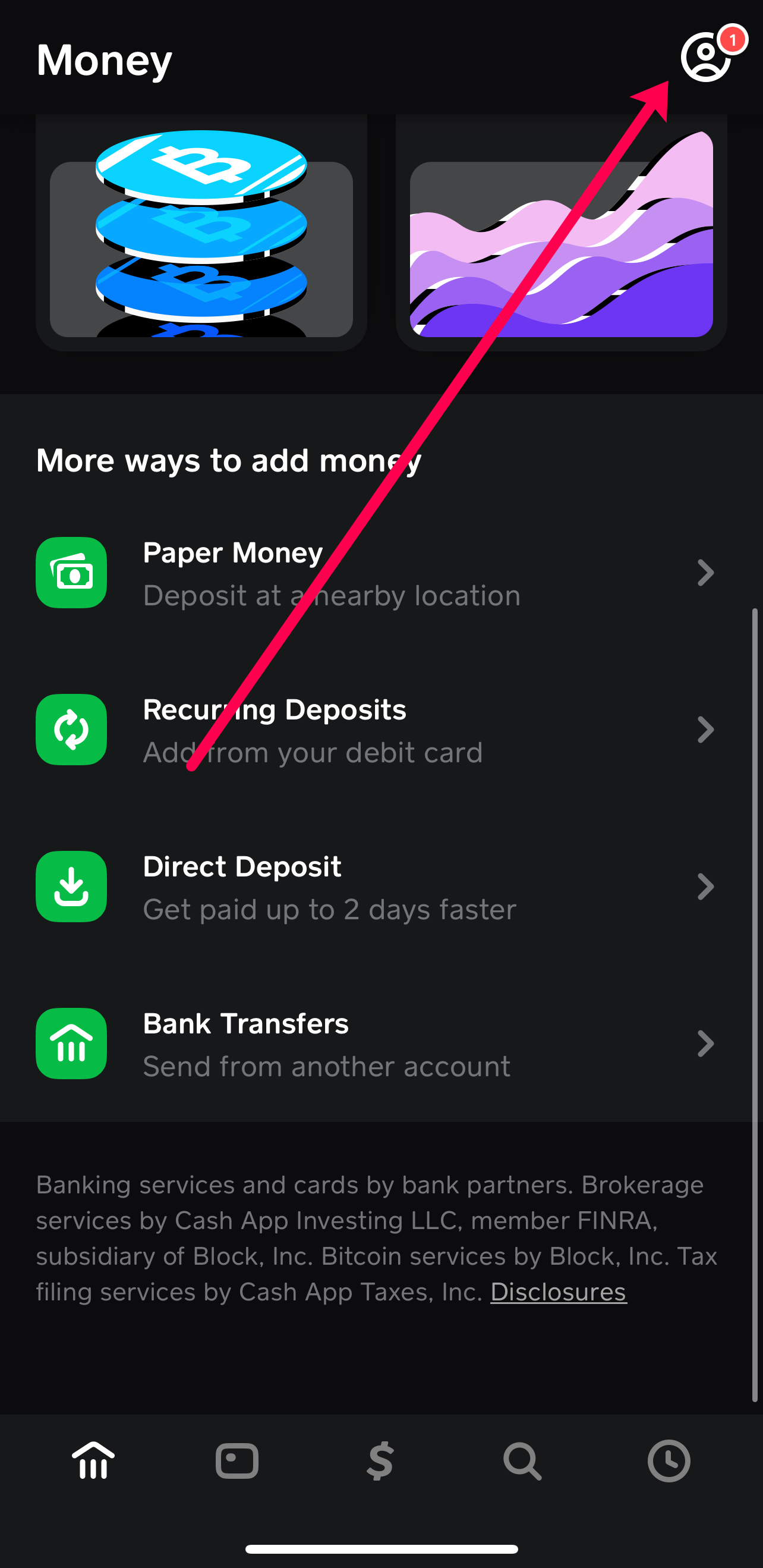
Direct Deposit: The Seamless Way to Load Regular Income
For those who receive regular paychecks, government benefits, or other recurring income, setting up direct deposit to your Cash App account is arguably the most efficient and financially prudent method. Cash App provides unique routing and account numbers, akin to a traditional bank account, which you can provide to your employer or benefits provider. This allows funds to be deposited directly into your Cash App balance, often making them available up to two days earlier than traditional banks. From a financial planning perspective, direct deposit streamlines income management, ensures funds are immediately accessible for your card, and can help mitigate the risk of late payments on bills or other financial commitments. It also simplifies budgeting, as your primary income flows directly into the platform you use for daily spending and tracking.
Linking a Bank Account: Instant Transfers for Quick Access
One of the most common and versatile ways to load your Cash App is by linking an external bank account. This method allows you to transfer funds from your traditional bank account directly to your Cash App balance. While transfers from linked debit cards are often instant, transfers from a linked bank account can take 1-3 business days. However, the convenience lies in its flexibility; you can initiate a transfer whenever needed, making it ideal for topping up your balance for specific purchases or when your primary income isn’t directly deposited. From a financial perspective, this method provides a safety net, allowing you to pull funds from a larger reserve (your bank account) to your active spending account (Cash App) as required, helping to control impulsive spending from your main funds while ensuring liquidity in your Cash App.
Adding Cash at Retail Stores: Convenience for Physical Deposits
For individuals who primarily deal in cash or receive cash payments, Cash App offers a convenient solution: depositing physical cash at participating retail locations. Stores like Walmart, Walgreens, 7-Eleven, and Dollar General often facilitate these transactions. Users generate a barcode within the Cash App, which a cashier scans, and then hand over the cash. The funds are typically credited to the Cash App balance instantly or within minutes. This method is particularly beneficial for managing petty cash, tips, or informal income that might otherwise remain outside digital financial tracking. It bridges the gap between physical currency and digital spending, ensuring that all your money, regardless of its initial form, can be managed and spent through your Cash App card.
Receiving Money from Other Cash App Users: Peer-to-Peer Loading
While primarily known for sending money, Cash App also allows you to receive funds from other users, effectively “loading” your balance. If a friend, family member, or client sends you money via Cash App, those funds are immediately added to your balance and become available for use with your card. This peer-to-peer functionality is incredibly useful for splitting bills, receiving repayments, or getting paid for small gigs, instantly integrating these transactions into your overall financial picture. It’s a quick, free, and efficient way to consolidate various incoming funds into a single, accessible balance.
Navigating the Loading Process: Step-by-Step Instructions
While the methods are diverse, the process for each is intuitive. Here’s a detailed look at how to execute the most common loading procedures.
Loading via Linked Bank Account
- Open Cash App: Launch the application on your smartphone.
- Navigate to the Banking Tab: Tap the banking icon (looks like a house or a bank building) on the bottom left of the home screen.
- Tap “Add Cash”: This option will be prominently displayed.
- Enter Amount: Input the desired amount you wish to transfer from your linked bank.
- Confirm Transfer: Tap “Add” and confirm the transaction using your PIN or Touch ID.
Funds from a linked debit card are usually instant, while bank account transfers might take a few business days.
Initiating a Direct Deposit Setup

- Open Cash App: Launch the application.
- Access Banking Tab: Go to the banking icon.
- Tap “Direct Deposit”: You’ll find options related to setting up direct deposit.
- Find Account & Routing Numbers: Cash App will display your unique account and routing numbers.
- Provide to Payer: Share these details with your employer or benefits provider. They will typically require you to fill out a direct deposit form, using the provided Cash App numbers.
This setup is usually a one-time process, after which your income will automatically be routed to your Cash App balance.
Depositing Cash at a Retailer
- Open Cash App: Launch the application.
- Access Banking Tab: Go to the banking icon.
- Tap “Paper Money”: This option is specifically for cash deposits.
- Select a Store: The app will display a map or list of nearby participating retailers.
- Generate Barcode: Follow the prompts to generate a unique barcode.
- Visit Retailer: Go to your chosen store and present the barcode to the cashier.
- Hand Over Cash: Give the cashier the cash amount you wish to deposit (typically limits apply, e.g., $500 per transaction, $1,000 per 7 days).
- Confirm: The cashier will scan the barcode and process the deposit. Funds should appear in your Cash App balance almost immediately.
Accepting Funds from Friends and Family
When someone sends you money via Cash App, it will often automatically appear in your balance. However, if it’s your first time receiving from a new sender, or if your privacy settings require it, you might need to manually accept the payment:
- Check Notifications: Look for a notification within Cash App indicating a pending payment.
- Tap “Accept”: Follow the prompts to accept the incoming funds.
Once accepted, the money is instantly added to your Cash App balance and available for use with your card.
Optimizing Your Cash App Card Use for Financial Management
Beyond simply loading funds, leveraging the Cash App card effectively involves strategic financial management practices. This includes budgeting, maximizing savings, and safeguarding your funds.
Budgeting and Tracking Spending with Cash App
Cash App provides a clear transaction history within the app, allowing users to review their spending patterns. While it might not offer advanced budgeting categories like some dedicated budgeting apps, its simplicity makes it excellent for tracking a primary spending account. By directing a portion of your income or specific budget allocations to your Cash App, you can easily monitor how much you’re spending on daily essentials, entertainment, or specific categories. Regularly reviewing your transaction history can highlight areas where you might be overspending and inform better financial decisions. For instance, if you’ve budgeted $200 for dining out via your Cash App card, a quick glance at your spending can tell you if you’re nearing that limit.
Leveraging Boosts and Discounts for Savings
As mentioned, Cash App Boosts are a powerful tool for savings. Regularly checking the available Boosts and activating those relevant to your spending habits can lead to tangible financial benefits. For example, if you frequently purchase coffee from a specific chain, activating a Boost for that merchant can save you a percentage on every transaction. Over time, these small savings accumulate, effectively reducing your overall expenditure without requiring conscious effort beyond activating the Boost. Integrating Boost usage into your spending habits is a smart way to make your money go further.
Security Best Practices for Your Cash App Card and Funds
Like any financial tool, the Cash App card requires diligent security practices.
- Enable Security Lock: Always have a PIN, Touch ID, or Face ID enabled for your Cash App account to prevent unauthorized access.
- Monitor Transactions: Regularly review your transaction history for any unfamiliar activity.
- Report Lost/Stolen Cards Immediately: If your physical card is lost or stolen, immediately disable it within the app or contact Cash App support. You can also freeze your card temporarily if you just misplace it.
- Beware of Scams: Be cautious of phishing attempts, fake customer support, or requests for your PIN or login details. Cash App will never ask for your PIN.
- Strong, Unique Passwords: Use a strong, unique password for your Cash App account, different from passwords used for other online services.
Adhering to these practices protects your funds and ensures the secure operation of your financial tool.
Troubleshooting Common Loading Issues
Occasionally, users might encounter issues when trying to load their Cash App card.
- Bank Transfer Delays: If funds don’t appear instantly after a bank transfer, remember that bank transfers can take 1-3 business days. Weekend and holiday transfers often process on the next business day.
- Declined Bank Transfers: Ensure your linked bank account has sufficient funds. Also, check if your bank has any daily transfer limits or security blocks. Sometimes, a quick call to your bank can resolve this.
- Retail Deposit Errors: If a retail deposit doesn’t appear, ensure the cashier correctly scanned the barcode and confirmed the transaction. Keep your receipt as proof of deposit. Contact Cash App support with the receipt details if funds are missing.
- Account Verification: Ensure your Cash App account is fully verified. Unverified accounts may have lower limits on loading and sending funds, which could prevent larger deposits.
- App Glitches: Sometimes, a simple restart of the app or your phone, or checking for app updates, can resolve temporary glitches.
Understanding these common issues and their solutions can save time and reduce financial stress.
Maximizing the Value of Your Cash App Card for Financial Empowerment
The Cash App card, when fully leveraged, extends beyond just a spending tool. It can be an active component of a broader financial empowerment strategy, from investing to managing regular payments and understanding financial limitations.
Beyond Spending: Investing with Cash App (Stocks & Bitcoin)
A unique feature of Cash App that differentiates it from many standard debit cards is its integrated investment capabilities. Users can buy and sell fractional shares of stocks and Bitcoin directly within the app. While this isn’t directly related to “loading” the card in terms of spending, the funds you load into your Cash App balance can be allocated to these investments. This offers a convenient entry point into the investment world for beginners, allowing them to participate in the market with small amounts of money. From a financial empowerment perspective, this democratizes investing, enabling more individuals to grow their wealth directly from their primary digital wallet, fostering a more holistic approach to personal finance that encompasses both spending and asset growth.
Using Cash App for Bill Payments and Subscriptions
The versatility of the Cash App card also extends to managing regular bill payments and subscriptions. Since it functions as a Visa debit card, you can use its card number for online recurring payments such just like any other debit card. This can be particularly useful for managing specific budgets, for example, allocating a set amount to your Cash App each month for subscription services or specific utility bills. By consolidating these payments through your Cash App card, you can gain better oversight of your recurring expenditures, helping in overall budgeting and preventing overdrafts on your main bank account if you’ve dedicated funds to Cash App for these purposes.
Understanding Limits and Fees for Prudent Financial Planning
While Cash App prides itself on being fee-free for many core services, understanding its limits and any potential associated fees is crucial for prudent financial planning.
- Sending/Receiving Limits: Unverified accounts typically have lower weekly sending and receiving limits. Verification (by providing personal details like your SSN) usually increases these limits significantly.
- ATM Withdrawal Fees: While Cash App allows ATM withdrawals with your card, fees may apply from both Cash App (if you don’t receive direct deposits) and the ATM operator. These fees can quickly erode small balances, so it’s wise to plan withdrawals carefully.
- Instant Deposit Fees: While standard transfers from Cash App to a linked bank account are free (but take 1-3 business days), choosing an “Instant Deposit” incurs a small fee (typically 0.5%–1.75%).
- Cash Deposit Limits: As mentioned earlier, there are daily and weekly limits on how much cash you can deposit at retail locations.
Being aware of these financial parameters allows users to make informed decisions, avoid unexpected costs, and manage their funds more effectively within the Cash App ecosystem, truly empowering them to control their financial well-being.
In conclusion, loading your Cash App card is more than a mere transaction; it’s a foundational step in utilizing a versatile financial tool. By understanding the various methods, adhering to security best practices, and leveraging its unique features, users can transform their Cash App card into a powerful ally in their journey toward comprehensive financial management and empowerment.
aViewFromTheCave is a participant in the Amazon Services LLC Associates Program, an affiliate advertising program designed to provide a means for sites to earn advertising fees by advertising and linking to Amazon.com. Amazon, the Amazon logo, AmazonSupply, and the AmazonSupply logo are trademarks of Amazon.com, Inc. or its affiliates. As an Amazon Associate we earn affiliate commissions from qualifying purchases.